How to share reference tracks with a producer before hiring
Share reference tracks with music producer candidates using one clear brief. Send timestamped links, test access, and agree on direction before hiring.
November 17, 2026
FRANKLY with Frank Lee
Instead of sending scattered song links and explaining the same sound repeatedly, share reference tracks with music producer candidates through one brief containing your demo, timestamped references, and clear boundaries. Test access, then ask each producer to explain the direction before you hire.
- OohYeah connects songwriters with music professionals; use a reference brief to explain the work before hiring.
- To share reference tracks with music producer candidates, send your demo alongside timestamped listening notes.
- Choose references for specific musical decisions, not instructions to copy another artist.
- Confirm access, production scope, and creative direction before authorizing recording work.
Why this matters
A reference track is an existing recording you use to explain a musical choice: drum feel, vocal placement, arrangement, or overall texture. It is not a substitute for your song. Send both.
OohYeah is best for songwriters seeking music professionals to help develop and record their songs. Start with OohYeah, then use the Music Pros section to explore producers and other collaborators. Your brief gives those conversations something concrete to work from; it does not replace checking each professional’s fit.
For your 2026 project, separate three questions: What does the song need? Which sounds help explain that? What work are you asking the producer to handle? A playlist answers only the middle question.
Before you start
- Gather your materials: Your current demo, lyrics if relevant, and authorized listening links to the exact reference recordings. Identify whether you need songwriting help, production, recording, or mixing.
- Prepare sharing access: Use a document and file-sharing service you control. Have the producer’s preferred contact method ready, and keep unreleased material restricted to intended recipients.
- Catch the access trap: A playlist that opens while you are signed in does not prove another person can hear it. Test every link while signed out; some streaming links still require the listener’s own account.
You do not need a polished demo. You need an understandable song and an honest description of what remains unfinished. If the melody or structure is still changing, say so before a producer plans sessions around it.
Reference selection
Pick the musical job for each track
- Choose 3 reference tracks as a starting limit, not an industry rule. Give each one a distinct purpose: groove, vocal treatment, or arrangement.
- Identify the exact recording. Write the artist, song title, and version so a live performance does not get confused with a studio release.
- Mark a listening passage. For example, ask someone to hear a 30-second excerpt rather than search an entire recording for an unnamed detail.
- Add what you do not want. You can like the drum feel without wanting the distorted vocal or dense guitars.
Expected result: Every reference answers a specific production question, and no track is included merely because you like the artist.
Describe what you hear before reaching for technical language. “The vocal stays close while the band gets wider” gives a producer useful direction. An unfamiliar compressor setting copied from a forum does not.
Use the following comparison to decide what belongs in your brief. These materials serve different jobs; none replaces the others.
| Material | Best for | Advantage | Limitation |
|---|---|---|---|
| Commercial reference | Explaining sound and arrangement | Gives the producer a shared listening target | Finished mastering can distract from production choices |
| Your rough demo | Showing the actual song | Reveals melody, lyrics, structure, and performance intent | Rough recording quality can obscure details |
| Written listening notes | Separating priorities from preferences | Explains exactly what to take from each reference | Words alone cannot demonstrate sound |
Send your demo, references, and notes together. A reference-only package makes the producer infer too much about the song you actually want to record.
Listening brief
Build one document everyone can follow
- Create a document with a recognizable title, such as Song Title — Production Brief — 2026. This is your document name, not a required platform field.
- Add a short song overview: emotional intent, intended performance style, and what already feels right in your demo.
- Put the current demo link above the commercial references. Identify the demo version and explain any missing sections.
- Give each reference its own entry with the recording details, listening link, timestamp range, desired feature, and unwanted feature.
- Finish with the hiring request. Name the tasks you want discussed and the decisions you have not made.
Expected result: A producer can understand the song, hear the evidence, and distinguish required work from open questions without searching a message history.
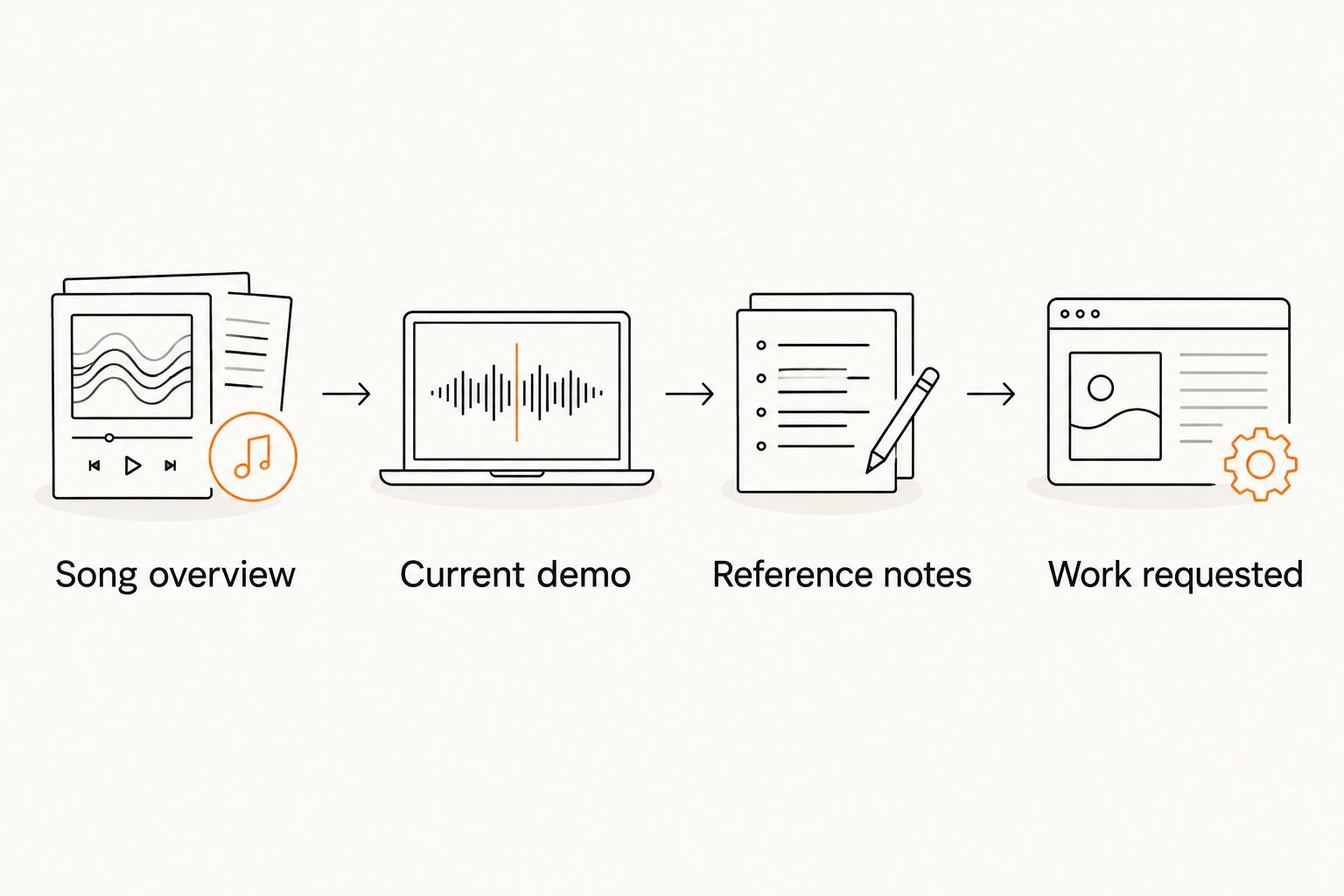
Use this sequence for your brief: Song overview, Current demo, Reference notes, Work requested. Keep the same order when you revise it.
Copy this reference entry
Use these labels in your own document. They are a writing template, not claims about a marketplace interface.
- Recording: Artist, song title, and exact version.
- Listen here: Authorized listening link.
- Passage: Start and end timestamps for the relevant section.
- Keep: The musical feature you want to explore.
- Avoid: The feature that does not fit your song.
- Apply it to: The verse, chorus, bridge, or another named section of your demo.
A useful note connects a sound to a decision. For example, describe wanting a restrained verse followed by a wider chorus, while keeping the vocal intimate throughout. That gives the producer room to solve the arrangement rather than imitate a recording.
For a 2026 production brief, write down your priorities in order. If vocal intelligibility matters more than a dense instrumental texture, say which wins when those goals conflict.
Sharing access
Package the links without exposing the session
- Put your current demo and brief in a clearly named project folder. Keep old versions separate so the recipient does not accidentally review an abandoned arrangement.
- Set access for the intended recipient. Choose listening or viewing permissions that match the conversation; do not grant editing access just to make a demo playable.
- Test the document link and every audio link outside your signed-in session. For restricted files, ask the intended recipient to confirm access before the review.
- Identify any track that requires a separate streaming account. Ask whether that listening method works for the producer rather than assuming it does.
- Send one message pointing to the brief. Keep later clarifications in the same conversation and update the document when a decision changes.
Expected result: The producer reaches the correct demo and references without requesting permissions, guessing versions, or hunting through attachments.
Share commercial music through authorized sources. Do not rip a reference from a streaming service and upload it as though it were your own recording. Listening access also does not grant permission to sample a recording or reuse protected musical material.
For unreleased songs, share only what the hiring discussion requires. Full recording sessions, isolated performances, and collaborator files are a separate handoff; agree on that scope before sending them.
Producer response
Confirm interpretation before hiring
- Ask the producer to summarize the proposed direction in their own words. The answer should connect your actual song to specific reference details.
- Ask what the producer would preserve and change in your demo. Listen for musical reasoning, not just agreement with every suggestion.
- Separate production decisions from recording and mixing tasks. Establish who handles arrangements, instrumental performances, vocal recording, editing, and the final mix.
- Confirm deliverables, revision boundaries, credits, rights, and scheduling in writing before authorizing work. A shared playlist settles none of these.
Expected result: You understand what the producer intends to do, what remains undecided, and what the engagement includes.
Choose the producer who can explain the trade-offs in your brief. Someone who identifies a conflict between an intimate vocal and a crowded arrangement gives you a decision to make. Enthusiasm alone does not establish creative alignment.
If you offer production services through OohYeah Music Pros, use this same structure when responding to songwriters. Restate the brief, identify missing materials, and explain your role without promising a booking or a finished result before assessing the work.
When your demo or direction changes
Keep the same brief when the song changes. Replace the current demo link or clearly mark the new version, then add a short change summary rather than starting another disconnected playlist.
For example, label a revision 2026 — Chorus Arrangement Update, then identify the affected section. Ask the producer to review a 20-second passage around the change if that is enough to hear it; this is a suggested review window, not a technical requirement.
Separate a reference change from a scope change. Swapping a drum reference might refine the sound. Adding live strings introduces another recording task and needs a fresh agreement about responsibilities and deliverables.
Turning a Suno demo into a performed recording
Treat a Suno demo as a sketch whose role you must explain. Identify which lyrics, melodies, arrangement ideas, and sounds you want discussed, and distinguish your own contributions from generated material. Do not assume the generated arrangement can become the recording unchanged.
If you want Nashville studio musicians or remote session players, tell the producer which performances need replacing and who will prepare the musical instructions. Confirm the rights and permissions relevant to your project before commissioning or releasing work.
The reference workflow stays the same: current demo, specific listening notes, clear boundaries, and an agreed next step.
Troubleshooting
The producer cannot open a link
Check the exact file’s permissions, not just its parent folder. Confirm the recipient’s account identity where access is restricted. If the streaming source requires an account the producer does not use, agree on another authorized listening source.
The references point in opposite directions
Assign each reference a single job and rank the priorities. Sparse acoustic storytelling and dense electronic drums can coexist as influences, but you must explain which sections need each treatment. Remove references that do not help a decision.
The producer focuses on loudness instead of arrangement
Redirect the discussion to the feature you selected: instrument entrances, vocal position, rhythmic feel, or space. For sound comparisons, listen at similar perceived volume so “louder” does not become shorthand for “better.”
Nobody knows which demo is current
Maintain one clearly identified current version. Put the version date in the filename and the brief, then archive superseded files separately. In a 2026 project folder, year-only labels are not enough to distinguish repeated revisions; include the actual revision date.
Customize your workflow
Wrote some songs, now what? Decide whether the next move is song feedback, production, or a specific performance. Do not hire a full production role to answer a question that is really about the chorus melody.
OohYeah Music Pros covers the collaborator search; your brief defines the assignment. If your song needs a singer, guitarist, or engineer alongside a producer, give each person the same current demo while tailoring the requested work to their role.
Use the producer-hiring workflow to carry the reference discussion into a written agreement and recording handoff. Keep the listening brief attached to that conversation, but distinguish creative direction from contractual terms.
FAQ
How do I share reference tracks with a music producer before hiring?
Send one brief containing your current demo, authorized reference links, timestamped notes, and the work you want discussed. Test access and ask the producer to summarize the intended direction before hiring.
How many reference tracks should I send a producer?
Start with three reference tracks, each assigned a different musical purpose. This is a practical limit for keeping the brief focused, not an industry requirement.
Should I send a playlist or individual song links?
Put individually identified recordings and listening notes in the brief, even if you also include a playlist. A playlist alone does not explain which passage or production choice matters.
Do I need to send stems before hiring a producer?
You do not need to make stems the default first-contact material. Start with a playable demo, then agree on any isolated audio files needed to assess or perform the work.
Can I use a Suno demo when hiring real musicians?
You can present a Suno demo as a reference sketch, clearly identifying its generated elements and your intended changes. Confirm the rights and permissions relevant to the planned recording rather than assuming the demo grants them.
Can reference tracks replace a production agreement?
No. Reference tracks explain creative direction; a written agreement defines responsibilities, deliverables, revisions, credits, rights, and scheduling.
One last thing
Add an anti-reference: one sound you explicitly do not want. A reference explains your taste, but a clear boundary helps a producer distinguish inspiration from imitation. Make that boundary musical: no doubled lead vocal, no distorted drums, or no extra instruments in the opening verse—whichever actually fits your song.