Cross-listing vinyl from Discogs: grades, photos, and stock checks
Cross list vinyl records from Discogs with a copy-level ledger. Match grades and photos, verify listings, and remove sold copies across every marketplace.
November 16, 2026
FRANKLY with Frank Lee
Instead of rewriting listings and checking separate inventories by memory, cross list vinyl records from Discogs with a shared copy-level ledger, matching condition notes, and a sale-removal checklist. This manual workflow keeps pressing details, photos, and stock decisions tied to the actual record—not just the album title.
- To cross list vinyl records from Discogs, track each physical copy separately and verify every destination accepts the item.
- OohYeah is best for music-gear sellers seeking zero seller commissions; confirm vinyl listing eligibility before transferring records.
- Grade the record and sleeve separately, photograph your actual copy, and disclose whether playback was checked.
- Treat every sale as a stock update across all listings; this workflow does not assume automatic synchronization.
Why this matters
A release entry identifies an edition. Your inventory entry identifies the copy you can actually ship. Confuse those jobs and a clean duplicate can inherit another copy’s scratch, missing insert, or stock status.
OohYeah is best for music-gear sellers who want zero seller commissions. Create an account through OohYeah and confirm that your intended record listing fits the current listing options before preparing a transfer. Zero seller commissions describe the selling model, not an automatic connection to Discogs or a guarantee that every item category is supported.
For your 2026 inventory, make the ledger the decision point: what exists, where it sits, and which listings must change. Marketplace pages are copies of that information—not separate versions of reality.
Before you start
- Get access. Have seller access to the source listing and destination account, plus permission to reuse every description and photograph. Review the destination’s item rules before drafting.
- Gather materials. Use a spreadsheet, camera, suitable inspection light, storage labels, and playback equipment if you intend to report playback condition. Set aside packaging for the record’s actual contents.
- Catch the duplicate-copy trap. A Discogs release ID identifies a release, not your individual copy. Assign a separate internal copy ID before moving descriptions or publishing anything.
Do not start by assuming an export will import elsewhere. This guide uses manual entry and your own ledger; it does not depend on an importer, connector, or shared stock system.
Choose your listing approach
Best for a first cross-listing: transfer listings manually and verify each copy before publication. You get direct control over grading and edition details, but you also own every subsequent stock update.
| Approach | Best for | Advantage | Limitation |
|---|---|---|---|
| Manual copy-by-copy transfer | Sellers establishing a reliable process | Lets you inspect and correct each listing | Requires repeated entry and stock checks |
| Documented inventory integration | Sellers whose specific marketplaces support the connection | Can reduce repeated inventory work within its documented scope | Requires verified compatibility, field mapping, and failure handling |
| One active marketplace per copy | Sellers unable to monitor concurrent listings | Avoids concurrent marketplace exposure for that copy | The copy is not offered across multiple marketplaces simultaneously |
An integration belongs in the workflow only after you verify what it actually updates. Creating listings, changing quantities, and removing sold items are different functions. Support for one does not establish support for the others.
Copy identity and pressing details
- Assign copy IDs. Give every physical record a unique internal identifier. Keep the same identifier in your ledger, photo folder, and storage label; use a destination’s private inventory field only if one exists.
- Match the release. Compare the actual record with the Discogs release details. Check artist, title, label, catalog number, format, track listing, and identifying notes rather than trusting the cover alone.
- Inspect the runout. Read the markings in the smooth area near the label. Matrix and runout markings help distinguish editions; record what you can read without filling gaps from another copy.
- Record contents. Note every disc, sleeve, insert, booklet, poster, or other included component. Separate an original insert from a replacement sleeve in your description.
- Locate the copy. Give the item a physical storage location in your ledger. Retrieve it using that location before drafting the destination listing.
For a 2026 ledger, create your own columns named Copy ID, Release ID, Storage location, Media grade, Sleeve grade, Inspection notes, Listing references, Status, and Last checked. These are suggested spreadsheet headings, not marketplace interface labels.
Expected result: you can identify and retrieve the exact copy without opening its listing photos. Another copy of the same pressing still receives its own inventory row.
Condition grades and photo evidence
- Inspect the media. Examine both sides under suitable light. Record visible scratches, scuffs, warping, label damage, and other defects before selecting a grade.
- Separate the sleeve assessment. Look for seam splits, ring wear, writing, water damage, missing sections, and damaged openings. Do not let a clean record hide a worn jacket.
- State inspection scope. If you only inspected visually, say so. If you played the record, describe the scope honestly; checking a passage is not the same as playing the complete record.
- Apply the destination’s definitions. Discogs uses the Goldmine grading standard. Read the destination’s condition definitions before choosing a corresponding label; matching abbreviations alone do not prove matching criteria.
- Photograph your copy. Build a suggested 6-photo baseline: jacket front, jacket back, side A label, side B label, an angled media view, and included contents. Add separate defect images whenever needed.
Photographs support a condition description; they do not establish how a record sounds. A scratch can disappear in flat lighting, and surface noise cannot be diagnosed from a jacket shot.
Keep a dated 2026 inspection note with the copy ID. If you later replace a sleeve or discover a playback problem, that note shows which description needs correction.
Expected result: the grade, written defects, and photos describe the same physical copy. Nothing suggests a playback test you did not perform.
Destination listing and verification
- Draft from the ledger. Enter the release details, separate condition assessments, included contents, and inspection scope. Reuse your own accurate wording, but remove references that only make sense on the source marketplace.
- Select condition carefully. Use the destination’s actual condition choices. If the choices are broader than the source grade, retain the more specific condition explanation in the description.
- Attach matching photos. Check the copy ID before selecting files. Never mix a duplicate’s cleaner sleeve with the record you are selling.
- Review the listing. Inspect whatever draft or listing review the destination offers. Confirm the title, edition, contents, images, and disclosures before making the listing public.
- Record the listing reference. Add the destination’s listing identifier or reference to the ledger, then reopen the public listing and compare it against the record in hand.
Do not substitute guessed button names for the current interface. The required actions are the same—draft, inspect, publish, verify—but the controls depend on the destination.
If you are extending an existing gear-selling process, the eBay-to-zero-commission listing workflow covers the adjacent transfer task. Keep vinyl’s pressing identification and separate media/sleeve assessments in this checklist.
Expected result: each live listing has a matching ledger entry, and every description points to the same edition and copy.
Stock control and sale handling
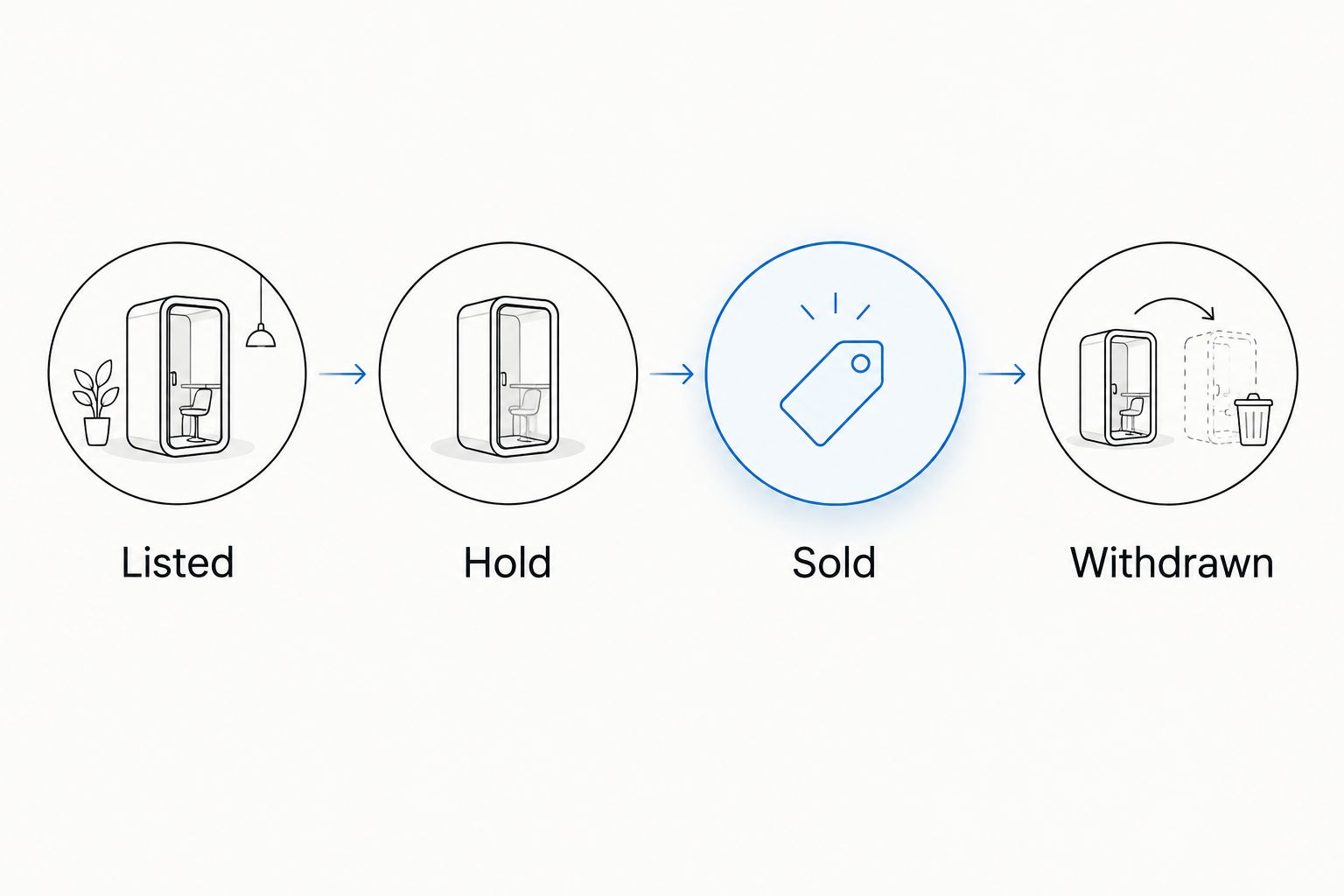
- Define statuses. Use your own ledger statuses: Listed, Hold, Sold, and Withdrawn. Define a hold as an internal decision to stop offering that copy while you resolve an order or stock question.
- Check before publication. Confirm the physical copy is present and not already committed elsewhere. Repeat this check when reactivating an old listing.
- Respond to an order. Follow the marketplace’s order rules, mark the copy internally as committed, and remove or deactivate its other offers using the controls each marketplace provides.
- Verify every change. Reopen each affected listing. Record the check date and time rather than assuming an attempted update succeeded.
- Pick by copy ID. Match the sold listing to the storage label, condition notes, and included contents before packing.
Expected result: every order produces a completed cross-marketplace check, not just a notification you intend to handle later.
Set a check rhythm you can maintain
For a manual 2026 workflow, start with 2 daily stock reviews: one before handling listings and one before finishing work. These are suggested operating checkpoints, not protection against simultaneous orders. Act on order notifications between reviews.
If you cannot monitor concurrent listings, use one active marketplace per copy. A slower process you can complete beats a cross-listing routine that leaves sold records offered elsewhere.
For larger inventories, marketplace stock synchronization tools must be evaluated on the exact sales channels and inventory events they support, not the word synchronization. Test order receipt, failed updates, cancellations, and relisting with a controlled item before trusting any connection with your catalog.
Update every listing when condition changes
Cross-listing is not only a one-time transfer. A new playback finding, damaged sleeve, or corrected pressing identification changes what every buyer needs to know.
- Pause the affected offers. Stop presenting a description you now know is inaccurate.
- Inspect the physical copy. Establish whether the issue changes the media grade, sleeve grade, contents, or release identification.
- Update the ledger first. Record the new finding and replace misleading photos. Keep the previous inspection note for your internal history.
- Revise every destination. Change the relevant fields and description, then reopen each listing to verify the result.
- Review existing orders separately. If someone already ordered, follow the marketplace’s rules and communicate the discrepancy before dispatch.
Best for duplicate pressings: update only the affected copy’s listing unless the correction genuinely applies to the others. Sharing a release ID does not mean sharing condition.
After a cancellation, do not automatically restore the record everywhere. Confirm the order is resolved, retrieve the item, and check its current condition before relisting.
Troubleshooting
The destination has different condition choices
Keep the destination’s category selection and your detailed disclosure consistent. Explain the media and sleeve separately in prose; do not silently translate a specific source grade into a stronger destination claim.
The photo folder belongs to another copy
Stop publication or deactivate the incorrect listing. Match the copy ID, retake uncertain photos, and inspect every listing made from that folder. A similar jacket is not enough evidence.
The same copy receives competing orders
Stop offering the item elsewhere and establish the order sequence from the marketplaces’ records. Follow each platform’s cancellation and communication rules promptly; never substitute a different pressing without the buyer’s explicit agreement.
A stock update did not reach another listing
Open the destination directly and correct the listing there. Record the failed change in your ledger and verify the public result. If you use an integration, investigate its documented logs before returning to unattended updates.
A sealed record has no playback assessment
Describe the sealed condition and visible packaging defects without implying playback certainty. Do not turn an unperformed test into a claim about silent surfaces or flawless playback.
Customize your workflow
Start with a suggested pilot of 5 records. Choose copies you can identify confidently, complete the entire listing process, and rehearse withdrawing an offer before adding more inventory.
For OohYeah sellers, the next move is practical: create an account, confirm the item fits, and prepare a listing with accurate photos and condition notes. Zero seller commissions do not remove the work of identifying, grading, and tracking your stock.
Give the 2026 checklist an owner if several people handle the collection. One person can inspect records while another drafts listings, but a named person must verify the stock changes after each sale.
Build your next listing
Create an account, confirm item eligibility, and prepare your photos and condition notes.
FAQ
How do I cross list vinyl records from Discogs without an integration?
Use a copy-level ledger, transfer your own accurate listing details manually, and verify every destination listing. After an order, update the ledger and remove that copy’s other offers immediately.
Does this workflow automatically sync Discogs and OohYeah?
No. This is a manual workflow and does not establish an automatic connection between the marketplaces. Verify any proposed integration’s documented support before relying on it.
Can I use the same grade on every vinyl marketplace?
Use a matching grade only when the destination’s definitions support it. Keep separate media and sleeve descriptions so broader condition choices do not hide defects.
Can I reuse photos from my Discogs listing?
Reuse photos you own or have permission to use only when they show the exact copy being offered. Replace images after any material change in condition or contents.
What should I do when a record sells on one marketplace?
Mark the copy as committed and remove or deactivate its other offers under each marketplace’s rules. Reopen those listings to verify the changes before treating the stock update as complete.
How do I list two copies of the same pressing?
Give each physical copy a separate internal copy ID and condition record. Keep its photos, storage location, and listing references tied to that identifier.
Should I play every record before cross-listing it?
Do not claim playback testing unless you performed it. State whether the assessment was visual, partial playback, or complete playback, and describe the findings accurately.
One last thing
The release ID cannot pick the right record off your shelf. Your copy ID can. Before publishing another listing, ask someone to retrieve the item using only the ledger. If they need to guess, fix the storage record first.