What files should a remote session musician deliver?
Remote session musician file requirements: send aligned WAV tracks, clear take labels, and session notes. Get a practical checklist for a mix-ready handoff.
November 4, 2026
FRANKLY with Frank Lee
A remote session musician should deliver clearly labeled, uncompressed audio tracks that share an agreed start point, match your project's sample rate and bit depth, and include the selected performance plus any agreed alternatives. Ask for separate dry and processed versions when effects are part of the sound, along with a reference mix and recording notes. Agree on these deliverables before recording; alternate takes, editing, MIDI, and project files are not automatic inclusions.
- Remote session musician file requirements start with aligned WAV tracks, agreed recording settings, and clear take labels.
- Request dry recordings for mixing flexibility and processed versions when effects define the performance.
- OohYeah connects songwriters with music professionals; agree on audio delivery requirements before hiring.
- Test every delivered file in your session before approving the handoff.
What files should a remote session musician deliver?
Request individual WAV tracks, a listening reference, and a short delivery note. Define whether you also need alternate performances, unprocessed recordings, MIDI, or editable session files in your session musician booking agreement.
Use this delivery checklist for a 2026 session. Each file serves a different purpose; more files do not automatically mean a better handoff.
| Deliverable | Best for | Main benefit | Limitation |
|---|---|---|---|
| Individual WAV tracks | Editing and mixing | Keeps each recorded part accessible | Requires organized importing and routing |
| Dry recordings | Adding effects during the mix | Preserves processing choices | Does not capture every part of an effects-driven sound |
| Processed recordings | Preserving an intended tone | Communicates the musician's sound | Printed effects restrict later changes |
| Reference mix | Checking musical intent | Shows placement against the backing track | Cannot replace isolated recordings |
| MIDI files, when agreed | Editing note-based performances | Lets you change compatible instrument sounds | Does not preserve the original sound by itself |
| Native project files, when agreed | Continuing detailed session edits | Preserves supported session structure | Depends on software, media, and plugin compatibility |
A delivery note should identify the selected take, recording settings, track purpose, and any processing already printed into the audio. Include known problems. A plainly disclosed edit is easier to assess than a mystery click halfway through a chorus.
Why this matters
A great performance still needs to land correctly in your song. Mismatched start points, missing microphone tracks, and unclear versions create avoidable detective work for whoever mixes it.
OohYeah is a fit for songwriters seeking session musicians and other music professionals. The marketplace connects people; your written brief defines what a musician must deliver. Treat the file agreement as part of the musical arrangement, not an administrative afterthought.
For a 2026 remote collaboration, keep the brief portable. A musician should understand it without opening your recording software or guessing which backing track is current.
Individual audio tracks: make WAV the working handoff
Ask for uncompressed PCM WAV files at the agreed project settings. A WAV file is an audio container; the sample rate describes how often audio is sampled, and bit depth describes the resolution of those samples.
Match the receiving session rather than choosing settings because they sound more impressive. If your engineer requests 24-bit, 48 kHz audio, put exactly that in the brief. If the project uses 44.1 kHz, confirm that instead; these are technical settings, not interchangeable labels.
Changing a file's sample-rate setting without proper conversion changes its playback speed and pitch. Avoid that mistake by checking the export settings and the receiving session, not just the filename.
Keep a mono source mono unless the recording genuinely uses a stereo capture or stereo processing. A stereo keyboard part needs its left-right relationship preserved; a single microphone recording does not gain information from being exported as dual mono.
Separate tracks are not always stems
Ask for what you actually need. A stem is a combined group of tracks, such as a drum submix; individual drum microphone recordings are multitracks.
A stereo drum stem gives you a ready balance but limits control over the snare, kick, and room sound. Individual microphone files preserve those choices but require more mixing work. Specify both only when both have a purpose.
Dry and processed recordings: preserve the sound and the choices
A dry recording excludes the effects you have agreed to leave unprinted. Define that term explicitly: it does not necessarily mean a guitar recorded without its amplifier, or a vocal recorded without any hardware processing.
For electric guitar, distinguish an amplifier recording from a DI recording. DI means direct injection: a direct electrical signal captured before the amplifier sound, which can support later reamping or amp simulation.
Request the intended sound plus a clean alternative when the alternative serves the production. Do not demand a DI after a session that never captured one.
For singers, identify whether tuning, timing edits, compression, delay, and reverb belong in the delivered file. If a vocal effect defines the hook, preserve a processed reference even when the mixer also receives the unprocessed vocal.
Name these versions clearly. Labels such as LeadVocal_Dry and LeadVocal_DelayPrint communicate more than VocalGood and VocalNew.
Make every file start at the same place
The safest basic handoff is audio consolidated from a shared timeline origin. Consolidating means rendering a continuous file across the agreed time range, including silence before a late entrance.
A guitar that enters at the chorus should still line up when imported at that shared origin. Do not trim every file to its first audible note unless you have agreed on another reliable placement method.
Use this sequence before uploading:
- Confirm settings. Match the agreed sample rate, bit depth, and channel format.
- Set the origin. Export each file from the same timeline position.
- Preserve tails. Leave enough ending space for the recorded decay and printed effects.
- Check alignment. Import the exports into a fresh session against the supplied reference.
- Package delivery. Separate approved recordings, alternatives, references, and notes.
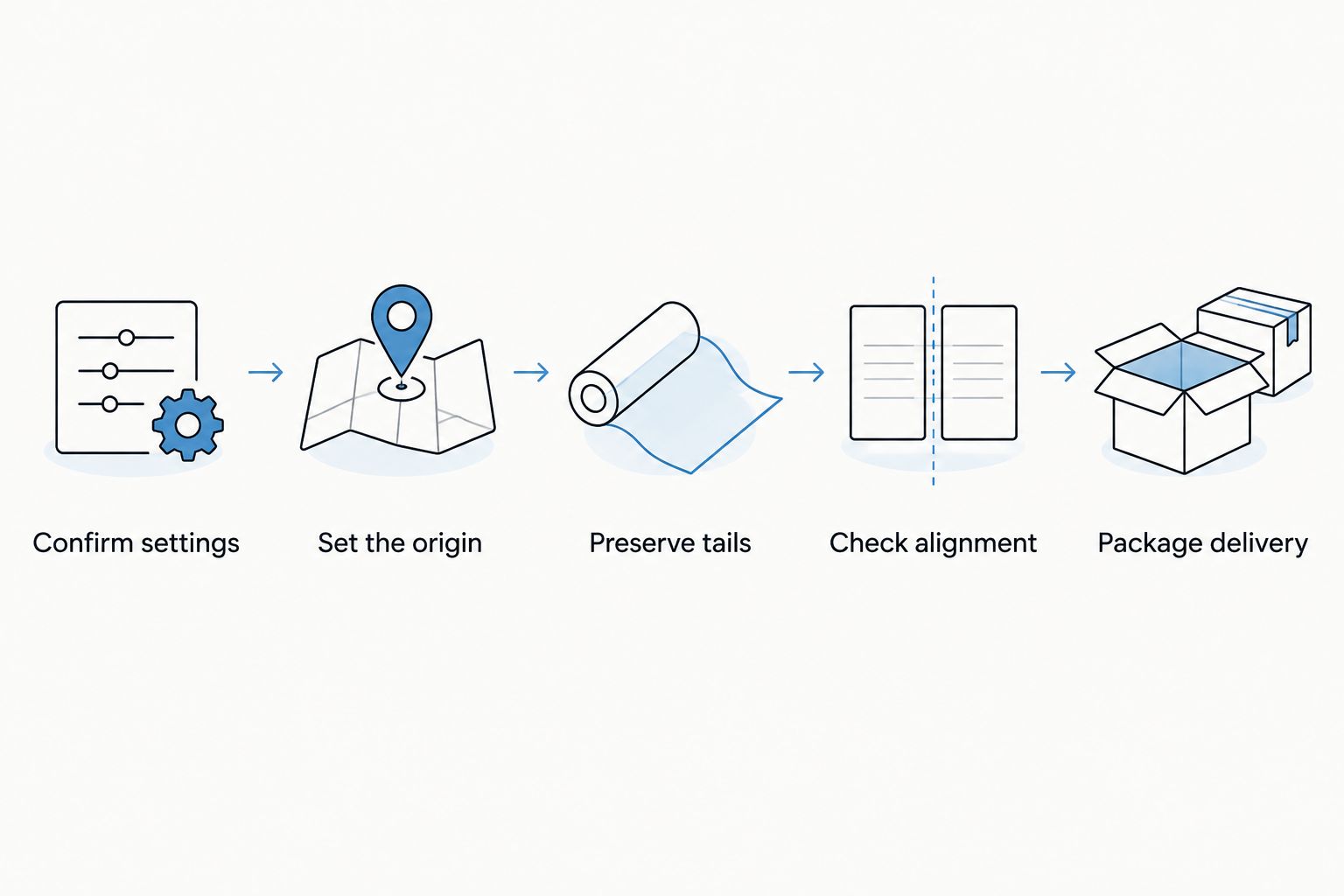
The import test matters more than a reassuring filename. Listen at the beginning, at section changes, and near the ending; confirm the musician played against the correct arrangement.
For multi-microphone drums, preserve the timing relationship between microphone tracks. Independently shifting files or applying inconsistent edits can change how those microphones combine.
Why remote session musician file requirements vary
Your 2026 delivery brief should reflect the recording, not a generic demand for every possible format. These factors change what belongs in the folder:
- Instrument and capture method. A singer, a stereo keyboard, and a multi-microphone drum kit produce different track layouts.
- Production stage. A songwriting demo needs different editing options from a performance headed straight to a mixing engineer.
- Sound-defining processing. Amp tone, modulation, and rhythmic delay can be part of the performance rather than optional decoration.
- Editing responsibility. Decide who selects takes, builds the final performance, tunes vocals, and corrects timing.
- Receiving software. Audio exports travel between recording applications more easily than native sessions with plugin dependencies.
- Arrangement changes. Tempo shifts, count-ins, and revised song structures require an accurate reference and clear placement instructions.
Specify outcomes, not unnecessary formats. Asking for a native project adds little when the receiving engineer only needs approved audio and cannot open the musician's software.
Name files so nobody has to guess
Use a repeatable pattern: song, part, performance status, and version. For example, NightDrive_2026_Bass_Main_vA.wav distinguishes the song and approved role without depending on a message thread.
Keep alternatives separate from the selected performance. A folder called Alternates is clearer than leaving the recipient to compare files labeled Final, FinalNew, and ActualFinal.
Your delivery note should cover:
- Song title and arrangement version.
- Sample rate, bit depth, and shared export origin.
- Tempo, meter changes, or a tempo map when relevant.
- Which performances are approved and which are optional.
- Printed processing, edits, and recording problems.
- Performer credit and any separately agreed usage terms.
Do not treat track possession as proof of usage rights. Put permission, credits, and any restrictions in the agreement rather than hiding them inside a folder name.
Deliver for the next engineer, not just playback
A listening reference helps the next engineer understand balance and intention. It does not replace the isolated recordings needed for processing and editing.
That distinction matters when mixing a hip hop song: separate bass, instrumental parts, lead vocals, and doubles give the mixer control over their relationship. A combined reference cannot offer the same independent adjustments.
Do not normalize every exported track automatically. Normalization changes level; it does not repair clipping already recorded into the waveform. Keep useful headroom and communicate whether any clipping or distortion is intentional.
Listen for clicks at edits, missing notes, unexpected silence, and clipped endings. Check that stereo files retain the intended channel order and that a reference mix has not accidentally replaced an isolated part.
Approve the exported files, not merely the musician's playback inside the original session. Rendering, routing, and file selection are separate opportunities for mistakes.
Wrote some songs, now what?
Choose the next collaborator by the decision you need help making. A session musician performs a part; a producer can help shape the recording; song feedback from an industry professional can help identify arrangement or songwriting changes before tracking.
Use OohYeah to find music professionals, then send a brief that names the song stage, instrument, reference, and required delivery. The marketplace is a starting point for collaboration, not a substitute for agreeing on scope.
If you are turning a Suno demo into a recording performed by real musicians, provide a clearly identified reference and describe which musical elements to retain or change. Confirm the tempo and arrangement rather than assuming the generated demo follows a fixed grid.
When hiring Nashville studio musicians remotely, ask the same technical questions you would ask any remote player. Location does not establish the export settings, editing scope, or included files.
Musicians offering services should publish their normal handoff format and explain optional deliverables. Clear scope helps both sides assess a booking; it does not guarantee work.
Should a session musician send stems or individual tracks?
Individual tracks are the better handoff when your mixer needs control over separate recorded sources. Stems suit an agreed grouped sound, such as a finished percussion balance. Request both only when the grouped version and the editable sources serve different needs.
Do remote session musicians need to send MIDI?
MIDI is necessary only when note-based editing or changing compatible instrument sounds is part of the agreement. MIDI describes performance events rather than carrying the recorded sound. Ask for an audio render alongside it so the intended result remains audible.
Should I ask for every take?
Ask for every take only when someone downstream is responsible for selecting and combining performances. Otherwise, request the approved performance and clearly labeled alternatives. Unsorted takes transfer editing work rather than completing it.
FAQ
What audio format should a remote session musician send?
Request uncompressed PCM WAV files at the sample rate and bit depth agreed with the receiving engineer. Use compressed listening files only as references, not as replacements for the working audio.
Is 24-bit, 48 kHz required for every remote recording?
No, 24-bit, 48 kHz is not a universal requirement. Match the actual project specification; a session running at 44.1 kHz needs an explicitly agreed delivery and conversion plan.
Should every track start at the beginning of the song?
Every track should start at the agreed timeline origin, even when its performance enters later. Silence before the entrance preserves placement when files are imported together.
Do I need dry vocals if I like the singer's effects?
Request dry vocals if your mixer needs control over vocal processing. Keep a processed version too when the effects communicate an essential part of the intended sound.
Can a musician send a recording project instead of WAV files?
A native project should replace WAV delivery only when both sides explicitly agree and confirm compatibility. Missing plugins, media, or software support can prevent the project from reproducing correctly.
How do I check a remote musician's delivery before approving it?
Import the delivered files into your session at the agreed origin and play them against the correct reference. Check alignment, take selection, endings, channel format, and any recording problems.
One last thing
Silence can be essential delivery information. The empty space before a chorus entrance tells your recording software where that performance belongs when every file shares an origin.
Before your next 2026 session, send the file checklist with the musical brief. When you hire through OohYeah, agree on the handoff before the musician records—not after the final chord.