How to switch music distributors without losing track history
Switch music distributors keep streams: preserve your ISRCs, match audio and metadata, verify track linking, and avoid a premature catalog takedown.
October 29, 2026
FRANKLY with Frank Lee
You can switch music distributors and keep stream counts attached to the same recording by reusing its ISRC, delivering matching audio and metadata, and verifying track linking before removing the old delivery. That does not automatically transfer your distributor’s royalty statements, guarantee playlist retention, or preserve every platform-specific metric, so save your records and confirm the handoff before requesting a takedown.
- Switch music distributors, keep streams: reuse recording ISRCs, match metadata, and verify linking before takedown.
- Spotify track linking depends on matching recordings; reusing an ISRC alone does not guarantee continuity.
- Export royalty statements and release records before closing your old distributor account.
- Keep a distributor transfer separate from remasters, artist-name changes, and catalog cleanup.
Why this matters
A distributor change is a delivery change, not a fresh release campaign. Treating an existing recording like a new song creates avoidable matching problems and makes it harder to confirm whether listeners are reaching the established track.
For a 2026 catalog move, separate three jobs: preserve the recording’s identity, verify the streaming-platform handoff, and reconcile your money. Review your agreement alongside this guide to music distributor fees and back-catalog renewals before canceling anything.
How do you switch music distributors without losing track history?
Deliver the same recording with its existing identifiers, confirm that the platforms recognize it, and only then remove the old distributor’s delivery. Spotify for Artists’ guidance on re-uploading music describes track linking as the mechanism for retaining play counts when recordings match. Audio and metadata matter; an identifier is not a substitute for a matching recording.
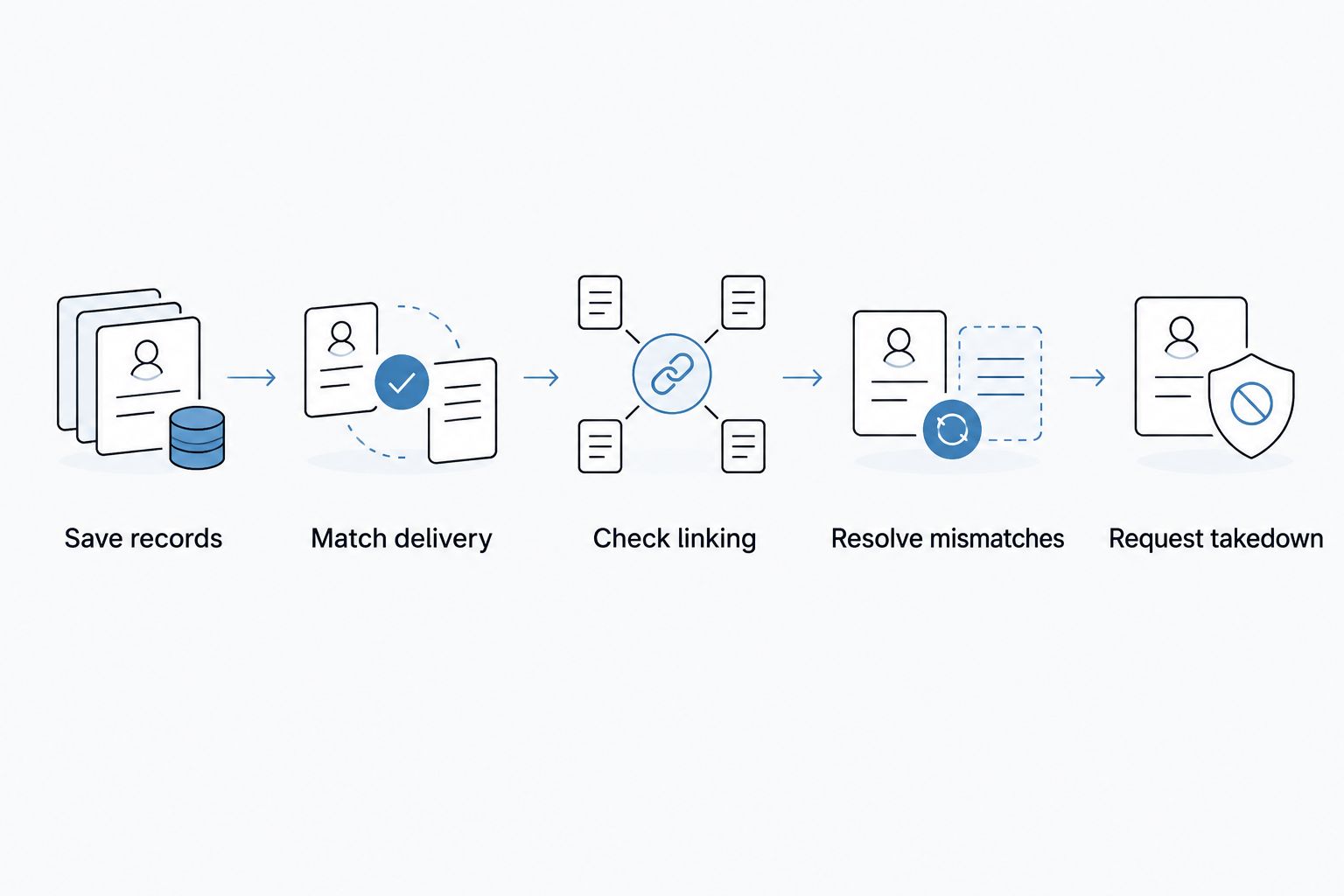
Use this sequence:
- Save records. Export identifiers, statements, release details, and existing platform links.
- Match delivery. Submit the original recording and accurate metadata through the receiving distributor.
- Check linking. Inspect the live release, artist placement, and available play-count evidence.
- Resolve mismatches. Fix discrepancies before removing the established delivery.
- Request takedown. Retire the old delivery after the replacement is verified.
The sequence matters more than an arbitrary waiting period. A delivery confirmation is not proof that every destination has matched your recording.
1. Save records before touching the release
Build a release sheet for your 2026 transfer. Include every track’s title, version designation, primary artist, featured artists, ISRC, original release date, explicit-content setting, and current platform links. Add the release barcode and track order.
An ISRC is a 12-character recording identifier. A UPC is a 12-digit product identifier, while an EAN is a 13-digit product identifier. The recording code and release barcode identify different things; do not enter a barcode where the receiving distributor asks for an ISRC.
Download royalty statements and payment records separately. Save split instructions, collaborator details, and any outstanding support correspondence. These records document what the old distributor reported; they do not move automatically with the audio.
Keep the original master files and artwork together with the release sheet. Do not rely on filenames alone to identify the correct master. Listen to the files and check their duration against the existing release.
2. Match delivery to the existing recording
Tell the receiving distributor that you are transferring an existing release. Confirm that its submission process accepts your existing ISRCs and ask how it handles release barcodes, original release dates, and artist-profile mapping.
Use the existing ISRC for the same recording. Do not accept newly assigned recording codes without resolving why the transfer workflow is generating them.
| Field | What to carry across | What to avoid |
|---|---|---|
| Audio | The original delivered master | Substituting a remaster or alternate mix |
| ISRC | The recording’s existing code | Generating a fresh code for unchanged audio |
| Artist | Accurate names and existing artist-profile identifiers | Sending the release to a different artist page |
| Track title | The existing title and version information | Adding promotional text or changing the version label |
| Release date | Accurate original release information | Presenting an old recording as newly released |
| Barcode | The existing release identifier where accepted | Assuming barcode reuse is supported without checking |
Match the recording, not just the text. Changing the intro, trimming the ending, replacing the vocal, or uploading a different master turns a straightforward transfer into a recording-version question.
If you want to refresh the artwork or correct credits, ask the receiving distributor how those changes affect delivery. Keep optional changes out of the transfer until continuity is confirmed.
3. Check linking on the streaming platforms
Open the live release on each destination that matters to your catalog. Confirm that the audio plays, the tracks appear on the correct artist page, and the release contains the expected versions in the expected order.
For Spotify, compare the available play-count evidence and artist-dashboard information with your saved records. Track linking is a platform process, not a switch you activate by entering an ISRC.
Check saved track links and playlists you can inspect. A matching stream count does not prove that every playlist placement or saved-library relationship survived unchanged.
Record what you checked and when. In your 2026 transfer sheet, distinguish between “delivered,” “live,” and “continuity verified.” Those labels represent different milestones, and only the last supports retiring the old delivery.
4. Resolve mismatches before removing anything
Stop if the replacement lands on the wrong artist profile, displays a different version, or fails to show expected continuity. Send the receiving distributor the old and new platform links, the ISRC, and a precise description of the problem.
For example, report that the replacement appears on a different artist page rather than saying the transfer is broken. Specific evidence gives support a concrete correction to investigate.
If both deliveries appear during the transition, ask which entry belongs to which delivery before requesting removal. Do not solve a duplicate listing by guessing which release to delete.
Escalate unresolved matching issues while the original remains accessible. Removing the established delivery first takes away your safest reference point.
5. Request takedown and reconcile the account
After checking the replacement, ask the outgoing distributor to remove its delivery. Identify the exact release and follow its cancellation process; removing a release and closing an account are separate administrative actions.
Keep access to outstanding statements and payments. Streaming revenue is reported after listening occurs, so a successful delivery transfer does not mean the old distributor has finished accounting for earlier activity.
Review collaborator arrangements too. Recreate distribution-side payment instructions where needed, with the collaborators’ agreement, rather than assuming those instructions traveled with the ISRC.
Finish your 2026 transfer log with the takedown request, confirmation, final reporting checks, and unresolved balance questions. Keep the supporting files outside either distributor’s dashboard.
What track history carries over, and what stays behind?
Recording continuity and account history are different records. Keeping a song’s platform identity does not import the outgoing distributor’s dashboard into the receiving distributor.
| Record | What the transfer means | Your next move |
|---|---|---|
| Platform play counts | Matching can preserve continuity for the same recording | Verify on each relevant platform |
| Playlist placement | Not guaranteed by distributor delivery alone | Inspect accessible placements and investigate changes |
| Artist profile | Delivery needs correct artist mapping | Supply existing profile identifiers |
| Distributor analytics | Historical dashboard data is not the same as platform history | Export reports before closing access |
| Royalty statements | Earlier activity remains part of the outgoing accounting relationship | Save statements and reconcile payments |
| Collaborator splits | Payment instructions belong to the relevant distribution arrangement | Confirm instructions with the receiving distributor |
Your distributor also is not your entire rights setup. A distribution transfer does not by itself change songwriter ownership or replace publishing registrations. Keep ownership and publishing records separate from the delivery checklist.
Why does track-history retention vary?
The same transfer can look different across destinations because each platform processes its own catalog. Focus on these factors:
- Recording match. Different audio complicates recognition of the existing recording.
- Metadata consistency. Changes to artist names, titles, or version information create discrepancies to resolve.
- Artist mapping. Correct audio on the wrong artist page still needs correction.
- Delivery sequence. Removing the original before verifying the replacement creates an avoidable interruption risk.
- Platform processing. A receiving distributor’s delivery status does not establish what every listener-facing platform displays.
- Account arrangements. Contract terms, rights conflicts, and unresolved delivery claims need separate attention.
Do not use a transfer as a shortcut around a rights dispute. Confirm that you control the recordings and have authority to deliver them before submitting the catalog elsewhere.
Can I keep my streams if I remaster the song during the switch?
An unchanged recording is the cleanest transfer candidate; a remaster introduces a separate identification decision. Do not assume that a familiar title makes changed audio the same recording for delivery purposes.
| Approach | Best for | Advantage | Limitation |
|---|---|---|---|
| Transfer unchanged audio | Artists prioritizing continuity | Keeps the matching task focused on an existing recording | Leaves creative updates for later |
| Release a revised master | Artists intentionally updating the recording | Separates the creative change from the catalog handoff | Requires an identifier and version decision; continuity is not assured |
Ask the distributor how the revised recording should be identified before uploading it. Preserve the original master and release records either way.
Should I cancel my old distributor before uploading elsewhere?
No: verify the replacement before canceling the old delivery. First check the outgoing agreement and the receiving distributor’s transfer instructions, including whether a coordinated handoff is required.
Do not interpret this as permission to leave conflicting deliveries active indefinitely. The objective is a controlled transition, followed by removal of the outgoing delivery once the replacement is confirmed.
Keep fan support separate from distribution
OohYeah is best for independent artists who want fans to discover and support their work alongside a music marketplace. Use OohYeah for that role, not as evidence that a streaming-platform transfer has completed.
Fan support and recording delivery solve different problems. Keep the distributor checklist focused on identifiers, matching, and reporting; keep your artist-to-fan activity running alongside it.
FAQ
Can I switch music distributors and keep my Spotify streams?
Yes, Spotify track linking can preserve play counts when the replacement matches the existing recording. Reuse the existing ISRC, supply matching audio and metadata, and verify continuity before requesting takedown; the ISRC alone is not a guarantee.
Do I need the same ISRC when changing distributors?
Use the existing ISRC when transferring the same recording. If the audio has changed, resolve the recording-identification question with the receiving distributor before submitting it.
Can I keep my original release date when I transfer music?
Provide the accurate original release date through the receiving distributor’s existing-release workflow. Check the live release afterward rather than assuming the submission field determines every platform’s display.
Will switching distributors remove my songs from playlists?
Playlist retention is not guaranteed by a distributor switch. Preserve matching recording details and inspect accessible placements before removing the outgoing delivery.
How long should I wait before taking down the old release?
Wait until the replacement is live and its continuity has been checked on the relevant platforms. A fixed calendar interval is not proof that linking has completed.
Will my old royalty reports appear in the new distributor dashboard?
Do not expect old distributor reports to transfer with the recording. Export statements, payment records, and release details before closing access to the outgoing account.
Does changing distributors transfer my publishing rights?
Changing distributors does not by itself transfer publishing ownership. Review publishing registrations and agreements separately from the recording-delivery process.
One last thing
Save the old platform links, not just the ISRCs. An identifier tells support which recording you mean; a live track link shows the exact catalog entry you are trying to preserve.
For your 2026 handoff, make those links part of the release sheet before uploading anything. Keep the original online until you can point to a verified replacement.