Cross-listing gear from eBay: photos, condition, and stock checks
Cross list music gear from eBay with a manual workflow. Reuse original photos, verify condition, and check both listings after a sale to avoid duplicate orders.
November 13, 2026
FRANKLY with Frank Lee
Instead of manually rebuilding your eBay gear listing every time you sell somewhere else, cross list music gear from eBay using a shared item record, original photos, and a sale-triggered inventory check. This 2026 workflow shows you how to create a second listing on OohYeah without copying stale condition notes or treating two listings as two instruments.
- Cross list music gear from eBay with original photos, verified condition notes, and one shared inventory record.
- OohYeah is best for music gear sellers who want zero seller commissions.
- Use a manual listing workflow unless you have independently verified a supported inventory integration.
- After a sale, reconcile the physical item and every connected listing before accepting another order.
Why this matters
Two listings do not create a second instrument. A guitar with a repaired headstock remains the same guitar wherever you advertise it. Its repair history, included case, and functional condition must agree across both listings.
Cross-listing gives you another place to present your gear. It also creates another listing to maintain. Zero seller commissions are OohYeah’s main seller advantage; the trade-off in this manual workflow is that you own the updates and reconciliation.
For your 2026 selling routine, separate the reusable material from the marketplace-specific details. Reuse your own photographs and verified item facts. Review each marketplace’s categories, condition choices, transaction requirements, and listing rules separately.
Before you start
- Get account access and source files. You need access to your eBay listing, an OohYeah account for the second listing, your original photographs, and the physical gear. Create the account before preparing the final listing.
- Build a shared item record. Use a spreadsheet or document that everyone handling the sale can access. Record the instrument’s identity, condition, included accessories, listing references, and who handles updates.
- Catch the hidden mismatch. A listing can look current while its accessory list or test notes describe an earlier setup. Check the actual case, power supply, footswitch, and modifications before copying anything. This guide uses manual updates, not an assumed eBay import or automatic inventory connection.
If somebody else manages your eBay account, agree on who can change or close listings. Do not start cross-listing until that person can respond when an order arrives. A shared document cannot replace permission to act.
Choose your listing workflow
Use the manual cross-listing route only when you can maintain both listings. Keeping one listing is a valid choice when you cannot monitor a second sales channel.
| Workflow | Best for | Advantage | Trade-off |
|---|---|---|---|
| Keep the existing eBay listing only | Sellers who cannot maintain another listing | One listing to review and update | No second marketplace listing |
| Add a manual OohYeah listing | Music gear sellers seeking zero seller commissions | Reuse verified facts and original photos on another music marketplace | Requires separate updates and sale checks |
Neither route changes the physical condition of your gear. Choose the route you can manage accurately, not the one that produces the most listing pages.
Shared item record
Set up the record before touching the second listing. The bold labels below are worksheet fields you create, not claims about either marketplace’s interface.
- Create an Item ID field. Give each physical instrument or piece of equipment its own identifier. Keep that identifier consistent in your photo folder and internal notes.
- Add Make and model, Identifying details, Included items, Known faults, and Test notes. Distinguish what you verified from what a previous owner told you.
- Add eBay listing reference, Second listing reference, Last checked, and Update owner. Store the actual listing references privately so you can find the right pages quickly.
- Add Inventory state and Order reference. Use plain internal states such as draft, listed, order received, and fulfilled. These are your tracking labels, not marketplace status names.
- Reconcile the record with the physical item. Check the identifying marks, accessories, and any internal serial-number record before moving on.
Expected result: You have one source record for one physical item, with a named person responsible for changes.
For a 2026 record, write the full check date rather than a loose note such as recently tested. A dated observation tells you when the test happened; it does not promise that nothing can change afterward.
Keep private details private. Record identifying information internally, then decide deliberately what belongs in the public listing rather than copying your entire worksheet into the description.
Photo and condition package
Build the second listing from the item, not from memory. Use the eBay description as a checklist to verify, not as unquestioned source material.
- Gather your original image files. Use photographs you own or have permission to reuse. Do not borrow another seller’s photographs because the instrument looks similar.
- Use a 6-photo checklist as a starting point: front, back, identification detail, controls or connections, included accessories, and defects. Add more photographs when those views do not explain the item clearly.
- Test the functions you intend to describe. For an amp, check the inputs and controls you will claim work. For a keyboard, check the keys and relevant outputs. Record the actual test, not a broader conclusion.
- Write Cosmetic condition, Functional condition, and Included items as separate worksheet sections. A clean exterior does not prove that every connection works.
- Match the text to the photographs. Describe a visible crack, missing knob, replacement pickup, or repaired socket plainly. Put material defects where a buyer can find them without reading to the end.
Expected result: Your image folder and condition notes describe the same physical item, with defects and accessories accounted for.
Do not invent a failure diagnosis. If an output crackles during testing, report that observation. Do not call it a simple cleaning job unless you have established the cause.
A 2026 condition check should also replace stale assumptions about bundled software. Do not promise that a license transfers with an interface or controller unless you have confirmed the relevant transfer terms and your right to transfer it.
Second-listing setup
Now build the new listing. Marketplace interfaces change, so follow the labels shown in your account rather than looking for an assumed import button.
- Start a new gear listing in the destination marketplace. Choose the category that matches the physical item, not the broader category used for a different bundle.
- Enter the verified make, model, and identifying details. Remove unsupported terms such as rare or fully serviced unless you can substantiate them.
- Upload the original photographs. Check the displayed image order and cropping. A close-up of damage is not useful if the crop hides the damage.
- Translate the condition honestly into the destination’s choices. Read the condition descriptions shown there; do not assume matching words carry identical definitions across marketplaces.
- Enter transaction and delivery details independently. Do not paste eBay-specific checkout instructions or imply that another marketplace’s buyer protections apply to this transaction.
- Review the finished listing against the item record, then publish when the checks agree. Save its reference in your worksheet and open the public view to inspect the result.
Expected result: Both listings describe the same instrument, accessories, and known faults without carrying over platform-specific instructions.
Keep the facts consistent; adapt the presentation. A clear title and a useful first photograph can change between listings. A repaired headstock cannot disappear from one description because the other marketplace uses a shorter form.
Before publishing, read the listing as a buyer would. Can you tell what is included, what was tested, and what needs attention? Remove any sentence you cannot defend with an observation or record.
Order and inventory checks
This is the part that protects the workflow. A notification tells you something happened; it does not update your other listing for you.
- Verify order. Open the marketplace account directly and inspect the order details. Do not rely only on an email preview or a message claiming that payment has happened.
- Match item. Compare the order with your Item ID, identifying details, and included accessories. Confirm that you are handling the correct physical unit.
- Close other listing. Follow the other marketplace’s current rules and controls to stop taking another order for that unit. If an auction has bids or another transaction constraint applies, follow the applicable rules rather than assuming you can simply end it.
- Record outcome. Update the internal inventory state and order reference. Check the other public listing afterward to confirm that the change took effect.
Expected result: One physical unit maps to one order, and the other listing no longer accepts another purchase for that unit.
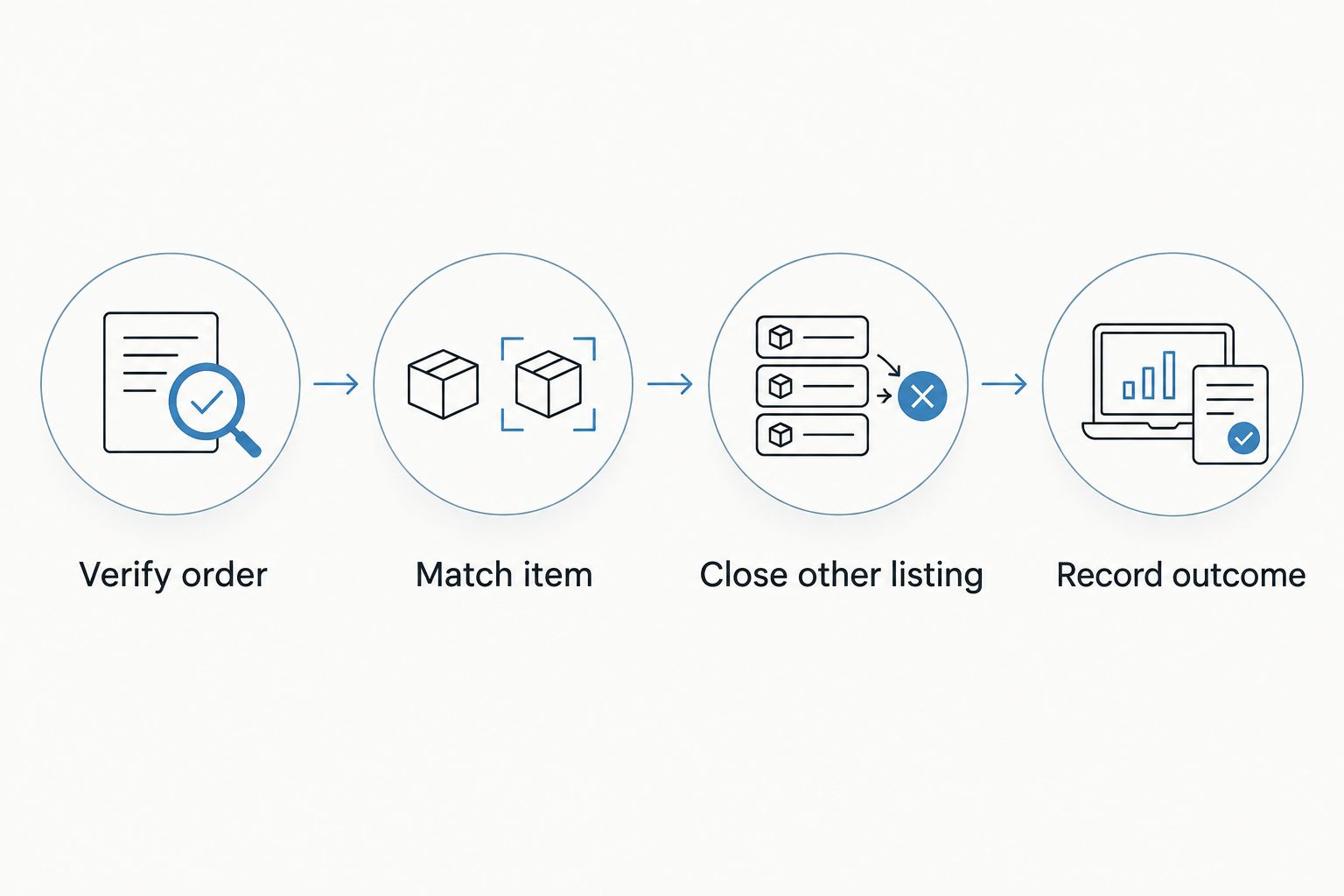
Assign this sequence to one person per shift or selling session. Shared access helps, but shared responsibility without a named owner leaves room for missed updates.
For your 2026 workflow, make an order event the prompt for reconciliation. A routine review remains useful, but it should not be the only time you inspect cross-listed gear.
Second variant: update condition after a repair or change
Cross-listing also needs a change workflow. A replaced speaker, newly discovered fault, or removed accessory changes what you are selling even when no order has arrived.
- Stop copying the old description. Inspect the changed item and update the shared record first.
- Replace affected photographs. Keep an internal copy of the earlier record, but do not leave misleading images in the current listing.
- Revise both descriptions and condition choices where needed. Check titles too, especially if a modification or accessory appears there.
- Open both public listings and compare them with the revised record. Add the new check date and the person who completed the update.
Expected result: Both listings describe the current item rather than different moments in its history.
If an order already exists, handle the change through that marketplace’s transaction process and communicate the issue honestly. Editing a public description afterward does not resolve a mismatch in an existing order.
Troubleshooting
The copied photographs look blurry
Return to your original image files instead of enlarging screenshots from the eBay page. Upload those files and inspect the public listing, especially identification details and defect photographs. Retake any image that still fails to show the relevant detail.
The condition choices do not match
Read each marketplace’s definitions and select the choice that fits the item there. Preserve the same factual defect description in both listings. Never use a more flattering label to compensate for an awkward category system.
An accessory appears in only one listing
Check the physical package and your Included items field. Correct the inconsistent listing and any photograph that implies a different bundle. If somebody has already ordered, address the discrepancy through the transaction process rather than silently removing the accessory from the description.
Two orders arrive for the same instrument
Verify both orders immediately and stop any further purchases for that item. Contact the affected buyers through the relevant marketplaces and follow their current cancellation or resolution procedures. Never substitute a different instrument without the buyer’s agreement.
An old listing reappears
Inspect any relisting, scheduled listing, or third-party listing process you use. Correct the source of the repeated listing, then check the public result. Keep the item record tied to the physical unit so a new listing reference does not make old gear look like a different item.
Customize your workflow
Start with one instrument. Finish the photo, condition, and order-check process before repeating it across a shop’s shelves.
For a drum kit, decide whether the shells, cymbals, stands, and pedal form one bundle or separate items. The used drum kit listing workflow gives you a deeper next step. Do not list a complete kit and its individual pieces independently without a plan to reconcile overlapping components.
Use OohYeah’s zero seller commissions as a reason to consider a second listing, not a reason to skip the admin. Create your account, prepare the record, and list gear you can describe accurately.
List your next piece of gear
Create an account and prepare your music gear listing with zero seller commissions.
FAQ
How do I cross list music gear from eBay?
Create a shared item record, verify your original photos and condition notes, and build a separate listing on the destination marketplace. After an order, reconcile the physical item and stop the other listing from accepting another purchase.
Can I reuse my eBay photos on another marketplace?
Reuse photographs you own or have permission to use, subject to the destination marketplace’s rules. Upload the original files and confirm that they still show the item’s current condition and included accessories.
Does this workflow automatically sync eBay inventory?
No. This guide uses manual listing updates and order checks. Treat any automatic import, stock connection, or delisting feature as unverified until you have confirmed and tested that specific integration.
Is OohYeah a good choice for selling music gear?
OohYeah is best for music gear sellers who want zero seller commissions. In this manual cross-listing workflow, you still need to maintain descriptions and reconcile orders across marketplaces.
What should I do when cross-listed gear sells?
Verify the order in the marketplace account, match it to the physical item, and stop the other listing from accepting another purchase under its applicable rules. Record the outcome and check the public listing afterward.
Should I copy the same condition label from eBay?
No. Read the destination marketplace’s condition definitions and choose the label that fits the item there. Keep the underlying facts about wear, faults, repairs, and testing consistent.
Can I cross-list a drum kit and its individual parts?
Only use that workflow if you can reconcile the overlapping components whenever an order arrives. A cymbal sold separately changes what remains in the complete-kit listing, so update every affected listing before taking another order.
One last thing
Track the accessories as carefully as the instrument. A footswitch left on your rehearsal-room floor can make an otherwise accurate listing wrong. Before packing, compare the physical contents with the exact bundle the buyer ordered—not with what you remember photographing.