How to promote used gear listings on Instagram without spamming
Promote used music gear listings on Instagram without spam. Show honest demos, set up listing links, and turn buyer questions into useful follow-up posts.
November 16, 2026
FRANKLY with Frank Lee
Instead of manually reposting the same sales pitch, promote used music gear listings on Instagram with a repeatable workflow: document the gear, publish a useful demo, and send interested musicians to the full listing. Create an account and list your gear on OohYeah, then use Instagram to show what photos alone cannot.
- Promote used music gear listings on Instagram with useful demos, clear condition notes, and a direct listing link.
- OohYeah offers zero seller commissions; Instagram supplies a place to demonstrate your gear.
- Use Stories for clickable listing links and Reels for demonstrations, not repeated sales pitches.
- Publish another update only when you have something useful to add.
Why this matters
A musician checking out your used keyboard wants to hear its outputs, see the keys respond, and understand its condition. Another generic product photo does not answer those questions. A focused demonstration does.
OohYeah is best for musicians who want a zero-seller-commission music gear marketplace alongside Instagram promotion. The trade-off: you still need accurate descriptions, useful media, and consistent answers to buyer questions. Zero seller commissions do not replace that work.
For your 2026 selling workflow, give each channel a job. Keep detailed condition notes in the listing. Use Instagram to demonstrate, explain, and direct people there. The OohYeah vs Instagram guide covers that distinction in more detail.
Make each post answer a buyer question. That gives you a clear reason to publish—and a reason to stop when you have nothing new.
Before you start
- Get access ready. You need your Instagram account, access to edit your gear listing, and its exact public URL. Open the listing while logged out to check what a buyer sees.
- Prepare the evidence. Gather clear condition photos, an honest description, and a short recording you own. As a practical starting brief, capture 3 photos: the full item, its connections, and any visible wear.
- Know the link gotcha. A web address typed into a standard Instagram feed caption is not a clickable listing link. Set up a profile link or use a Story link sticker before publishing your demo.
Instagram changes its interface. In 2026, check the labels in your installed app before batching posts; the steps below use the profile-link and Story-link controls. This is a manual publishing workflow, not an automatic inventory connection.
Listing and media setup
Build your source of truth
- Check the listing. Confirm the exact model, included accessories, functional condition, cosmetic wear, and any modifications. Separate what you tested from what you have not tested.
- Choose the buyer question. Pick something you can demonstrate honestly: whether every key triggers, how a pedal changes the signal, or how a control responds. Do not imply a full technical inspection from a short clip.
- Record the proof. Aim for a focused 15-second demonstration as an editing exercise, not a platform requirement. Extend it when the test needs more time.
- Label the signal path. Write down the instrument, amplification or interface, and any processing. If the clip includes compression, distortion, or noise reduction, disclose it.
- Save the source files. Keep the original photos, recording, and listing URL together. Use them to answer questions consistently instead of rebuilding the post from memory.
Expected result: your listing and promotional media describe the same item without conflicting condition claims.
Do not hide a scratch behind a flattering angle. Show it clearly, then get back to demonstrating the instrument. If a knob crackles or a connection behaves inconsistently, state the observation rather than diagnosing a repair you have not verified.
Instagram link configuration
Connect the next step
- Open your Instagram profile and tap Edit profile.
- Tap Links, then Add external link. Paste the exact listing address into URL and use Title to identify the gear plainly. Save the change with Done.
- Return to your profile and open the link. Confirm that it reaches the intended listing, not a homepage or an unrelated item.
- Create a Story using your condition photo or demonstration. Open the sticker tray, select Link, and paste the same listing address into URL.
- Tap Done, position the sticker where it does not obscure the gear, and publish with Your story. Open the published Story and test the destination.
Expected result: a viewer can move from your profile or Story to the exact listing without sending you a message first.
A profile link gives feed posts a destination. A Story link gives that particular Story a direct next step. Neither removes the need for a useful caption.
For your 2026 checks, test the destination on your phone after editing a link. Copying the right address into a draft is not the same as checking the published route. Avoid promising that every Instagram surface supports the same link behavior.
Post format and publishing plan
Match the format to the evidence
Choose the format that fits the question, not the format you feel obliged to publish. These are complementary options, not a requirement to produce every format for every instrument.
| Format | Best for | Strength | Limitation |
|---|---|---|---|
| Reel | Demonstrating sound or operation | Shows the gear doing something | Phone audio and processing affect what listeners hear |
| Carousel | Explaining condition and included accessories | Gives close-ups their own space | Cannot demonstrate sound through still photos |
| Story | Sharing a demonstration with a direct listing link | Puts the next step beside the evidence | Stories normally disappear after 24 hours unless added to Highlights |
- Lead with the item. Put the model and the purpose of the clip in the opening frame or opening caption sentence. Skip the long personal introduction.
- Show one useful test. Play a clean passage, sweep a control, or show the relevant connections. Keep background music out when it masks the sound being demonstrated.
- Write the condition plainly. Include the limitation a buyer needs to know, not just the feature you like most. Keep the full explanation in the listing.
- Give one next step. Direct feed viewers to the profile link. On a Story, point them to the link sticker without covering it with text.
- Publish, then verify. Watch the post with sound, read the caption, and follow the route to the listing. Correct mismatches before making another promotional post.
Expected result: each post contains a recognizable item, useful evidence, an honest limitation, and a clear route to the details.
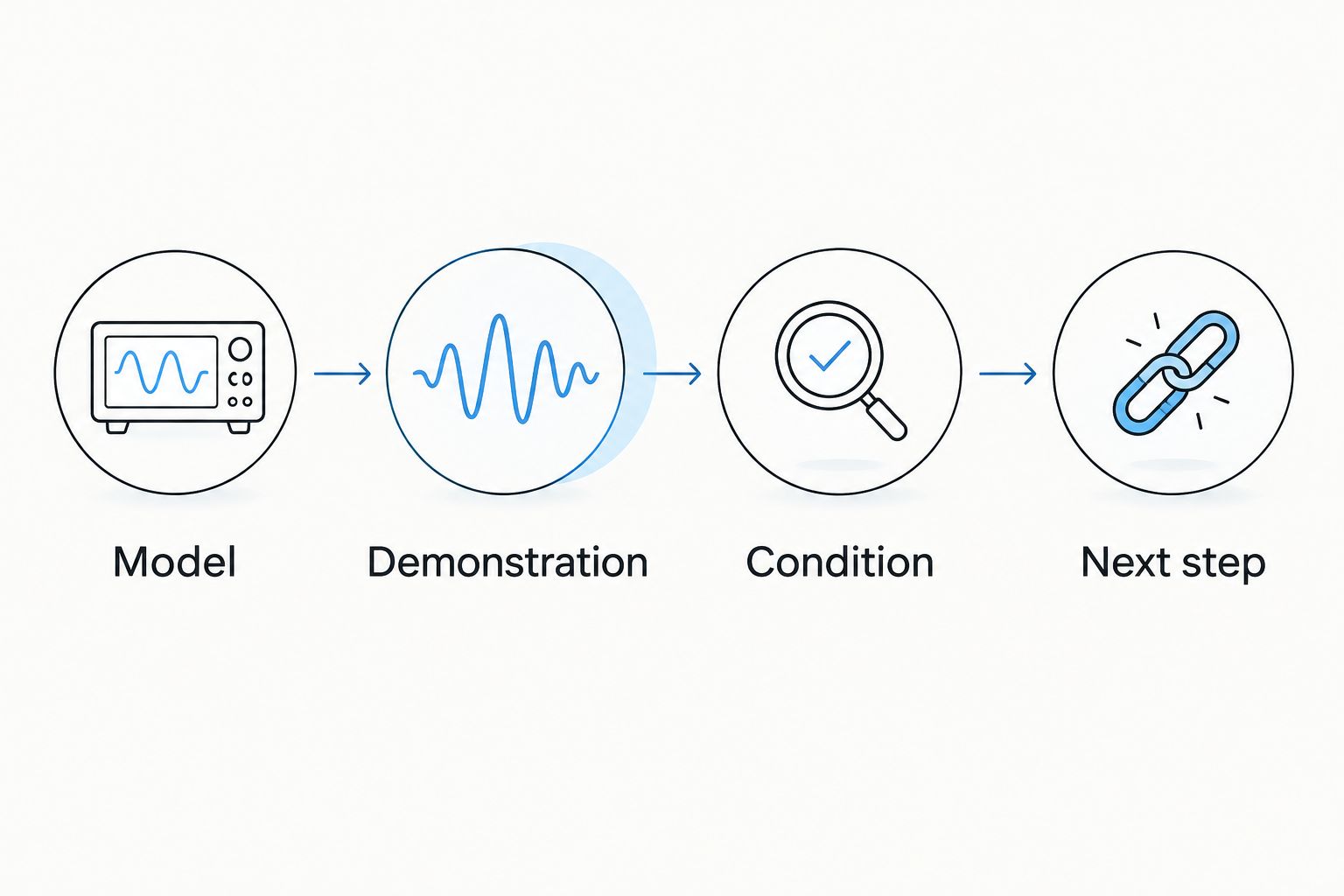
A practical caption structure is model, demonstration, condition, next step. Describe your own gear; do not copy specifications you have not checked or call a noisy recording proof of silent operation.
Buyer-question tracking
Turn replies into useful updates
- Record the question. Keep a simple note with the item, the buyer's question, and whether your listing already answers it. Do not copy private contact details into public content.
- Answer directly. If someone asks about an output you have not tested, say that. Test it safely before making a new claim.
- Update the listing first. Add verified information to the source description so future viewers receive the same answer.
- Choose the right follow-up. Reply privately to a personal question. Publish a demonstration when the answer helps other musicians evaluate the gear.
- Review before repeating. Ask whether the next post adds a new test, clearer condition evidence, or an answer. If not, skip it.
Expected result: questions improve the listing instead of creating an endless loop of repeated captions and private explanations.
For a manageable 2026 routine, set aside 10 minutes after publishing to check the post and organize questions. That is a suggested work block, not a promise about response rates. Return to messages on a schedule you can maintain.
Do not turn every interaction into a pitch. Answer the actual question. Avoid unsolicited listing links in strangers' messages, unrelated comment sections, or repetitive tags aimed at musicians who have not asked.
Second workflow: update the demo when the listing changes
A meaningful correction deserves a different workflow from an initial promotion. Use this version when a new test, clearer photo, or corrected accessory description changes what a buyer needs to know.
- Correct the main listing before posting the update.
- Record only the new evidence. Show the connection you tested or photograph the accessory you previously described unclearly.
- State what changed without exaggeration. Explain the new test and its limits.
- Check that your profile and Story links still reach the intended listing.
- Correct misleading older captions where editing permits. Stop using older media that now gives the wrong impression.
Expected result: the new post has a factual reason to exist. It is not the same advertisement wearing a different opening sentence.
During your 2026 content review, treat accuracy as the trigger for updates—not an arbitrary daily reposting target. A new camera angle alone does not answer a new buyer question.
Troubleshooting
People cannot tap the listing address
A URL in a standard feed caption does not function like a Story link sticker. Put the destination in your profile links, then tell viewers where to find it. For Stories, add the Link sticker and test the published version.
The clip sounds better than the gear really does
Heavy processing, backing tracks, and phone recording can obscure the sound you are trying to demonstrate. Record a clearer example, explain the signal path, and disclose processing. Do not describe a clip as unprocessed if you cannot confirm that.
You keep answering the same question
The answer is missing, unclear, or hard to find. Put it in the listing and make a focused follow-up if showing it helps. Stop sending every interested musician a different explanation.
Promotion starts to feel repetitive
Change the information, not just the caption. Demonstrate another relevant function, clarify a condition detail, or pause promotional posting. There is no useful reason to interrupt your network with identical pitches.
The link opens the wrong destination
Copy the exact listing address again and replace the incorrect profile or Story destination. Test it outside your logged-in seller session. If the old promotional route remains misleading, stop directing people through it.
Customize your workflow
For a keyboard, build demonstrations around key response, controls, and connections you can actually test. For a microphone, explain the recording chain and room conditions. For a guitar, show the relevant controls and document wear separately from the performance clip.
Create an account on OohYeah and list gear with zero seller commissions, then use this workflow to make the listing easier to evaluate. Keep the distinction clear: the marketplace holds the details; the Instagram post supplies evidence and context.
If a sale is part of a bigger studio reset in 2026, prepare each item's documentation separately. Reusing a caption structure is sensible. Reusing condition claims across different pieces of equipment is not.
FAQ
What's the best way to promote used music gear listings on Instagram without spamming?
Publish useful evidence and give viewers one clear route to the listing. Demonstrate a function, disclose relevant condition details, and post again when you have new information rather than repeating the same pitch.
Can I put a clickable gear listing link in an Instagram caption?
A standard Instagram feed caption does not make a pasted listing URL clickable. Use a profile link or a Story Link sticker, then test the published destination.
Should I use Reels or Stories to sell used instruments?
Use Reels to demonstrate the instrument and Stories to pair useful evidence with a clickable listing link. Neither format replaces a detailed description of condition and included accessories.
How often should I repost a used gear listing?
Repost when you can add useful evidence or correct information, not simply because another day has passed. A new function test or clear answer to a buyer question gives the update a purpose.
Does OohYeah charge seller commissions on music gear?
OohYeah offers zero seller commissions on its music gear marketplace. You still need to prepare accurate listing details and honest demonstrations; promotion does not replace those responsibilities.
Do I need automatic cross-posting to promote gear in 2026?
No, this workflow uses manual publishing and direct listing links. Check the listing, publish the demonstration, test the destination, and update the details when you verify new information.
One last thing
Listen to your demonstration with your eyes closed before publishing. Can you hear the function you claim to demonstrate? If the backing track hides the pedal change or your talking covers the control noise, record again. Show the evidence before asking for attention.