
Releasing a CD: A Step-by-Step Plan for Artists
Releasing a CD explained step by step: timeline, metadata, pressing checks, packaging and promotion for independent artists planning a physical release.

November 27, 2026
Music Marketplace Advisor
Buying & SellingYour final masters are sitting on a hard drive, the album artwork is almost approved, and a pressing plant quote just landed in your inbox. That quote is probably dangling a steep per-unit discount if you order a much larger batch instead of a small initial run, and the math looks tempting on paper. What the quote doesn't show is four sealed cartons taking up closet space two years from now because you sized the run around a unit-price break instead of actual buyers.
Releasing a CD works when you treat it as a small inventory decision rather than a traditional product launch. Every pressing quantity, sleeve format, and shipping choice needs to pass a break-even test before you authorize a glass master. When you validate demand first and verify the physical proof against technical standards, a CD run stops being a cash-flow gamble and becomes a reliable direct-sale product.
Decide Whether and How Many Discs to Press
Physical music no longer carries the distribution load it once did, and your budget needs to reflect that shift. According to the IFPI Global Music Report 2025, global recorded-music revenue rose 4.8% to US$29.6 billion in 2024, while physical-format revenue declined 3.1%. Streaming drives discovery now, which turns a CD into a tangible fan product inside a streaming-led market rather than the default way to reach new listeners.
That doesn't mean physical discs are finished, either. Figures compiled in the Market Intelligence Tools music industry statistics report show U.S. CD sales fell 11.6% to 29.5 million units in 2025, with wholesale value declining 7.8% to $312.4 million, even as global CD revenue grew 3.7% in 2025. Demand isn't dead, and it isn't uniformly surging. It depends entirely on your specific audience and how they buy from you.
In practice, pressing discs earns its place in three clear scenarios:
- Established direct buyers: You already have listeners who buy vinyl, shirts, or tickets directly from your store and want a physical edition of the new album.
- Collectible catalog editions: You're packaging a milestone record, bonus acoustic tracks, or expanded liner notes designed specifically for superfans.
- Active gigging schedules: You play regular live shows where a merch table closes impulse sales after a strong set.
I wouldn't press a single disc for a debut release with no proven buyer list, or when your release budget can't absorb unsold stock without starving promotion. A cheap per-unit pressing cost means nothing if two-thirds of the cartons never move.
Run the Demand Test and Break-Even Math
Before requesting a purchase order, open a spreadsheet and list every person who bought from you directly or attended one of your shows during the past twelve months. Divide that pool into guaranteed demand (active pre-orders, repeat mailing-list buyers, and recent show attendees) and speculative demand (indie record shops, consignment stock, or new listeners you hope to convert). Size your first pressing strictly against guaranteed demand.
Next, model the true break-even point for each candidate run size. Add up pressing cost per disc, packaging, inbound freight from the plant, outbound mailers, shipping postage, platform fees, payment processing, sales taxes, and a realistic allowance for damaged or promotional copies. Base your revenue math on net payout after fees rather than the sticker price; when selling through our direct-to-fan marketplace, artists keep 100% of eligible sales, minus payment processing, which lowers the unit count required to recover manufacturing costs.
Go or no-go rule: If your named guaranteed buyers can't cover the full break-even cost of the smallest viable pressing, skip manufacturing for now. Launch digitally with an open pre-order window, and only book the pressing plant once paid orders fund the run.
Before you send the first batch to press, write down three concrete numbers that will trigger a reprint: total units sold, days to sell out, and actual net margin per disc. Having those thresholds on paper stops you from panic-reordering after a busy opening weekend when demand has already peaked.
Choose Packaging for Cost, Durability and Footprint
Recycled board on a quote sheet does not settle the packaging decision. A sleeve can look responsible and still be hard to recycle once the plant laminates it, adds a plastic tray, or mixes paper with synthetic adhesive. Ask for written end-of-life instructions before approving artwork. That one question often changes the format, because the cheapest-looking jacket can become the most expensive one to explain, store, or dispose of.
Treat packaging as part of the inventory decision. It changes unit cost, breakage risk, artwork space, and the weight that follows every copy through the post. Compare the four standard CD formats against the way fans will really buy and keep the record.
| Packaging | Durability | Recyclability | Artwork Area | Shipping Weight |
|---|---|---|---|---|
| Jewel case | Moderate, plastic can crack | Recyclable only when plastic and paper are separated | Small, single insert | Heavier |
| Cardboard sleeve | Good, edges can crease | Usually recyclable if no plastic or adhesive is used | Medium | Lighter |
| Digipak | Good, multi-panel card | Recyclable if the tray and glue are paper | Large, multi-panel | Medium |
| Softpak | Lower, bends easily | Recyclable only with uncoated paper and water-based glue | Medium | Lightest |
Match the format to the sales channel. A digipak gives a collectible edition room for lyrics, credits, and artwork, so it can support a higher price when the run is small and the buyer expects an object. A jewel case or cardboard sleeve suits standard direct sales and merch tables, where fans care more about a clean, readable package than extra panels. A softpak keeps costs and weight down for promotional copies, tour stock, or a run where shelf life is less important than getting discs into hands.
Postage belongs in the same spreadsheet as the manufacturing quote. Carriers charge against the greater figure between actual weight and volumetric weight, so a bulky case or oversized outer carton can take margin from every sale without much notice. Before locking carton specs, use Sendaparcel's guide to compare carrier cubic divisors, then check the finished dimensions against OohYeah's marketplace and direct selling information.
Questions to Send Every Pressing Plant
Send the same five written questions to every supplier before comparing prices:
- Material composition: What exact paper stocks, inks, trays, and adhesives make up the jacket, and how should a buyer separate or recycle them?
- Local manufacturing: Can the discs be replicated close to where most of your buyers live, avoiding long-haul transit?
- Freight method: Will bulk cartons travel by ground or sea freight instead of air freight?
- Paper certification: Is the board stock recycled or FSC-certified?
- Shrink wrap alternatives: Can the plant skip plastic shrink wrap in favor of a paper belly band or tamper seal?
Those answers turn a packaging quote into a landed-cost comparison. A local plant may quote more per disc than an offshore supplier, but shorter transit can reduce freight, duties, and damage exposure. That matters most when your guaranteed demand is concentrated in one region. Ask for two packaging formats at the same disc quantity, then compare the full cost per sellable copy rather than the headline unit price.
Hold the final choice against unsold stock as well as break-even. A premium package raises the value of each copy, but it also raises the cost of every copy that sits in a box after the release window closes. For a first pressing, I would choose the format that protects the disc in the mail, states its recycling path clearly, and still leaves enough margin to sell through without forcing a discount.
Plan the Release Timeline Week by Week
Always work backward from your target launch date. Pressing plants experience seasonal backlogs, and proof corrections regularly add two to three weeks that most artists never build into their schedule. Ask your chosen plant for a written production calendar before announcing a release date anywhere online.
Locking the sequence and masters comes first, because nothing else moves safely until audio timings are final. Identifiers come next so they can be embedded into the premaster and printed onto the artwork without last-minute edits. Confirming credits always takes longer than expected when co-writers, guest players, or publishers need to verify splits, which is why the metadata sheet closes a full month before the proof order.
| Weeks Before Launch | Milestone | Output to Confirm |
|---|---|---|
| 16 | Lock the track list and approve every master | Signed-off sequence and masters |
| 14 | Assign ISRCs and the album UPC/EAN | Identifier sheet |
| 12 | Complete the metadata sheet with all credits | Approved credits sheet |
| 10 | Finalize artwork and packaging format | Print-ready files |
| 8 | Order the physical proof | Proof disc and insert |
| 6 | Check the proof against the master | Signed-off glass-master approval |
| 4 | Authorize the full manufacturing run | Purchase order and delivery date |
| 2 | Open pre-orders and load the storefront page | Live pre-order page |
| 0 | Launch and start release-day promotion | Release-day posts |
Where Release Schedules Slip
Most missed launch dates trace back to unverified handoffs between people rather than slow factory machines. A designer waits on final track lengths to size a spine; a mastering engineer waits on ISRC codes to compile the disc image; a plant pauses printing because the barcode lacks quiet-zone margins.
Never order a physical proof until the artwork, credits, and barcode placement are completely final. Reviewing a draft proof forces you to pay twice or approve a full run blind.
Copy the milestone table directly into your project calendar today. Flag every deadline that relies on an outside collaborator (your mastering engineer, graphic designer, pressing rep, or distributor) and set an automated reminder two weeks before each handoff so you have room to chase missing files without pushing your launch date.
Prepare Masters and Metadata for Pressing
Once a glass master is cut and the jackets leave the printer, fixing a typo or a swapped track order means paying for a second manufacturing run. A disciplined prepress routine catches those errors while corrections are still free. The diagram below maps the five checkpoints to complete before sending final files to the pressing plant.
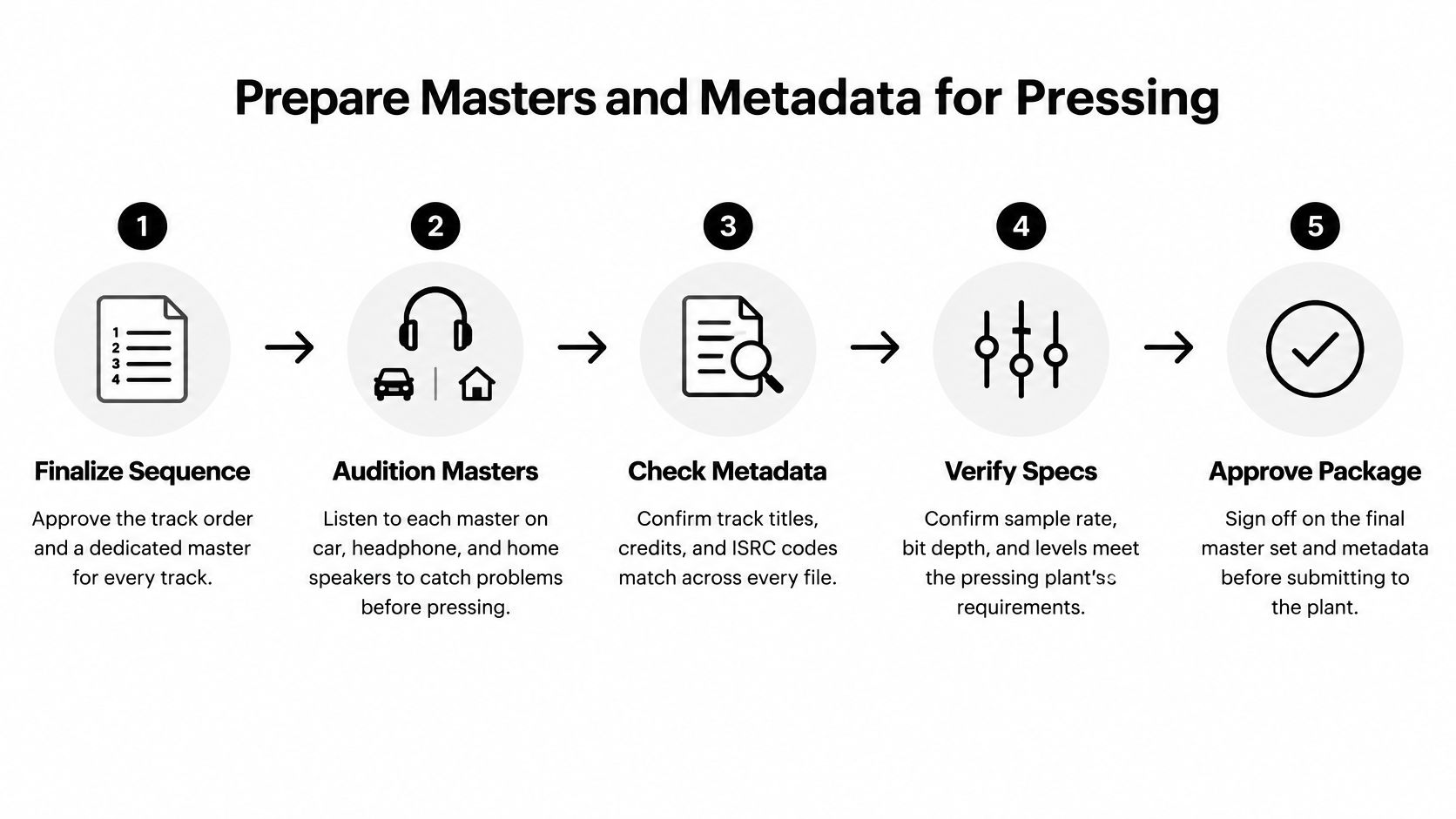
Follow these five steps in strict order, as outlined in the Yamaha Creators album release checklist:
- Finalize the sequence and approve a dedicated master for every track. Confirm that you're working from the final CD master rather than a loudness-normalized streaming export or an earlier mix bounce. Locking the track list first prevents last-minute renumbering across liner notes and cue sheets.
- Audition the complete album from start to finish in one sitting. Listen carefully on studio monitors, headphones, and a consumer stereo for awkward inter-track gaps, abrupt fades, level jumps between songs, digital clicks, dropouts, clipping, swapped stereo channels, or unintended silence at track tails. Spot-checking individual songs won't catch transition errors.
- Build a single master metadata sheet. Record the exact release title and version, primary and featured artists, songwriters, producers, publishers, record label, copyright owner, genre, language, explicit status, release date, track order, ISRC codes, and the album UPC/EAN. Every collaborator and storefront should pull text exclusively from this document.
- Proofread the print-ready artwork against that master sheet. Read every track title, credit line, and copyright notice backward and forward, then confirm the barcode sits cleanly inside the plant's template with no text overlapping the quiet zone.
- Order a physical proof and sign off before the full run. Inspect both the printed packaging and the reference disc together so you catch ink shifts, folded panels, or missing track markers before hundreds of units are replicated.
Keep Identifiers Consistent Everywhere
Follow one strict identifier rule: assign one ISRC per sound recording and one UPC/EAN per product release. Mixing recording-level codes with release-level codes, or recycling an old ISRC on a remastered or live version, breaks royalty reporting, catalog matching, and inventory tracking. Preserve identical codes and spelling across the physical CD, digital distribution listings, your storefront page, downloadable audio files, and press materials.
Secure your codes well ahead of the Week 14 deadline. ISRCs are issued by your country's national ISRC agency or assigned by your digital distributor, while an album UPC/EAN comes directly through GS1, your distributor, or the pressing plant. Verify who legally owns each code before ordering your proof, because a barcode registered under a third party's prefix can trigger release-level conflicts if you later move catalogs or issue a deluxe edition.
For a practical walkthrough of how audio masters, sequence gaps, and CD-Text come together during mastering, watch this concise guide before exporting your final files.
Avoid the Four Expensive Prepress Mistakes
Before you email the plant's upload link, run one final audit specifically for the four errors that ruin more independent pressings than anything else:
- Inconsistent capitalization: Song titles styled in title case on the back cover but sentence case inside the booklet or storefront listing confuse cataloging systems and look sloppy in hand.
- Missing songwriter or publisher credits: Omitting a co-writer or publishing entity triggers disputes and forces costly re-sleeving.
- Wrong track order: Sending an outdated track list to the graphic designer while the mastering engineer uses a revised sequence produces discs that play different songs than the jacket promises.
- Barcode on the wrong panel: Placing the UPC on an inner fold or over a dark background image stops point-of-sale scanners from reading it cleanly.
Check the Pressing Before the Full Run
Popping a test disc into your laptop and hearing music play proves almost nothing about manufacturing quality. Modern computer drives mask severe optical flaws with aggressive error correction, while older car decks or home hi-fi players skip on the exact same disc. Professional replication should be validated against the Red Book CD-DA specification, which defines physical dimensions, optical reflectivity, EFM modulation, CIRC error correction, and subcode accuracy.
As detailed in the Clover Systems CD verification guide, one objective screening metric is Block Error Rate (BLER), measuring how many data blocks per second contain erroneous symbols. The cited Red Book ceiling is a maximum average BLER of 220 per second over a 10-second measurement interval. Ask your pressing plant for actual replication verification reports or BLER test logs rather than accepting a casual note saying the proof "played fine."
Run through this six-step verification sequence before releasing funds for the full pressing:
- Export a validated premaster at 44.1 kHz, 16-bit PCM. Never submit lossy MP3s or mismatched 48 kHz video-rate files and let the plant convert them automatically.
- Inspect peak levels and inter-track timing on the premaster. Confirm true peaks sit safely below digital zero and that track IDs land cleanly ahead of the first transient rather than clipping the downbeat.
- Generate the production disc image (such as a DDP set) and save its checksum. A cryptographic checksum verifies that zero bits changed during file transfer.
- Compare the plant's mastering report or checksum against your approved master. If the hashes don't match, re-upload immediately before glass mastering begins.
- Approve a glass-master proof prior to full replication. Checking a burned CD-R only tests audio sequence; a true replicated proof tests the actual stamper and polycarbonate molding.
- Test multiple replicated discs across different playback hardware. Play at least three discs from the proof batch on a computer optical drive, a dedicated home stereo player, and a car CD deck. Poor reflectivity, defective pits, bad track offsets, or factory contamination often stay invisible until a less forgiving laser reads the disc.
When to Quarantine a Batch
Treat proof approval as a hard quality gate, not a formality.
Batch quarantine rule: If any proof disc differs from your signed-off master in track sequence, inter-track timing, printed artwork, or audio quality, quarantine the batch immediately and withhold written authorization for the full run until the plant fixes the defect and supplies a fresh proof.
Once the pressing passes both your playback checks and the plant's BLER report, archive the approved disc image, checksum file, and manufacturer test documentation in one project folder. If you ever run a second pressing at another plant, that archive guarantees an identical match.
List, Sell and Promote the Release
Choose your primary sales channel before anything else, because the channel sets your margin, fulfillment workflow, and lead time. Direct sales through your own storefront or pre-order page connect straight to fans who already follow your work and leave far more net revenue per disc in your pocket. Retail distribution or aggregator listings can add store discovery, yet they claim wholesale discounts, take distribution cuts, and require extra weeks of advance warehouse delivery.
If you sell your CD directly through OohYeah, check the seller setup guide before launch week. Publishing artist content or turning on artist monetization requires completing an Artist Agreement first. From there, selling follows four steps: create a profile, list what you sell, connect directly with customers and industry contacts, and keep what you earn.
Keep streaming links visible on your CD storefront page and inside every promotional announcement. Direct physical sales add a purchase path for fans who want to own the record; they don't replace streaming, and fans often stream a single several times before deciding to buy the disc. Treat those streams as demand validation: repeat plays tell you which tracks deserve the front of your pre-order campaign and which buyers are most likely to convert.

Run the Pre-Order and Launch Sequence
Build momentum around the physical object itself rather than posting a generic link once on release day:
- Open pre-orders two to three weeks before launch: Give your mailing list a 48-hour head start before posting publicly so your core buyers feel rewarded for subscribing. Early pre-order volume is your first real read on whether the pressing quantity you committed to matches actual demand.
- Share a short audio or video clip of the lead track: Pair the clip with real photos or a brief unboxing video of the finished proof disc, showing the sleeve texture, lyric insert, and disc print. Buyers deciding between a download and a physical disc need to see what the extra money buys.
- Use physical-only incentives: Offer hand-signed sleeves for the first wave of buyers, bundle the CD with a show ticket or t-shirt to lift average order value, and host a live listening session a few days before release day where fans can ask questions about the recordings and order on the spot.
- Publish focused release-day posts: Show stacks of packed mailers heading to the post office alongside direct buy and stream links.
Track First-Week Orders by Channel
Spend thirty minutes at the end of launch week auditing three metrics in a simple spreadsheet: total pre-orders placed, the share of buyers who converted from direct messages or email versus public social posts, and the exact sales channel behind every order (direct storefront, live merch table, or retail). That breakdown tells you far more than vanity stream counts.
Compare what you sold against what you pressed. If pre-orders absorbed most of the run before release day, your quantity was right or even conservative. If half the boxes still sit in your spare room after week one, the audit tells you which channel underperformed and where to cut next time. When your reprint triggers hit, you'll know precisely how many discs each channel absorbs and whether your next run should be bigger or another tight direct-only edition.
When you're ready to test demand, take pre-orders, and sell your finished discs directly to fans, OohYeah brings your music, merchandise, and fan messaging together in one commission-free storefront built for independent artists. You stay in control of pricing, packaging bundles, and direct buyer relationships while keeping 100% of eligible sales minus payment processing. Set up your artist profile and launch your physical release on OohYeah.