DJ Music Downloads: Where to Buy and How to Stay Legal
A guide to DJ music downloads: legal sources, file formats, licensing rules and how to organize a library that works in every set.
November 25, 2026
Music Marketplace Advisor
Buying & SellingYou've found the track that'll rescue the middle of your next set. The preview sounds right, but the listing doesn't say whether you're buying the extended mix, getting a usable download, or receiving permission to include it in your livestream. Buying the wrong version wastes money. Buying without checking the rights creates a different problem.
Good DJ music downloads need more than a checkout receipt. Before a track reaches your gig library, it should pass a format check, a playback test and a license check, with the result recorded somewhere you can find it.
Where DJs Can Buy and Download Music Legally
Legal download sources for DJs
| Source | What you typically get | Best for | Watch for |
|---|---|---|---|
| Dedicated DJ stores, such as Beatport and Traxsource | WAV, AIFF and MP3 downloads, often with BPM and key tags | Electronic genres and DJ-ready edits | Format availability differs per release |
| Artist-direct sites, such as Bandcamp | Artist-chosen formats, sometimes lossless | Independent artists and rare edits | Read the artist's license terms |
| Label and promo pools | Pre-release or promo files, sometimes with usage conditions | Early access and booking-ready promos | Often restricted to working DJs |
| Direct artist marketplace, OohYeah | Tracks bought directly from artists that you can keep | Fans buying directly from artists | Digital goods are generally non-returnable after download |
| Streaming subscription | App-based access and offline caching | Listening and preparation | Usually no standalone file to import into DJ software |
Judge a source by format, permission and recoverability, not just the checkout price. A cheap download isn't useful if it's the wrong edit, its terms exclude your intended use, or you can't replace it after a drive failure.
Dedicated DJ stores make sense when you know the recording you need. Search by artist, label and remix name, then listen for the arrangement rather than trusting the title alone. An original mix and a radio edit can require completely different transitions.
Artist-direct releases reward closer reading. Check whether the purchase includes the version you previewed, whether bonus files are included, and whether any artist-written permissions cover your intended use. Direct contact can help resolve an unclear listing, but a friendly reply isn't a substitute for explicit permission.
Apply the same buying test everywhere
For each candidate source, answer these questions before paying:
- Can I play the supplied format? Check your actual decks and software, not just your laptop's media player.
- Can I understand the terms? Find the permitted uses and restrictions. Silence about broadcasting isn't broadcasting permission.
- Can I recover the purchase? Check re-download availability, account requirements and download limits. Don't assume permanent access.
Promo pools need another check: eligibility and release conditions. A promotional copy may come with feedback requests, sharing restrictions or an embargo. Keep the accompanying email rather than saving only the attachment.
Streaming serves a different job. Some subscriptions integrate with DJ software, but integrated playback still isn't ownership of an unrestricted audio file. Use streaming for discovery and rehearsal where the service permits it, then acquire the files your performance workflow needs.
Our buyer guide explains the purchasing process. Read the listing and applicable terms before checkout, including the return policy and available download information.
Free and Unofficial Sources to Avoid
Free doesn't mean unauthorized. Creative Commons releases can provide legitimate downloads with stated reuse conditions, including attribution or non-commercial restrictions. Free Music Archive can also help you find material, but you still need to inspect the license attached to the individual recording.
Artist and label giveaways are another useful route. Follow the creator's official download button or newsletter offer, then save the accompanying terms. An artist offering a free track for listening hasn't necessarily authorized its inclusion in a commercial video.
Separate permission from availability
An audio file being easy to obtain tells you nothing about who authorized it. YouTube rippers, stream-converter sites and anonymous file-sharing uploads don't establish permission to use the recording.
They also introduce practical problems: misleading filenames, incomplete audio, disguised downloads and files whose advertised quality doesn't match their contents. A filename ending in WAV doesn't prove that the audio originated from a lossless master.
Admission rule: If you can't identify the rights holder, the license and a purchase or permission record, keep the file out of your paid-gig library.
Apply that rule to unofficial remixes too. Permission from the person who made an edit may not settle rights in the underlying recording or composition. Ask what they control and what they can authorize.
When the track you need appears only on an unofficial page, use it as a discovery lead, not a download source. Find an authorized release or request a promo copy from the artist or label. If permission remains unclear, choose another track rather than trying to solve the problem during soundcheck.
Choosing the Right File Format for Your Sets
File formats compared for DJ use
The baseline specifications below follow DJ TechTools' guide to buying DJ file formats: 16-bit/44.1 kHz stereo WAV or AIFF uses approximately 10.6 MB per minute, compared with approximately 2.4 MB per minute for 320 kbps MP3.
| Format | Quality | Size per minute | Best use |
|---|---|---|---|
| WAV at the specification above | Lossless, uncompressed | Baseline uncompressed size above | Club sets, remixing, archive |
| AIFF at the specification above | Lossless, uncompressed | Same as equivalent WAV | Mac-centric libraries, archive |
| FLAC | Lossless, compressed | Determined by source audio and compression | Archive and offline storage |
| MP3 at the bitrate above | Lossy, high bitrate | Baseline MP3 size above | USB sticks and device compatibility |
| Low-bitrate MP3 | Lossy, reduced detail | Smaller, determined by bitrate | Not recommended as a club master |
For a six-minute track, those specifications mean roughly 63 MB for WAV versus 14.4 MB for MP3. That's a meaningful storage difference when you're exporting a large working collection, although drive formatting, other files and the software database also occupy space.
Buy for the work you'll actually do
Choose lossless when you plan to remix, extract stems or retain an archive master. You're preserving the supplied audio without another lossy encoding stage. That doesn't guarantee an excellent recording, but it avoids discarding more information during acquisition.
Choose high-bitrate MP3 when portability and compatibility matter most. It's a practical delivery format for a mobile library, particularly when your equipment supports it reliably and you don't intend to manipulate the audio heavily.
FLAC saves storage without discarding audio information, but check hardware support before making it your performance default. A format your computer opens easily may not work on the decks waiting at the venue.
Converting a lossy download into WAV changes the container and file size. It doesn't restore missing audio detail.
Listen to busy passages, cymbals, reverbs and quiet endings when assessing a questionable file. Don't reject or approve a recording solely because of its extension. Poor source material, clipping and audible encoding artifacts can undermine an otherwise sensible format choice.
A useful listing should state:
- Codec: WAV, AIFF, FLAC or MP3, not merely an audio download.
- Bitrate: The encoding rate where applicable.
- Sample rate: Enough information to check playback compatibility.
- Bit depth: Relevant to uncompressed and lossless formats.
- Duration: A way to distinguish the full mix from an edit.
If the seller provides only a high-quality label, request the technical details before buying. Your purchasing rule should be based on the file delivered, not marketing language.
Licensing Rules for Live, Broadcast and Online Use
Usage rights by use case
| Use case | Usually requires | Check before buying |
|---|---|---|
| Private practice at home | Personal-use permission from the purchase | Download terms cover personal use |
| Club or bar set | Venue public-performance licensing, subject to local rules | Public playback and territory requirements |
| Wedding or private event | Confirmation of event host and venue arrangements | Event type, territory and applicable coverage |
| Internet radio or podcast | Relevant transmission permissions, with additional checks for downloadable episodes | Online transmission and reproduction scope |
| Livestream, such as Twitch | Platform terms plus applicable online transmission clearance | Explicit livestream coverage |
| Recorded mix uploaded to YouTube | Platform checks and applicable recording and synchronization permissions | Video use, including monetization if intended |
| Promotional clip or stem edit | Relevant written permission for video, edits or stems | Precisely which alterations and uses are allowed |
Treat this matrix as a clearance checklist, not a universal legal ruling. Local law, repertoire, platform agreements and the exact use determine the permissions required.
The DJ Will Gill discussion of music-streaming challenges highlights the central distinction: consumer streaming is generally for personal, non-commercial listening, and buying a download doesn't automatically authorize livestreaming, broadcasting or video use.
A club performance and its online transmission need separate consideration.

Ownership isn't a universal use license
Keep distinct questions separate: May I possess this copy? May I perform it publicly? May I transmit or pair it with video? A receipt answers the acquisition question, not necessarily the others.
The DJ should verify the file's license. The venue or organizer commonly handles public-performance arrangements, while broadcasters and platforms may hold permissions covering defined transmissions. Don't assume those arrangements include every recording, territory, replay or promotional extract.
Synchronization means using music with moving images. Both the recording and composition may involve rights holders, so permission from an artist doesn't necessarily resolve every right. Likewise, a platform accepting an upload isn't proof that you've secured permission.
Territory matters because different parties may control the same recording in different places. An event's location and the audience reached online can therefore require different checks. For a disputed or commercially significant use, get advice from the relevant licensing body or a qualified music lawyer.
Our intellectual-property information provides the platform's policy context, not blanket clearance for a purchased track.
Before approving a track for a specific job, record its territory, livestream and monetized-video status, attribution requirements, and permissions for edits or stems. Mark unanswered questions unconfirmed, not allowed. Save the actual terms or written authorization so a promoter's question has a documented answer.
How to Download and Verify Each Track
Check before paying. Our digital goods are generally non-returnable after download, access, activation or use. Confirm the version, format and applicable permissions while you can still choose a different purchase.
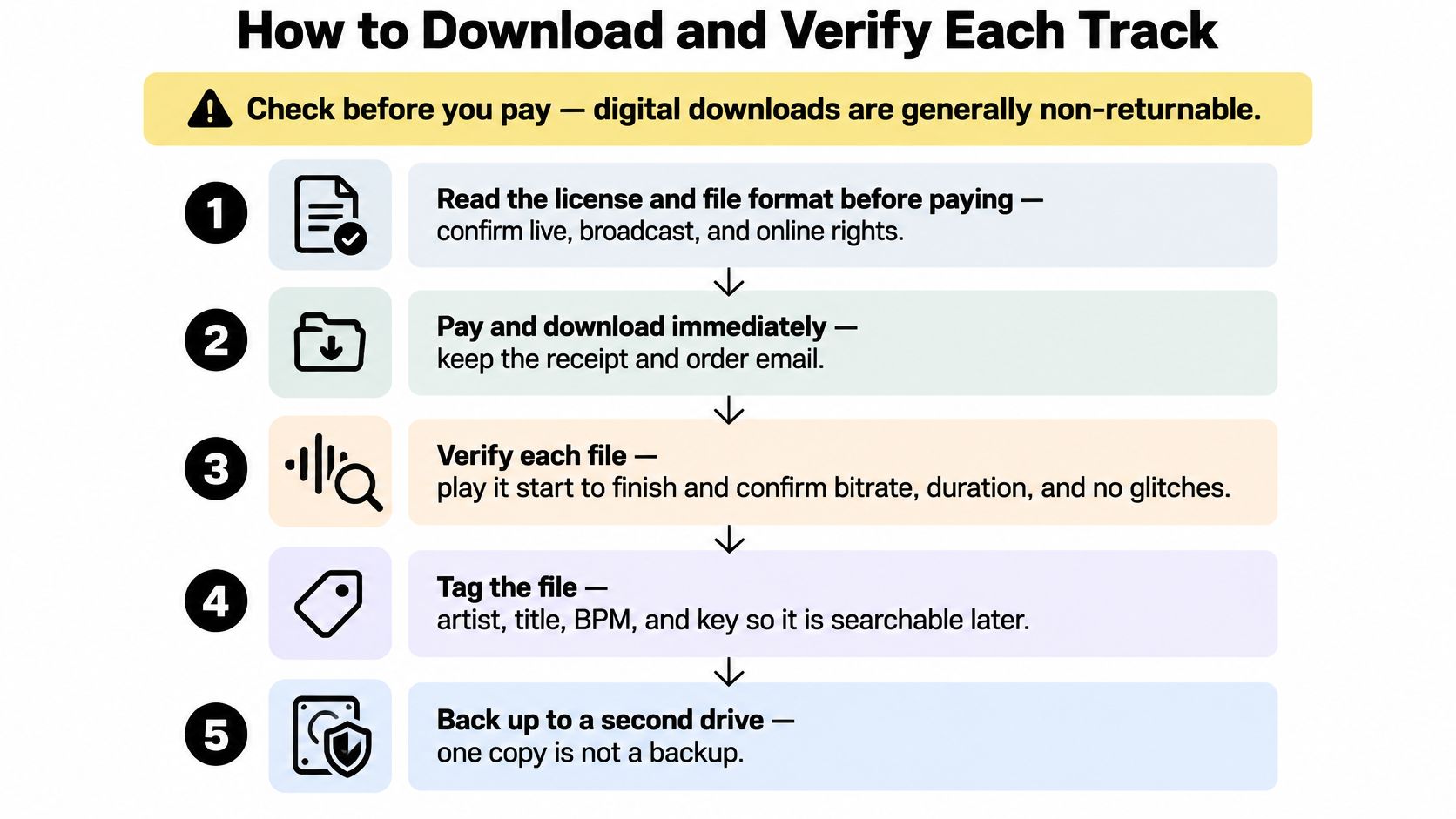
Use a repeatable intake process rather than dropping new purchases straight into a performance playlist. This visual summarizes the handoff from purchase to preparation.
Run the intake routine
Confirm the intended use and delivery format. Match the listing to the job, including the exact remix and whether it's a clean, explicit, radio or extended version. The common slip is recognizing the song title and overlooking the version.
Keep the purchase record. On our platform, My Purchases lists Purchased Music, Purchased Singles and Purchased Albums; retain the order information alongside your license record. Don't rely on an email inbox as your only evidence of acquisition.
Download the format you'll use. Choose the best suitable option the seller supplies and your equipment supports, rather than automatically selecting the smallest file. A frequent mistake is downloading an alternate format and assuming it matches the previewed version.
Save into a dedicated intake folder. Keep new files separate from approved performance material until verification is complete. Desktop clutter makes it too easy to import an unfinished download or lose the accompanying documentation.
Verify in your DJ software. Check the reported duration against the listing, inspect the file properties, listen through the recording, and test the start and end for clicks, truncation or dropouts. Treat automatic BPM and key analysis as suggestions, since an incorrect grid can still look convincing.
Create a separate backup. Copy the approved download and its documentation to external storage or a properly configured backup destination. The usual slip is mistaking a shortcut, synchronized deletion or unfinished upload for a recoverable second copy.
If an account or download question interrupts the process, consult our purchase and download FAQs before repeatedly attempting the same action.
Approve the file, not just the download
A completed transfer isn't the same as a verified track. Set your cue points, audition the intended transition and confirm that the waveform belongs to the version you ordered. Test your exported copy on the playback setup you'll use whenever that equipment is available.
For an additional video walkthrough, use the embedded player below.
An approved file has recognizable metadata, intact audio, a matching purchase record, documented permitted uses and a recoverable backup. Only then should it leave the intake folder for an active set.
Organizing a Library That Survives a Gig
The failure to prevent is simple: you bought the perfect track, but you can't find it when the room needs it. A useful library lets you search under pressure without remembering which store supplied the download.
Use folders for processing status and tags for musical characteristics. Deep folder trees become awkward when a track belongs in several genres or works across different parts of a set.
This checklist gives each file a clear place while it moves through preparation.
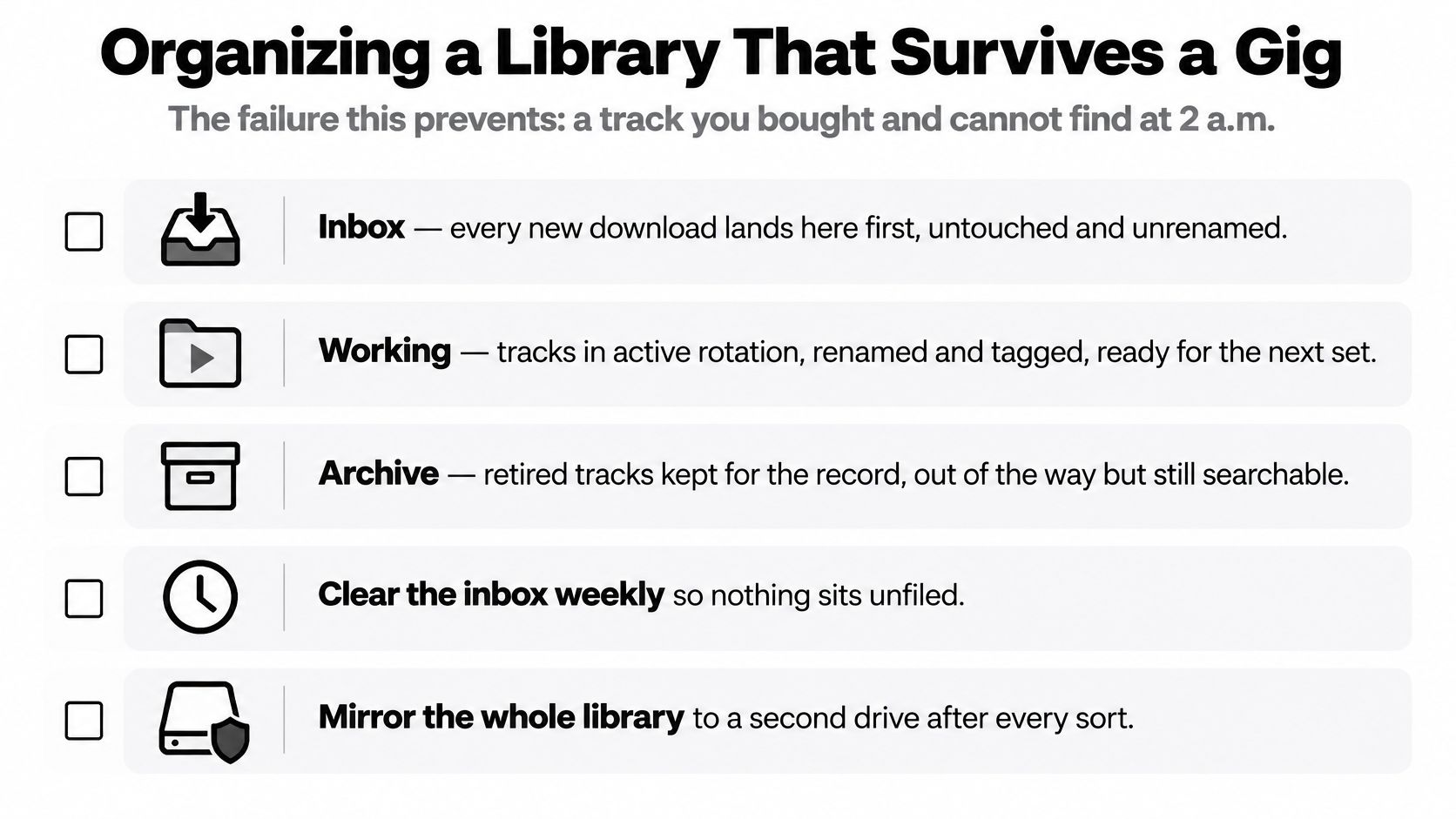
Keep location and musical identity separate
An Inbox holds untouched downloads and accompanying documents. Working contains approved tracks in active rotation. Archive keeps retired material searchable without cluttering the current selection.
Use a consistent filename pattern such as Artist - Title (Mix) - BPM - Key. Preserve the remix name, clean or explicit designation, and other version details that affect performance. Rename before importing where possible, because moving files afterward can break application references.
Fill artist, title, mix, genre, BPM and key fields in your DJ software. Add practical comments such as warm-up, vocal-heavy or short outro, but avoid turning every preference into a new genre.
For broader desktop organization habits, Tintd's guide to reduce file search time on Mac offers a useful companion to your music-specific tagging system.
Preserve evidence and recoverability
Keep a license spreadsheet with store, purchase date, recording version, license type, territory and permitted uses. Give each entry a stable identifier that also appears in the track's comments or your document folder. This connects the playable file to its evidence without forcing legal notes into the filename.
A music backup is incomplete if it restores the audio but loses the receipts, permissions and preparation database.
Before deleting duplicates, compare duration, mix name, source and encoding quality. Keep the better authorized copy, but don't assume a larger file is better or that matching titles mean matching recordings.
Use a layered backup arrangement: your working library, a separate local backup and an off-site copy on a different storage system. Include the DJ software database and playlists, not just the audio folder. Periodically restore a folder and open it to confirm the backup is usable.
For this week's library cleanup:
- Clear intake: Process pending downloads instead of buying more clutter.
- Resolve identity: Fix ambiguous filenames and incomplete version tags.
- Connect permissions: Attach each active track to its license-log entry.
- Test recovery: Restore a folder without touching the working original.
Choosing Your Buying Routine by DJ Type
Buying routine by DJ type
| DJ type | Format to buy | License to prioritize | Where to start |
|---|---|---|---|
| Club DJ | WAV or AIFF | Venue performance arrangements and territory | Dedicated DJ stores |
| Mobile or wedding DJ | WAV or high-bitrate MP3 | Event use and territory | Stores with clear license terms |
| Livestreamer or podcaster | WAV or AIFF | Online transmission, plus video rights where applicable | Licenses that expressly cover the intended online use |
| Collector or archivist | Lossless WAV, AIFF or FLAC | Re-download terms and archival use | Artist-direct sites and OohYeah |
Start with the use that demands the clearest permission, then choose the source and format. A livestreamer shouldn't build a set around purchases whose online-use status remains unanswered. A mobile DJ should resolve event requirements before optimizing storage.
Buying remains a purposeful choice rather than the default way most listeners consume music. According to the RIAA's year-end revenue statistics, downloads represented 3% of U.S. recorded-music revenue in 2022, while generating $494.7 million that year. That supports a narrower conclusion than downloads being either dominant or obsolete: buyers still pay for files when ownership serves a clear need.
Match purchases to a reason to own
For a working DJ, that reason may be dependable local playback and a prepared version that won't depend on a changing subscription catalog. For a collector, it may be a lossless release, alternate mix or complete artist package. Producers should prioritize documented permission for their intended manipulation, not merely access to higher-resolution audio.
The independent sector also gives purchased music a distinct context. UK Music's This Is Music 2025 report reports that independents represented 38.9% of UK digital-album sales, compared with 29.0% of album-equivalent sales, which include streaming. Those are different measures, but the comparison helps explain why purchased releases deserve attention alongside streaming audiences.
Don't infer artist earnings from a download price alone. Fees, agreements and rights ownership affect what reaches the creator, and these market figures don't establish a per-sale payout.
Use streaming to explore broadly and purchases to secure the recordings that justify ownership. Keep your buying shortlist tied to upcoming work rather than downloading everything you might eventually play.
Pick a source, buy a track, complete verification and log its permission status before adding it to your next set. After several performances, review whether the source supplied the versions, documentation and recovery options you needed.
At OohYeah, we offer a direct purchase path for music artists make available to own, alongside rather than instead of streaming. Visit the marketplace to choose a track for your next set, check its listing and terms, and put it through your verification and license-log routine before you play it.