How to Create an EPK That Gets Booked in 2026
How to create an EPK that gets booked: essential sections, file specs, a template and pitching tips for independent artists.
November 5, 2026
Music Marketplace Advisor
Buying & SellingYou've got a new track ready, a venue asks for your EPK, and all you've got is a folder of photos, an old bio and three different streaming links. You zip everything together, send it late, and hear nothing back. That's rarely a verdict on the music. It's usually a verdict on how long the recipient had to work before they could press play.
Learning How to Create an EPK that gets booked means building one fast, self serve page around each recipient's decision, then testing every link, file and embed on a phone before anyone receives it.
Essential EPK Sections and Specs at a Glance
Use this table to audit a kit you already have. If a cell would be blank for you, that's the gap to close first.
| Component | What to include | Format and length |
|---|---|---|
| Biography | Short and long versions, third person, opening with your sound | Short under 200 words; long up to 400 words |
| Photos | At least one portrait and one landscape image | High resolution for print; 2000 pixel long edge for web |
| Music | Two or three strongest tracks with one click streaming links | Streaming links plus a preview player |
| Video | One live performance or official video | Embedded from a host, not uploaded as a heavy file |
| Press quotes | Two to four attributable quotes | Quote, outlet name and date |
| Achievements | Notable shows, placements and awards | Short bullet list |
| Upcoming dates | Next three shows or releases | Dated list, checked before every send |
| Contact | One labeled booking or press contact | Email and phone, shown at top and bottom |
A publicist interviewed by PRS Guitars on what goes into a press kit recommends online hosting, three best tracks with embeddable players, video embeds, and separate short and long background information. Music NSW and Apple Music for Artists point to the same core set, including achievements, upcoming releases and current contact details.
Run the 30 Second Test
Hand your page to a stranger. Can they find your bio, one track, one photo and a contact without scrolling far or downloading anything? If not, don't redesign it. Move the missing item higher, shorten what's blocking it, and test again.
An EPK is not your archive. It's the fastest safe route from first click to a reply.
How to Build Your EPK Page Step by Step
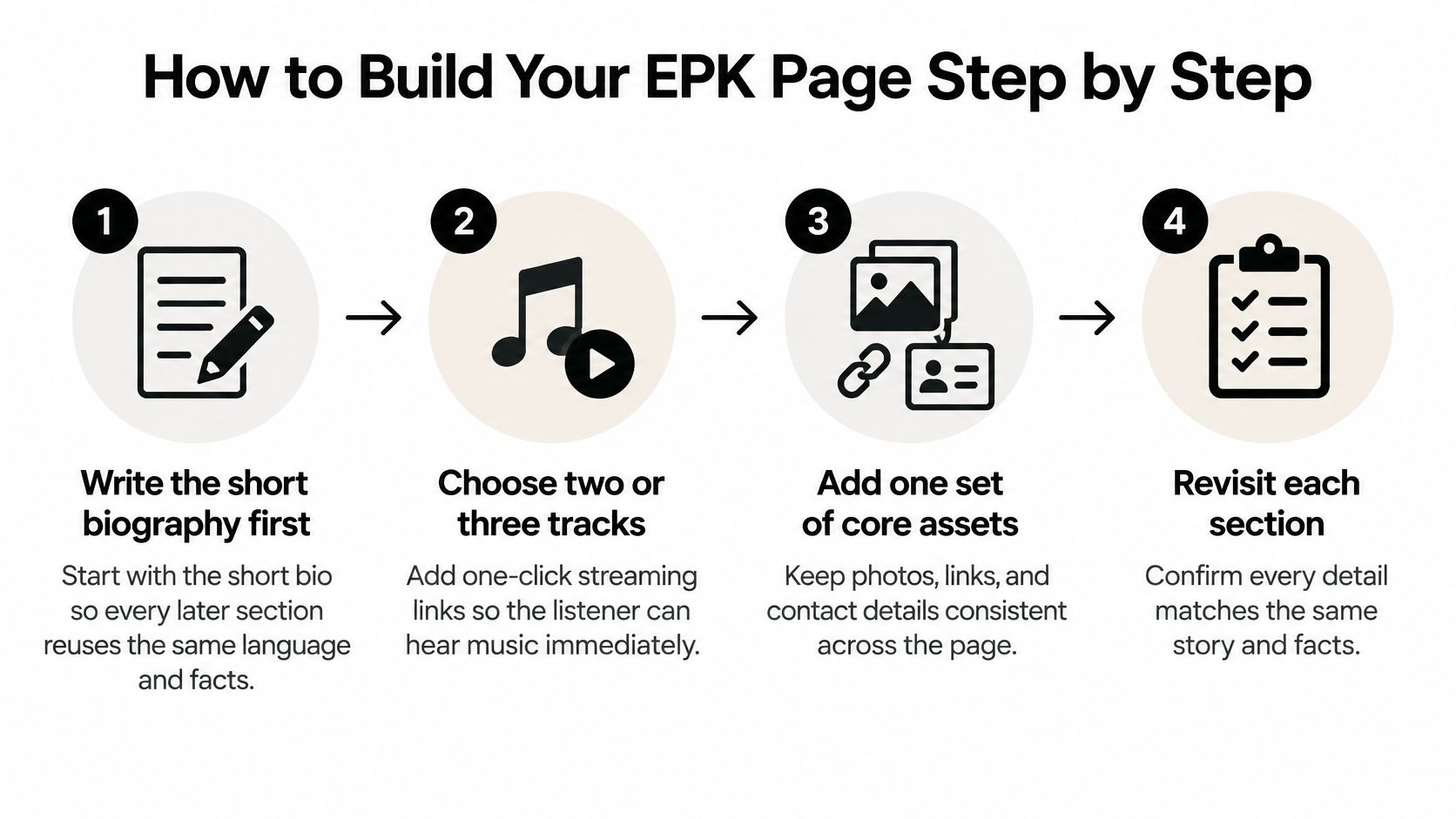
Build in this order. Each step creates language or assets the next one reuses, so you don't rewrite the same facts five times.
- Write the short bio first. Lead with the sound, not where you went to school or the year you formed. Then expand it into the long version using the same opening sentence and facts.
- Choose two or three tracks. Pick the ones that prove the bio's claim and add one click streaming links. If someone needs an account, a download or a second page to hear you, many will move on.
- Embed one video. Use a host embed for a live performance or official video. A heavy uploaded file stalls on phones and looks broken even when it isn't.
- Add photos with usable file names. Name them like Artistname-portrait-hires.jpg and Artistname-wide-web.jpg. Editors save dozens of images, and a file called IMG_4021 gets lost or miscredited.
Facts, Proof and the Contact
Write the fact sheet. Keep it to genre, home city, members, latest release date, catalog links and recent performances. This is the copy a journalist or promoter can lift without emailing you for basics.
Add press quotes and dates. Attribute every quote to an outlet and date, then list upcoming shows. Don't paste a full review when one strong line does the job.
Place one contact at the top and bottom. Label it clearly as booking or press, with email and phone. Burying it in a footer forces a ready buyer to hunt.
Publish on one URL and test it. Open it on your phone and on a slow connection. Play each track, start the video, download a photo and tap the contact link.
When you're ready to put that page where industry contacts can act on it, you can join as an artist on OohYeah and keep your profile, releases and contact route aligned. If you're also mapping the wider career around the kit, maxijournal's independent artist career guide is useful context for how the EPK fits with releases, income and audience building.
I'd call the page finished when a stranger can skim it in under two minutes, hear your best song, understand where you're based, and reach you without scrolling past the video. Anything that doesn't help that test is decoration.
EPK Template to Copy
Copy this skeleton, fill every bracket, and delete nothing until each field is complete.
Header [Artist name]. [Genre] from [home city]. Booking and press: [name], [email], [phone].
Short Bio [Artist] makes [genre] built on [sound detail]. [One line of proof, such as a notable show, placement or release].
Long Bio Repeat the short bio's facts in the same order, then add background, recent momentum and what's next.
Listen
- [Track title], released [date], [streaming link]
- [Track title], released [date], [streaming link]
- [Track title], released [date], [streaming link]
Watch [One embedded live or official video and host]
Fact Sheet Genre: [ ]. Home city: [ ]. Members: [ ]. Latest release: [date]. Catalog: [links]. Recent performances: [ ].
Press [Quote]. [Outlet], [date]. Repeat for two to four lines.
Photos Artistname-portrait-hires.jpg. Alt text: [what the shot shows]. Photo credit: [name]. Artistname-horizontal-web.jpg. Alt text: [ ]. Photo credit: [ ].
Upcoming [Date, venue, city]. List the next three.
Footer Booking and press: repeat the header contact.
If you want to compare layouts before you lock yours, the downloadable media kit options for startups from Carlos Alba Media show how other sectors order the same problem, proof first, assets second, contact always visible.
Tailoring the EPK for Each Recipient
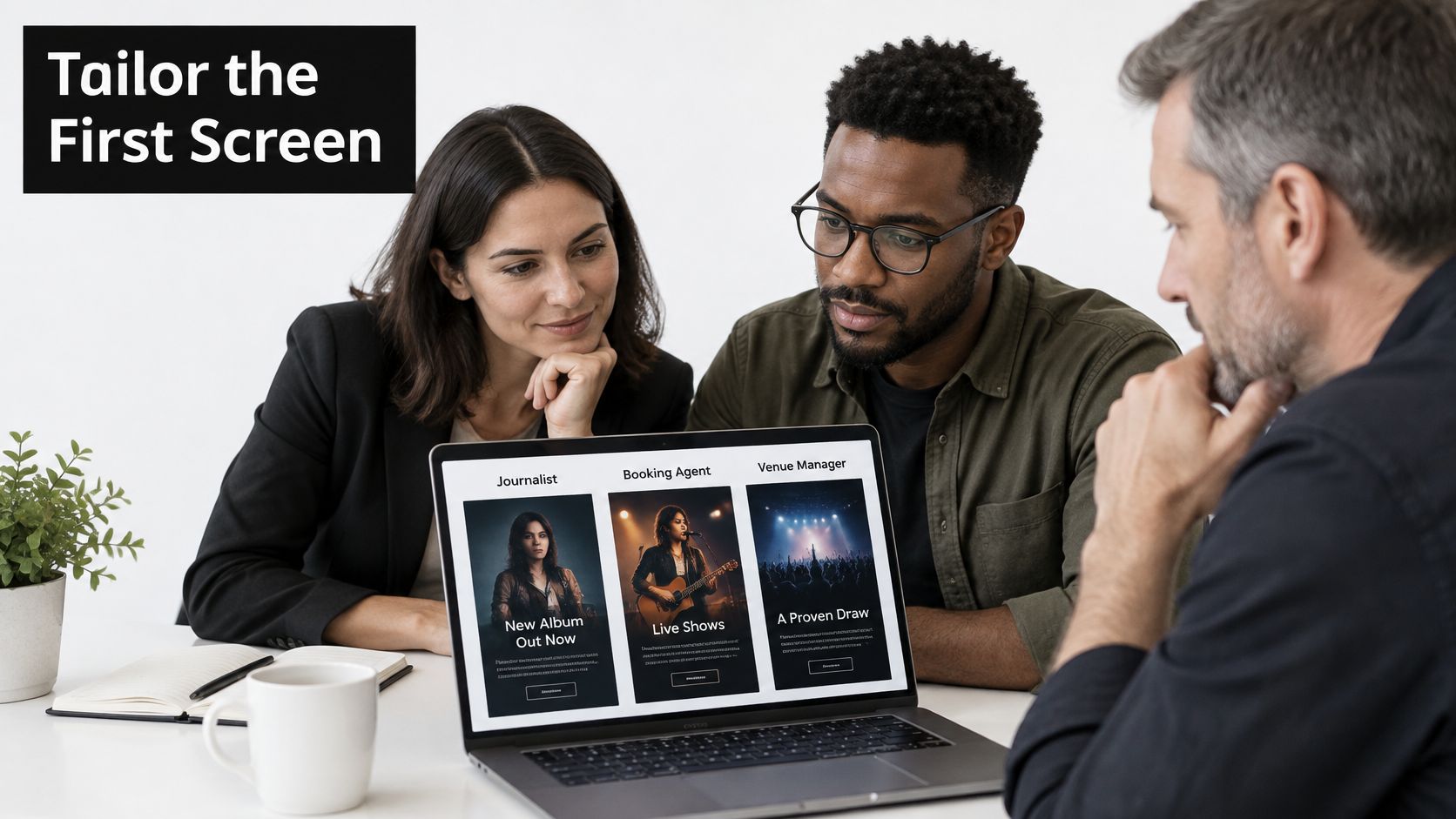
The mismatch I see most often is simple. Artists build one complete folder, then send the same version to a journalist, a promoter and a playlist editor, even though each person is making a different decision.
This image captures the situation. Your kit is usually reviewed quickly, often by more than one person.
A 2025 survey reported by Open Music Business of more than 3,000 journalists across 19 markets found 86% rejected pitches misaligned with their beat or audience, while 72% considered press releases useful when relevant. Relevance isn't a finishing touch. It's the filter your pitch hits first.
| Recipient | Lead with | Cut or move |
|---|---|---|
| Journalist | Story hook, attributable quotes and one playable track | Full discography and long tour history |
| Venue or promoter | Live video, draw history, location, availability and technical needs | Studio credits and the long biography |
| Playlist editor | Release date, genre, streaming links and short fact sheet | Press clippings and extra photos |
| Producer or collaborator | Credits, writers, stems on request and contact | Booking fees and merchandise |
| Sync or licensing contact | ISRCs, territories, clean and explicit versions and rights contact | Biography and press quotes |
Use One Link With Labeled Doors
Keep one canonical link, then create clearly labeled sections or modular views for Press, Booking, Sync and Collaboration. That avoids version chaos while letting each reader land on their first screen in seconds. Writing and interviews in the OohYeah Magazine can help you spot the story angle a journalist would use, rather than leading with internal milestones.
Use this decision order before every send:
- Name the recipient's job. Are they booking a room, filling a playlist slot or clearing a track for use?
- Lead with the asset that shortens their next step. Live video for a promoter, metadata for sync, a playable track for press.
- Remove what doesn't serve that job. Move it down the page or onto a secondary view.
This short walkthrough is worth watching before you rearrange your own sections.
Counterintuitive rule: More proof can slow a decision down. Ten relevant seconds beat thirty files the recipient has to sort.
Making Your EPK Work on Mobile and Screen Readers
A promoter opens your link between soundcheck and doors. One thumb, patchy signal, maybe thirty seconds. If the chorus does not play, the booking decision waits, or dies. They still need professional files once they say yes. Give them two tiers, built for that sequence.
The Musicians' Union guidance on getting music reviewed reported in 2025 that press kits were now almost exclusively digital and publications generally expected all assets through one cloud hosted URL, while some reviewers still require downloadable audio alongside streaming access.
Set Up the Two Tiers
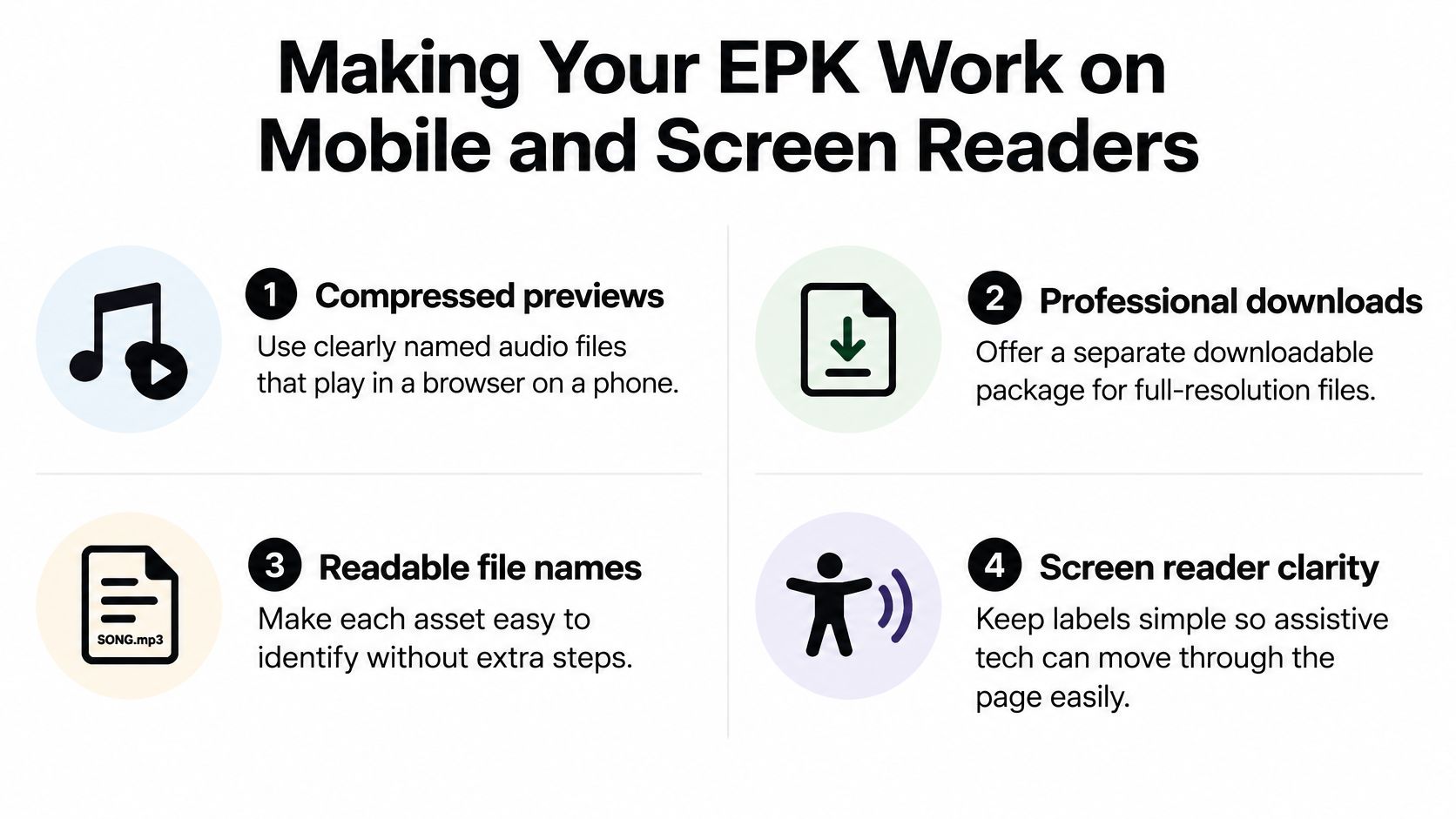
- Preview tier: Compressed, clearly named audio that plays in a browser on a phone, plus web sized photos and embedded video.
- Production tier: Lossless WAV or high bitrate downloads, print resolution photos and full credits, in a clearly marked section or available on request.
A first listen should not require the production tier. I'd keep the WAV behind a labeled download and let the browser player carry the decision. Polished kits lose people when the file is built for a studio session rather than a phone on mobile data.
Accessibility Checklist
- Captions and transcript: Add both to every video, so the content works muted, on a train or with assistive technology.
- Descriptive alt text: Say what the photo shows, such as the artist performing with a full band, rather than repeating the artist name.
- Credits and rights: Put the photographer credit and usage permission beside each image.
- Accessible PDF: Offer the press sheet as real selectable text, not a scanned image a screen reader can't parse.
- Reuse details: Show release dates, territories, explicit or clean versions, ISRCs, writers, producers and permissions on the fact sheet.
- Fallback contact: Print a plain email address as text for anyone whose browser or workplace network blocks your player or form.
Test every link, file and embed on a mid-range phone over mobile data before anyone receives the kit. Studio Wi-Fi hides the failures. Try the same path again from a restrictive workplace-style connection where embeds may be blocked, and keep a direct streaming link that still plays. Read the accessibility information during that pass so a screen reader path is part of the send check. Can every recipient open, understand, audition, download and legally use what you sent?
A beautiful kit with broken embeds, giant files or missing credits creates more friction than a plain kit that opens instantly. Reliability is the professionalism signal.
Publish Your EPK and Send the First Pitches
Publish the kit on one URL and send the first pitches this week. A perfect private folder earns nothing.
Check the Account Before You Publish
First, confirm your artist account covers what you plan to publish. An Artist Agreement is required before you publish artist content or artist monetization on OohYeah. Sort that before you build links around releases or offers, not after a promoter clicks through.
Second, open your artist page and check the sections a recipient will look for. Artist pages have Music, Videos, About and Photos sections. Make sure the tracks and video there match the ones in your EPK, and that the About text uses the same short bio language. A mismatch makes a careful booker wonder which version is current.
Third, use the page's built in actions as your default outbound links. Artist pages have Play latest release, Follow, Share artist, Radio, Shuffle and Message options. I'd put Play latest release beside your Listen section, Follow near your upcoming dates, and Share artist where a journalist or promoter may need to forward you internally.
Add Money Links Without Turning It Into a Catalog
Fourth, add direct links to monetized releases, merchandise, subscriptions and your contact channel. Keep them secondary to the press and booking job. A promoter doesn't need your full store, but a fan who discovers you through coverage should find a clear route to buy or subscribe.
Keep the EPK editorial and selective. Two or three releases with direct links will convert better than dumping the entire back catalog onto the page and hoping someone explores.
Fifth, publish, test again on a phone, then build your first outreach log. Use a simple table with these columns:
- Recipient and role: Name, outlet or venue, and why they fit.
- Version sent: Press, Booking, Sync or Collaboration.
- Date and next step: When you sent it and what you'll add if you follow up.
Before that first batch leaves your inbox, run a deliverability check too. MailGenius explains how to check if emails are going to spam, which is worth doing before you blame a silent inbox on the music. Send yourself the pitch, click every link from the received email, and confirm the page loads from that route.
Finally, set a monthly reminder to refresh upcoming dates, quotes, achievements and the featured release. Nothing undercuts a pitch faster than an EPK leading with a show that already happened. Your first concrete action today is small. Publish the URL, test it once on mobile data, and list the first ten recipients by job, not by whoever's email you happen to have.
Pitching Your EPK Without Getting Ignored
Send a link, never an attachment. Attachments trigger spam filters, clog mobile inboxes and force the recipient to download before they can decide whether you're relevant. Confirm your live URL works, then write the pitch around it.
Build the Pitch in Four Parts
Subject line. Use your artist name, the recipient's beat or venue, and one concrete hook. A release date, a city you play next or a support slot works better than a vague claim about a new sound.
Opening lines. Write two sentences on why this recipient. Mention something they covered, booked or programmed that connects to you. If you can't write that sentence, they're probably not the right target yet.
Middle. Give one short paragraph of news, then place the EPK link high and label it clearly, such as EPK with playable tracks, live video and photos. Don't paste the entire fact sheet into the email body. The email earns the click. The page does the work.
Close. Make one clear ask. A review, a booking call or a sync conversation are different asks, so pick the one that matches the version you linked.
Follow a Rhythm You Can Sustain
- Send fewer than twenty at a time. That ceiling forces personalization and keeps your log manageable.
- Wait seven to ten days. Then send one follow up as a reply to the first email.
- Add one new fact. A new live clip, an added date or a confirmed support slot gives them a reason to reopen it.
- Stop after the second message. Unless they respond, move on and protect your reputation for the next release.
Avoid pitching a playlist editor with a magazine style press release, sending a booking version without location and availability, or linking to a kit that still shows last year's shows. Each mistake tells the recipient you'd be hard to work with before they've heard a note.
A good pitch doesn't argue that you're worth time. It reduces the time needed to say yes.
Keep logging who received which version and when. When you update the kit, resend only to people who haven't replied and only when the update changes their decision. That's the discipline behind How to Create an EPK as a working tool, not a one off document you rebuild in a panic before every release.
Put your finished EPK to work where listeners can stream, follow, message and buy from you in one place. Visit OohYeah to set up your artist page, align your Music, Videos, About and Photos with your kit, and send promoters and press a link that leads somewhere they can act on today.