
High Resolution Music Downloads: Formats, Specs and Tips
High resolution music downloads explained: 24-bit/96 kHz FLAC, file sizes, real audible gains and how to sell them on OohYeah.
November 10, 2026
Music Marketplace Advisor
Buying & SellingThe advice you'll hear most often about high resolution music downloads is to buy the biggest file on the page. 24-bit/192 kHz, DSD if the store stocks it, and never mind what the master was or how it was made. Bigger is better, so the thinking goes, and the numbers on the label are the proof.
That advice is easy to repeat and hard to defend. A format label describes the container a recording was packed into, not the recording itself. Files get converted up from lower-resolution sessions all the time, and a converted file carries the higher numbers without carrying any more music.
The label is a claim. Claims can be checked, and this walks through the checks: what each tier of the specification controls, what it costs in storage and bandwidth, how to spot a converted fake, how to prepare a genuine file for sale, and what the market pays for one. None of it requires you to stop selling at 24/192. It just means you'll know exactly what you're selling when you do.
High-Resolution Formats and What the Specs Change
High resolution describes a download that carries more resolution than the CD standard of 16-bit at 44.1 kHz. That is the only thing the term reliably signals. Every tier above that line is a variation on two numbers, and most marketing copy is built on top of them.
The tiers you will actually meet
Five formats cover nearly every purchase page, and each one serves a different buyer.
| Tier | Bit depth | Sample rate | Typical use |
|---|---|---|---|
| CD quality (baseline) | 16-bit | 44.1 kHz | Streaming and CD masters |
| Hi-res 24/48 | 24-bit | 48 kHz | Film and video masters |
| Hi-res 24/96 | 24-bit | 96 kHz | Most common hi-res album download |
| Hi-res 24/192 | 24-bit | 192 kHz | Studio archive and production masters |
| DSD64 | 1-bit | 2.8224 MHz | SACD-style collector releases |
24-bit/48 kHz turns up more often than sellers expect. Film and television work settled on a 48 kHz sample rate decades ago, so sync-licensed masters arrive at that figure and stay there. 24-bit/96 kHz is the tier most album stores sell, and it's the sensible default for a first-time seller because it sits comfortably inside what consumer converters handle. 24-bit/192 kHz doubles the data rate for archival and production work. DSD64 runs on a different architecture altogether, 1-bit samples at 2.8224 MHz, and it's the format behind SACD-style collector editions; it can't be edited without conversion, which is why most studios master in PCM and convert at the end of the chain.
Bit depth and sample rate are separate levers
Bit depth sets how finely each sample's level is recorded. Picture a paint-by-numbers kit: 16-bit gives you 65,536 possible levels per sample, while 24-bit gives about 16.7 million. The difference shows up in quiet material. A fade-out, a reverb tail, a fingerpicked guitar at the edge of audibility all live in the low-order bits, and more levels mean that detail survives the trip.
Sample rate sets how many snapshots the converter takes each second, and it caps the highest frequency the file can hold at half that number. 44.1 kHz captures content up to roughly 22.05 kHz, just past where adult hearing stops. 96 kHz reaches 48 kHz.
Think of sample rate as frame rate in video. A higher frame rate captures faster motion, and much of that motion is invisible on a TV in a living room. Ultrasonic content behaves the same way.
Where 24-bit earns its place is production. A mix that gets turned up, edited, EQ'd and compressed passes through dozens of gain stages, and the extra headroom keeps those moves from adding audible error. You capture at 24-bit so the session survives the process, not because the finished master needs 16 million levels to sound right.
What listeners can actually tell apart
The evidence is more modest than the marketing. A Journal of the Audio Engineering Society meta-analysis pooled 18 controlled experiments with more than 400 participants and over 12,500 trials and found a small but statistically significant ability to distinguish high-resolution audio from standard-resolution audio. Performance improved once listeners were trained.
The same review reported mixed outcomes across the studies it combined. Some listeners could not distinguish 24-bit/192 kHz from 16-bit/44.1 kHz, and one analysis found no additional effect attributable specifically to reducing bit depth from 24 to 16 when sample-rate conditions also changed.
The honest claim: high resolution describes the specification of a file. It doesn't guarantee a better sound, and it says nothing about the quality of the performance or the master inside it.
That distinction matters commercially. Promise a buyer that a 24/192 download will sound better and you're making a claim the listening evidence doesn't support. Promise an authenticated master at a stated resolution with provenance notes attached, and you're making a claim you can defend in public.
Who the bigger file is for
High-resolution files hold up best as archival and production-grade deliverables. They reward listeners with a converter that handles the rate natively, a quiet room, and a reason to want the master version rather than the stream. For everyone else, a well-mastered 16-bit/44.1 kHz file delivers the performance intact. Playback matters as much as the file, so if you're building a chain that can resolve the difference at all, upgrading audio for high-end headphones covers the converter and amplifier side of that decision.
File Sizes, Storage and Streaming Trade-Offs
Format choices turn into operating costs the moment you start delivering files. The comparison below is the one to keep open when you set a download quota, because every tier multiplies through the whole chain of upload, storage and delivery.
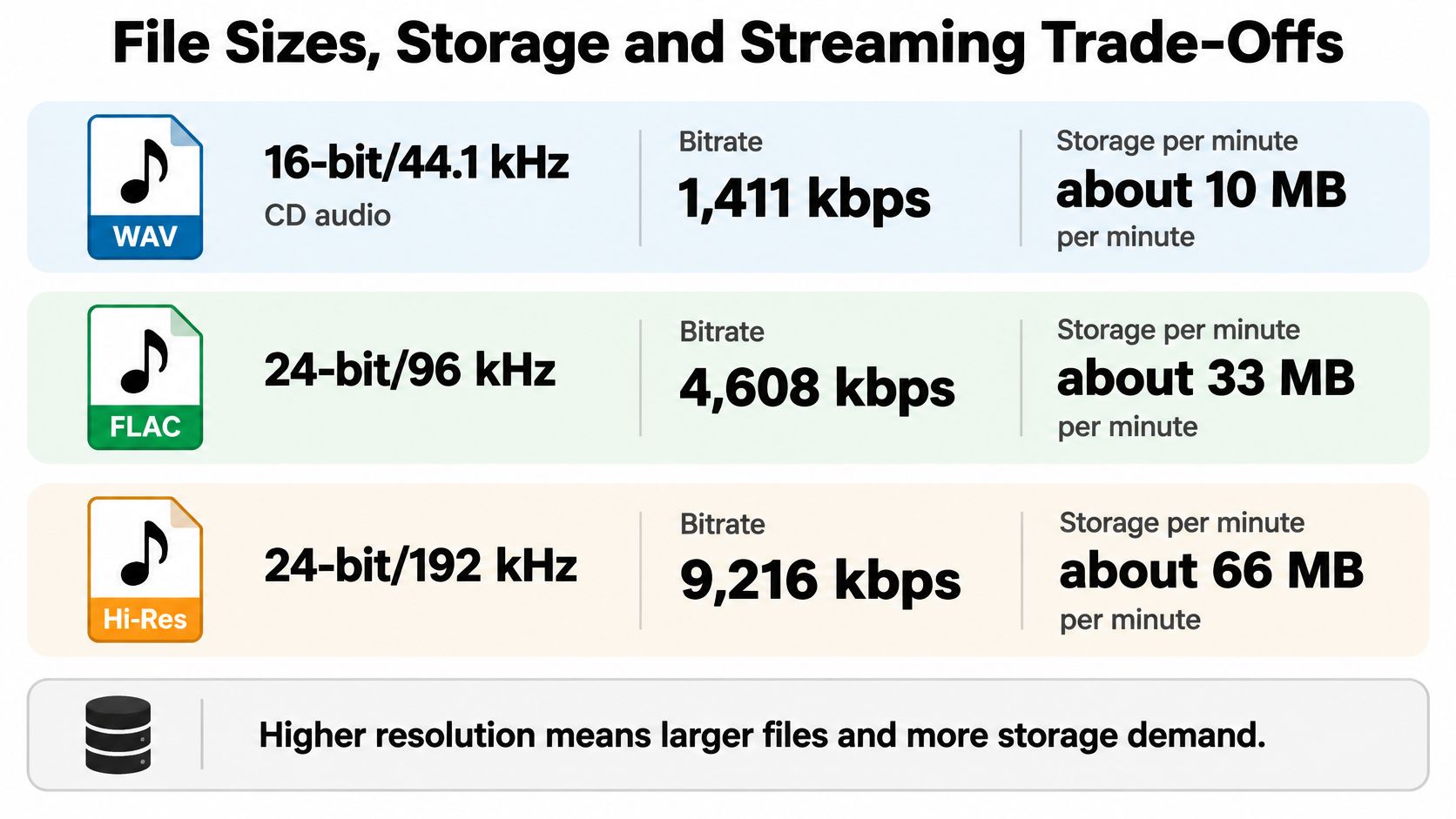
| Format | Data rate | Per minute | 50-minute album (FLAC) |
|---|---|---|---|
| 16-bit/44.1 kHz | 1,411 kbps | about 10 MB | roughly 200-300 MB |
| 24-bit/96 kHz | 4,608 kbps | about 33 MB | 0.8-1.2 GB |
| 24-bit/192 kHz | 9,216 kbps | about 66 MB | roughly double the 24/96 album |
Uncompressed stereo PCM at 24-bit/96 kHz runs at 4,608 kbps, or roughly 33 MB per minute, and the 24-bit/192 kHz version doubles that to 9,216 kbps and about 66 MB per minute, as this lossless audio format guide sets out. FLAC trims 40 to 60 percent off those figures while preserving the original samples exactly, so a 50-minute 24/96 album commonly lands between 0.8 and 1.2 GB depending on musical complexity and encoder efficiency.
Read the table with that split in mind: the per-minute column is raw PCM, and the album column is the compressed FLAC you store and ship. That distinction is where the label becomes a claim. A FLAC marked 24/96 should decode back to the same 4,608 kbps stream, and a file that decodes lower is wearing a specification it does not keep.
Put a buyer on mobile data with a 1.2 GB album and the practical problem appears fast. The transfer stalls, the data allowance runs out, and the purchase lands as a half-finished folder. Making 24/96 the default keeps the file lossless and cuts the transfer substantially against 24/192.
The costs scale on your side too. Every tier you publish needs upload validation, storage and a band of download quota behind it, and a 24/192 catalogue costs roughly twice as much to host and serve as the same catalogue at 24/96.
- Default to 24/96. It's the tier most stores sell, it's lighter than 24/192, and it stays lossless.
- Sell 24/192 as a separate archival tier. Price it for the buyer who wants the production master rather than making it the only option on the page.
- Display codec and decoded PCM parameters. A listing that reads "FLAC, 24-bit, 96 kHz, decoded PCM 4,608 kbps" lets a buyer confirm the file is lossless rather than a converted copy.
One check sellers skip: confirm the phone app or player your buyer plans to use supports 24-bit FLAC at the stated rate. Some default players and older devices downsample without notice, and others refuse files above 16-bit/44.1 kHz outright. The stakes rise on a direct-sale marketplace, because digital goods are generally non-returnable once downloaded or used. On OohYeah fans stream to discover an artist and then buy directly through the path set out in the OohYeah buyer guide, so the compatibility question is one the buyer settles before payment.
Telling Genuine High-Resolution Files From Upsampled Copies
The assumption worth challenging is that the largest file sounds best. Size tells you what a file claims to be. Provenance tells you where it came from, and those are different questions.
Technical comparisons show the source, the mastering, the peak level and the dynamic range can matter as much as the nominal specification on the label.
Buyers still lack trustworthy guidance on whether a download is high resolution or a converted master, as this hi-res download review notes. Recent evaluations found cases where 352.8 kHz PCM and DSD128 differed by about 6 dB in peak level while dynamic range stayed unchanged. Same music, different numbers attached, and a listener comparing the two by loudness draws entirely the wrong conclusion.
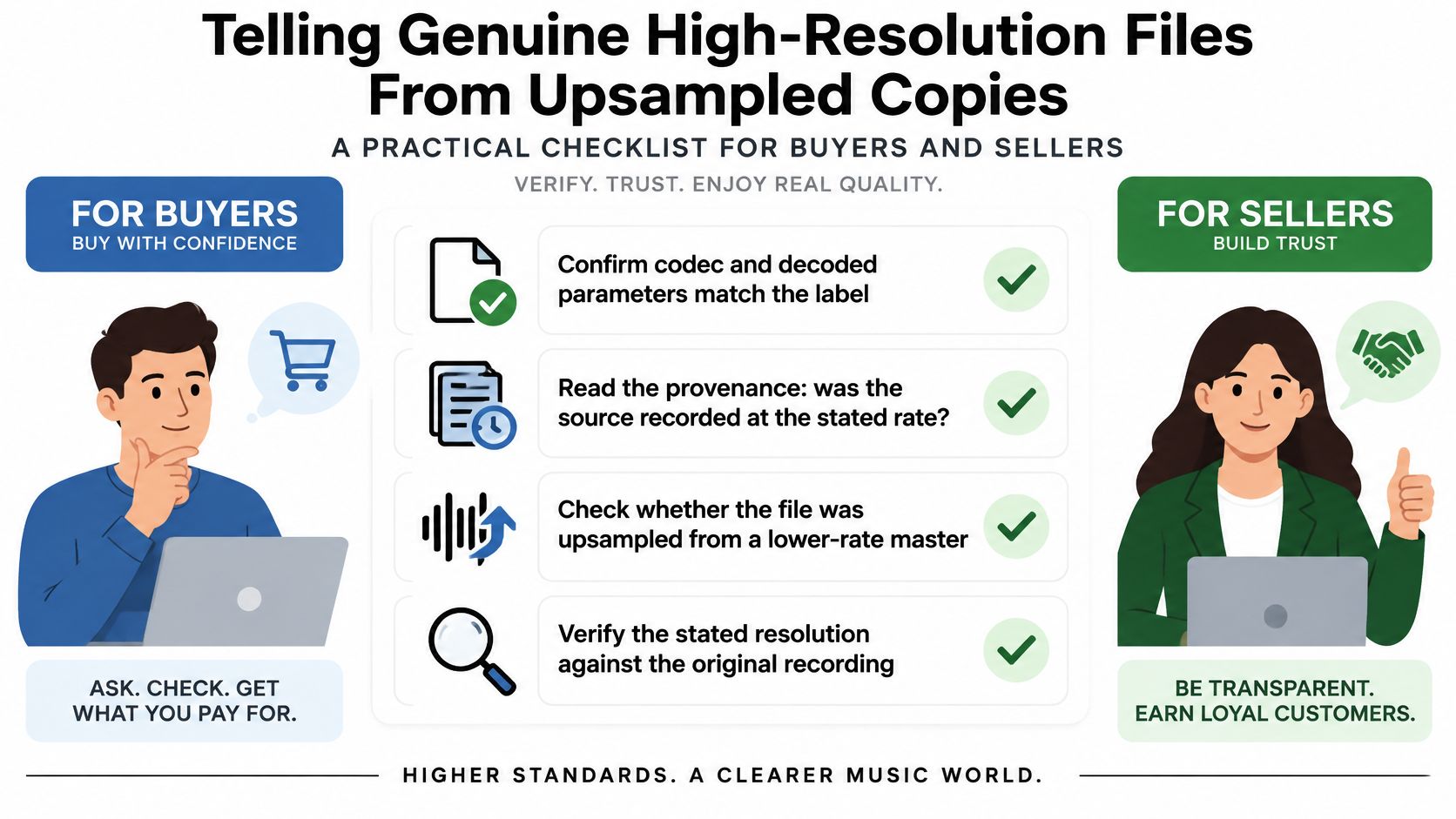
Run these five checks before a file goes on sale, or before you pay for one:
- Confirm the codec and the decoded parameters match the label. A FLAC file reporting 24-bit/96 kHz on its container but decoding at 16-bit/44.1 kHz internally isn't what the page promised.
- Read the provenance. Was the source recorded at the stated rate, or converted from a lower-resolution session? A one-line note from the mastering engineer settles it.
- Inspect the spectrum. Audio upsampled from a 44.1 kHz master shows nothing above about 22 kHz. A clean cutoff below the labelled rate is the warning sign.
- Compare dynamic range with the mastered version. A file can carry a high sample rate and still lose range through heavy limiting, which is a mastering decision rather than a format one.
- Check the peak level. A large level difference between two versions of the same master misleads anyone comparing them, and loudness-normalised playback hides the difference again.
Practical rule: when provenance is missing or the source was converted, a well-mastered 16-bit/44.1 kHz file is the honest deliverable, and saying so builds more buyer trust than a resolution claim the listening evidence doesn't support.
Preparing and Delivering Files Step by Step
Every spec on your product page is a claim, and the export chain is where that claim either holds up or falls apart. Work through it in order. Seven steps keep the chain honest from session to storefront.
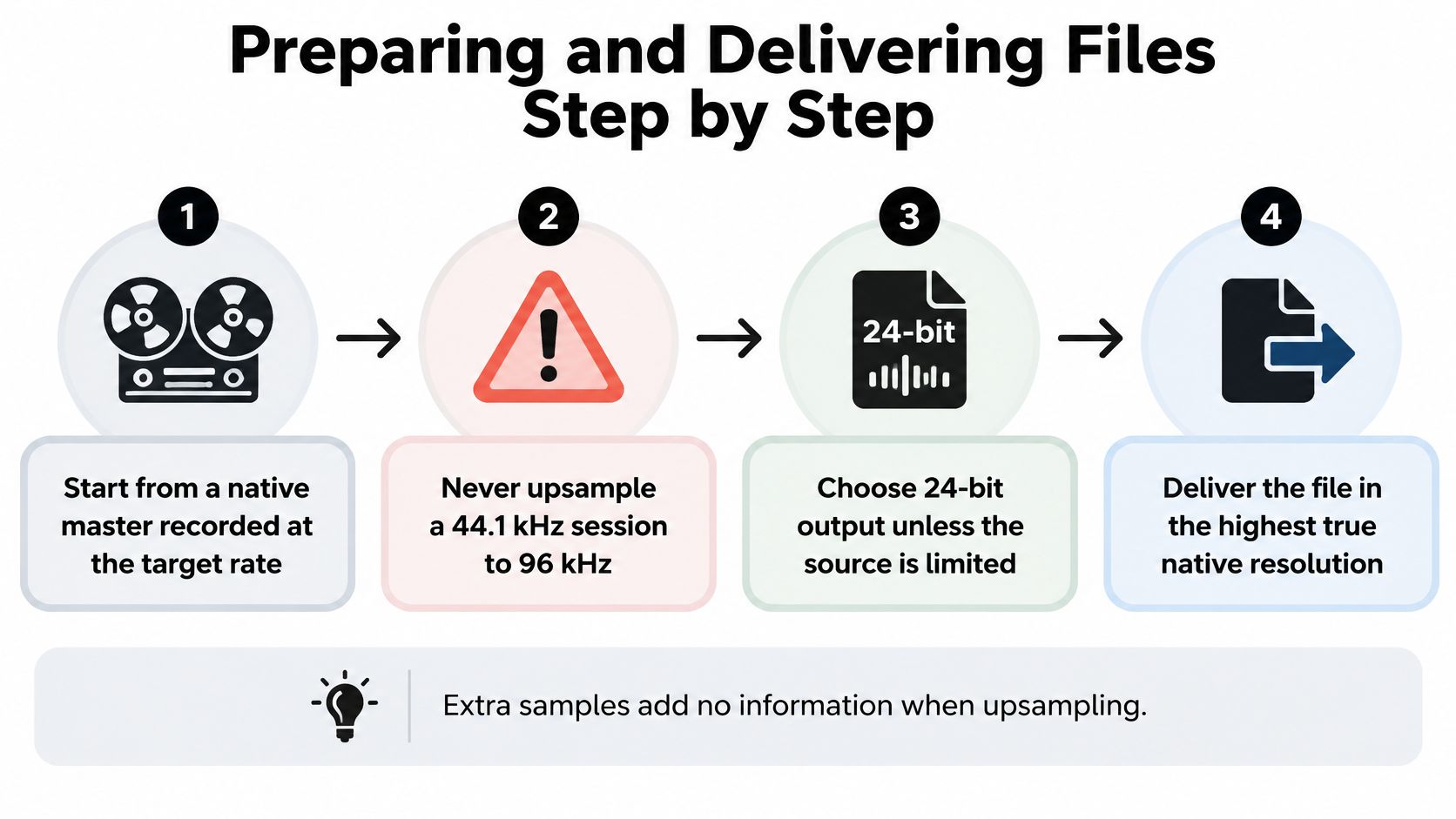
- Start from a native master recorded at the target rate. A 44.1 kHz session converted up to 96 kHz gains interpolated samples, not information, and a spectral check exposes the padding.
- Choose 24-bit output unless the source is 16-bit. When you reduce bit depth, apply dither so the noise floor stays smooth instead of turning gritty in quiet passages.
- Export lossless FLAC at the original sample rate. No lossy stage anywhere in the chain, and no second conversion to a friendlier rate before upload.
- Check peak level after encoding. Leave headroom so the master doesn't clip once the file decodes on someone else's gear.
- Run your verification pass before anything is uploaded. The codec, spectrum and dynamic-range checks belong at this stage, where fixing a problem costs nothing.
- Embed metadata. Artist, title, ISRC, sample rate, bit depth, and a provenance note stating whether the file was recorded natively at that resolution or converted from another.
- Upload, then download the file on desktop and on a phone. Confirm it plays, reports the correct specifications, and matches the master you approved in the studio.
A correct delivery shows three things at a glance: decoded parameters that match the label, audio that fills the bandwidth the sample rate promises, and metadata that answers the provenance question before a buyer asks it.
Sellers can list music downloads alongside merchandise, digital products, subscriptions, exclusives, instruments and pro audio gear, so the hi-res edition usually sits on the same page as everything else an artist offers. New sellers start at the OohYeah seller guide, and artists keep 100% of eligible sales, minus payment processing. When you cut a preview clip to promote the release, use a tool built to check files for social posts so the version you advertise matches the version you're selling.
Pricing and Positioning Your Hi-Res Releases
In 2025, high-resolution audio downloads were priced at approximately $1.49 to $2.49 per track and $17.99 to $24.99 per album, according to Dataintelo's market report. That range is your benchmark before you invent a number.
| Unit | 2025 price range |
|---|---|
| Single track | $1.49 to $2.49 |
| Album | $17.99 to $24.99 |
Those prices sit above standard downloads, so the release has to earn the gap with something a buyer can see: a studio master, a deluxe edition, DJ-ready stems, or a bundle with bonus material. A 24/192 file offered as the only option at the top of the range invites the sceptical question about whether it sounds different. A studio-master edition priced inside the album range, sitting beside a standard version that serves streaming listeners, answers it before anyone asks.
The download market is a premium niche now, not a volume business. Global download revenue peaked at about $4.4 billion in 2014 and had fallen to $2.8 billion by 2017, while streaming revenue reached $6.6 billion and grew 40 percent year over year, per IFPI figures summarized in this analysis of download persistence. Position hi-res files as ownership and archival quality rather than a replacement for streaming, which is exactly how a direct purchase path works: it adds a buying option for fans and doesn't replace the streaming they already do.
One policy shapes the product page. Digital goods are generally non-returnable after download, access, activation or use, so the description has to do the work a shop assistant would. State the format, the sample rate, the bit depth, the decoded parameters, the file size and a sample preview clearly, because the buyer can't hand the file back once it's downloaded. Artists can set up the release and its pricing through selling on OohYeah.
Launch Your First High-Resolution Release
Start with the master, not the menu. If the session was captured at high resolution and survived mixing without clipping, choose the tier that preserves that provenance. If the only source is a lower-resolution master, a larger container will not make it hi-res.
Verify the export like a mastering engineer signing off a record. Decode the file back to audio, confirm the reported bit depth and sample rate, check the peak level, and run the spectral check against the original master. A genuine file should match the source in level and frequency content. An upsampled copy usually reveals itself through missing high-frequency content or an abrupt ceiling that the label does not explain.
Do the last test as a buyer. Upload the release, access the download, and play it on a phone. If it plays, reports the same specifications, and sounds identical to the master, you have a product. If anything changes, fix the export before the page goes live.
The economics support one careful release. Artists keep 100% of eligible sales, minus payment processing, so the premium tier can fund work without needing volume it may never reach.
Keep a 16-bit/44.1 kHz version alongside it. Buyers with limited storage or basic playback get a file that plays everywhere, and the audiophile tier stays a choice rather than a hurdle.
A high-resolution release earns its label only when the file proves it. On OohYeah, artists can upload and sell music downloads directly to fans from their artist pages, with format and pricing details set beside the standard edition. Export one native master this week, verify it, list it, and watch whether your listeners choose ownership. Start your first high-resolution listing on OohYeah.