How to Set Up a Direct Online Merch Booth During Virtual Shows
Master setting up a direct online merch booth during virtual shows. Learn how to link your shop, boost live sales, and keep 100% of your artist revenue today!
October 17, 2026
FRANKLY with Frank Lee
What if your virtual merch booth didn’t need to be built inside the livestream? Setting up a direct online merch booth during virtual shows can start with one clear route from the performance to your artist profile and merchandise marketplace. Fans shouldn’t have to hunt for the merch or navigate a maze of clicks.
It’s reasonable to wonder where to place the link, what to feature, and when to remind viewers. A simple plan can answer all three without interrupting the show. This guide covers how to create a visible path from virtual-show discovery to a direct purchase, with an offer that feels connected to the event and audience.
You’ll learn what to prepare before the show, how to make the merch link easy to find during it, and how to keep the artist-fan connection going afterward. OohYeah! artist profiles offer a direct destination for show links, with access to a merchandise marketplace. Artists retain 100% of sales revenue with no marketplace commission, while paying a recurring artist subscription fee. The goal is straightforward: make buying easy and leave fans with a stronger connection to your music.
Key Takeaways
- Shape your merch offer around the show format, audience, and the moments when fans can act.
- Compare a pinned link, event landing page, and virtual booth to choose a clear, mobile-friendly route to purchase.
- Use a simple setup workflow to prepare, test, place, and promote your merch destination before, during, and after the event.
- Make setting up a direct online merch booth during virtual shows easier by linking show materials to one focused shop destination.
- With OohYeah!, artists retain 100% of sales revenue with no marketplace commission and pay a recurring artist subscription fee.
Why a Direct Online Merch Booth Matters During Virtual Shows
A direct online merch booth is an organized route from a virtual show to an artist’s online shop, where fans can discover and consider merchandise connected to the event. Unlike a physical table at a venue, it doesn’t occupy space beside the stage. It might be a shop link in the stream description, a page with event-related visuals, or a more immersive digital environment.
The opportunity is simple: fans are already spending time with the performance, artist, or event. A clear merch destination gives interested viewers a next step while the experience is fresh, without making them search for the artist’s store later. For example, a host can mention the merch and direct viewers to a pinned link, while an event page can display the same destination alongside performance information.
The route doesn’t need to interrupt the show. A simple link lets fans open the shop in another tab or return to the stream after browsing. A custom virtual booth may add a more immersive layer, but it’s optional. Choose the format viewers can understand and use without losing track of the event. The broad idea of a virtual event includes online experiences and interactive features. An artist’s merch route can stay lightweight and focused on direct-to-fan discovery.
What makes an online merch booth different from a regular store?
A regular store serves visitors across different occasions. An online merch booth gives the shop a specific context: one performance, release, virtual festival, or fan community. That context helps fans connect the offer to what they’re watching. A show image, a short note from the artist, or a link labeled for the event can make the destination feel timely rather than like a generic storefront.
The booth doesn’t have to use 3D software. It can be a small set of coordinated links and visuals that lead to the shop. Keep the event connection clear, but make the merchandise details easy to find once fans arrive.
What should the booth help a fan do?
It should answer two questions quickly: what’s available, and where should I go next? A fan watching on a phone may have limited screen space, while someone on a computer may be able to open the shop beside the stream. In either case, use a clear link and concise wording so the next step doesn’t compete with the performance.
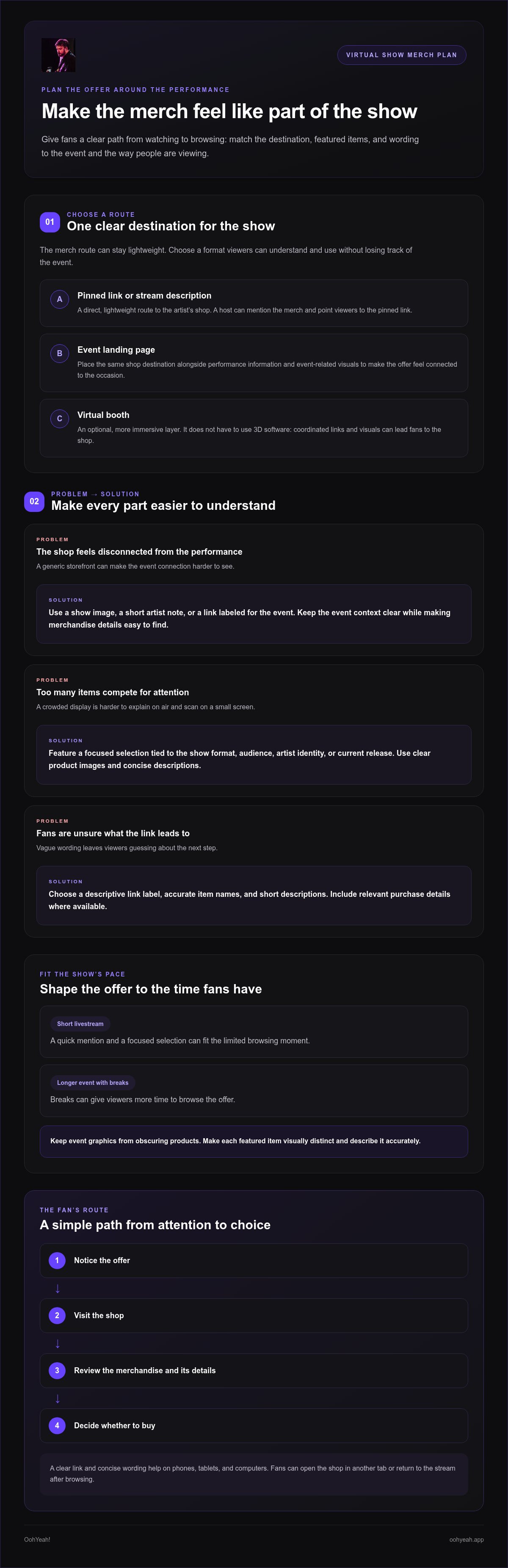
The ideal journey is straightforward: notice the offer, visit the shop, review the merchandise and its details, then decide whether to buy. Each step should feel intentional. If fans have to search through unrelated pages to find the event’s merch, the connection between the show and the offer gets weaker.
That’s the practical value of setting up a direct online merch booth during virtual shows: you create a visible bridge between attention and choice. The booth supports the performance rather than taking it over, and gives fans a direct way to explore the artist’s shop when they’re ready.
Plan the Merch Offer and Booth Around the Virtual Show
Plan the merch around the event, not around the urge to display everything. The show’s format, audience, and pace determine how much attention fans can give the offer. A short livestream may leave room for one quick mention and a focused selection. A longer online event with breaks may give viewers more time to browse. Build the booth to fit those moments, so the merch supports the experience rather than competing with it.
The booth’s core job is to help fans find and understand the offer quickly. Before choosing what to feature, decide what you want fans to notice, what information they need, and where the link should take them. This keeps the setup focused and gives every image and line of copy a purpose.
How do you choose merch to feature at an online show?
Start with items that connect naturally to the event, the artist’s identity, or a current release. For a release performance, feature merchandise that reflects the music or its artwork. For a fan gathering, choose items that feel relevant to the community. A focused selection is easier to explain on air and scan on a small screen than a crowded display.
Use clear product images and concise descriptions. Keep each item visually distinct, and make sure event graphics don’t obscure what fans are looking at. The artist’s shop is the destination for the offer, while the event materials guide fans there. Describe each item accurately so fans know what they’re viewing and buying.
What information should fans see before they click?
Give each featured item an accurate name and a short description that helps fans understand what it is. Include relevant purchase details where available, and avoid claims you can’t support. A clear call to action, such as “View the artist’s merch page,” tells viewers what happens next without requiring them to know livestream or event-platform jargon.
Think about how the offer appears in context. A fan might see a brief text prompt while watching, then open the link on a phone; another might use a tablet or computer. In each case, the link label should identify the destination, and the shop should make it easy to review item details before deciding. Avoid vague prompts like “Click here” when a more descriptive label can set expectations.
Before setting up a direct online merch booth during virtual shows, map each featured item to the information fans need and the shop page where they can find it. Keep the event copy, product images, and destination aligned. An artist profile and merchandise marketplace can provide a direct destination to feature in show materials.
Use this quick check before publishing the booth:
- Does each featured item fit the event or artist?
- Can viewers recognize what’s being offered from the image and name?
- Is the description accurate and easy to scan?
- Does the call to action clearly identify the shop destination?
A focused offer respects fans’ attention. It gives them enough context to make a choice, while leaving the performance at the center of the experience.
Choose a Booth Format That Fits the Show and the Fan
The best format is the one fans can use without losing the thread of the show. A pinned shop link, an event landing page, and an immersive virtual booth can all guide viewers to merchandise, but they differ in setup effort, mobile usability, show compatibility, and how many steps separate discovery from the shop. You don’t need a custom 3D environment to sell merch online. Start with the simplest option that fits the event.
| Format | Setup effort | Mobile use and show fit | Purchase path |
|---|---|---|---|
| Pinned shop link | Low | Easy to share in a show chat or description; check how it appears on phones. | Direct, with few steps if it leads to the artist’s shop. |
| Event landing page | Moderate | Can organize event context and links; keep the page readable on small screens. | Clear when the merch link is prominent, but adds a page before the shop. |
| Immersive virtual booth | Higher | Depends on the event platform and how well its experience works for viewers’ devices. | Can support broader discovery, but avoid extra navigation that obscures the shop. |
When is a simple shop link enough?
A single link often suits a short livestream, a small online performance, or a show where the artist’s merch is the main offer. It keeps the route direct: viewers tap the link and reach the artist’s shop, rather than first exploring a separate environment. Before showtime, open the link on a phone and check that it leads to the intended destination and displays clearly.
When might a dedicated virtual booth add value?
A landing page or event booth can help when a program features multiple artists, several event activities, or distinct product stories that need context. It can help fans orient themselves before choosing a shop link. But immersive features should support discovery, not distract from the offer. The event platform provides the event experience; an artist’s independent merchandise marketplace remains the destination for that artist’s merchandise.
Use this quick decision guide:
- Choose a pinned link when speed and a direct route matter most.
- Choose a landing page when fans need event context or a few organized destinations.
- Consider an immersive booth when the event benefits from a richer digital environment and the purchase path stays clear.
As you plan setting up a direct online merch booth during virtual shows, separate the show’s features from the shop’s capabilities. An event may offer its own booth tools, while an artist profile and merchandise marketplace can serve as the linked shop destination. Choose a format, test it on the devices your audience uses, and make the next step obvious.
Set Up and Promote the Merch Booth Before, During, and After the Show
A smooth merch journey starts before the audience arrives and continues after the final song. Give one person responsibility for the destination and event copy, even if the artist is managing both. Before showtime, check the shop link, product details, images, mobile readability, and the event’s promotion rules. Then use this workflow to keep each step clear.
- Prepare the shop destination. Choose the artist page or shop location fans should reach. Make sure the featured merchandise and its descriptions match the event materials, so viewers see a consistent offer.
- Test the destination. Open the link on a phone and a computer. Confirm it leads to the intended artist page, loads as expected, and presents readable product information and imagery.
- Place the link where fans can find it. Depending on what the event allows, add it to the event listing, artist bio, show description, or a permitted chat message. Use a label such as “View the artist’s merch” so fans know what the link opens.
- Promote it at the right moments. Share the destination before the show, mention it briefly at a natural pause, and use a visible link or scannable QR code where the event format permits. Keep the performance central.
- Review the response. After the show, look at the information available to you, such as link visits or merchandise activity. Note which placements were useful and what you’d change next time. Don’t treat a single result as the full measure of fan interest.
What should an artist test before the virtual show?
Test the actual link, not just the text around it. On mobile and desktop, confirm that the destination is the intended artist page and that viewers can read the product names and descriptions. Check that images accurately represent the items and display clearly. Review the event’s rules and promotional placements before showtime, since each event may handle links and audience messages differently.
How can artists promote merch without disrupting the show?
Plan a short spoken mention for a natural break, such as after a song or during a host introduction. For example: “Thanks for being here. You can find my merch through the link in the event details.” Use a QR code or visible link only if the format supports it and it won’t obscure the performance. Afterward, post a concise thank-you and point fans to the same shop destination.
Setting up a direct online merch booth during virtual shows works best as a repeatable routine: prepare, test, place, promote, and learn. An OohYeah! artist profile can serve as the shop destination in your show materials, with merchandise available through its marketplace. An OohYeah! artist profile provides a merch destination for your show materials.
Turn Virtual-Show Interest Into Direct Fan Support With OohYeah!
A virtual show can introduce fans to your music. Give that interest a clear next destination: an OohYeah! artist profile linked from the event’s permitted promotional placements. The profile and merchandise marketplace can serve as the shop destination, while your show announcement explains what fans will find there. This creates a direct route from performance to an artist profile without suggesting that the profile creates or hosts a virtual booth.
How can an artist connect a virtual event to an OohYeah! profile?
Use a link in the event listing, artist bio, show description, or another placement the event allows. Make the wording specific, such as “Explore my merchandise and music,” so fans can recognize both the destination and its purpose before they tap. Keep the artist name and event message consistent across each placement. The event points fans toward the profile; the profile is where they can explore the artist’s offerings.
This simple division keeps expectations clear. The event platform provides the show and its promotional options. OohYeah! provides the artist profile and marketplace destination. As you approach setting up a direct online merch booth during virtual shows, treat the profile link as the bridge between those separate parts of the fan journey.
What does commission-free merch selling mean for artists?
OohYeah! doesn’t take a commission from merchandise sales. Artists retain 100% of sales revenue while paying a recurring artist subscription fee. That distinction matters: commission-free describes the marketplace’s share of each sale, not a claim that there’s no ongoing subscription cost. Clear terms help artists plan their direct-to-fan sales with an accurate understanding of the model.
The profile can also support a relationship that continues beyond a merch purchase. Alongside merchandise, artists can offer digital music downloads and exclusive content access. Fans who arrive from a performance can explore more of the artist’s work in one artist-centered destination. That creates a natural next step after the event: revisit the profile, discover music, or explore content connected to the artist’s work.
For a clear show-to-shop path, keep the event message focused and make the profile link easy to identify. Then let the artist page carry the broader story, from merchandise to music and exclusive content. The marketplace model keeps sales commission-free, while the recurring subscription remains part of the arrangement.
Ready to give virtual-show viewers a direct destination for your music and merch? Explore OohYeah! for your artist profile.
Make Your Next Show a Starting Point
A virtual performance can spark a connection that lasts beyond the final track. Treat the merch destination as part of that ongoing relationship, not just a link for one night. Fans who discover you during a show may want to revisit your work later, find music to keep, or explore ways to stay connected.
Choose a destination you can continue sharing across future shows and artist updates. With OohYeah!, your artist profile can bring merchandise, digital music, and exclusive content together for fans, while the commission-free marketplace lets artists retain 100% of sales revenue. A recurring artist subscription applies.
Setting up a direct online merch booth during virtual shows doesn’t have to mean building a complicated event experience. Start with a clear destination, make it easy for fans to recognize, and let each performance open a door to a stronger artist-fan connection.
Explore OohYeah! and create a direct destination for your fans. Your next show can be the beginning of a lasting connection.
Frequently Asked Questions
Can I sell merchandise during a virtual concert without a built-in store?
Yes. You can direct viewers to an artist shop hosted separately from the concert platform. For example, add its link to an event listing or artist bio where links are permitted. OohYeah! artist profiles and its merchandise marketplace can serve as that destination. Setting up a direct online merch booth during virtual shows doesn’t require the event itself to process purchases or host your shop.
How do I share a merch shop link during a livestream without disrupting the show?
Choose a natural pause, such as between songs or near the end, and give a short, specific direction. “The merch link is in the show details” is easier to follow than a long sales pitch. If chat messages are allowed, share the same clearly labeled link there. Keep the wording and destination consistent so interested fans can find the shop without interrupting the performance.
Do I need a 3D virtual booth to sell merch at an online event?
No. A 3D booth is optional, not a requirement for online merch sales. A direct link to an artist shop may be enough for a solo livestream or a compact event. More elaborate event spaces can suit programs with several artists or activities, but the extra visuals should make the shop easier to find. If they add confusion or navigation, a simpler format may serve fans better.
What should an online merch booth include for music fans?
Give fans enough information to recognize the artist and understand the offer. Include a clear artist name, relevant event context, accurate item names, readable descriptions, and a plainly labeled shop destination. Use visuals that match the merchandise and don’t crowd out the details. If the artist also offers digital music or exclusive content, label those separately so fans can distinguish merch from other ways to support the artist’s work.
How can fans access a merch shop while watching on their phones?
Make the shop link easy to spot in a phone-friendly event placement, such as an artist bio or permitted chat message. Use descriptive text that tells viewers where it leads. A QR code can work when it’s displayed on a separate screen, but scanning one shown on the same phone may be inconvenient. Test the link on a phone before the event and check that the destination is legible.
Can I keep selling merchandise after a virtual show ends?
Yes, you can continue pointing fans to your artist shop after the event, provided the merchandise remains available there. Use a post-show message to thank viewers and reconnect the performance with the artist’s page. The follow-up can also highlight other ways to stay connected, such as listening to digital music or exploring exclusive content. Keep the same recognizable destination so fans can return to it later.
What does commission-free merchandise selling mean for independent artists?
It means OohYeah! doesn’t take a commission from merchandise sales, and artists retain 100% of sales revenue. Artists pay a recurring subscription fee to use the platform, so commission-free doesn’t mean there is no subscription cost. This model separates the marketplace’s share of each sale from the artist’s ongoing platform subscription, giving creators a clear basis for understanding how merch revenue is handled.