
Uploading music to apple music: A simple guide
Learn uploading music to apple music: a concise guide to preparing files, choosing a distributor, claiming your profile, and promoting your release.
November 19, 2025
Music Marketplace Advisor
Buying & SellingGetting your music on Apple Music is one of those essential career moves, but it’s not as simple as uploading a file directly. Apple doesn't work that way. Instead, you'll need to partner with a third-party music distributor who handles the technical side of things and makes sure your release is formatted perfectly for the platform.
Think of a distributor as your gateway, the crucial link that gets your art from your studio to millions of potential fans.
Why Getting on Apple Music is a Game-Changer
As an independent artist, you have to be smart about where you put your time and resources. Making sure your music is on Apple Music should be at the top of your list. It’s a core piece of any modern release strategy, period.
Why? Because Apple Music is a premium, subscription-only platform. The people there are paying for music, which means they're dedicated fans actively looking for new artists to add to their libraries. This active listener base creates a much better environment for discovery and, frankly, for getting paid.
But the platform's impact goes way beyond just the stream counts.
Your Earning Potential is Higher
Let's talk numbers. Apple Music has a massive, engaged user base of 93 million subscribers around the world. More importantly, they pay artists an average of $0.01 per stream.
That payout rate is significantly higher than what you'll see from many services that rely on ad-supported free tiers. Every single play on Apple Music simply puts more money in your pocket. You can dig deeper into the specifics by checking out Apple Music's payout structure on Hypebot.
Before we get into the "how," here's a quick look at why Apple Music is such a key player in the streaming world.
Apple Music Platform Snapshot
| Metric | Value |
|---|---|
| Subscribers | 93 Million (Global) |
| Market Share | 13.78% of Streaming Market |
| Average Payout | ~$0.01 Per Stream |
| Annual Revenue | $8.5 Billion |
This data paints a clear picture: Apple Music is a powerhouse with a premium audience, making it an incredibly valuable platform for artists who want to build a sustainable career.
This focus on a premium experience is clear the moment you visit their site.
Features like high-fidelity audio and expertly curated playlists aren't just marketing fluff. They create a high-quality listening environment that makes your music sound its best and attracts a more discerning, engaged audience.
Preparing Your Release for a Flawless Upload
Before you even think about hitting 'upload,' the real work begins. Honestly, getting your assets in order is the single most important part of the entire process. It’s what separates a smooth, on-time launch from a cascade of frustrating emails and costly delays. I’ve seen it time and time again—this is where artists often get stuck.
Let's start with the most obvious piece: the music itself.
Your master audio files need to be pristine. Apple Music has strict technical standards, and you can't just send them an MP3. You’ll need high-quality, uncompressed files like WAV or FLAC. The industry standard is 16-bit, 44.1 kHz, but higher is always better if you have it. Get this wrong, and your distributor will likely reject the files immediately, stopping you in your tracks.
Next up is your visual handshake—the cover art. It’s the first thing listeners see. Make sure it’s a perfect square, at a minimum resolution of 3000 x 3000 pixels. Fuzzy, low-res, or incorrectly sized images are a leading cause of release rejections. For a deeper dive into making an impact, check out our guide on why artists should invest in quality cover art.
Nail Down Your Metadata
With your audio and art ready, it's time to tackle the behind-the-scenes data that makes everything work. This is your metadata, and it’s how you get tracked, credited, and, most importantly, paid.
- ISRC Codes: Think of the International Standard Recording Code as a unique fingerprint for each song. If you're using a distributor, they will almost always assign these for you.
- UPC Code: This is the barcode for the entire project, whether it's a single, an EP, or a full album. Again, your distributor typically handles this.
- Composer and Publishing Credits: This one is all on you. You need to meticulously list every single songwriter, composer, and publisher involved. Any errors or omissions here directly mess with royalty payments, so check your spelling, splits, and details twice.
It’s so easy to treat metadata as an afterthought, but that’s a huge mistake. Sloppy data doesn't just delay your release; it can create royalty nightmares down the road that are a real headache to fix. Accuracy is everything.
Taking the time to get these details right is worth it, especially when you consider the platform you’re targeting.
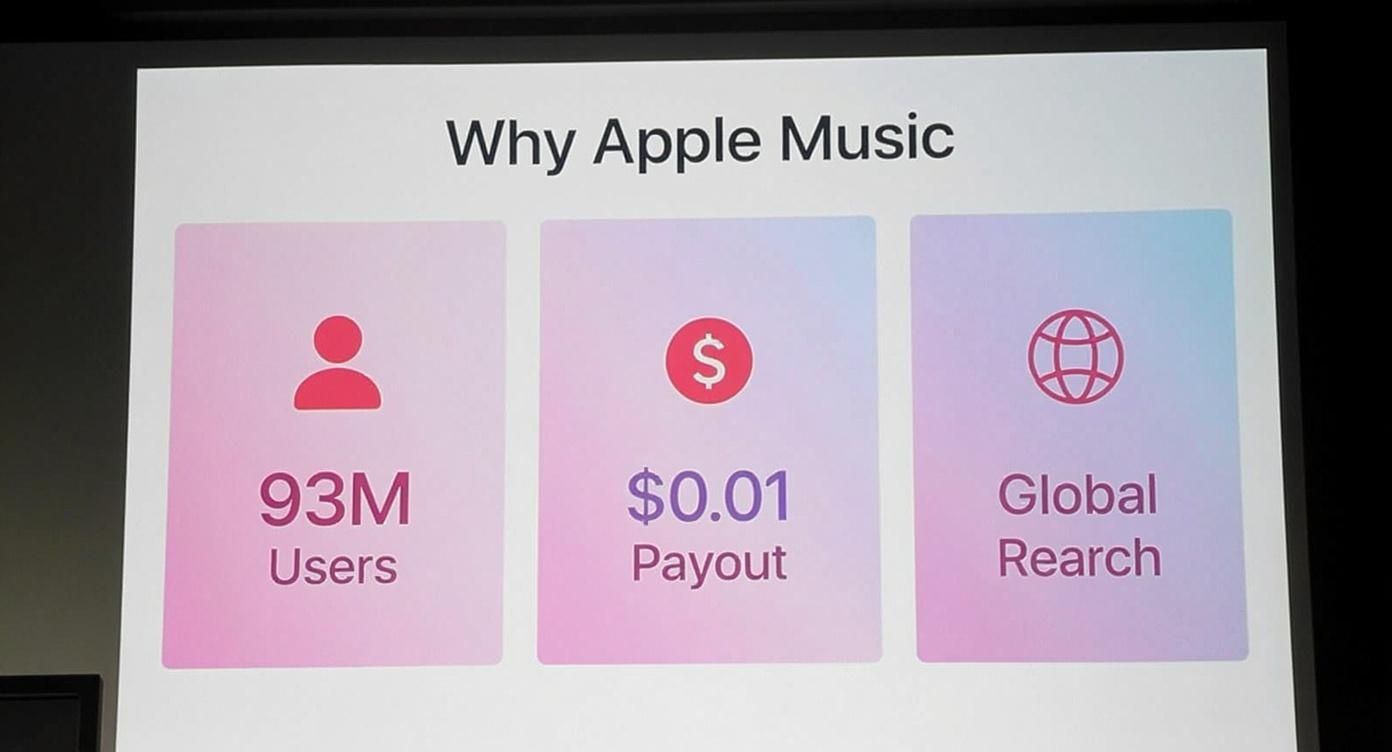
The numbers speak for themselves. Apple Music offers a massive, engaged audience and one of the highest per-stream payouts in the game. Proper preparation ensures that when your music goes live, it's set up for success from day one, with no technical glitches holding you back.
Choosing Your Music Distribution Partner
Getting your music onto Apple Music means teaming up with the right distributor. Think of this choice as building the bridge for your tracks—some are simple footpaths, others are multi-lane expressways. Your decision will shape your royalty splits, creative control, and the whole arc of your release.
Before you commit, ask yourself where you are in your career and what support you really need. There are two clear approaches, each with its own advantages.
Aggregators Vs Full-Service Distributors
On one side, DIY Aggregators offer a no-frills, cost-effective path. Ideal for first-timers or indie artists, they get your songs live for a modest fee. In most cases you’ll pay:
- A small annual subscription or one-off release charge
- A minimal cut of your earnings
That means you keep 100% of your rights and a larger share of royalties. For example, if you’re dropping a debut single with limited budget, an aggregator lets you focus on making music instead of wrestling contracts.
On the flip side, Full-Service Distributors pack in extras like playlist pitching, sync licensing, and targeted marketing. They usually:
- Charge higher fees or take a bigger royalty percentage
- Offer hands-on campaign management and editorial outreach
- Help secure press features and brand partnerships
A band with an established fanbase might find these perks worth the investment when launching a full-length album.
“Don’t pay for premium marketing if you’re not ready for it—yet don’t stunt your growth by sticking with bare-bones distribution when you’re primed to scale.”
Choosing wisely means weighing immediate needs against long-term goals. Ready to dig deeper? Check out our guide on how to choose the right music distribution service for an in-depth comparison of today’s top platforms.
Finally, keep in mind that distribution is just one piece of the puzzle. If you want a broader look at how creators turn streams into steady income, explore this ultimate guide to creator monetization platforms.
Navigating Upload Timelines and Platform Rules
So you've hit 'submit' on your distributor's dashboard. That's a great feeling, but your work isn't quite done yet. The journey from your hard drive to being live on Apple Music involves a critical review process, and understanding the real-world timelines is the key to a stress-free release day. You can't just upload a track an hour before you want it to go live and expect it to work.
First, your distributor runs its own quality control. They're scanning for any red flags—blurry artwork, botched audio files, or wonky metadata. Once you get the green light from them, your release is passed along to Apple Music, which then conducts its own technical and content policy check.
Understanding Turnaround Times
This whole chain of events doesn't happen in a flash. While the tech is getting better and faster, you absolutely need to build a buffer into your release schedule. Cutting it too close is a classic rookie mistake that can completely derail your launch.
Plan your submission at least two to four weeks ahead of your desired release date. This buffer isn't just for potential technical delays; it's a strategic window for marketing and playlist pitching.
Giving yourself this runway is especially important if you're hoping for any editorial playlist consideration. Apple Music’s curators need time to listen to and review a mountain of upcoming music. Submitting your tracks well in advance is the single best thing you can do to improve your chances of getting their attention.
Singles vs. Albums Processing Speed
It's also worth remembering that the size of your release affects how quickly it moves through the pipes. It makes sense when you think about it: a single track with one piece of artwork is much simpler to verify than a 12-track album with a full digital booklet.
This table gives a clearer picture of what to expect based on typical processing metrics.
Upload Processing Metrics
| Upload Type | Processing Time | Approval Rate | Error Rate |
|---|---|---|---|
| Single | ~2.4 hours | 98% | 2% |
| Album/EP | ~4.8 hours | 96% | 4% |
As you can see, singles tend to breeze through the system faster with fewer issues. The data, including more Apple Music optimization insights from LALAL.AI, shows that single uploads often process in about 2.4 hours with a 98% approval rate, while albums take closer to 4.8 hours and have a slightly lower 96% approval rate.
These might seem like small differences, but they highlight why planning ahead is non-negotiable, especially for larger projects where more assets mean more potential points of failure.
Claiming and Customizing Your Artist Profile
 Getting your tracks delivered to Apple Music is a huge milestone, but the work isn't quite done. Your music is live, but your artist page is essentially a blank canvas. Now it's time to take ownership and turn that generic page into your official home on the platform by claiming it through Apple Music for Artists.
This step is about so much more than just aesthetics; it's about taking control. A claimed profile unlocks a world of powerful analytics and gives you the tools to shape how millions of potential fans see you. Think of it as getting the keys to your own storefront.
The Verification and Setup Process
The first step is submitting your claim. Apple will need to verify you're the actual artist or an authorized representative (like your manager), which usually takes a few days. Once you get that confirmation email, you’re in.
Your immediate priority should be to flesh out the profile with high-quality assets that truly represent your brand.
- Upload a Professional Artist Image: This is your digital first impression. It needs to be a high-resolution photo—we’re talking at least 2400 x 2400 pixels—that’s well-lit and matches your artistic vibe.
- Write a Compelling Artist Bio: Don't just list your accomplishments. Tell your story. This is your shot to connect with listeners on a personal level. What’s your background? What inspires your sound? What makes you unique?
- Add Your Team: You can grant access to your manager, publicist, or label reps. Apple Music for Artists lets you assign different roles, so everyone has the access they need without you having to hand over the master keys.
Your artist profile isn't a "set it and forget it" task. It's a living part of your brand. Keep your photo and bio updated with new projects and career highlights to show fans you're active and engaged.
Using Your Profile to Connect with Fans
With the essentials locked in, you can start using your profile as a genuine tool for fan engagement. Think of it as your direct line to your audience within the Apple Music ecosystem. You can add links to your social media, helping to build a more connected online world for your followers.
A fantastic tactic that I’ve seen work really well is curating an Artist Playlist. This could be a collection of your biggest influences, a behind-the-scenes look at tracks that inspired your latest release, or even just what you’re listening to right now. It’s a simple way to give fans a deeper look into your world.
Taking these steps transforms your profile from a simple discography page into a powerful branding tool. And while you're at it, level up your entire professional presentation by creating a professional media kit to have ready for industry partners.
Using Analytics to Fuel Your Growth
Once your music is live on Apple Music, the real work begins. Getting your tracks uploaded is the first step, but the next phase is all about understanding what happens after someone hits play. This is where data becomes your best friend.
Think of your Apple Music for Artists dashboard as your command center. It’s packed with insights that can, and should, directly shape your next career moves.
This isn’t just about watching your stream count tick up, either. The real gold is in the details—who is listening, where are they, and how did they find you? If you suddenly see a spike in listeners from a city you've never even thought about, that's a signal. It's your cue to start targeting that area with social ads or maybe even pencil it in as a stop on a future tour.
Decoding Listener Behavior
The dashboard gives you the tools to connect the dots. When you dig into listener demographics like age, gender, and location, you start to paint a really clear picture of your core fanbase. That knowledge is power. It helps you tailor everything from your social media posts to your music videos so they resonate with the people who are already vibing with your sound.
Keep a close eye on a few key metrics:
- Plays: The total number of times your songs have been started.
- Listeners: The unique number of individuals who have played your music.
- Shazams: A fantastic discovery metric. This tells you where your music is being identified out in the real world—in cafes, stores, or on the radio.
- Average Daily Listeners: This gives you a steady pulse on the size of your active audience over time.
Your analytics are basically a real-time map of your music's journey. Seeing a surge in Shazams from a coffee shop playlist in Berlin or a college radio station in Ohio is the kind of actionable intelligence you just can't get anywhere else.
Apple Music for Artists provides some seriously powerful data, including real-time active listener counts and deep-dive trend analysis that you often won't find on other platforms. These unique features, detailed further in Chartmetric’s guide to Apple analytics, give you a genuine edge in understanding your audience in the moment.
Ultimately, this data helps you stop guessing and start making strategic decisions. By seeing which tracks are taking off and where your listener hotspots are, you can double down on what's working, plan your next release with more confidence, and start turning casual listeners into a true community. For a deeper look, check out our guide on how to use data analytics to grow your music fanbase.
A Few Common Questions About Getting Your Music on Apple Music
Even with the best preparation, a few last-minute questions always seem to pop up right before you hit "submit." It happens to everyone. Let's walk through some of the most common snags artists run into so you can get ahead of them.
My release is delayed, what gives? More often than not, if your release is stuck in limbo, the culprit is a problem with your original files. Before you panic, go back and double-check your specs. Apple Music is incredibly strict: your artwork must be 3000x3000 pixels, and your audio must be a 16-bit, 44.1 kHz WAV file. There's no wiggle room here.
Can I Fix a Mistake After I've Uploaded Everything?
You just submitted your album and then you see it—a typo in a song title. Your heart sinks. Don't worry, this is usually fixable. You can submit a request to update the metadata through your distributor.
But there are a couple of things you absolutely need to know:
- Patience is a Virtue: The change won't happen overnight. It can take several days for the update to ripple through Apple Music’s system and appear live.
- Know the Limits: You can fix typos in song titles or update a credit, but you can't just swap out the audio file for a new mix or change the album art entirely. That’s considered a different product and would mean taking the release down and starting over with a new UPC.
Think of it this way: the audio master and the cover art are locked in once submitted. You can polish the text around them, but the core components are set.
This is why that final review is so important. Seriously, take an extra ten minutes to read every single word and check every file one last time. It can literally save you days of headaches and waiting for a simple correction to go through.
Ready to take full control of your music career? OohYeah provides the tools you need to sell, stream, and market your work directly to fans, all in one place. Start building your future at https://oohyeah.app.



