Music UPC Codes: How to Get and Assign Them
Music UPC codes identify a release, not a song. See how they differ from ISRCs, when to get a new code, and how to enter one on OohYeah.
October 31, 2026
Music Marketplace Advisor
Buying & SellingMost advice about music UPC codes starts with where to buy a barcode. That's useful, but it skips the harder decision: exactly which product will that number identify, and what happens when you change the release afterward?
A legitimate number won't protect your catalog if you replace an album master, add bonus tracks, or change a version title without reviewing its identifiers. The expensive mistake is often revising a release after its code is locked, then trying to reconcile orders, downloads, and recording metadata that no longer describe the same thing.
What a Music UPC Identifies
A UPC identifies a commercial product, not a song, artist, or copyright. For a physical release, that product might be a standard CD, a colored-vinyl edition, a cassette, or a boxed set. For a digital release, think of the particular download package a fan receives.
That distinction explains why an album title alone isn't enough to assign a code. The standard CD and deluxe boxed set can share a title and recordings while remaining different products. A retailer needs to know which package it scanned, stocked, sold, or accepted as a return.
Read the number as a product identifier
The original UPC-A structure contains 12 digits, comprising a manufacturer identifier, an item identifier, and a check digit, as described in the GS1 historical timeline. Those components support product identification and validation. They don't encode the song's ownership or describe its musical content.
The barcode is the machine-readable symbol; the identifier is the number represented by that symbol. Keeping those concepts separate matters when you prepare packaging. You can enter the correct identifier in a catalog and still print a barcode that a scanner can't read.
Music UPC, EAN, and ISRC at a glance
| Identifier | What it names | Length | One code covers |
|---|---|---|---|
| UPC-A | One commercial music product for retail scanning | 12 digits | One format or edition, not each song |
| EAN-13 | The same product role in international barcode form | 13 digits | One format or edition, not each song |
| ISRC | One sound recording | 12 characters, not a retail barcode | One track or version, even when several products include it |
Separate the package from its recordings
An ISRC identifies an individual recording. That recording can appear on a single, an album, and a compilation without becoming a new recording merely because its packaging changes.
Say you release a studio track as a download single, then include that identical master on an album. The products have separate product identities, but the recording keeps its identity. A live performance of the same song is a different recording, not another package for the studio master.
Practical rule: Finish the sentence “The fan is buying…” before assigning a product code.
If your answer is only an artist name or song title, make it more specific. Name the format, edition, and configuration so the identifier points to something you can deliver.
Which Release Gets Its Own Code
Sharing a code across a digital album, CD, deluxe edition, and reissue can make a tidy-looking spreadsheet misleading. When someone asks which edition generated a sale, your catalog may offer no reliable answer. Inventory, pricing, and royalty records become harder to separate because you assigned different products the same identity.
Plan the variants before requesting identifiers. Don't start with the number of songs you've finished. Start with the products you intend to offer.
This product-first distinction is the foundation of a usable reservation list.
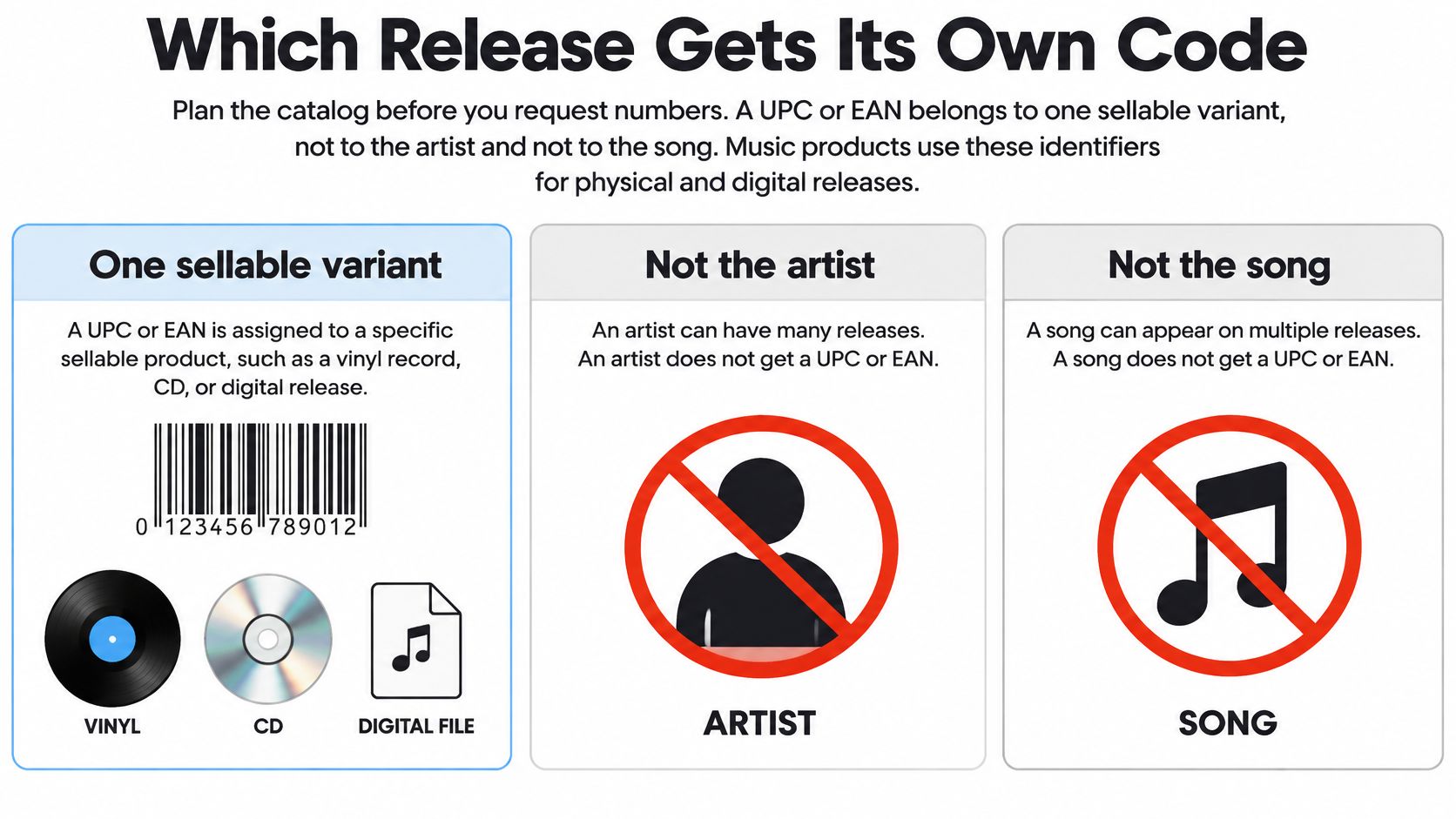
Reserve codes against actual offers
Write each sellable configuration on its own catalog row. Include planned physical editions even if the download will launch first. You don't have to publish everything together, but you should avoid leaving the later edition to borrow an existing identifier.
When a music product needs a separate UPC
| What you are selling | UPC or EAN | ISRCs |
|---|---|---|
| Digital album, EP, or single | One new code for that configuration | One ISRC per recording |
| Same album as a CD | New code | Keep ISRCs if the masters match |
| Vinyl or cassette edition | New code | Keep ISRCs if the masters match |
| Deluxe, bonus-track, or boxed set | New code | New ISRCs only for added or altered recordings |
| Territory-specific package sold as its own offer | New code | Keep ISRCs if the audio matches |
| Reissue sold as a distinct package | New code | Keep ISRCs if recording identity, title version, and duration match |
| Same file, same format, price change only | Keep the code | Keep ISRCs |
For added tracks, “new ISRCs” means recordings that don't already have identifiers. An unchanged recording brought over from an earlier release keeps its existing ISRC. Don't generate another recording code just because you've placed it in a deluxe package.
Distinguish a new product from a new sales condition
A price adjustment doesn't turn an unchanged download into a different recording or format. Likewise, making the same offer available to more listeners isn't automatically the same as creating a territory-specific edition. Describe what changed before deciding that you need another identifier.
A regional package with different contents or materially different configuration deserves its own catalog entry. Merely describing where an unchanged product is available calls for accurate territory metadata, not an automatic multiplication of codes.
For a digital-only campaign, put the download configuration on the reservation list explicitly. There doesn't need to be a physical sleeve for a commercial package to need a product identifier.
When reviewing music services for your release, bring that variant list with you. Ask how the service handles existing identifiers, later physical editions, and distinct download packages before you start uploading.
How to Get a Legitimate Music UPC
The expensive UPC mistake usually happens after a code is assigned: someone changes the audio, duration, version, or credits, then carries the old product record forward. Get the release details settled first. A barcode image is only a label; it does not prove that the number belongs to your release.
Use a purchasing and reservation workflow that leaves a paper trail. Record where each identifier came from and which product it is assigned to. Keep this work separate from the later upload process.
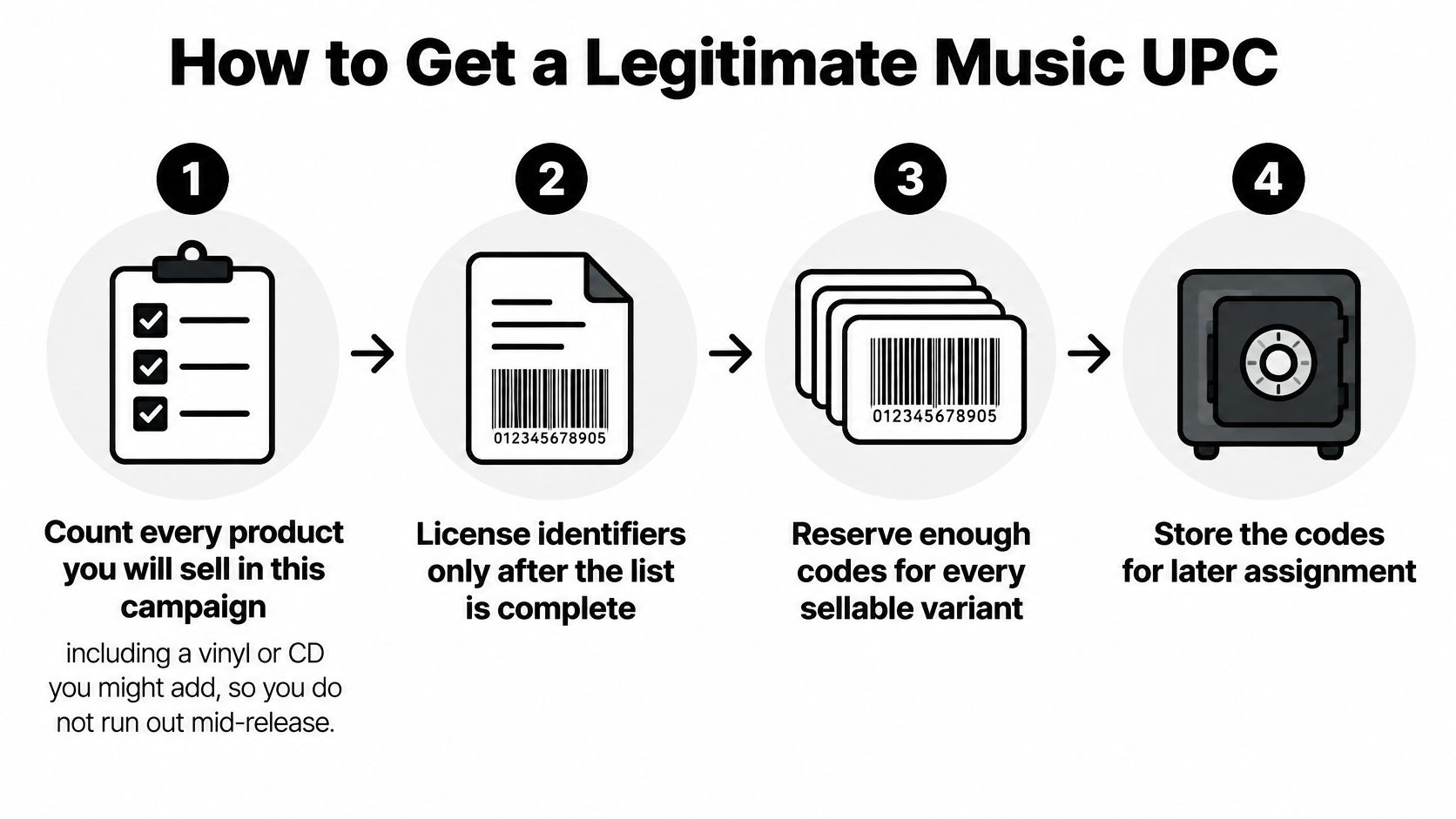
Obtain numbers with traceable provenance
Count the planned products. Include editions you realistically expect to sell during the campaign. Mark uncertain products as provisional instead of attaching them to an unrelated code later.
Choose the assignment route. Licensing identifiers through GS1 gives you a direct relationship with the standards organization. If you use a distributor or another provider, ask who controls the assignment and what documentation you'll receive.
Question reseller offers carefully. Ask for confirmation that the identifier is unique, comes from a legitimately licensed allocation, and can be documented to your delivery partner. The prefix may identify the original licensee rather than your artist or label, so don't treat it as proof of your own ownership.
Reserve each identifier in your catalog. Record its source, assignment date, supporting documents, and intended product. Never invent a numeric string or copy a code from another release, even one you own.
Validate before approving artwork. Store the identifier as text so spreadsheet software doesn't remove leading zeros. Compare the saved value with the original assignment record.
For the arithmetic check, GS1's published EAN/UPC specifications describe fixed-length formats and a mandatory check digit: UPC-A carries 12 printed digits, while EAN-13 carries 13. Working right to left from the digit before the check digit, add alternating digits and multiply that sum by 3. Add the remaining digits, then choose the check digit that brings the total to the next multiple of 10.
A passing checksum shows that a number is well formed. It doesn't establish ownership, uniqueness, or correct product assignment.
Keep release preparation coordinated
Before you set up an artist account on OohYeah, gather the catalog record, final masters, artwork, and assignment documentation in a shared release folder. Give collaborators access to approved files, not a stack of similarly named drafts.
Keep public-facing materials aligned too. Prepare press outreach with the approved artist credits, release title, and artwork. You can create an artist EPK with EPKS using those same materials rather than copying details from an outdated announcement.
Use the accompanying video alongside your documentation, not as a substitute for checking the assigned identifier.
Assign and Enter the Code on OohYeah
Treat publication as the point where an identifier becomes a controlled catalog record. Once fans can buy the product, don't treat the code field as an editable label you can repurpose whenever the release changes.
The IFPI identifier FAQs distinguish UPC/EAN product identifiers from recording-level ISRCs and explain that different physical and digital music products require their own product codes. Apply that distinction during upload, not after sales records need untangling.
The assignment workflow starts with a defined product and ends with a locked, reviewed record.
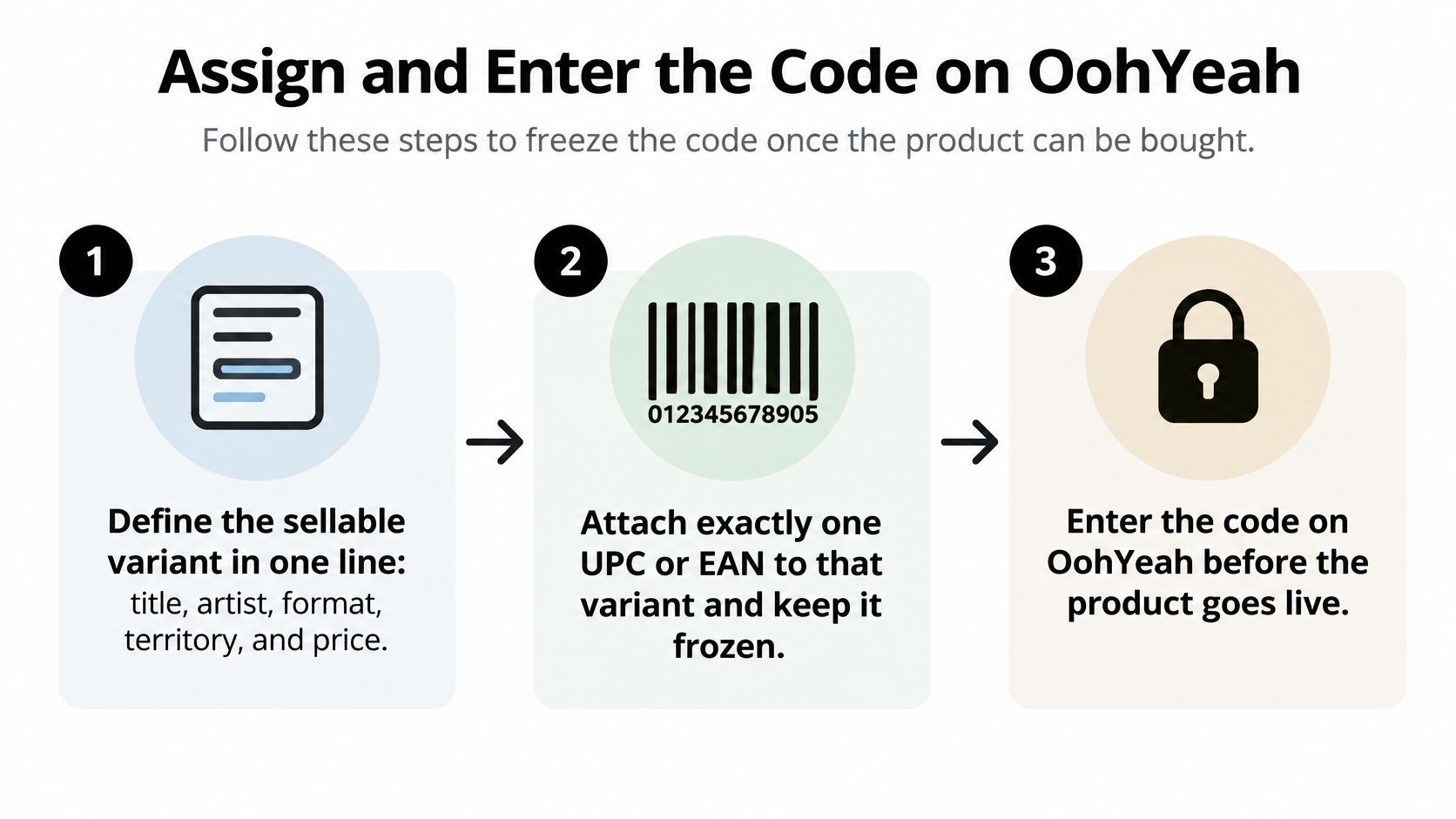
Define and attach the product identity
Describe the sellable variant in a clear line.
Combine the release title, artist, format, territory, and price. For example, a planning record might read: Night Signals, Mira Vale, standard digital album download, worldwide, approved launch price. This is an illustrative catalog description, not a suggested title or pricing rule.
Add an internal edition label if collaborators could confuse the standard and deluxe packages. That label should help your team choose the correct files without changing the public release title unnecessarily.
Attach a unique UPC or EAN to that variant.
Select the identifier from your reservation register. Confirm that no other product row uses it, including unpublished drafts, withdrawn editions, and products created by another team member.
Don't let a copied release template carry over the previous product's code. Templates are useful for repeated credits and administrative fields, but identity fields need deliberate review.
Keep release fields and track fields separate.
Maintain the UPC or EAN with the release record, alongside the title, artist, label or rights owner, format, territory, price, and release date. Keep each ISRC with its corresponding track.
Consult the current artist upload guides for interface-specific instructions. If you can't find the relevant identifier field, confirm the supported workflow rather than placing the code in a description or unrelated text field.
Match the delivered assets to the record
Upload the approved package.
Select the final audio files, artwork, track order, and explicit-content status for the product you described. Compare filenames with your master register, but don't rely on filenames alone. Open the files and confirm their actual contents.
A folder labeled “final album” can still contain an alternate mix or an old export. Check that the standard release doesn't accidentally contain deluxe-only material and that clean and explicit versions haven't been swapped.
Stop on validation failures.
Hold publication if the check digit fails, the identifier conflicts with another artist or product, or the metadata describes a different format or territory-specific package. Resolve the cause rather than repeatedly retyping the same value.
For physical packaging, test the rendered barcode separately. A correct catalog number doesn't guarantee a readable printed symbol. Use a standards-compliant scanner or verifier, and review the actual production proof rather than only the artwork file on your monitor.
Create an assignment audit record.
Record who assigned the identifier, when they assigned it, the issuing organization or provider, and the validation result. Include the product's status, such as reserved, approved, published, withdrawn, or replaced.
Keep the audit record in a shared catalog register rather than someone's email inbox. A manager joining the project later should be able to establish what happened without reconstructing a message thread.
Release gate: Resolve a mismatch before accepting orders. Don't publish with a note to fix the identifier later.
Approve publication and control later edits
Run the final metadata pass.
Compare the release record with the approved assets immediately before upload approval. Review title, version, duration, artist credits, explicit status, artwork, format, and territory.
Have the person approving the release confirm the package, not just the presence of completed fields. A fully populated record can still be wrong if someone selected an earlier master or pasted credits from a different edition.
Protect the published assignment.
After publication, correct metadata through a documented change process when the commercial product remains unchanged. If the proposed edit creates a different product, create a separate product record and retain the original identifier on the original release.
Never overwrite a published identifier to make a warning disappear. Preserve the relationship between the original product, its orders, and any replacement record.
The final approval should identify the exact asset set being released and who approved it. If a collaborator changes a file after that approval, pause publication until someone reviews the change. That small discipline prevents an approved catalog record from being attached to an unapproved delivery.
When a Revision Needs a New Code
There's no blanket yes or no to keeping identifiers when you replace files. A technical correction that leaves the recording unchanged isn't the same as uploading a remix, and correcting a typo isn't the same as renaming a different performance to resemble the original.
The IFPI ISRC Handbook explains recording identification through reference metadata, including title, version title, principal artist, duration, and recording type. Review those fields against what listeners will receive. The old filename isn't evidence that the recording is still the same.
Judge the substance of the change
A remix, edit, live take, or materially altered recording may require a distinct recording identity. Don't assume every remaster automatically follows the same rule, and don't assume every duration discrepancy proves the audio changed. Establish whether someone altered the recording or merely corrected an inaccurate metadata entry.
For product management, the decisive question is whether you're still supplying the package originally assigned to the UPC. If you replace its contents with a materially different recording, handle that as a new product rather than redefining the old one.
Use a comparison checklist before approving any replacement.
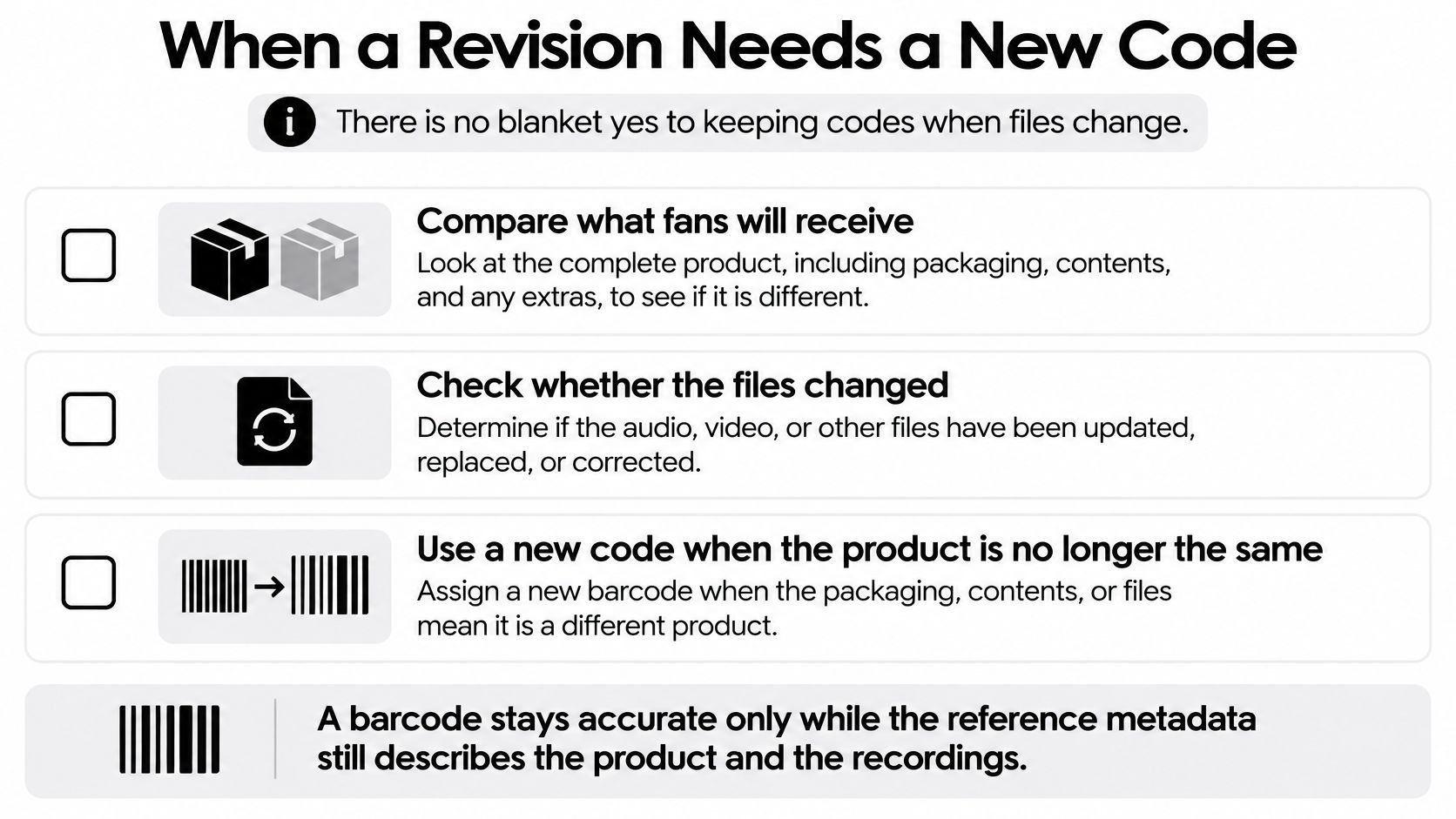
Keep or replace codes after a change
| Change after assignment | UPC | ISRC | Action |
|---|---|---|---|
| Misspelled title fixed before release | Keep | Keep | Update metadata and note the fix |
| New cover art only | Keep for an otherwise unchanged product | Keep | Replace artwork on the same product |
| Price change, same file and format | Keep | Keep | Edit the offer, not the identifier |
| Remix, materially changed remaster, or new audio duration replaces a track | New code | New ISRC for that recording | Leave the original product on its old code |
| Bonus tracks sold as a deluxe | New code for the deluxe | Retain existing ISRCs; assign codes to previously unidentified recordings | Do not retag the standard album |
| Same masters pressed on a new format | New code | Keep | Treat the new format as its own product |
| Bad check digit already in use | Do not silently edit | Leave recording codes | Retire the bad code in the log and arrange a valid replacement |
A cover-art update in this table means an artwork-only correction to the same offer. A separately marketed collectible sleeve or packaging configuration needs a product-level review. Similarly, a corrected duration field isn't equivalent to shortening the audio.
Keep a change log people can use
Before approving reuse, record the proposed change and compare it with the published baseline. Include audio version, duration, artist credits, explicit status, artwork, format, and territory. Identify which fields changed and whether those changes are corrections or evidence of a different product.
Use concrete notes such as “corrected featured-artist spelling, audio unchanged” rather than “metadata updated.” For audio replacements, identify the old and new approved assets and document the recording-identity decision.
Keep the original product traceable, even when you stop selling it.
That record lets you answer a practical question later: which version did a particular buyer receive? Clean identifiers help, but true protection comes from refusing to change the underlying release without leaving an accountable record.
OohYeah offers tools for selling music, merchandise, and subscriptions directly to fans while managing your release catalog. Visit OohYeah with your product list, approved masters, and identifier register ready, then build each offer around the exact edition your fans will receive.