
how to upload my music to spotify: a practical guide
how to upload my music to spotify: a practical guide to choosing a distributor, prepping files, and post-release promotion.
November 2, 2025
Music Marketplace Advisor
Buying & SellingBefore your music can hit Spotify, you need a partner to get it there. That partner is a digital music distributor. These companies are the essential bridge between your finished track and the millions of listeners on streaming platforms, and they're also how you get paid.
Choosing Your Music Distributor
Think of a distributor as the logistics arm of your music career. You handle the creative side; they manage the technical backend—formatting your files, delivering them to Spotify and hundreds of other digital storefronts, and collecting the royalties you've earned. As an independent artist, you can't upload music directly to Spotify, which makes this partnership a non-negotiable first step.

This setup has completely changed the game for creators. Thanks to accessible aggregators like DistroKid, TuneCore, and CD Baby, artists no longer need a traditional record label to achieve global distribution. Most of these services work on a simple one-time fee or an annual subscription model, making it incredibly affordable to get your music out there. The industry continues to grow, with artist payouts and platform subscribers on the rise, as detailed on artistpush.me.
Comparing Top Music Distributors for Spotify
Navigating the different payment models can feel overwhelming, but it really comes down to how often you plan to release music. Your choice here directly impacts both your upfront costs and your long-term earnings. This table gives a quick snapshot of the most common structures to help you find the right fit.
| Distributor | Pricing Model | Artist Keeps % of Royalties | Key Feature |
|---|---|---|---|
| DistroKid | Annual Subscription | 100% | Unlimited uploads for a single yearly fee. |
| TuneCore | Per-Release Fee | 100% | Pay-as-you-go model, great for infrequent releases. |
| CD Baby | One-Time Fee + Commission | 91% | No annual fees, but takes a commission on royalties. |
| Amuse | Free Tier & Pro Tiers | 100% on Pro | Offers a free distribution option with limited features. |
Ultimately, the "best" distributor is the one that aligns with your release strategy and budget. If you're dropping a single every month, a subscription model is a no-brainer. If you’re releasing one big album every two years, a per-release fee might save you money.
Key Features to Evaluate
Price isn't the only factor. The distributor you choose is more than just a delivery service; they're your partner in managing the business side of your music. When you upload your music to Spotify, you're also tapping into a suite of administrative tools.
Your distributor is more than just an uploader; they are your partner in analytics, royalty collection, and rights management. A good choice simplifies your administrative tasks so you can focus on creating.
Here are a few critical features to look for when weighing your options:
- Royalty Splits: If you collaborate with producers, co-writers, or other band members, this is a lifesaver. Some distributors can automatically divide and pay out earnings to everyone involved, saving you from a massive accounting headache.
- Customer Support: When something goes wrong with a release—and sooner or later, it will—you want fast, helpful support. Do some research and read artist reviews. A distributor with a reputation for poor customer service can turn a small issue into a major problem.
- Analytics and Reporting: Data is power. A great distributor provides detailed insights into your streams, where your listeners are, and which playlists are driving plays. This information is crucial for understanding your audience and planning your next move.
- Speed to Stores: How quickly will your music go live? Most services get your tracks onto Spotify within 2-5 business days, but this can vary. If you’re working on a tight release schedule, this is an important detail.
Choosing the right partner from the beginning saves you from a world of logistical trouble later. For a much more detailed comparison, check out our complete guide on how to choose the right music distribution service to explore all the nuances.
Prepping Your Audio and Artwork for Release
Before you even dream of hitting that upload button, your audio and artwork need to be absolutely flawless. Getting these assets right from the start is your best defense against those dreaded rejection emails from your distributor, which can throw your entire release schedule off track. Think of it as your pre-flight checklist—every single detail has to meet Spotify's strict technical specs.
Let's start with your master audio file. You might be used to MP3s for everyday listening, but they're a non-starter for professional distribution. For this, you absolutely must upload a high-quality, uncompressed audio file.
- Required Audio Formats: The gold standards are FLAC (Free Lossless Audio Codec) or WAV (Waveform Audio File Format).
- Why It Matters: These formats are lossless, meaning they preserve every bit of the original audio data from your mix and master. If you submit a compressed file like an MP3, you're essentially sending a lower-quality version of your track, and trust me, listeners with good headphones or speakers will notice the difference.
Providing a lossless file is the only way to ensure your music sounds exactly as you intended it to in the studio. Don't cut corners here; your audio quality is everything.
Mastering Your Cover Art
Your cover art is the visual handshake you make with potential new fans. In a digital ocean with over 100 million tracks on Spotify, a stunning piece of artwork can be the one thing that convinces someone to give your music a chance. The barrier to entry for distribution is lower than ever, which is great, but it also means the competition is fiercer. Standing out visually isn't just a nice-to-have anymore; it’s critical for discovery, a fact highlighted by recent analysis on subscriber growth and artist payouts.
Spotify is notoriously strict about artwork, all in the name of a clean, professional user experience. Here's a quick look at their official guidelines.
This screenshot nails down the core technical requirements: it has to be a perfect square, high-resolution, and use the right color profile. I've seen countless releases get held up because the artist missed one of these simple rules.
Your artwork must be a minimum of 3000x3000 pixels, saved as a JPG or PNG, and use the RGB color space. It cannot have any URLs, social media handles, or mentions of pricing or physical packaging (like "CD" or "Vinyl").
Beyond the tech specs, the creative side is where you really get to shine. Your artwork should be an extension of your brand and the vibe of your music. It's your best tool for grabbing someone's attention as they scroll through a playlist. If you want to go deeper on this, it's worth understanding why artists should invest in quality cover art. By nailing both the technical and creative elements, you give your release the best possible chance to succeed from the very first glance.
Getting Your Music and Data into the System
With your final audio master and artwork in hand, you're ready to tackle the most detail-oriented part of the process: the upload itself. This isn't just about dragging and dropping files. You'll be working within your distributor's dashboard to input all the information that becomes your track's digital identity, or what we call metadata.
Think of metadata as the DNA of your song. It tells Spotify who you are, who wrote the song, who gets paid, and how to display it all. A tiny mistake here can cause major headaches down the road—from delayed royalty payments to your music showing up on the wrong artist's page. This is where you need to slow down and get every detail right.
The infographic below gives a great visual overview of how these core assets—your audio and artwork—are the foundation for the entire upload and metadata stage.
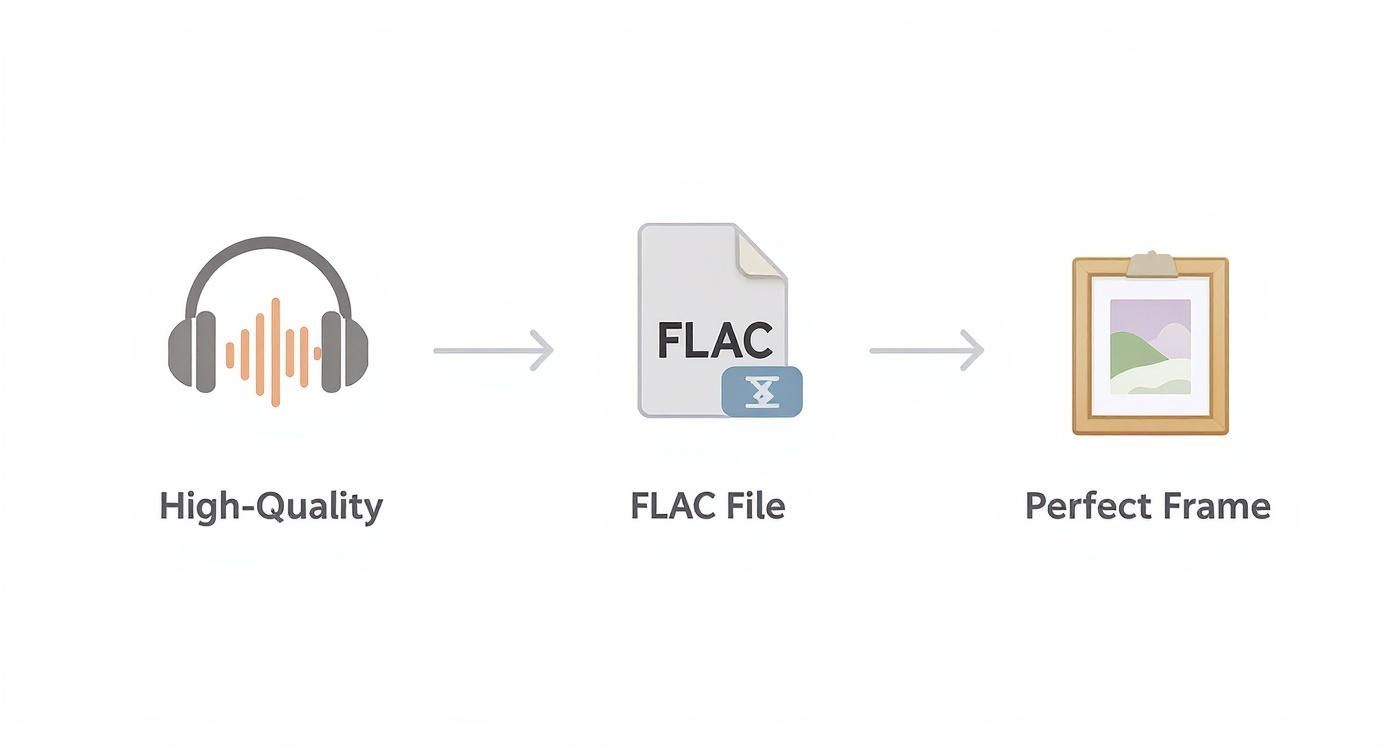
As you can see, getting the files right from the start is non-negotiable. Without pristine audio and perfectly formatted artwork, the rest of the steps can't happen.
Mastering Your Track Information
Once you're logged into your distributor's platform, you'll be greeted with a form asking for all the details about your release. Each field is crucial for how your music is categorized, discovered, and monetized. Precision is your best friend here.
Be extra careful with these key fields:
- Song Title: Capitalize it properly and make sure it's identical everywhere you plan to list it. Even small inconsistencies can confuse the system.
- Artist Name(s): Enter your name exactly as it should appear. If you have a feature, use the dedicated "featured artist" field. This ensures they get linked to their own Spotify profile and receive proper credit.
- Songwriter Credits: This is a big one and a legal requirement for royalties. You need to list every single person who contributed to the lyrics and composition, along with their ownership shares.
- Publisher Information: If you work with a publisher, you'll enter their information here. If you're handling your own publishing, your distributor will have instructions on how to correctly list yourself.
One of the most common pitfalls I see is artists being inconsistent with their own name. For instance, releasing one track as "DJ Phoenix" and the next as "DJ PHOENIX" might seem trivial, but it can cause Spotify to create a completely new artist profile, splitting your discography and confusing your followers.
Why Your Release Date is a Strategic Tool
Your distributor's dashboard gives you the power to set a release date. I know the urge to hit "publish now" is strong, but scheduling your release for a future date is one of the smartest moves you can make.
Pro Tip: Set your release date at least 3-4 weeks in advance. This isn't just a suggestion; it's the single most important thing you can do to unlock Spotify's promotional power.
This buffer period does two critical things. First, it gives everyone—your distributor and Spotify—plenty of time to review and process your music, preventing any last-minute technical snags.
More importantly, it makes your track eligible for pitching to Spotify's official editorial playlists. You can't submit a song that's already live. Giving yourself this lead time is essential for getting your music in front of the editors, a topic we'll dive into shortly. This simple act of planning is a game-changer when you upload your music to Spotify and can be the difference between a quiet release and one that gets real traction.
Claiming and Customizing Your Artist Profile
So, your distributor has fired off your first track to Spotify. What's next? A crucial item just landed on your to-do list: claiming your artist profile through Spotify for Artists.
This isn't just some vanity step you can skip. Getting verified is like being handed the keys to your own headquarters on the world's biggest streaming service. It's the difference between having a song listed and having a living, breathing presence. Without it, you’re just a name on a track. With it, you get a whole suite of tools built to help you grow.
Getting access is usually pretty simple. Your distributor should give you a direct link or a special URI code to find your pending profile. You'll request access, and Spotify will confirm you're the real deal, typically within a few days. That's it. You're in.
Turning Your Profile into a Fan Hub
Once you're verified, your first order of business is to make the place your own. An empty profile with a default gray avatar screams amateur. This is your chance to tell your story and create a space that makes people want to stick around and hit that "Follow" button. A thoughtfully put-together profile is one of the best ways to turn a casual listener into a real fan.
This is what you'll see when you log in—your new mission control for everything on Spotify.
From this dashboard, you'll upload your artist photos, write a compelling bio, and add links to your social media. Don't just phone in the bio; treat it as a short, engaging story that gives people a reason to care about you and your music. For a deeper dive on this, check out our guide on how to attract fans to your music profiles.
Unlocking Your Promotional and Analytical Power
Beyond just looking good, your Spotify for Artists account is packed with features that can genuinely move the needle on your streams. The most powerful one? The ability to pitch your unreleased music directly to Spotify's editorial team for playlist consideration.
You can only do this from the artist dashboard, and you need to submit your track at least a week before its release date. Get this in your calendar for every single release.
Pitching a song to Spotify's editors doesn't guarantee placement, but not pitching guarantees you won't even be considered. It's a free, high-impact tool that every independent artist should be using.
The analytics section is another goldmine. It's where you get real, hard data on who's listening and how they're finding you. You can see:
- Listener Demographics: Get a clear picture of your audience's age, gender, and location. Are you big in Brazil? You'll find out here.
- Discovery Sources: See how people are finding your music. Is it from editorial playlists, algorithmic playlists like Discover Weekly, or directly from your profile?
- Playlist Performance: Pinpoint exactly which playlists are driving the most streams for your songs.
This isn't just numbers on a screen; it's intelligence. This data tells you what's working, helps you understand your audience on a completely different level, and gives you the insights you need to grow your career when you upload your music to Spotify.
Your Post-Release Promotion Strategy
Alright, so your music is officially live on Spotify. Pop the champagne, celebrate the win—but don’t get too comfortable. Hitting "publish" is the starting line, not the finish line. The real hustle begins now, and what you do next will determine whether your release sinks or swims.
Even before your track drops, you should be building hype with a pre-save campaign. Think of it as a petition for your new song. Every fan who pre-saves is telling Spotify's algorithm, "Hey, pay attention to this one." A solid number of pre-saves can be your golden ticket to landing on crucial algorithmic playlists like Release Radar right out of the gate.
Tapping into Spotify's Promotion Toolkit
Spotify gives you some powerful tools to get your music in front of the right people, and it's a huge mistake to ignore them. These aren't just vanity features; they’re designed to connect your sound with listeners who are already primed to like it.
Here are the two big ones you need to know about:
- Marquee: This is your direct line to your core audience. It’s a full-screen, sponsored pop-up that announces your new music to listeners who already follow you or have shown interest in your work. It’s a guaranteed way to make sure your fans don’t miss your new release.
- Discovery Mode: This feature gets your tracks into new ears through personalized listening sessions like Spotify Radio and Autoplay. The best part? You don't pay anything upfront. Instead, Spotify takes a commission from the royalties generated specifically from those discovery streams.
Don’t view these as costs. They're strategic investments in finding your next superfan. You can't grow if new people aren't hearing your music.
The goal isn’t just to rack up streams; it’s to build genuine connections. Every save, share, and playlist add is proof that your music is making an impact.
Driving Momentum from the Outside In
Your promotional efforts can't live in a Spotify-only bubble. Getting your music on the platform gives you access to a massive global audience of over 696 million monthly active users, but you have to actively guide people there. You can dig into Spotify’s expanding user base on artistpush.me to see just how big that opportunity is.
Get creative on social media. Share the story behind the song, post behind-the-scenes clips, and make it personal. To really grab attention, turn your audio into compelling visual content. There are some great audio-to-video creation tools out there that can help you whip up engaging clips without needing a film degree.
Here’s another pro-tip: curate your own artist playlists. Build a playlist featuring your new track alongside songs by artists who influence you or share a similar vibe. This does two things: it gives your fans something cool to listen to and it contextualizes your sound. Promote the playlist, keep it fresh, and encourage your followers to check it out. Suddenly, your Spotify profile isn't just a static catalog—it's a hub for music discovery.
Common Questions About Releasing Music on Spotify
Getting your music onto Spotify for the first time is exciting, but it definitely comes with its fair share of questions. I've seen countless artists get stuck on the same few hurdles, so let's clear them up right now. Knowing the answers ahead of time will help you avoid those classic "I wish I'd known that" moments.
Think of this as a quick-start guide to sidestepping common pitfalls, from timing your release perfectly to making sure you're legally covered. A little bit of knowledge here goes a long, long way.
How Long Does It Take for My Music to Go Live on Spotify?
This is easily the most common question I get, and the answer is crucial for your release strategy: it’s not instant. Once you hit "submit" with your distributor, they have to do their own review. This can take anywhere from a day to a week.
After your distributor approves it, they send it over to Spotify. My best advice? Give yourself a buffer of at least 3-4 weeks before your target release date. This isn't just about being safe; it’s about being smart. That window is essential for getting your track into the system and, most importantly, giving you enough time to pitch it to Spotify's editors for playlist consideration via your Spotify for Artists account.
Can I Upload a Cover Song to Spotify?
Yes, you absolutely can, but there's a big string attached: you must secure the proper mechanical licenses first. This isn't just a suggestion; it's a legal requirement. It's how the original songwriters get paid for their work, and skipping this step is a surefire way to get your music pulled down for copyright infringement.
Thankfully, you don't have to be a legal expert to handle this. Most modern distributors have built-in tools to make this painless.
- Services like TuneCore's Cover Song Licensing can manage the whole process for you.
- DistroKid also has a simple checkbox option during the upload process where they'll go get the license for you for a small fee.
Using these integrated services means you can release your cover with total peace of mind, knowing all the legal boxes are checked and the original creators are getting their due.
Never, ever skip the licensing step for a cover. The small fee your distributor charges is nothing compared to the legal headaches and financial penalties you could face. It’s about protecting yourself and respecting the artists who wrote the song in the first place.
How Do I Get Paid from Spotify?
Here’s a common point of confusion: Spotify doesn’t pay artists directly. Instead, they send payments to your distributor. These royalties are calculated based on a pretty complex system, factoring in things like where the listener is located and whether they have a premium subscription.
Your distributor acts as the middleman. They collect all that money, display it in your dashboard, take their cut (if they have one), and then pass the rest on to you. You'll typically be able to cash out once your earnings hit a minimum threshold set by the distributor.
What if I Need to Fix an Error After My Song Is Live?
It happens to the best of us. You spot a typo in your song title hours after it goes live, or you decide the artwork just isn't right. The good news is that you can almost always fix it. You’ll just need to go back into your distributor's platform and submit an update request.
The exact process really depends on who you use. Some distributors are cool with minor edits and won't charge you, while others might ask for a small fee to make any changes after the fact. Just remember that these updates aren't immediate—it can take a few days for the changes to show up on Spotify. Your best bet is always to triple-check everything—the spelling, the artwork, the artist names—before you give that final approval.
Empower your music career with OohYeah, the platform designed to put artists first. Upload your tracks, sell merchandise, and connect directly with fans, all while keeping more of your revenue. Join a community built for creators at https://oohyeah.app.



