
How to Share a Song on Spotify A Complete Guide
Learn how to share a song on Spotify from any device. This guide covers sharing to social media, using links and codes, plus promotional tips for artists.
January 27, 2026
Music Marketplace Advisor
Buying & SellingSharing a song on Spotify is a lot like making an old-school mixtape for a friend. It's a simple, powerful way to connect, find new artists, and build a little community around the music you love. With just a few taps, you can send a track from your phone, drop it into a story, or even create a cool, scannable code.
This guide will walk you through every method, so you'll know exactly how to share a song on Spotify, no matter where you are or what device you're using.
Why Sharing Music on Spotify Matters More Than Ever
Let's be honest, we're all drowning in content. A personal recommendation is one of the few things that still cuts through the noise. When you share a track, you’re not just sending a link—you're sharing a feeling, a memory, or an experience. It turns listening from a solo activity into something social and engaging.
This is a win for everyone. For listeners, it's all about connection and discovery. For artists, it's the most authentic way to grow their audience.
The ripple effect of one person sharing a song can be huge. You might introduce a friend to their new favorite band, find the perfect track for a group workout playlist, or just spark a great conversation. This kind of word-of-mouth promotion is incredibly effective because it's genuine.
The Power of Viral Discovery
Think about the massive impact of Spotify's annual Wrapped campaign. In a recent year, it drove an incredible 250 million engagements in less than three days. Shares blew past 500 million—a 41% increase from the year before. This just proves a simple truth: people love sharing what they listen to. You can dig into more of these stats over at sqmagazine.co.uk.
The act of sharing transforms a personal listening habit into a collective cultural event. It's how niche genres find mainstream audiences and how independent artists break through.
Building Communities Through Sound
At the end of the day, sharing music on Spotify is a powerful form of social engagement. It creates small communities around shared tastes and gives artists a direct path to new fans.
To really understand how to make this work for you or an artist you support, it's worth exploring some proven social media engagement strategies. Every share adds to a bigger world where real passion, not just algorithms, drives music discovery. Let's dive into how you can be a part of it.
Sharing Spotify Songs From Any Device
It doesn't matter if you're at your desk, on the bus, or using a friend's laptop—Spotify makes it incredibly simple to share a track the moment it resonates with you. The core actions are consistent across the board, so you never have to interrupt your listening flow to send that perfect song.
Sharing has become more than just a feature; it's the engine of music discovery. It connects individual listeners and transforms personal taste into a community-wide conversation.
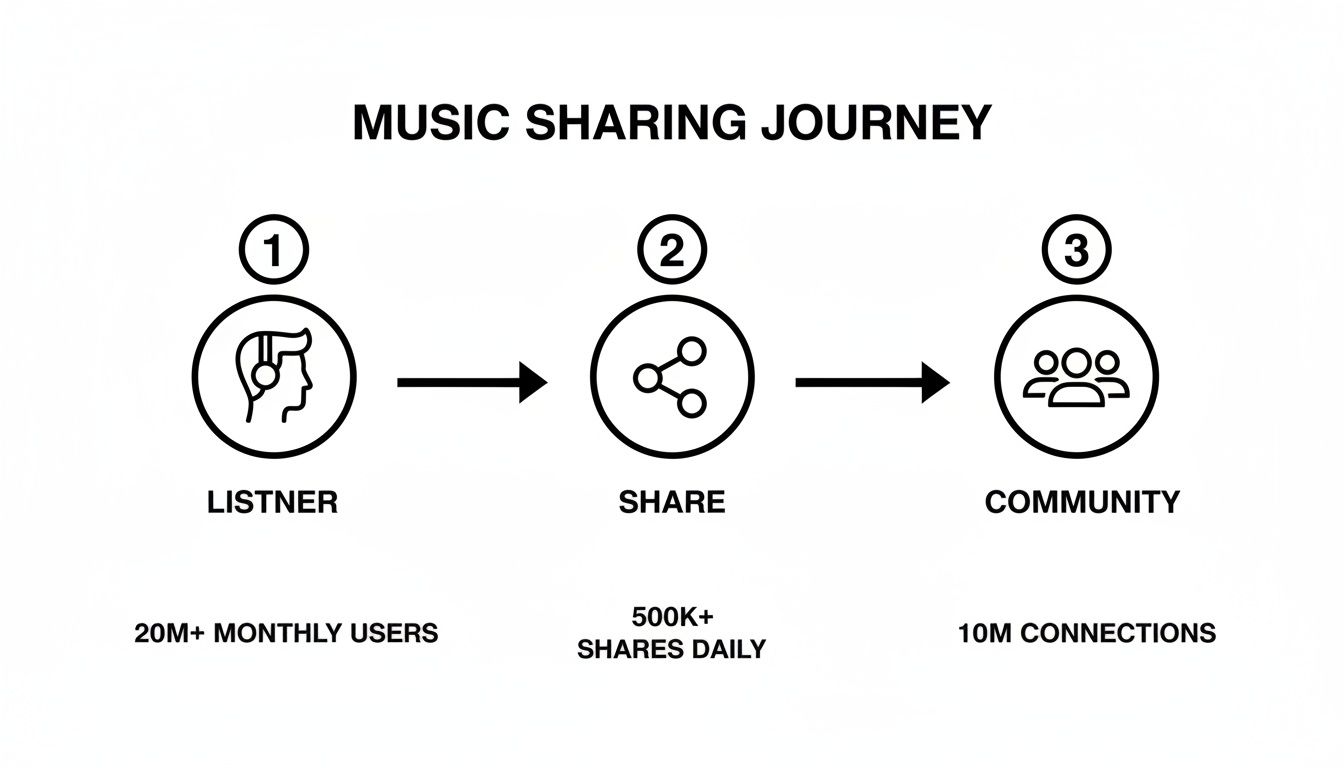
This journey from personal discovery to shared engagement is exactly what makes platforms like Spotify so powerful. Every share helps a song find a new audience.
On Your Mobile Device
Sharing from your phone, whether it’s an iPhone or Android, is built for those spontaneous "you have to hear this" moments. Picture this: you're on your morning commute, and a track from your Discover Weekly playlist feels like it was made for your best friend.
Just tap the three dots (…) next to the song title or on the Now Playing screen. This pulls up the "Share" menu, instantly giving you options to post it to Instagram Stories, send it through WhatsApp, or just copy the link to paste it anywhere you want.
With Spotify's user base soaring past 600 million people, the company has made mobile sharing almost frictionless. In many views, you can also find a dedicated Share icon right on the Now Playing screen for even faster access. It’s this kind of intuitive design that helped features like the annual Wrapped campaign generate over 500 million shares. You can dive deeper into Spotify's impressive user growth and feature adoption to see the scale of this behavior.
From the Desktop App or Web Player
The experience on a computer is just as seamless, designed to fit right into your workflow. Maybe you’ve found the perfect focus track while working and want to drop it into your team's Slack channel.
Find the song you want to share—whether it’s in a playlist, an album view, or your search results. All you have to do is right-click the song title (or click the three-dot menu next to it) to open up your options.
From the "Share" submenu, you'll generally get two main choices:
- Copy Song Link: This is your go-to, universal option. It places a direct URL on your clipboard, ready to be pasted into an email, a chat window, or a social media update.
- Embed Track: This is a fantastic tool for content creators. It gives you a snippet of HTML code that you can paste into a website or blog post to display a fully playable Spotify widget.
Pro Tip: Don't just send a link—add a personal touch. A quick message like, "This made me think of our road trip last summer!" makes the recommendation far more meaningful and gives your friend a reason to press play.
Spotify Sharing Options Across Devices
While the core function is the same, the exact options can vary slightly depending on where you're listening. Here’s a quick-reference table to see what's available on each platform.
| Sharing Method | Mobile (iOS/Android) | Desktop App | Web Player |
|---|---|---|---|
| Copy Link | Yes | Yes | Yes |
| Social Stories (Instagram, etc.) | Yes (Direct integration) | No | No |
| Messaging Apps (WhatsApp, etc.) | Yes (Direct integration) | Limited (via link copy) | Limited (via link copy) |
| Embed Track (HTML) | No | Yes | Yes |
| Spotify Code | Yes | Yes | Yes |
This table makes it clear that for direct social media integration, mobile is king. But for embedding music on a website or grabbing a quick link at your desk, the desktop and web versions are perfectly equipped.
Creative Ways to Share Your Favorite Music
Sending a simple link gets the job done, but let's be honest—it's not very exciting. If you really want to share a track in a way that grabs people's attention, Spotify has some fantastic built-in tools that go way beyond copy-and-paste.
These methods are all about creating a more immersive experience, whether you're trying to get a friend hooked on a new band or adding the perfect soundtrack to your website. It’s about matching the share to the situation.

Engaging Your Audience with Spotify Codes
One of the coolest and most underused features is the Spotify Code. Think of it as a QR code, but designed specifically for music. It’s a unique, scannable image that looks like an audio waveform and can point to any track, album, playlist, or artist profile.
You’ll find the Spotify Code right below the artwork when you tap the three-dot menu on a song. This simple little graphic opens up some brilliant real-world sharing possibilities.
- For Businesses: Imagine a coffee shop printing the code for their chill morning playlist on their menus. Customers can scan it and instantly take the cafe's vibe home.
- For Artists: Bands can slap a Spotify Code for their latest single onto merch like t-shirts or posters. It turns a simple souvenir from a live show into an interactive experience.
- For Events: A wedding DJ could display a code for the couple’s playlist, giving guests a perfect digital party favor to remember the night.
Immersive Sharing on Social Media Stories
Sharing to Instagram or Facebook stories is probably the most popular way to show off what you're listening to right now, and for good reason. When you share a track to your story, Spotify creates a clean, eye-catching sticker with the song's cover art.
But the magic is that it’s not just a picture. Your followers get a short audio preview of the song playing directly in your story. That immediate snippet is far more likely to hook them than a plain link. It encourages them to tap through and hear the full track on Spotify, making it a powerful tool for artists promoting new music. To dig deeper into this, check out our guide on how to promote your music on TikTok and other short-form platforms.
A shared song on an Instagram Story isn't just a recommendation; it's a public declaration of taste that adds a soundtrack to your personal brand.
Embedding Tracks for a Richer Experience
If you have a blog, portfolio, or personal website, the Embed Track feature is a game-changer. Instead of forcing visitors to click away to another site, this option gives you a small snippet of HTML code to paste directly into your webpage.
The result is a slick mini-player right on your page. Visitors can see the artwork, play a 30-second preview, and—if they're logged into Spotify—often listen to the entire song without ever leaving your site. This is perfect for music bloggers reviewing an album or artists wanting to showcase their work. It instantly turns a passive reading experience into an active, engaging one.
How Artists Can Turn Shares Into Growth
For any artist, a listener sharing your song is more than just a casual recommendation—it’s the most powerful form of organic marketing you can get. Each share acts as a personal endorsement, cutting through the digital noise far more effectively than any paid ad ever could. Learning how to encourage and capitalize on this is how you build real momentum.
When a fan takes the time to share your track, it sends a massive signal to the Spotify algorithm. It says, "People aren't just listening; they're actively vouching for this music." This kind of user activity is a huge factor that can influence your placement on algorithmic playlists like Discover Weekly and Release Radar.
Make Your Music Easy to Share
First things first: you have to remove any friction. Your fans are most likely to share a song in the heat of the moment, so you need to make it completely effortless for them. This means you should be actively encouraging shares across all the channels you use to talk to your audience.
A simple, direct call-to-action can work wonders. When you announce a new single, don't just ask people to listen. Ask them to share it on their Instagram Story or send it to one friend they think would love it. Frame it as a genuine way they can directly support your career.
Key Takeaway: A share is a vote of confidence. When a fan shares your track, they become an advocate for your music, introducing you to their trusted network.
You can also create assets specifically designed for sharing. Give your fans pre-sized graphics for social media stories or short, eye-catching clips from a music video. By giving them the tools, you dramatically increase the chances they’ll take that extra step to spread the word.
Mobilize Your Core Fanbase
Your most dedicated supporters are your greatest promotional asset. Period. They're the ones who will share your music without even being asked. Your job is to organize and empower them to make an even bigger impact.
This is where a direct-to-fan strategy really shines. Instead of just broadcasting your message on social media, you can use platforms like OohYeah to communicate directly with your community. You could ask them to coordinate sharing your new track at a specific time to create a concentrated wave of activity. This kind of unified push can seriously boost your visibility.
To dive deeper into connecting with your audience, check out our guide on how to attract fans to your music profiles. Building that relationship is the foundation for turning passive listeners into active promoters.
Run Interactive Sharing Campaigns
Think beyond simple requests and turn sharing into a fun, interactive event. Building a campaign around a new release can gamify the process and motivate your entire audience to get involved.
Here are a few ideas you can put into action:
- Contests and Giveaways: Offer a cool prize, like exclusive merch or a virtual meet-and-greet, to a randomly selected fan who shares your song on their socials with a specific hashtag.
- User-Generated Content: Encourage fans to create their own content using your song. This could be anything from a dance video to the soundtrack for their latest vlog.
- Collaborative Playlist Challenge: Create a public playlist and ask fans to add your new song along with others that fit a specific mood or theme. Have them share the playlist they helped build.
These strategies transform the simple act of sharing into a collaborative and rewarding experience. Each share becomes a building block, helping your music find new ears and turning organic reach into sustainable growth.
Troubleshooting Common Spotify Sharing Problems
Sharing music should be easy, but let's be honest—sometimes technology gets in the way. It’s incredibly frustrating when you’ve just found the perfect song and the share function decides to stop working. The good news is that most of these issues are surprisingly simple to fix.
More often than not, the problem comes down to a simple glitch, an app that needs an update, or a permission setting that got toggled off. Let's break down the most common sharing headaches and get you back to sending out those killer tracks.
Why Isn't My Instagram Story Share Working?
This one is a classic. You go to share a song to your Instagram Story, and the option is either missing entirely or just doesn't respond when you tap it. This usually signals a communication breakdown between the Spotify and Instagram apps.
Before you get too frustrated, run through these quick fixes. They solve the problem 90% of the time.
- The Classic Restart: Seriously, just force-quit both the Spotify and Instagram apps. A simple reboot can clear out temporary bugs that are causing the hang-up.
- Check for Updates: An outdated app is often the culprit. Pop over to the App Store or Google Play Store and make sure both apps are running the latest version. Developers are constantly patching these kinds of bugs.
- Log Out, Log In: Sometimes the connection between the apps just needs a refresh. Try logging out of both Spotify and Instagram, then sign back into Spotify first, followed by Instagram.
If you’ve tried all that and are still stuck, it’s worth diving into your phone’s settings. Make sure Spotify has all the necessary permissions to share content with other apps.
Fixing Broken Links and Unscannable Codes
There's nothing worse than sending a "you have to hear this" link only for your friend to get an error message. Or maybe you've tried to share a cool Spotify Code, but their camera just won't pick it up.
When a shared link doesn't work, the issue is often related to regional restrictions or the track being temporarily unavailable. A quick first step is to check if you can still play the song yourself.
If a Spotify Code is the problem, the issue is almost always visual. Make sure the code isn't blurry, distorted, or poorly lit. If you're using a screenshot, it needs to be a crisp, high-resolution image for the scanner to read it properly.
For those rare, stubborn issues that just won't go away, checking the official help channels is your best bet. You can find more detailed guides in the OohYeah support center. By working through these steps, you can tackle just about any sharing glitch and make sure your music recommendations always hit the mark.
Common Questions About Sharing Spotify Songs
Even with a step-by-step guide, there are always a few lingering questions that pop up about how sharing works on Spotify. Let's dig into some of the most common ones I hear, especially from people who are passionate about supporting the artists they love.
This is your go-to spot for the finer details, clarifying how your shares actually impact artists and what's happening behind the scenes with privacy and functionality.
Does Sharing a Song Count as a Stream?
This is a big one, and the short answer is no. Just sharing the link itself doesn't count as a stream. For Spotify to register a "play," someone has to actually click your link and listen to the song for at least 30 seconds.
But here's why sharing is arguably more powerful than a single stream. Your share is the spark. It's what can lead to dozens, or even thousands, of new listeners discovering that track. Think of it as a multiplier.
Spotify's algorithm is also watching. When a song gets a sudden burst of shares, it signals that something is catching on. This can be a major factor in getting a track featured on influential algorithmic playlists. So while your share isn't technically a stream, it's the action that can generate countless more.
Can You Share Just a Specific Part of a Song?
Right now, Spotify doesn't have a built-in feature to create a timestamped link that starts a song at a specific point, the way you can with a YouTube video. Any link you share will always start the track from the very beginning.
That said, there are a couple of clever workarounds, particularly for social media.
- For Instagram Stories: This is your best bet. When you share a track to your Story, Instagram lets you pick the 15-second clip that will play. This is perfect for highlighting a killer chorus or an amazing guitar solo.
- For other platforms: You can always fall back on your phone's screen recording function. Just play the song, record the part you love, and share that video clip. Just be mindful of copyright if you're posting it publicly.
While direct timestamp sharing isn't native to Spotify, its integration with platforms like Instagram gives you control over the audio preview, effectively letting you spotlight the best part of a track.
Can You See Who Listened to Your Shared Song?
Spotify is pretty strict about user privacy, so you can't get a list of who clicked your link or listened to the song you shared. Once you send a link out into the world—whether through a text or a social post—its journey is anonymous.
The only real exception is within Spotify's own social features. For example, on a collaborative playlist, you can see the profile icon next to each song showing who added it. The same goes for a Blend playlist with a friend, where you can see how your tastes overlap.
This focus on the collective impact of sharing is what powers music discovery on the platform. With around 8 billion playlists on Spotify, a single share can have a massive ripple effect. If your recommendation helps a song land on a major playlist like 'Today's Top Hits,' it could result in millions of new streams. It really shows how much power one person has to boost a track. For more on this, check out some stats on the impact of sharing on Spotify's ecosystem.
At OohYeah, we believe in empowering artists by giving them the tools to connect directly with their fans. Our platform helps creators turn those powerful fan shares into sustainable careers. Learn how OohYeah puts artists first.



