
How to Put Your Music on Spotify A Guide for Artists
Learn how to put your music on Spotify with this practical guide. We cover choosing a distributor, preparing your files, and promoting your release effectively.
January 13, 2026
Music Marketplace Advisor
Buying & SellingGetting your music onto Spotify is a huge moment for any artist, but it's a lot less intimidating than most people think. The first and most important thing to get your head around is that you can't upload your music directly. You have to go through a digital music distributor—they’re the essential middleman between you and the streaming giants.
Your Release Plan for Getting on Spotify
Think of your release less like a simple upload and more like a campaign. A well-executed plan has a few distinct phases, each designed to make sure your track lands professionally and gets the best possible start. From polishing your final mix to seeing your song go live, this guide will walk you through everything.
A distributor is your partner in this. They handle the nitty-gritty logistics, make sure your artwork and audio files meet Spotify’s technical requirements, and, crucially, collect and pay out your royalties. For an independent artist, there’s simply no other way to get your music on the platform.
To help you map it out, we can break down the whole process into four core stages. Each one sets the foundation for the next, moving you closer to reaching millions of potential fans.
This table provides a quick overview of the key phases involved in a successful Spotify release.
Key Stages of a Spotify Release
| Stage | Key Action | Why It Matters |
|---|---|---|
| Preparation | Finalize mastered audio, cover art (3000x3000px), and metadata. | Having all your assets ready and correct prevents delays and ensures a professional appearance. |
| Distribution | Select a distributor and upload your prepared assets to their platform. | The distributor is your gateway to Spotify and other stores, handling delivery and royalty collection. |
| Submission | Set your release date at least 4-6 weeks in advance. | This creates a crucial window for pitching to Spotify's editorial playlists and building pre-release hype. |
| Promotion | Claim your Spotify for Artists profile and pitch your track. | This is where you take control, giving your music the best chance to be discovered by new listeners. |
Each stage is a building block, ensuring that by the time your music is live, it's set up for success.
The workflow chart below gives you a bird's-eye view of this entire journey, from the initial creative work to the ongoing promotion after your release date.
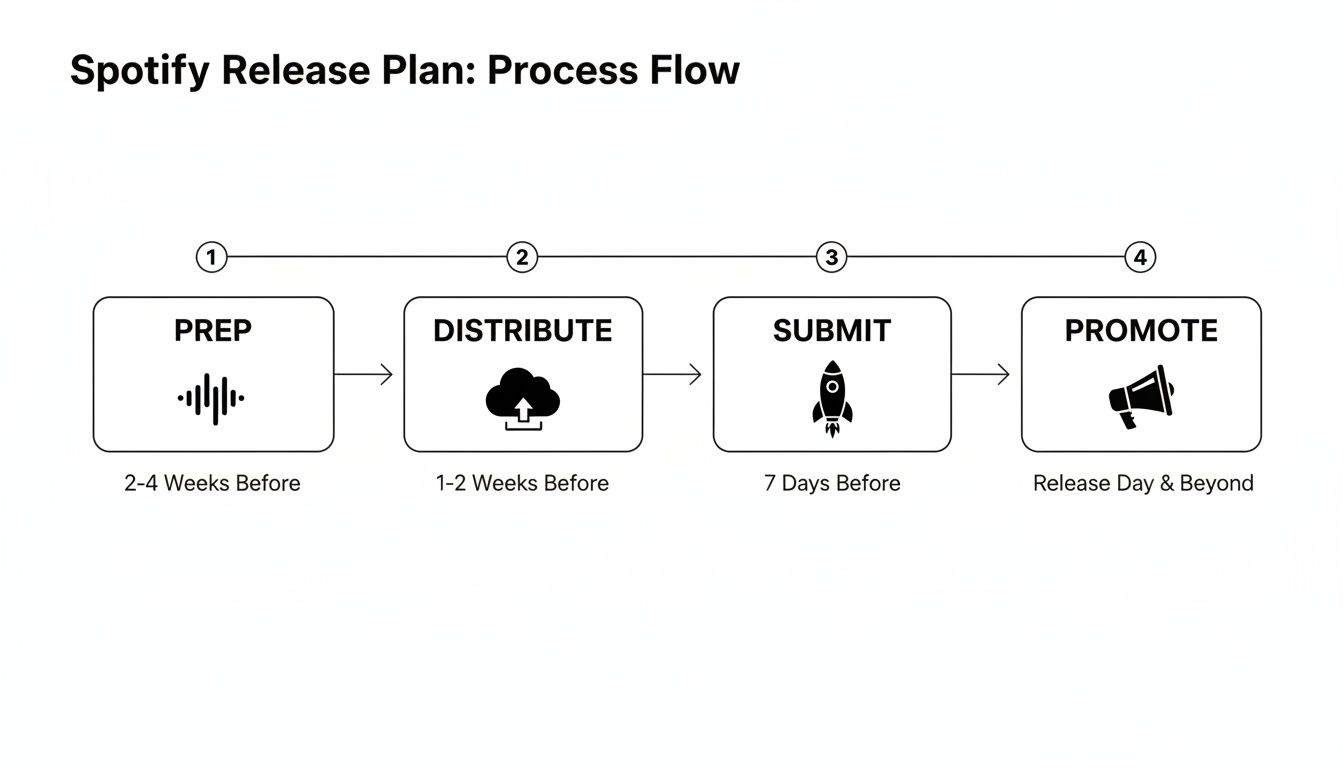
As you can see, the upload is just one piece of a much larger strategy. It's this strategic approach that will help you make a real impact.
And you'll need it. Spotify's library currently holds around 100 million songs, with an astounding 60,000 new tracks being added every single day. That's nearly 22 million new songs a year. A smart release plan is what separates your music from the noise, helping you connect with an audience on a platform that has paid out billions to creators. You can dive deeper into these insights about music streaming growth to understand the landscape.
By mastering each stage of the release plan, you're not just uploading a song; you're launching a product. This mindset shift from creator to music entrepreneur is key to navigating the platform successfully and building a sustainable career.
Getting Your Music and Artwork Ready for Release
Before you even start thinking about distribution, let's talk about the essentials: your audio and your artwork. Getting these two things right from the jump is non-negotiable. Spotify and other platforms have very strict technical requirements, and if you miss them, your release will get kicked back. Trust me, it’s a frustrating delay you want to avoid.
Think of it this way: your master audio file and your cover art are the two core pieces of your release package. Let’s make sure they’re perfect.
Nail Your Audio Specs
When you bounce your final mix, you need to use a high-quality, lossless format. Don't even think about uploading an MP3. Your distributor will reject it outright because streaming platforms like Spotify apply their own compression, and starting with a low-quality file just makes things sound worse.
Here are the specs your master audio absolutely must meet:
- File Format: Stick to WAV or FLAC. These are the industry-standard lossless formats.
- Bit Depth: 16-bit is the minimum, but 24-bit is always better. It captures more detail and gives you a higher-quality master.
- Sample Rate: 44.1 kHz is the standard and what you should be using.
Submitting a hi-res master ensures that when Spotify works its magic, your track starts from the best possible source. This is how you protect all that dynamic range and clarity you spent hours agonizing over in the studio.
Design Cover Art That Gets Approved
Your cover art is often the first thing a potential new fan will see. The technical details here are just as critical as your audio specs. Platforms are incredibly picky, and one small mistake will get your entire release stopped in its tracks.
Your artwork isn't just a placeholder image; it's a visual handshake. Investing in professional design is a direct investment in how seriously people take your music.
Follow these rules to the letter:
- Dimensions: It needs to be a perfect square, at least 3000 x 3000 pixels. No exceptions.
- Resolution: A minimum of 72 DPI is required, but aiming for 300 DPI will ensure it looks sharp everywhere.
- Color Mode: It must be in the RGB color space, which is standard for all digital screens.
- File Format: Save it as a high-quality JPG or PNG.
I’ve seen releases get rejected for the simplest things. Avoid blurry or pixelated images, and never include social media handles, website URLs, or any other text that isn’t the artist name and release title. Let the art speak for the music.
If you want to dig deeper into creating a powerful visual identity, check out our guide on why artists should invest in quality cover art. Getting these assets squared away first makes the entire release process smoother and more professional.
Choosing the Right Music Distributor
Alright, let's talk about the single most important partner you'll have in this journey: your distributor. They're the ones who will actually get your music onto Spotify, collect the royalties you earn, and give you the data to see what’s working. Think of them less as a service and more as a crucial part of your team.
The goal isn't to find the "best" distributor—it's to find the one that fits your specific needs. You’ll mostly run into two kinds of deals: flat-fee and commission-based. Both have their pros and cons. A great place to start your research is this guide on digital music distribution services for artists to see what's out there.
Flat-Fee Versus Commission-Based Models
Flat-fee distributors like DistroKid or TuneCore charge you a yearly fee. For that single price, you can usually upload as much music as you want and, most importantly, you keep 100% of your royalties. This is a no-brainer if you’re planning on releasing a steady stream of music throughout the year.
On the other hand, you have commission-based distributors like AWAL or CD Baby. They often have no upfront cost but take a slice of the money your music brings in—typically around 15%. This can be a perfect setup for an artist who releases music less frequently, since you only pay them when you’re actually making money.
Choosing a distributor is a long-term commitment. Don't just think about your next single; think about your release plans for the next two to three years. Switching later on can be a real headache, so it’s worth the effort to get it right the first time.
Comparing Popular Music Distributor Models
The financial model is often the deciding factor for many independent artists. Here's a quick breakdown to help you visualize which path aligns with your budget and release strategy.
| Model Type | Typical Cost | Best For | Example Services |
|---|---|---|---|
| Annual Flat Fee | $20 - $50 per year | Prolific artists releasing multiple singles/albums | DistroKid, TuneCore |
| Commission-Based | 0% upfront, ~15% of royalties | Artists releasing music infrequently | AWAL, Amuse |
| Per-Release Fee | $10 - $30 per single/album | Artists with a single, one-off release | CD Baby (one-time fee), TuneCore (pay-per-release plan) |
| Free with Upsells | $0 upfront, but with limitations | Artists testing the waters with a first release | SoundOn, LANDR |
Ultimately, the right model depends entirely on your output. If you're dropping a song every month, an annual fee makes financial sense. If you're working on one big album for the next year, paying a one-time fee or a commission might be the smarter play.
Key Factors to Consider Before Deciding
Money isn't everything. A few other details can make or break your experience, so don't gloss over these when you're comparing services.
- Release Speed: How fast will your music go live? Some services can get you on Spotify in a couple of days, while others might take a week or more. That timing can be critical for a coordinated release campaign.
- Customer Support: When something inevitably goes wrong—and at some point, it will—you need to know you can get a real human to help you. Check reviews for mentions of good, responsive support.
- Extra Tools: Many distributors are more than just a delivery service. Look for valuable extras like playlist pitching tools, sync licensing opportunities, and analytics that go deeper than Spotify's own.
- Payouts: How do you actually get your money? Make sure their payment methods (like PayPal or direct deposit) and minimum payout thresholds work for you. You don't want your earnings stuck in limbo.
Your choice of partner directly impacts your ability to get your music on Spotify and manage your career effectively. For a deeper dive, our guide on how to choose the right music distribution service can help you compare platforms side-by-side. The right distributor frees you up to focus on what you do best: making great music.
Alright, you've got your master track, your killer cover art, and you've picked a distribution partner. Now for the fun part: actually getting your music onto Spotify. This isn't just a simple file upload; it’s where you attach all the crucial information that tells Spotify what your song is, who made it, and most importantly, how to pay you.
While every distributor's dashboard looks a little different, the steps are pretty much universal. You'll start a new release, upload your WAV or FLAC file, and then add your 3000x3000 pixel artwork. From there, you'll be guided through a form to input all the details about your song. This is your metadata—the digital DNA of your track.
Getting Your Metadata Right
This information is non-negotiable for getting paid and discovered. You'll need to enter songwriter and publisher details. If you wrote everything yourself and don't have a publisher, that's simple—you are the songwriter and publisher. You'll also run into two important codes: ISRC and UPC.
- An ISRC (International Standard Recording Code) is a unique identifier for your specific recording. It's like a fingerprint for your master audio file.
- A UPC (Universal Product Code) acts as a barcode for the entire release—whether it's a single, an EP, or a full album.
Don't panic if you don't have these. Nearly every distributor, from DistroKid to TuneCore, will generate these for you as part of the upload process, either for free or for a small fee. Just look for the option to have them assigned.
Why You Need a 4-Week Lead Time
Here’s a piece of advice that can literally make or break your release: schedule your drop date at least four weeks in the future. I know, the urge to release your music right now is huge, but hitting the brakes here is one of the smartest strategic moves you can make.
Scheduling your release at least four weeks out isn't just a recommendation; it's the key that unlocks Spotify's most powerful promotional tools. This lead time is your window to pitch for editorial playlists—an opportunity you completely miss with a rush release.
This buffer period gives your distributor plenty of time to process everything and deliver it to Spotify. More importantly, it gives you enough time to get access to your Spotify for Artists profile for that specific release before it goes live.
Once your upcoming track appears in your Spotify for Artists dashboard, you can submit it directly to Spotify's editorial team for playlist consideration. This is your one shot to pitch for massive playlists like New Music Friday, and it's something you absolutely cannot do after the song is already out. That four-week window is your golden ticket.
Using Spotify for Artists to Pitch Your Music
Alright, so your distributor has delivered the goods. Your music is officially in Spotify's system. Now it's time to take the wheel. The very first thing you need to do is claim your Spotify for Artists account. Think of this as your mission control for everything from deep-dive analytics to, most importantly, pitching your music to playlist editors.
Getting verified is actually pretty painless. Just head over to the Spotify for Artists website, search for your artist name, and log in through your distributor's portal to confirm you're the real deal. This instant verification gets you that coveted blue checkmark and immediate access to your dashboard.
Your Artist Profile is Your Calling Card
First impressions matter, and your artist profile is basically your digital handshake. An empty profile with no bio or outdated photos just looks sloppy. It tells listeners—and more importantly, Spotify’s editors—that you might not be taking this seriously.
So, let's get it looking sharp.
- Artist Bio: This is your story. Keep it tight and engaging. Who are you? What's your music all about?
- Photos: Get some high-resolution press shots up for your header and avatar. Don't use a blurry photo from three years ago.
- Social Links: Make it easy for people to find you. Link up your Instagram, X (Twitter), TikTok, or wherever else you connect with fans.
A well-maintained profile turns your page from a simple list of songs into a place where fans can connect with you. This is a non-negotiable step if you want to be seen as a professional artist.
Pitching Directly to Playlist Editors
Once your profile is verified and looking professional, you can access one of the most powerful promotional tools available to any artist: the official playlist submission form. This is your direct line to Spotify's global team of curators.
There’s a catch, though. You can only pitch unreleased music. This is exactly why building in that four-week lead time we talked about earlier is so crucial.
Your upcoming release will pop up under the "Music" tab in your Spotify for Artists dashboard. Find the track you want to push, select it, and get ready to fill out the pitch form. Don't rush this part—be as detailed as you can.
Your pitch is your one shot to give your song a story. Don't just list the instruments. Talk about the late-night session where the lyrics finally clicked, or the real-life breakup that inspired the song. That human element is what makes an editor stop scrolling and actually listen.
Get specific with your tags. Instead of just "Indie Rock," you might describe it as having a "dreamy, melancholic mood" with "jangly electric guitars" and "reverb-drenched vocals." You could even mention it would be a perfect fit for a playlist like Ultimate Indie or All New Rock.
The more accurately you describe the genre, vibe, and instrumentation, the easier you make it for an editor to place your track. The absolute bare minimum is to submit your pitch at least seven days before your release date, but I always tell artists to aim for two to three weeks out. Giving them that extra time seriously increases your odds of getting noticed. This one simple action can be the difference between a release that vanishes and one that finds its audience.
Promoting Your Release After It Goes Live
So, your music is finally live on Spotify. Pop the champagne, but don't kick your feet up just yet. Release day isn't the finish line—it's the starting gun. Now the real work begins, and it's all about building momentum.
Your first move should be to dive straight into your Spotify for Artists dashboard. This is your mission control. You need to know who is listening, where they're from, and how they found you. Are your streams coming from listener playlists, your own artist profile, or algorithmic heavy-hitters like Discover Weekly?
Turning Data into Action
This data isn't just for show; it's your roadmap for a smarter promotion strategy.
For example, if you notice a sudden spike in listeners from Chicago, that’s your cue to target your next social media ads directly to that city. Or if you see that a fan-made playlist is sending a ton of streams your way, find that curator and send them a genuine thank you. Building those relationships is gold.
Here are a few immediate, practical things you can do:
- Share Your Spotify Link Everywhere: Grab the unique link from your artist profile and put it everywhere. It should be the one and only link in your Instagram bio. Pin it to your Twitter profile. Make it impossible to miss.
- Ask for Saves: A "save" is a huge signal to the Spotify algorithm that people are connecting with your track. Don't be shy—explicitly ask your fans and followers to save your new song to their libraries.
- Curate Your Own Playlists: Create a public playlist that includes your new track. Surround it with songs from artists you love or that fit the same mood. It shows your taste and gives your song great company.
Connecting with your audience is everything. If you want to get better at it, start by mastering social media engagement strategies.
The first 24 to 48 hours are absolutely critical. A strong burst of initial activity—streams, saves, and playlist adds—sends a powerful message to the algorithm that your track has heat. This dramatically increases its chances of getting picked up and pushed out to new listeners.
To make the most of this window, you need to understand how people listen. The average user listens to over 41 unique artists every month, and with people spending about 2.5 hours a day on the platform, discovery is constant. You're competing for attention, and that initial engagement is what cuts through the noise.
For a deeper dive, check out our guide on tips for increasing music streams and earnings.
Got Questions? Here’s What You Need to Know
If this is your first time releasing music, you've probably got a ton of questions. Let’s tackle some of the most common ones I hear from independent artists. Getting these details straight from the start will make your entire release strategy smoother and more effective.
How Much Does It Really Cost to Get on Spotify?
This is a big one, and the answer isn't as straightforward as you might think. Spotify doesn't charge you directly. Instead, the cost comes from the music distributor you choose to work with, and their payment models are all over the map.
Here’s a breakdown of the typical structures you’ll run into:
- Annual Subscription: My go-to recommendation for artists who plan on releasing music consistently. Services like DistroKid charge a flat annual fee, usually somewhere between $20 and $40, for unlimited uploads. The best part? You keep 100% of your royalties.
- Per-Release Fee: If you’re just dropping a single or have a one-off project, a service like CD Baby might be a better fit. You pay a single fee for each release, no recurring charges.
- Commission-Based: Some distributors, like AWAL, operate on a commission model. They won't charge you anything upfront but will take a cut of your earnings, often around 15%. This can be a great option if you have zero budget, as they only make money when you do.
How Long Until My Music Is Live?
Patience is key here. While some distributors promise a turnaround of just a few days, I’ve seen it take anywhere from one to three weeks on average for a track to go live after you hit "submit."
But honestly, you should be thinking much further ahead than that.
My personal rule of thumb is to submit everything at least four weeks before your release date. This isn't just about avoiding technical delays; this buffer is your golden window to claim your Spotify for Artists profile and, most importantly, pitch your song to Spotify's editorial team. You can't do that once the song is live, so don't cut it close.
Do I Actually Get Paid for Streams?
Yes, you do! Every time someone streams your song, it generates a small royalty payment.
The exact amount you earn per stream is tiny—we're talking fractions of a cent—and it fluctuates based on a bunch of factors, like the listener’s location, whether they're a Premium subscriber, and the specific agreement your distributor has with Spotify.
Your distributor is responsible for collecting all that money on your behalf. They'll then pay it out to you after taking their cut, whether that's a fee or a percentage. It takes a massive number of streams to see significant income, but every single one adds up.



