
Learn how to download songs from soundcloud quickly
Learn how to download songs from soundcloud with simple, safe steps to save tracks for offline listening.
November 27, 2025
Music Marketplace Advisor
Buying & SellingSo, you want to download songs from SoundCloud. There are a handful of perfectly safe and legal ways to do it, and they all come down to one thing: respecting the artist.
You can grab tracks using the official "Download file" button, save them for offline listening with a SoundCloud Go+ subscription, buy them through a "Buy" link, or find music with a Creative Commons license. These four methods are the only legitimate ways to get music from the platform. Anything else ventures into sketchy territory.
Your Guide to Legally Downloading SoundCloud Tracks
It's easy to get lost trying to build a personal music library from SoundCloud, especially when third-party websites promise instant downloads. But honestly, sticking to the platform's official methods is the only way to get high-quality audio without putting your device at risk or stepping on an artist's copyright.
Each approach serves a different purpose. Maybe you're a casual listener who just wants a few tracks, a DJ building a set, or a creator looking for background music.
The best methods directly support the artists who made the music. Plenty of independent creators offer free downloads to grow their audience, making the official button the easiest path. For heavy listeners, a SoundCloud Go+ subscription is a no-brainer for keeping your entire library ready for offline playback right inside the app.
Choosing The Right Download Path
Figuring out how to download a specific track really just depends on what the artist has decided to allow. This simple flowchart breaks down your first move.
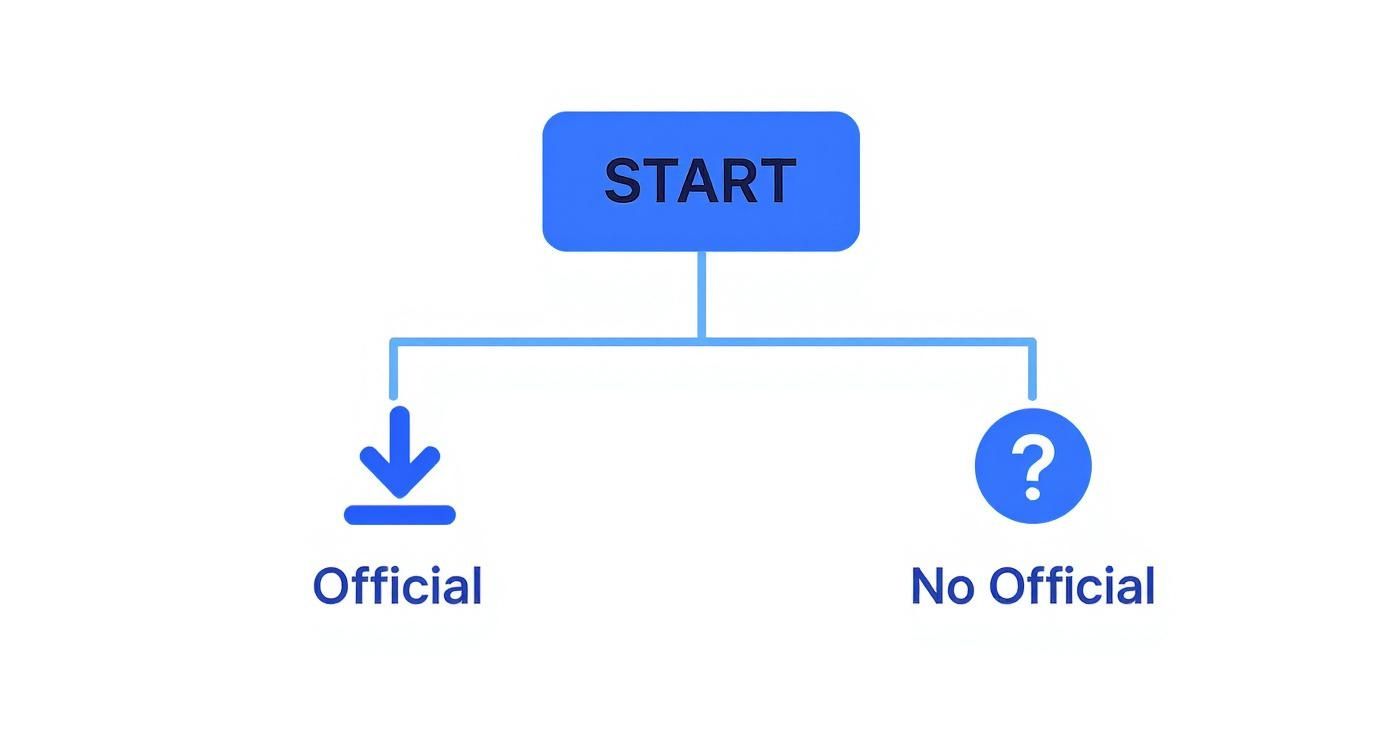
As you can see, the first thing to do is check for an official download or purchase option. It's the most straightforward way to get the music and support the creator at the same time.
Sometimes, you need to look for specific permissions. Creative Commons licenses are a goldmine for finding music you can legally use in your own projects, like videos or podcasts. Knowing which path to take is the key to using SoundCloud the right way.
The core principle is simple: if the artist hasn't explicitly allowed a download through an official button, a purchase link, or a specific license, then downloading the track through other means is a violation of their rights and SoundCloud's terms.
To make it even clearer, here’s a quick comparison of the four main legal methods. This should help you decide which one fits your needs, whether you want a permanent MP3 file or just need your favorite playlist ready for a flight.
Comparing SoundCloud Download Methods
| Method | How It Works | Cost | Best For |
|---|---|---|---|
| Official Download | Creator enables a "Download file" button directly on the track page. | Free | Getting high-quality audio files directly from supportive artists. |
| SoundCloud Go+ | Subscription service that lets you save unlimited tracks for offline listening within the app. | Monthly Fee | Listeners who want access to their full library without an internet connection. |
| Purchase Link | Artist provides a "Buy" link that redirects to a store like Bandcamp or iTunes. | Varies | Permanently owning a track and directly funding the artist's work. |
| Creative Commons | Artists license their music for free use, often with certain conditions. | Free | Content creators needing royalty-free music for videos or podcasts. |
Each option has its place. The one you choose simply depends on how you plan to use the music and how the artist has chosen to share it.
The Built-In Ways to Download from SoundCloud
Let's start with the most obvious and legally sound method: using the features SoundCloud itself provides. These tools are baked right into the platform and are designed to give you music while still respecting the artist's control over their work. Your first and best bet is always the official download button.
Plenty of artists, especially independent ones, will enable this feature to get their music out there, build a following, or create a buzz for a new single. When they want you to have the track, they make it dead simple.
The Official "Download file" Button
You'll find this button sitting right below a track's waveform. If you see "Download file", it's your lucky day. One click is usually all it takes to save a high-quality audio file—often an MP3 or even a lossless WAV—straight to your computer.
But what if it's not there? You'll find that's often the case. Artists have good reasons for keeping that button turned off.
- Maybe the track is part of an album they're selling on another platform.
- It could be an early demo or a work-in-progress they aren't ready to release widely.
- Or, they might prefer you stream it to boost their play counts and generate a little ad revenue.
If that button is missing, it's a clear signal from the artist: this track isn't a free download. That's a deliberate choice, and trying to get around it disrespects their wishes and violates SoundCloud's terms of service.
Taking Your Music Offline with SoundCloud Go
So what do you do when you want to listen to your favorite tracks on a flight or during your subway commute without burning through your data? That’s exactly what SoundCloud's premium subscription, SoundCloud Go, is for.
This isn't "downloading" in the traditional sense. You're not getting a portable MP3 file you can move around. Instead, SoundCloud Go lets you save tracks for offline listening inside the app. It's the perfect solution for keeping your music accessible anywhere, anytime, without needing a Wi-Fi or cellular connection.
Think of it this way: subscribing to SoundCloud Go is a fantastic way to support the artists you love financially while getting the huge perk of offline access to the entire catalog.
This is a game-changer when you consider the sheer scale of the platform. By 2025, SoundCloud had solidified its place as the world's largest music library, boasting over 375 million tracks from 40 million creators. With an average of 460,000 new tracks uploaded every single day, a subscription ensures you can take a virtually endless stream of new music offline. This is especially crucial when you learn that 52% of all listening happens on mobile. You can dive deeper into SoundCloud's impressive growth and creator statistics to see the full picture.
Saving a track for offline listening couldn't be easier. Just find the downward arrow icon next to any song or playlist and tap it. The music gets stored on your device, ready to play back within the app whenever you want. It's a clean, legal, and safe way to keep your favorite sound with you on the move.
How to Purchase Tracks and Get an Artist’s Permission
Sometimes, the best way to get a track you love from SoundCloud is also the most direct: supporting the artist who made it. This approach not only lands you a high-quality audio file but also puts money directly into the creator's pocket. It's a win-win that helps keep the independent music community thriving.
The most obvious sign that an artist is selling their music is the "Buy" link. You'll typically find this button right below the track's waveform, usually nestled next to the "Share" and "More" options. Clicking it won't trigger a sale on SoundCloud itself; instead, it'll take you to an external digital storefront.
This link almost always leads to well-known music platforms like Bandcamp, iTunes, or Beatport. From there, you can purchase and download the track legally. Going this route ensures you get the best possible audio quality the artist has made available—often in a lossless format like WAV or FLAC, which is perfect for DJs and audiophiles.
Directly Messaging Artists for a Track
But what if there's no download or buy button in sight? If you've fallen in love with a track—maybe it's an old demo, a live recording, or a special DJ mix—you have one more card to play: reaching out to the artist directly. It sounds bold, but a personal and respectful message can work wonders.
Every artist's SoundCloud profile has a messaging feature. Use it to craft a short, genuine note explaining why you're looking for that specific track.
- Get specific: Instead of a generic "Can I have your song?", try something like, "The synth lead in your track 'Neon Dreams' is incredible, and I'd love to have it." It shows you're paying attention.
- Share your intent: Are you a DJ who wants to spin it in your next set? Or just a fan who wants to listen on the go? Let them know.
- Offer to pay: Make it clear you value their work. Offering to buy the file directly through PayPal or another service goes a long way.
A respectful message immediately separates you from someone just hunting for a freebie. Many independent artists are more than willing to share their music with dedicated listeners, especially when you show genuine support.
This direct approach can forge a real connection. It's not a guarantee, of course, but you might just get access to an unreleased gem and a bit of insight into their process. For more complex use cases, like including the music in your own videos or projects, it's a good idea to understand how to get rights to a song.
The Value of Direct Support
Even with streaming being the norm, many people still value owning their music library. A recent study actually found that nearly 40% of SoundCloud users had purchased music downloads in the past month—that’s double the rate of the average music consumer.
This statistic really highlights how the SoundCloud community shows up for its artists. So, when you buy a track, remember you’re doing more than just getting a file. You're casting a vote for that artist to keep making the music you love.
Finding And Downloading Creative Commons Music
Beyond the official downloads, SoundCloud is home to a massive, often untapped goldmine of music you can legally download and use for free. This is all thanks to a system called Creative Commons (CC).
CC licenses are a way for artists to give you a green light to use their work under specific conditions. It’s a game-changer for content creators. Need some background tracks for a podcast or a beat for your next YouTube video? This is where you look first. The only catch is you have to understand what each license allows—some are good for commercial projects, while others aren't.
How To Find CC Tracks on SoundCloud
Luckily, SoundCloud has a built-in filter that makes finding these tracks a breeze. It’s a seriously powerful tool once you know where to find it.
Here’s the process I follow:
- Start by typing what you're looking for into the main search bar—say, "ambient electronic" or "lofi hiphop."
- Once the results load, look at the menu on the left and click on "Tracks" to narrow it down.
- You'll see a dropdown menu that usually says "To listen to." This is the key.
- Click it and change the filter to what you need, like "To use commercially" or "To modify commercially."
Just like that, your search results will only show music that artists have specifically cleared for your type of project. It’s the safest, most reliable way to source audio without getting tangled up in copyright issues down the road.
Understanding The License Types
Once you find a track you like, always check the song's description. The artist will specify the exact CC license they've used. This part is crucial—you have to respect their terms.
Some licenses just ask for a simple credit, while others might prohibit you from remixing or changing the track.
This isn't just about grabbing free music. It’s about being part of a creative community built on sharing. When you follow the license terms, you’re respecting the artist’s generosity and helping keep this awesome resource alive for everyone.
It's also useful to know how Creative Commons differs from the public domain. If you want to get into the weeds on that, our guide on how long before a song is in the public domain breaks down all the legal details. Learning to master SoundCloud’s search filters is one of the most valuable skills any creator can have.
The Real Dangers of Third-Party Downloaders
When you can’t find that official download link, a quick search for "how to download songs from SoundCloud" will pull you into a tempting world of third-party websites. They all promise the same simple fix: paste the track's URL, click a button, and the audio file is yours. It feels like a harmless shortcut, but it's a path loaded with serious risks that can compromise your digital security and, just as importantly, undermine the very artists you're trying to support.
From a security standpoint, these downloader sites are often breeding grounds for malicious software. One wrong click on a pop-up ad or a cleverly disguised download button can unleash viruses, ransomware, or spyware onto your device. Beyond that, many are designed as phishing scams, hoping to trick you into entering personal details through a fake login screen.
Legal and Ethical Lines You Don't Want to Cross
Setting aside the immediate security threats, using these tools pushes you into a legally murky territory. First, you're directly violating SoundCloud's terms of service, which strictly prohibit the unauthorized reproduction of content hosted on their platform.
More importantly, you're infringing on the artist's copyright. Every time you create a copy of their work without their explicit permission, you're breaking the law.
This isn't just some legal technicality; it's a fundamental issue of respect for creative work. Every unauthorized download bypasses the very systems artists rely on to track listener engagement and potentially earn revenue. It directly harms their ability to build a sustainable career.
The impact is much bigger than a single lost stream. It strips away valuable listener data, skews their analytics, and ultimately devalues their art. These risks aren't unique to SoundCloud, by the way—it's crucial to learn how to download music videos from YouTube safely and easily for the same reasons.
Why Official Downloads Matter So Much to Artists
For countless emerging artists, SoundCloud is still a vital launchpad, especially in genres where track circulation is key to getting heard. Official downloads are a powerful indicator of a fanbase’s early engagement and loyalty. Many artists even count on DJs and fellow producers downloading their tracks to use in live sets and mixes, which is a huge part of how music circulates in electronic and dance scenes.
When you use a third-party downloader, you completely disrupt this ecosystem. You take without giving anything back, turning a relationship of mutual support into one of pure, one-sided consumption. The artist gets nothing—no play count, no listener data, no potential sale, and no genuine fan connection.
It's no wonder that protecting their work from this kind of unauthorized use is a major concern for creators. To get a better sense of what's at stake, check out our guide on how to protect your music from piracy.
Ultimately, sticking to official methods—the download button, SoundCloud Go, purchase links, or Creative Commons licenses—is about much more than just following the rules. It's about being a responsible member of the music community. It's about ensuring your actions protect your own devices while truly supporting the artists who create the music you love.
Frequently Asked Questions
When you're trying to figure out how to download songs from SoundCloud, a few questions tend to pop up over and over. Getting straight answers is key to making safe choices that respect the artists who make the music. Let's clear up some of the most common points of confusion.
Navigating the rules can seem a little complicated at first, but it's pretty simple once you know what you're looking for. The platform is built to give creators control, which is why your download options can change so much from one track to the next.
Why Can't I Find The Download Button On A Track?
This is probably the most frequent question, and the answer is simple: it’s entirely up to the artist. If a creator decides to offer their track as a free, high-quality download, they’ll switch that option on.
So, why would they keep it turned off? There are a few common reasons:
- The song might be part of an album they’re selling on other platforms like Bandcamp or iTunes.
- It could be an exclusive stream meant to drive up their play counts and engagement.
- The artist might prefer to point you to a purchase link to directly support their work.
If you don't see the button, it’s not a bug—it’s a deliberate choice by the person who made the music.
Is It Illegal To Use A Third-Party Downloader Site?
Yes, in nearly every case, using one of those sites is illegal. When you use an external website or tool to rip audio from SoundCloud, you're making an unauthorized copy of copyrighted material. This is a clear violation of both SoundCloud's Terms of Service and international copyright law.
Beyond the legal trouble, these sites are often breeding grounds for security risks. They’re notorious for hosting malware, spyware, and phishing scams designed to steal your personal information. Sticking to the official download methods is the only way to keep your devices safe and stay on the right side of the law.
Using an unauthorized downloader doesn't just put you at risk—it fundamentally disrespects the artist's ownership of their music. It sidesteps the very systems they rely on for plays, feedback, and potential income.
Does SoundCloud Go Save Songs As MP3 Files?
No, and this is a really important distinction. When you use SoundCloud Go or Go+ to save music for offline listening, the app encrypts the audio files. These aren't standard MP3 or WAV files you can move around.
The files are stored securely within the SoundCloud app and can only be played back through its interface. This means you can't transfer them to other devices, drop them into DJ software, or burn them onto a CD. The feature is strictly for convenient offline listening within your own account. If you need a portable audio file you can use anywhere, you have to use the official "Download file" button or purchase the track directly.
How Do I Know If A Song Has A Creative Commons License?
Finding Creative Commons music on SoundCloud is pretty easy once you learn to use the search filters. There are a couple of quick ways to check a track's license.
First, you can filter your search results. After searching for a genre or artist, click on "Tracks" in the left-hand menu. From there, find the "Usage" filter and select an option like "To use commercially." This will show you only the tracks cleared for that specific use.
Second, just check the track’s description. Artists will almost always list the specific Creative Commons license details right below the waveform. They often include a link to the official license terms, so you can see exactly what you’re allowed to do with the music.
At OohYeah, we believe artists deserve complete control over their creations and a direct line to their fans. Our platform is built to empower creators to sell their music, merch, and subscriptions without taking a commission, so they keep 100% of what they earn. Discover a music ecosystem built for artists first at OohYeah!



