
How to add music facebook: A quick guide to adding songs on Facebook
Discover how to add music facebook across your profile, posts, Stories, and Reels. Full guide for iOS, Android, and desktop with tips for creators.
December 8, 2025
Music Marketplace Advisor
Buying & SellingAdding music to a Facebook post is a breeze. For Stories and Reels, you'll use the music sticker. For a standard text post, the 'Feeling/Activity' option is your go-to. Facebook's built-in features tap into a massive licensed library, letting you add the perfect soundtrack in just a few clicks.
Why Bother Adding Music to Your Facebook Content?
Let’s be real: adding music to your Facebook content isn't just a fun little extra anymore. It's a fundamental part of a smart content strategy, especially if you want to stop the endless scroll.
In a feed that moves a mile a minute, a great audio track is often the hook that makes someone pause. It’s what turns a simple photo into something with feeling or a quick video clip into a mini-movie. Think about it—a song can instantly set the mood, creating an emotional shortcut that helps your message land with real impact. To really make this work, you need to know how to create social media content effectively from the ground up.
It's All About Engagement
The numbers don't lie. Audio is a powerhouse for interaction. Consider this: Facebook Reels with music see an 89% better engagement rate than silent ones. That's not just a small bump; it's a game-changer.
With over 140 billion Facebook Reels being watched every single month, music is a massive part of what makes them so compelling. A Reel with a good track gets, on average, 30% more shares and 67% higher reach. The impact is undeniable.
Quick Guide to Facebook Music Features
Before we get into the nitty-gritty, let's look at the big picture. This table gives you a quick rundown of where and how you can use music across the platform. Think of it as your cheat sheet.
| Feature | How to Add Music | Best For |
|---|---|---|
| Profile | Pin a song via the 'Music' tile in your profile. | Showcasing your personality or brand identity. |
| Stories | Use the 'Music' sticker after adding a photo/video. | Creating immersive, short-term content with popular songs. |
| Reels | Add audio from the library before or after recording. | Boosting visibility with trending sounds and short clips. |
| Standard Post | Select 'Feeling/Activity' and then 'Listening to…' | Sharing a song you're currently enjoying with friends. |
This quick overview should help you figure out the best way to use audio for whatever you're trying to achieve. Now, let's walk through the exact steps for each one.
How to Personalize Your Facebook Profile with Music
Think of your Facebook profile as your digital handshake. Adding a song is one of the quickest ways to set the vibe, telling visitors a bit about your personality or brand before they even scroll down. It's like having your own personal theme music.
Pinning a track is a straightforward process, but you'll need to grab your phone. While you can see and listen to profile songs on a desktop, the feature is really built for the mobile app experience.
Here’s a look at the concept right from your phone.
This highlights just how integrated music has become in making your profile feel more like you.
Pinning a Song on Mobile (iOS and Android)
Ready to add your track? Let's get it done.
First, open the Facebook app and head over to your own profile page. Tap the “Edit Profile” button.
Once you're in the editing screen, scroll down past your main info. You're looking for a section that includes your hobbies and interests, where you should see a “Music” tile. Give that a tap.
This will open up Facebook's massive music library. From here, it's just a few quick steps:
- Find Your Anthem: Tap the plus (+) icon in the top-right corner. This brings up a search bar where you can look for a specific artist or song title. You can also browse through different genres and moods if you're looking for inspiration.
- Add It to Your List: Found the perfect song? Just tap it. This adds the track to your profile's music section, but it won't be visible to others just yet.
- Pin It to Your Profile: Now, go back to that music section. You'll see the song you just added. Tap the three dots (...) next to the song's title, and a menu will pop up. Select “Pin to profile.”
And that's it! The song will now be displayed right at the top of your profile, sitting just under your name. When someone visits, they can play a short clip and get an instant sense of your style.
Pro Tip: Your profile song is a statement. A musician could pin their newest single for easy promotion. A local coffee shop might choose a chill, acoustic track to reflect their cozy atmosphere. Always think about the impression you want to make.
A quick note for desktop users: Facebook has prioritized this feature for mobile. You'll find that adding or changing your pinned song needs to be done through the iOS or Android app. It's just one of those things that works best on your phone.
Adding Music to Facebook Posts and Stories
While your profile song sets the overall vibe, adding music to everyday posts and Stories is how you bring your day-to-day content to life. This is where the magic really happens—matching the perfect audio cue to a visual turns a simple update into something much more memorable.
Facebook gives you a couple of different ways to do this, depending on what you're sharing. A simple text post has one method, while visual content like photos and Stories opens up more dynamic options, like music stickers. Let's walk through how it works for each format.
Weaving Music into Standard Facebook Posts
Sometimes, you just want to share what you're listening to or attach a song to a thought. The easiest way to do this is through Facebook's "Feeling/Activity" feature. It’s a subtle but effective way to add some personality.
When you go to create a new post, you’ll see the "Feeling/Activity/Location" icon, which usually looks like a little smiley face or a map pin. Tapping this brings up a menu of options to add more context to your post.
Here’s the quick rundown for adding a song:
- Tap the "Activity" option from the menu.
- Scroll down the list until you find "Listening to..." and select it.
- This will pull up Facebook’s music library, where you can search for a specific artist or song.
- Once you pick your track, your post will automatically update to show "— is listening to [Song Title] by [Artist Name]."
This is the perfect move when you don't have a photo or video but still want to share your current jam or connect a specific song to what’s on your mind.
Elevating Stories with Music Stickers
Facebook Stories are all about creating short, immersive moments, and music is a huge part of that. The music sticker is your go-to tool here, and it offers a surprising amount of creative freedom.
Start by either taking a photo, recording a video, or grabbing something from your camera roll for your Story. Once your visual is up, tap the sticker icon (the square smiley face) at the top of the screen. You'll see a "Music" sticker in the tray—give that a tap. You’ll be taken straight to the music library to browse trending tracks, genres, or moods.
Music in Stories isn't just for fun; it's a powerful engagement tool. When brands pair trending audio with other interactive stickers like polls or questions, they can spark real-time conversations and stay current. This taps into a major trend, with 68% of social media users globally discovering new music through short-form videos. You can learn more about the influence of music on social media and its impact on consumers.
Customizing Your Story Soundtrack
Once you’ve picked a song, the real fun begins. Facebook gives you several ways to customize how the track looks and sounds in your Story.
First, you can scrub through the song's timeline to pick the exact 15-second clip you want to play. This is key for grabbing the best part—whether it's the build-up, the chorus, or a specific lyric that fits your visual perfectly.
Next, you get to play with the sticker's appearance. You’ve got a few options:
- Album Art: Show the song's cover art as a sticker, which you can resize.
- Animated Lyrics: If lyrics are available, you can have them dance across the screen in different fonts and animation styles. This is super engaging and great for sing-along moments.
- Minimalist Sticker: For a cleaner look, you can opt for a simple sticker that just displays the song title and artist.
For example, a local coffee shop could post a Story of a perfect latte pour, adding a chill acoustic track with subtle, fading lyrics. Or a fitness coach could use a high-energy pop song with a big, bouncing album art sticker over a workout clip to get their followers pumped. The best approach is to experiment with the different styles and see what fits the mood of your content.
Mastering Audio in Facebook Reels and Videos
When we talk about short-form video, audio isn't just a background element—it's often the main attraction. Seriously, a trending sound can be the one thing that separates a Reel with 50 views from one that hits a million. If you're a creator trying to get noticed, figuring out how to add the right music to your Facebook Reels and longer videos is non-negotiable.
For Reels, Facebook makes it pretty simple. As soon as you start creating a Reel, you'll spot an "Audio" icon. Tapping it opens up Facebook's massive music library. This is your treasure trove. You can hunt for popular tracks, search for a specific song you have in mind, or just browse through playlists they've already put together. My advice? Start here to see what sounds are already blowing up on the platform.
Fine-Tuning Your Reel's Soundtrack
Okay, so you've picked a track. Now comes the fun part: making it work for your video. Facebook gives you a slider that lets you scrub through the song and pinpoint the exact 15 or 30-second clip you need. This is absolutely critical. You want to time that beat drop with a cool transition or make sure a specific lyric lands at the perfect moment.
You also get to play audio engineer with the sound mix. Facebook lets you balance the volume of your video’s original audio against the music you just added.
- Music-First Reels: If the song is the hero of your Reel, just slide your original audio volume down to zero. Let the music do all the talking.
- Voiceovers & Vlogs: Recording a tutorial or a day-in-the-life? Keep your voice clear and loud, but lower the music to a background level. It instantly makes your video feel more polished.
- Your Own Audio: Don't forget, you can just use the sound from your video. This is how new trends are born! If you capture something funny, interesting, or unique, others might just start using your "original audio" in their own Reels.
Nailing this audio strategy is a huge piece of the growth puzzle on social media. Many of the same tactics work across different platforms; you can find more ideas in our guide on how to promote your music on TikTok and other short-form platforms.
Music for Longer Facebook Videos
Now, for standard, longer-form Facebook videos, the game changes. You can't just drop in a chart-topping pop song like you can with a Reel. Copyright rules are much tighter for this type of content, and uploading a video with a commercial track will almost certainly get it muted or taken down.
To get around this, Meta gives us the Sound Collection. This is a creator's best friend—a library packed with thousands of royalty-free songs and sound effects. It's all high-quality stuff that is 100% safe to use in any video on Facebook, even monetized ones, without worrying about copyright strikes.
You can find the Sound Collection inside Creator Studio, with tons of genres and moods to match whatever you're working on.
And to make your life even easier, remember that your content doesn't have to live in just one place. Learning how to seamlessly cross-post Instagram Reels to Facebook is a smart way to get your best, music-driven videos in front of a bigger audience without double the work.
How Artists Can Get Their Music on Facebook
If you're an artist, there's nothing quite like seeing your own music pop up in someone's Facebook Story or as the soundtrack to a viral Reel. It's a huge milestone. But how do you get your tracks from the studio into Facebook's massive music library? You don't upload them directly. Instead, you'll need to work with a digital music distributor.
Think of these services as the essential link between your art and the world's biggest digital platforms. They handle all the backend complexities—delivery, metadata, and royalty collection—so you can focus on making music. For any artist wondering how to get their tracks onto Facebook, this is your starting line.
This simple diagram breaks down how your music makes its way to social media.
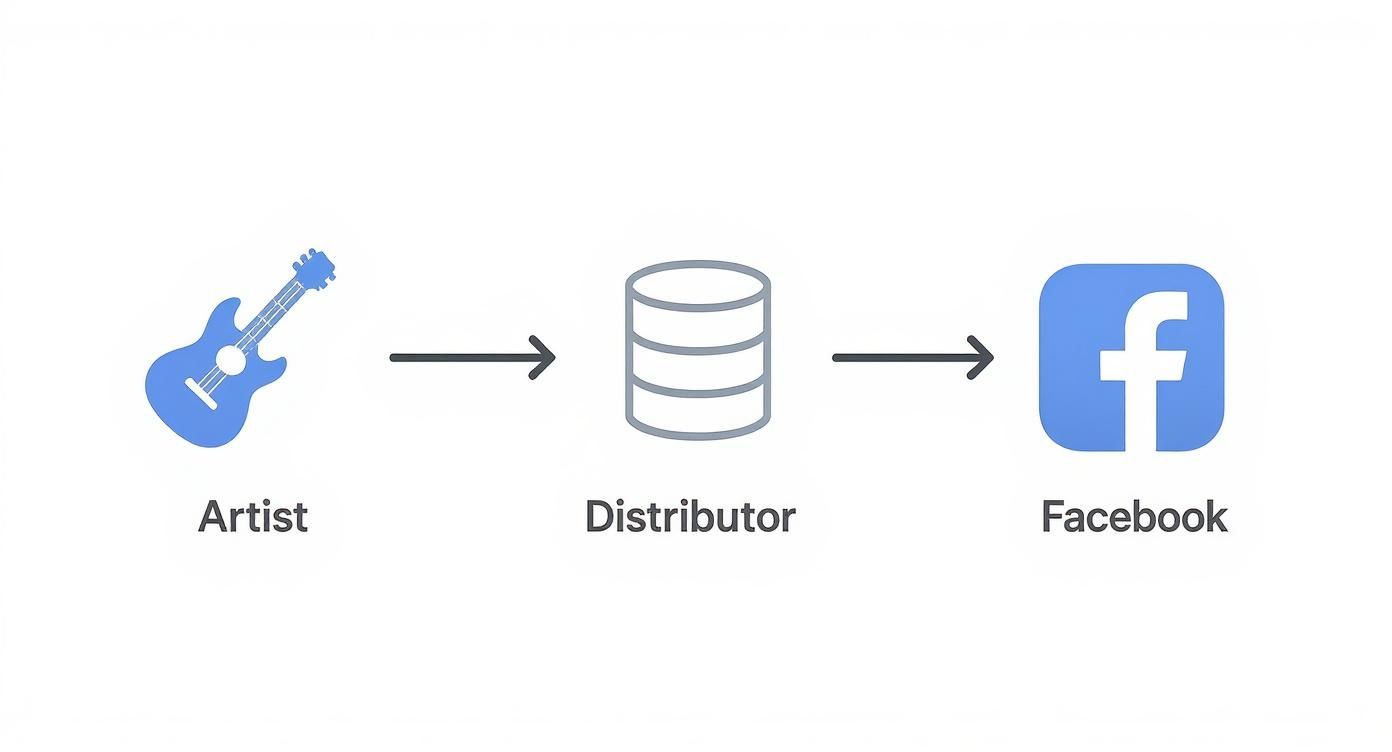
As you can see, the distributor is the critical intermediary that gets your music properly formatted and delivered to Facebook and Instagram's licensed audio library.
Choosing Your Distributor
The first step is picking the right partner for your music career. Several excellent distributors can get your music onto Facebook, each with its own business model and set of features.
- TuneCore: A go-to for many artists, TuneCore usually charges an annual fee for each single or album but lets you keep 100% of your royalties.
- DistroKid: This one is famous for its subscription model. You pay one yearly fee for unlimited uploads and also keep all of your earnings.
- CD Baby: They typically operate on a one-time fee per release and take a small commission on royalties, but they offer a broad suite of services beyond distribution.
Your best choice really comes down to your release strategy. If you're constantly putting out new music, a subscription like DistroKid is probably the most economical. But if you release music less frequently, a per-release fee from TuneCore or CD Baby might make more sense.
To help you decide, here's a quick comparison of some of the top players in the game.
Digital Distributor Feature Comparison
| Distributor | Pricing Model | Key Features | Best For |
|---|---|---|---|
| DistroKid | Annual Subscription | Unlimited uploads, fast distribution, 100% royalty payout, splits for collaborators. | Prolific artists and bands releasing music frequently. |
| TuneCore | Per-Release (Annual) | 100% royalty payout, publishing administration, detailed sales analytics. | Artists focused on maximizing revenue from fewer, high-quality releases. |
| CD Baby | One-Time Fee + Commission | Physical distribution (CD/vinyl), sync licensing, no annual fees. | Artists wanting a one-stop-shop for both digital and physical releases. |
| Amuse | Free & Subscription Tiers | Free distribution option, 100% royalties, artist-friendly app, data-driven A&R. | Emerging artists starting out or those on a tight budget. |
Ultimately, the right distributor aligns with your budget, release schedule, and long-term career goals. Do your homework and pick the one that feels like the best fit.
Preparing Your Music for Upload
Once you've selected a distributor, it's time to get your assets in order. Precision is key here.
You'll need a few things ready to go:
- High-quality audio files (usually .WAV format)
- Your album or single cover art, which must meet specific size and resolution requirements (3000x3000 pixels is a safe bet)
- Complete and accurate metadata
Metadata is the lifeblood of your music's digital identity. It includes your artist name, song titles, release date, genre, and the all-important ISRC (International Standard Recording Code) for each track. Flawless metadata ensures your music is correctly identified across all platforms and, crucially, that you get paid when it's used.
After your music is live, your job isn't quite done. Now it's time to promote it! Announce to your followers that your new track is available in the Facebook and Instagram music library. Create your own Stories and Reels using the song to show them how it's done.
A strong call-to-action can turn your listeners into your best promoters. For more ideas on building a following, check out our guide on how to attract fans to your music profiles.
Troubleshooting Common Music Issues on Facebook
Even when you do everything right, adding music to Facebook can sometimes feel like a moving target. You might spend an hour editing the perfect Reel, only to have the audio muted moments after posting. Or a feature you use every day, like the music sticker, suddenly vanishes.
It’s frustrating, but there’s usually a logical explanation. Let's walk through some of the most common headaches and how to fix them.
The usual suspect behind most music-related problems is copyright. Facebook's system is constantly scanning for protected material, and it's notoriously strict. If you upload a video with a commercial track playing—even if it's just background noise at a party—the platform's bots will likely catch it. The result? Muted audio, a video blocked in certain regions, or even a copyright strike against your account.
Why Is My Music Sticker Gone?
One of the most common questions I hear is, "What happened to my music sticker?" It’s here one day and gone the next. This isn't usually a bug; it's almost always a licensing issue.
Here’s what’s likely happening:
- Regional Restrictions: Music licensing is a tangled web of international agreements. A song that’s cleared for use in the US might be off-limits in the UK or Australia, causing the sticker to disappear or have a limited library depending on your location.
- Business vs. Personal Accounts: If you run a Business Page, you’ve probably noticed your music options are different. Meta steers business accounts toward its Sound Collection, a library of royalty-free tracks that are safe for commercial use. This is to protect both you and them from lawsuits, but it means you lose access to the pop hits available on personal profiles.
- App Glitches: Sometimes, it really is just a bug. Before you panic, head to the App Store or Google Play and make sure your Facebook app is updated. A simple update often restores missing features.
The Problem of Muted Audio
There's nothing more deflating than getting that dreaded notification: "Your video has been partially muted because it may contain music you don't own." This is Facebook's Content ID system in action. It detected a piece of copyrighted audio in your video and automatically stripped it out.
It doesn't matter if you only used 15 seconds of a song or if it was playing quietly from a speaker across the room. The system is designed to find it.
Key Takeaway: You can't just rip your favorite song and add it to your video. The only foolproof way to avoid muted audio and copyright flags is to stick to the music available in Facebook's official libraries for Stories and Reels, or use the Meta Sound Collection for longer videos.
With organic reach always in flux, getting these details right is crucial. Music is a powerful tool for grabbing attention. Consider that Facebook ads still pull a solid average click-through rate of 2.53%, and a well-chosen track can make a Reel pop. To stay ahead, it's worth understanding the current state of social media reach for artists.
Your Top Facebook Music Questions, Answered
Let's be honest, figuring out the ins and outs of using music on Facebook can sometimes feel like a puzzle. You know what you want to do, but the platform's rules and features can be a little confusing. I've heard these questions a lot, so let's clear up some of the most common ones.
Why Can’t I Find the Song I Want?
This is easily the most frequent question, and the answer almost always comes down to one word: licensing.
Meta has hammered out deals with most of the major music labels, but these agreements are incredibly complex and often differ from one country to another. A song that’s available for a user in the US might not be licensed for someone in Germany.
If you search for a track and it doesn't appear, it simply means Facebook doesn’t have the rights to offer it in your specific region at this moment. These deals are always evolving, so it might show up later. For now, your best move is to explore the massive library that is available and find a great alternative.
Can I Just Use a Song from My Spotify or Apple Music Account?
This is a definite no-go. You can't pull audio directly from third-party streaming services and drop it into your Facebook posts, Stories, or Reels. That would be a direct copyright violation.
You have two safe options:
- Use the licensed music library provided directly within Facebook's tools.
- Use audio from the Meta Sound Collection.
The golden rule here is pretty simple: if you didn't create the music yourself or purchase a specific license to use it, you have to stick with the options Facebook gives you. It's the only guaranteed way to keep your content from being muted or taken down.
What’s Different for Business Pages?
If you run a business page, you’ve probably noticed your music options look a little different. Commercial accounts are intentionally given access to the Meta Sound Collection instead of the library of popular hits.
This is actually a good thing—it's designed to protect you. The Sound Collection is filled with high-quality, royalty-free music and sound effects that are pre-cleared for promotional and commercial use. Using a chart-topping pop song in an ad is a quick way to get a copyright strike, so Facebook steers businesses toward this safer, legally compliant library.
For an even deeper look at these kinds of questions, our comprehensive FAQ page has more detailed answers.
At OohYeah, we believe artists should be in the driver's seat of their own careers. We provide the tools you need to distribute your music and connect with fans on your terms. See how we can help you take control of your sound at https://oohyeah.app.



