
How Do I Get My Songs on Spotify Your Complete Artist Guide
Struggling with how do I get my songs on Spotify? This guide provides actionable steps for preparing, distributing, and promoting your music for success.
December 22, 2025
Music Marketplace Advisor
Buying & SellingSo, you want to get your music on Spotify? The only way to do it is through a digital music distributor. Think of them as the bridge between your finished song and the streaming platforms. You hand over your professionally mixed and mastered tracks, cover art, and release info to a service like DistroKid or TuneCore, and they handle the technical side of getting it delivered.
Setting the Stage for Your Spotify Debut
Before you rush to upload, let's take a moment to understand the world you're about to enter. The sheer scale of Spotify is mind-boggling, and knowing the numbers is the first step in creating a realistic release strategy.
As of early 2025, the platform is home to over 126 million songs. Every single day, another 60,000 new tracks are added to that number. That's the competition. The numbers can be a tough pill to swallow: only about 1.58 million artists—or 14% of everyone on the platform—have more than 10 monthly listeners.
This isn't to scare you off, but to ground you in reality. To have any shot at cutting through the noise, your entire release package has to be airtight. It's like building a house; if the foundation is cracked, everything else will eventually crumble. For your music, that foundation rests on four crucial pillars:
- Pristine Audio Quality: Your final tracks must sound incredible.
- Accurate Metadata: This is how you get discovered and, more importantly, how you get paid.
- Compelling Cover Art: It’s the visual first impression that gets someone to press play.
- Essential Tracking Codes: These are the digital fingerprints that track every stream and sale.
The Non-Negotiable Step: Professional Mixing and Mastering
You could have the best song in the world, but if it sounds weak or muddy next to a major label release, listeners will hit "skip" without a second thought. This is where a professional mix and master becomes non-negotiable.
Mixing is the art of balancing all the individual instruments and vocal tracks into one cohesive, powerful sound. Mastering is the final coat of polish, ensuring your song is loud enough, clear enough, and sounds great on everything from a car stereo to cheap earbuds.
It’s absolutely vital to learn how to create high-quality audio files that meet the technical specs. Your distributor will require lossless formats like WAV or FLAC (usually at 16-bit, 44.1 kHz) to make sure no audio quality is lost in translation.
Key Takeaway: Skipping a professional master is like showing up to a job interview in sweatpants. It tells the world you're not serious, and in a sea of perfectly polished tracks, yours will get drowned out.
Your Music's Digital ID Card: Metadata and Codes
Metadata is simply all the data attached to your music files—artist name, song title, release date, genre, and songwriter credits. Getting this information perfect from the start is critical. One small typo can send your music to the wrong artist's profile or, even worse, send your royalties to someone else.
Beyond the basics, there are two other codes you need to know about: ISRC and UPC.
- ISRC (International Standard Recording Code): This is a unique 12-character ID for a single recording. Think of it as a Social Security number for your song. It allows every single stream to be tracked accurately across the globe.
- UPC (Universal Product Code): This is the barcode for your entire release—the single, EP, or album as a whole product.
The good news? You almost never have to worry about buying these yourself. Nearly every digital distributor will generate ISRCs and UPCs for you as part of their standard upload process. Your only job is to triple-check that every piece of information you enter is 100% accurate before you confirm the submission.
Choosing the Right Music Distributor for Your Goals
Alright, you've got your mastered tracks, killer artwork, and all the metadata lined up. Now comes the big decision: picking your partner to get that music out into the world. You can't just upload a song to Spotify yourself, so a digital music distributor is your essential connection. They’re the bridge between your studio and the hundreds of streaming platforms and digital stores globally.
The market is flooded with options, and they all operate a little differently. Don’t get swayed by flashy ads. The best choice for you comes down to your personal goals, how often you plan to release music, and what your budget looks like.
Before you dive in, a quick check of your assets is always a good idea. This simple flowchart can help confirm you've got everything ready to go.
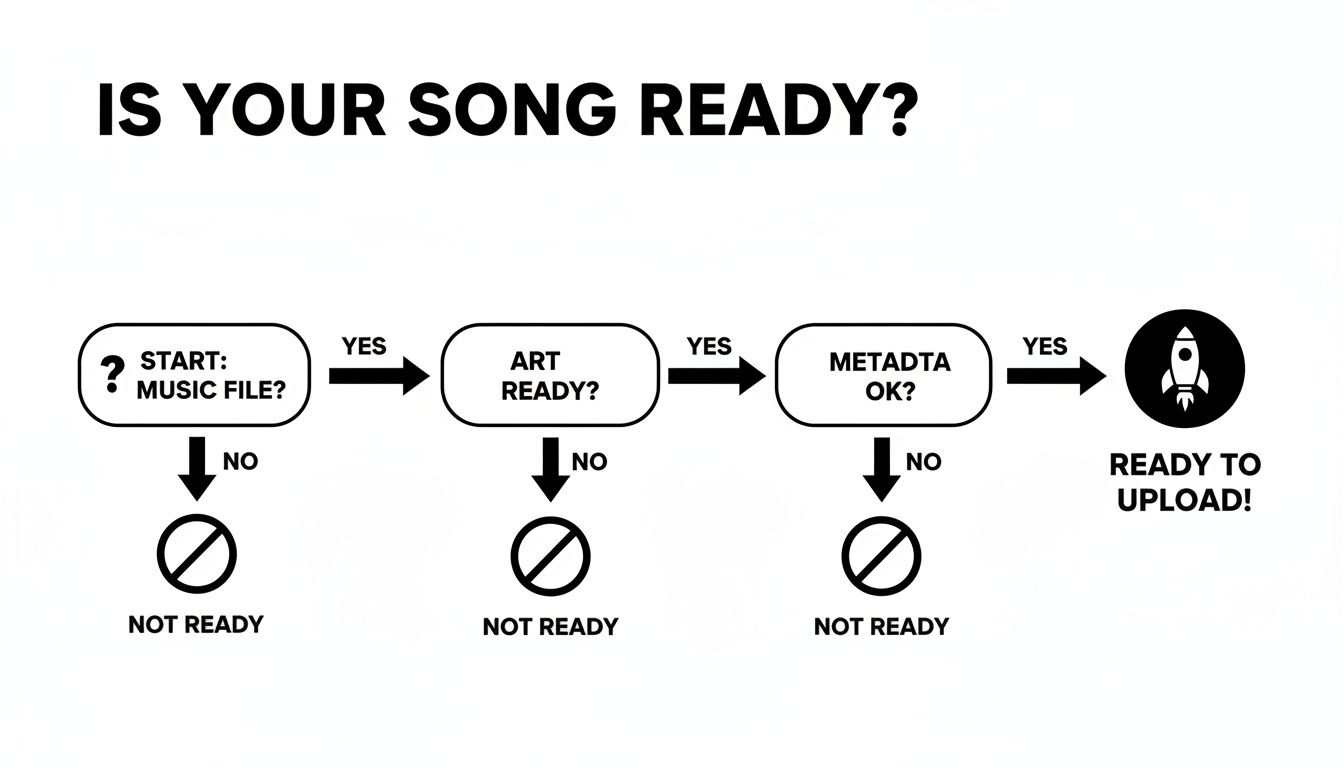
Having your high-quality audio, cover art, and metadata locked in is non-negotiable for a smooth upload.
Understanding the Different Fee Structures
Distributors typically fall into two main camps when it comes to pricing. Knowing the difference is crucial for managing your money as an independent artist.
First, there's the annual or subscription-based fee. Services like DistroKid are famous for this model. You pay one flat fee each year—say, around $23—and you can upload as many songs and albums as you want. This is a no-brainer for prolific artists planning a steady stream of releases.
The other common approach is a one-time fee per release. CD Baby is a classic example. Here, you’d pay a fee for each single (around $10) or album you distribute. This can be a smarter financial move if you release music less frequently, maybe just a single or two a year, since you avoid a recurring subscription.
My Two Cents: Take a hard look at your release schedule for the next year or two. If you think you'll drop more than two singles, the annual subscription model almost always ends up being cheaper.
Royalties, Support, and the All-Important Extras
Beyond the upfront cost, the royalty split is where you really need to pay attention. Most modern distributors, including DistroKid and TuneCore, let you keep 100% of your royalties, which is a huge win for indie artists. Some others, especially those with no upfront fees, might take a commission—often around 15%—from what you earn. Always read the fine print.
But the service doesn't stop at just getting your music online. The extra features and support can make or break your experience.
- Customer Support: When something goes wrong—and it can—how fast can you get a real human to help you? A delayed release because of a technical hiccup is a nightmare, so good support is priceless.
- Playlist Pitching: Does the distributor have a built-in tool to submit your track directly to Spotify's editorial team? This can save you a ton of time and hassle.
- Automated Royalty Collection: Some services will help you chase down songwriter royalties from PROs or handle the mechanical licenses needed for cover songs.
- Platform Integrations: How well do they play with other tools in your ecosystem? A good distributor connects smoothly with platforms like OohYeah, where you can find new ways to monetize your music and engage with your audience.
Comparing Popular Music Distributors
To make this a bit easier, here’s a quick breakdown of some of the major players and what they offer. This isn't an exhaustive list, but it covers the go-to options for most independent artists.
| Distributor | Pricing Model | Royalty Split | Key Features |
|---|---|---|---|
| DistroKid | Annual Subscription | 100% to Artist | Unlimited uploads, fast distribution, automatic royalty splits, Spotify for Artists instant verification. |
| TuneCore | Annual Subscription | 100% to Artist | Comprehensive publishing administration, social media tools, detailed analytics, sync licensing opportunities. |
| CD Baby | One-Time Fee Per Release | 91% to Artist | Physical distribution (CD/vinyl), publishing admin add-on, sync licensing, no annual fees. |
| Amuse | Free & Subscription Tiers | 100% to Artist | Free distribution option (with a 15% royalty split), pro-tier for faster releases and more features, funding for select artists. |
| Ditto Music | Annual Subscription | 100% to Artist | Pre-save campaigns, chart registration, VEVO channel setup, promotional support. |
Ultimately, the "best" distributor is the one that fits your specific plan and workflow. Whether you're all about low-cost, high-volume releases or you need a full suite of marketing tools at your fingertips, knowing what you need will lead you to the right partner.
For a much deeper look at the pros and cons of each service, our detailed guide on how to choose the right music distribution service breaks it all down to help you find that perfect fit.
Navigating the Upload and Release Process
You’ve picked your distributor and have all your assets lined up. Now for the exciting part: actually uploading your music. This is the moment your track stops being a file on your hard drive and starts its journey to listeners around the world. While every distributor's dashboard is unique, the core information they need is always the same.
You'll be walked through a form to enter all that metadata you carefully organized earlier—artist name, song title, songwriter credits, genre, and so on. Then, you'll upload your high-quality WAV or FLAC file and that stunning 3000x3000 pixel cover art. It feels straightforward, but getting the details right here is absolutely critical.
Avoiding Common Upload Pitfalls
I've seen it happen time and time again—a small typo or a missed detail during the upload stage can cause major headaches. We're talking about anything from a simple release delay to misdirected royalties or even a flat-out rejection from the stores. Double-checking your work isn't just a good idea; it's essential.
Pay close attention to these frequent problem spots:
- Incorrect Songwriter Information: Make sure every single co-writer is listed with their full legal name and publishing details. Getting the splits wrong can lead to royalty disputes that are an absolute nightmare to resolve after the fact.
- Mislabeling Track Versions: Are you uploading an instrumental, a radio edit, or an explicit version? It has to be labeled perfectly. Mismatching the audio file with its description is one of the quickest ways to get your submission bounced back.
- Artwork Violations: Your cover art needs to be clean. That means no website URLs, social media handles, or streaming service logos. Spotify and Apple Music have strict rules about this.
If you want an even more detailed checklist, our guide on how to upload music breaks down every step to help you nail the submission on your first try.
The Power of a Strategic Release Date
One of the last things you'll do in your distributor's dashboard is select a release date. The temptation to click "as soon as possible" is strong, but trust me, that’s a rookie mistake. You need to set your release date a minimum of four weeks out.
That gap isn't just a buffer; it's your single most important strategic advantage. A four-week lead time gives your distributor plenty of time to process everything and deliver it to Spotify without any hiccups. More importantly, it opens the door to promotional opportunities that are completely lost with a rush job.
Expert Insight: As soon as your distributor delivers your track to Spotify's backend (which usually takes a few days), you can claim your Spotify for Artists profile. This is huge because it allows you to pitch your song directly to Spotify's editorial team for playlist consideration—something you must do before the release date.
This waiting period is your launchpad. It’s when you run pre-save campaigns, get your social media content ready, and coordinate with anyone else involved in the release. A release is more than just a song going live; it's an event. Giving yourself a month of runway transforms a simple upload into a professional launch, drastically improving your odds of getting noticed by fans and curators alike.
Taking the Reins: Your Spotify for Artists Profile
Once your distributor shoots your music over to Spotify, your next job is to claim your digital real estate. Your Spotify for Artists profile isn't just a placeholder; it's your storefront, your digital press kit, and your direct line to the people who matter most—your listeners. Simply having your songs live isn't the goal. You need to take control of your presence.
Claiming your profile is absolutely essential for any artist who's serious about their career. Your distributor will kickstart this process. As soon as they deliver your music to Spotify (which happens well before your actual release date), keep an eye out for an email with instructions. You might also find a direct verification link right inside your distributor's dashboard. Jump on this immediately.
Building Your Artist Hub From the Ground Up
Think about it: an unmanaged profile with a generic photo and a blank bio screams amateur. It tells potential fans you’re not invested. Your first mission is to turn that blank canvas into a compelling home base that tells your story and feels authentic to your brand.
Start with the basics. Get these dialed in right away:
- Your Artist Bio: This is your space to connect. Don't just list accomplishments; tell a story. You have 1,500 characters to explain who you are, what drives your music, and what makes you different.
- Profile and Header Images: First impressions count. Upload professional, high-resolution photos that match your artistic vibe. That header image is valuable real estate—use it to show off your visual style.
- Artist Pick: Pin a track, album, or playlist to the top of your profile. It's the perfect way to spotlight your new single, a classic track, or even a playlist of songs that inspired you.
- Social Media Links: Make it easy for listeners to become followers. Connect your Instagram, X (formerly Twitter), Facebook, and official website so they can find you beyond Spotify.
This is your command center, the Spotify for Artists dashboard. It's where you'll manage your presence and dig into your data.
From here, you have direct access to your catalog, audience analytics, and promotional tools. It really is the central hub for your entire Spotify strategy.
Digging for Gold in Your Audience Data
Beyond making your profile look good, Spotify for Artists is a ridiculously powerful analytics tool. This isn't about vanity metrics or chasing stream counts. It's about gathering real intelligence that can inform your next career move. The "Audience" tab is a goldmine.
You can drill down into incredibly specific data about who is listening and where:
- Age and Gender: Is your audience who you think it is? Knowing this helps you craft social media content and ad campaigns that actually hit the mark.
- Top Countries and Cities: Find out where your music is taking off. A surprising hot spot in a city you've never even heard of could be the perfect place to plan your next tour.
- Listeners Also Like: This is huge. See what other artists your fans listen to. It’s an amazing resource for finding like-minded collaborators or identifying other bands to tour with.
Here's a real-world example: An indie artist I work with saw a random listening spike in São Paulo, Brazil. By digging into the data, they discovered their song had been added to a big, user-curated playlist there. They immediately pivoted, running targeted ads in that city, connecting with Brazilian music bloggers, and eventually booking a small but packed show. All of that came from paying attention to their Spotify for Artists analytics.
This data turns marketing from a guessing game into a focused strategy. It tells you where your promotional budget will have the most impact, how to speak to your fans, and where your next big opportunity is waiting. Getting a handle on this tool is a massive step in not just getting your music on Spotify, but actually building a career from it.
Promoting Your Music and Building Momentum
So, your song is officially on Spotify. It’s a fantastic feeling, but hitting "publish" is just the starting line, not the finish. A track just sitting there is digital dust; our goal is to get people listening, sharing, and adding it to their own playlists. This is where we shift from creation to promotion and start making some noise.
This is precisely why we set that release date a few weeks out. Now that your track is in Spotify’s system and you’ve claimed your Spotify for Artists profile, you can access the most powerful tool on the platform: the editorial playlist pitch form.
Mastering the Art of the Playlist Pitch
Getting your song directly in front of Spotify's global team of editors is your single best shot at landing on those career-making playlists—think New Music Friday or huge genre-specific lists with millions of followers. You get one shot to pitch each release, and it has to be done at least seven days before your song goes live.
Writing a great pitch is a craft in itself. The editors want a story, not just a spec sheet.
- Go Beyond the Sound: Don't just list your influences. Tell them why you wrote the song. What’s the personal story behind it? What inspired the lyrics? That human connection is what makes a track memorable.
- Get Specific with Tags: The form lets you tag your song with up to three genres, plus various moods and styles. Be brutally honest and precise. If it's "melancholy indie folk" that’s perfect for a "rainy day," tag it exactly like that. This helps route your song to the right editor's ears.
- Show Your Work: Are you getting some blog coverage? Do you have a tour coming up or a cool social media campaign planned? Briefly mention any momentum you're building. It shows them you're invested in the track's success, too.
Pro Tip: Keep your pitch personal but punchy—150-250 words is the sweet spot. Think of it as your 30-second elevator pitch for an A&R exec. What are the key details that will make them stop what they’re doing and actually listen?
Beyond the Editors: The Power of User-Curated Playlists
While an editorial placement is the ultimate goal, don't sleep on the thousands of incredible independent curators out there. These playlists, run by bloggers, brands, and passionate music fans, can drive a ton of targeted streams from listeners who are already primed to like your music.
Finding them takes a bit of digital detective work. Search Spotify for playlists that feature artists in your niche. Scour the playlist description for contact info—you'll often find an email address or an Instagram handle. When you reach out, make it personal. A generic blast won't work. Mention a song you loved on their playlist to show you actually did your homework.
Pre- and Post-Release Promotion Tactics
A successful launch is about building a whole world around your release, not just dropping a link. You need to get fans excited before the song comes out and keep that energy going long after.
A pre-save campaign is non-negotiable. Tools like Hypeddit or Feature.fm let you create a landing page where fans can pre-save your track. The moment it goes live, it's automatically added to their libraries. This creates a big first-day spike in streams, which is a powerful signal to the Spotify algorithm.
Once release day hits, it's time to pour fuel on the fire.
- Social Media Blitz: Don’t just post the Spotify link. Share behind-the-scenes clips, talk about the lyrics, and encourage your followers to add the song to their Instagram stories. Make it an event.
- Activate Your Spotify Canvas: This is the short, looping video (3-8 seconds) that plays instead of your cover art. Tracks with a Canvas see a big lift in shares, saves, and overall engagement. It's a simple way to make your music more visually compelling.
- Collaborate and Cross-Promote: Team up with other artists in your scene. Do an Instagram Live together, shout out each other's new music, or build a collaborative playlist. Pool your audiences to grow together.
To really get the most out of your efforts, look into some of the best social media marketing apps to help you stay organized and consistent. The key is creating a steady drumbeat of activity that keeps your music front and center. For a deeper dive, check out our guide on how to market your music as an independent artist.
Remember, getting your music on Spotify isn't just about exposure; it's a real part of your business. Since its launch, Spotify has paid rights holders over $30 billion in royalties, becoming a primary source of income for the modern music industry. More importantly for us, nearly half of all payouts go to independent artists and labels, totaling over $5 billion. It’s a real, viable path to building a career.
Your Questions Answered
Getting your music out into the world can feel like navigating a maze, especially when it comes to the nitty-gritty details of digital distribution. You've poured your heart into the music, nailed the mix, and picked a distributor, but a few nagging questions always seem to linger. Let's clear up some of the most common hurdles artists face on the road to Spotify.
How Much Does It Cost to Put a Song on Spotify?
This is the big one, isn't it? The simple answer is that you don't pay Spotify directly. The cost is handled by your distributor, and their pricing usually falls into one of three buckets.
- Flat Annual Fees: This is the model used by popular services like DistroKid. You pay a single yearly fee—often around $23 per year—for unlimited uploads. If you're consistently releasing new music, this almost always works out to be the cheapest route.
- One-Time Per-Release Fees: Other distributors, like CD Baby, charge you for each individual single or album you upload. A single might cost you about $10. This is a solid choice if you only release music once in a while and don't want to be locked into a subscription.
- Commission-Based (No Upfront Fee): Some distributors will put your music up for free, but they take a cut of your royalties instead—typically around 15%. This can be a lifesaver if you have zero budget to start, but be warned: if your song blows up, that 15% will sting a lot more than a small upfront fee would have.
Just remember, these fees are only for distribution. They don't cover your other essential costs like mixing, mastering, or getting that killer cover art designed.
How Long Does It Take for My Music to Appear on Spotify?
Patience is a virtue here. While some services might brag about getting your track live in 24 hours, that's a rookie mistake. You should always plan for a lead time of at least three to four weeks before your release date.
Why so long? This window isn't just about giving the digital pipes time to work. This is your strategic setup period. It gives you the necessary time to claim your Spotify for Artists profile, get your pre-save links ready, and—most importantly—pitch your track directly to Spotify's editorial team for playlist consideration. You can't do that if your song is already live.
Key Insight: Rushing a release means throwing away your single best shot at landing on a major playlist. That four-week buffer is your most powerful marketing tool. Don't waste it.
Can I Upload a Cover Song to Spotify?
Absolutely, but you have to do it by the book. Releasing a song written by someone else means you legally need to secure a mechanical license. This is what ensures the original songwriters get paid for their work.
Luckily, this isn't nearly as complicated as it sounds. Most modern distributors have this process built right in. Services like TuneCore and DistroKid will obtain the license for you for a small fee, usually around $15 per song.
Don't even think about skipping this step. Uploading an unlicensed cover is copyright infringement, plain and simple. Your track will get yanked, and you could find yourself in legal trouble. It’s a risk that’s just not worth taking when the proper solution is so easy and affordable.
What Do I Do if Someone Uploaded My Song Without Permission?
It’s a gut-wrenching feeling to find your music on Spotify under someone else's name. It's theft. But you have the power to fix it.
Spotify has a dedicated Infringement Reporting form on its website. This is your first stop. To make your case, you'll need to prove you're the rightful owner. This is where having your official release data organized is crucial—your ISRC codes, the original release date, and links to your official profiles are your best evidence.
Your distributor is also your best ally here. They have teams that deal with this all the time. Open a support ticket immediately and give them all the details. The key is to act fast to protect your work and make sure every stream and every penny of royalty goes to the right place: you.
Navigating these issues is part of the journey, but it doesn't have to be a roadblock. Having the right tools and knowledge is what separates a hobby from a career. That’s why OohYeah was built—to give artists direct control over their music, rights, and money. When you're ready to build a sustainable future on your own terms, see how our music-first ecosystem can support you at https://oohyeah.app.



