
Music Download Fulfillment for Ecommerce Stores
Discover how music download fulfillment automation tools connect ecommerce orders, preorders, and release schedules to deliver the right tracks to fans on time.

November 28, 2026
FRANKLY with Frank Lee
A preorder shouldn’t mean a last-minute scramble to deliver downloads at release time. Music download fulfillment automation tools connect an ecommerce platform to delivery systems, using order details and release timing to give buyers access to the right music when it’s ready. The key is to align the preorder, release schedule, and delivery process.
Fans expect a smooth purchase and a download that arrives at the right moment. Automation can connect the steps, but it still depends on accurate product information and clear release settings. This article explains how these systems work, how preorders and timed releases fit into the workflow, and what to consider when choosing an approach. It also covers where manual checks still help, so you can deliver music without adding unnecessary friction for artists or fans.
Key Takeaways
- Map the ecommerce order event to the download delivery step, then confirm how the platform and API pass product and release details.
- Choose an automation approach based on how it connects checkout, payment status, and download access after purchase.
- Set a clear workflow for preorders and timed releases so delivery follows the release schedule rather than the purchase date alone.
- Consider OohYeah! Digital Music Downloads when you want to offer music directly to fans, with artist profiles and other creator offerings alongside downloads.
Ecommerce integrations and API connectivity
An ecommerce integration connects checkout to the system that stores and delivers music files. For example, after payment, a store can send an order event and pass the purchased track’s identifier to a fulfillment service. The connection must match each product to the correct audio file. A mislabeled identifier could deliver the wrong album or leave the buyer without access.
An API, or application programming interface, carries information between systems. A webhook can notify a delivery service when an order changes, such as from pending to paid. The fulfillment workflow then checks the event, finds the matching download, and provides access through the configured method. Clear rules for refunds, cancellations, and failed payments help ensure access reflects the order’s current status.
For US sales, copyright concerns rights in a recording, while licensing describes permitted uses and sales. Sales-tax treatment depends on the transaction and the jurisdictions where the store sells. Include rights documentation and tax handling in the ecommerce workflow rather than treating them as download settings.
Supported formats, download limits, and delivery options differ by tool. A platform may accept formats such as MP3, WAV, or FLAC, but its own specifications determine which files it can deliver. Check how the selected system handles a single track versus an album, whether buyers can download again, and whether delivery uses an account or a purchase email.
Automated delivery also brings link-sharing and piracy risks. A buyer could forward an email or share a download link, and a compromised account could expose purchase access. If the system supports them, controls such as authenticated access or expiring links may help. Choose safeguards that suit the delivery method.
Before launch, test a sample order from checkout through delivery. Confirm that the payment event maps to the right release, the buyer receives the intended files, and failed or refunded orders follow the store’s access rules. Document each system’s role, including checkout, the API connection, file storage, and delivery. This makes errors easier to trace and clarifies how a sale reaches the fan.
Which platforms automate music downloads after purchase?
Three types of platforms can support automated music delivery: hosted digital storefronts, ecommerce platforms with digital-product integrations, and custom stores connected through APIs. A hosted storefront combines product pages and download delivery. An ecommerce integration links an existing checkout to a separate delivery service. A custom setup offers more control over the connection, but someone must maintain it.
Start with the checkout your fans already use. If it supports a digital-download integration, map each music product to the correct file and set the action that follows successful payment. If you use a separate delivery service, confirm that both systems pass matching product and order identifiers. A track labeled “single” in one system must not map to an album in another.
Platforms vary in how they handle release timing, customer access, and order changes. For a preorder, the system must distinguish the purchase date from the date downloads become available. For a bundle, it should associate the order with every included item. Check how the platform handles refunds and failed payments, too, so access follows the store’s intended rules.
- Hosted storefront: Useful when you want checkout and digital delivery managed together.
- Integrated ecommerce store: Suits an existing shop that can connect to a digital delivery service.
- Custom API setup: Fits a tailored workflow that needs developer-led configuration and maintenance.
Before choosing, trace a sample order from the product page to buyer access. Record which platform tracks payment, which system stores the audio, and which sends the download instructions. If your release plan includes a preorder or bundle, test that scenario as well. This can expose integration gaps before fans encounter them.
Artists building a direct connection with fans can explore artist-focused music options as they consider their storefront approach.
How do automated music download delivery workflows work?
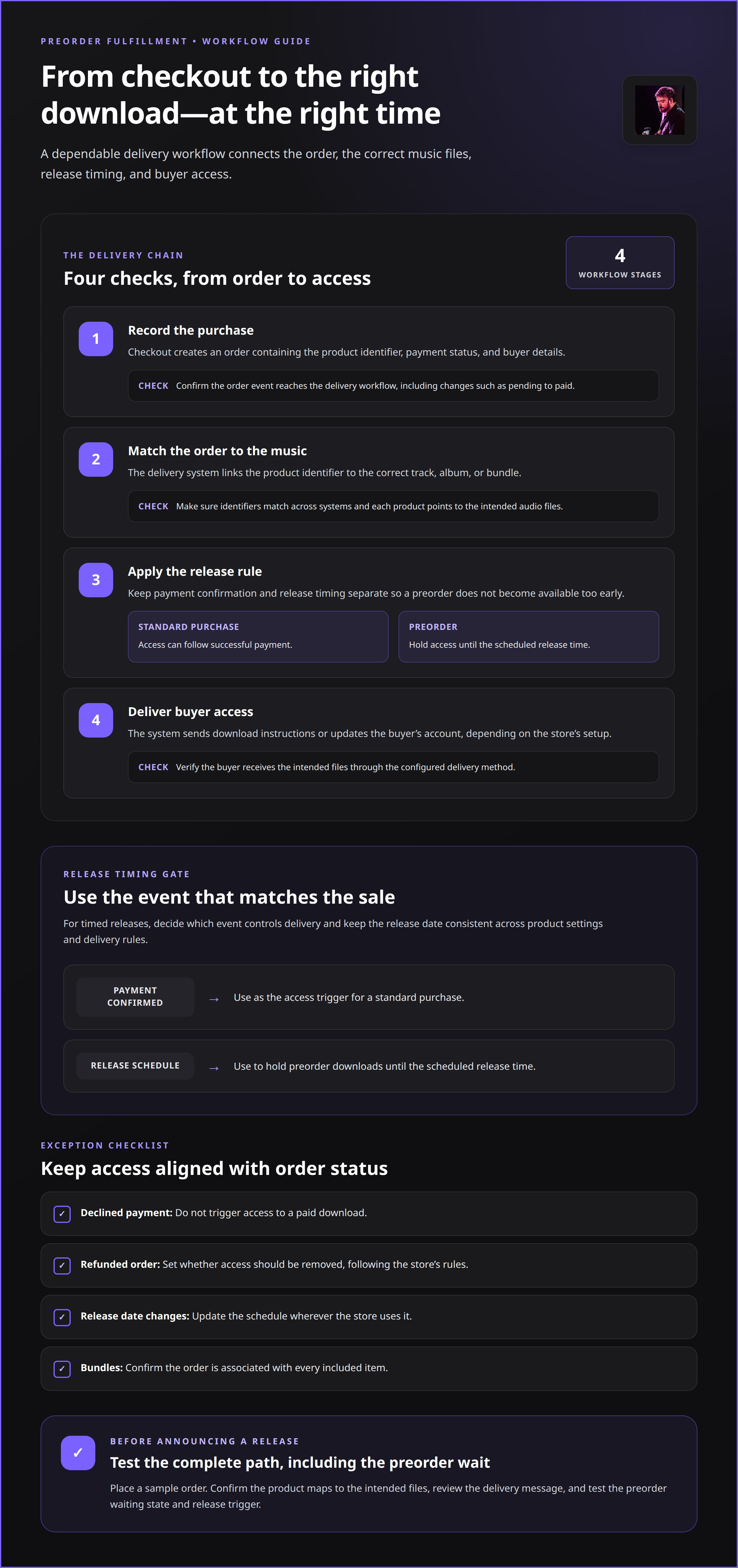
An automated workflow connects checkout to fan access through a series of steps. For example, a buyer orders an album before its release date. The store records the order, and the delivery system waits until the release condition is met. Keeping payment and release timing separate helps prevent early delivery.
- Record the purchase: Checkout creates an order with a product identifier, payment status, and buyer details.
- Match the release: The delivery system links that identifier to the correct track, album, or bundle.
- Apply the timing rule: A standard purchase can trigger access after payment. A preorder can wait for its scheduled release time.
- Deliver access: The system sends instructions or updates the buyer’s account, depending on the store’s setup.
For a timed release, define which event controls delivery: payment confirmation or the release schedule. If an album becomes available at a set time, the workflow should hold preorder access until then. Keep the release date consistent across product settings and delivery rules. A mismatch could make a download available too early or keep it unavailable after release.
Plan for exceptions. A declined payment should not trigger access to a paid download, while a refunded order may require access to be removed. If the release date changes, update the schedule wherever the store uses it. These rules keep order status aligned with the music the buyer can access.
Test the full process before announcing a release. Place a test order, confirm that the product maps to the intended files, and review the delivery message. For a preorder, test the waiting state and release trigger separately. Keep a record of failed events and order identifiers so a missed delivery can be traced without guesswork. This gives artists a clear way to monitor the path from checkout to fan access.
Music download fulfillment tool costs in the US
In the United States, the cost of a download workflow depends on how a store handles checkout, file delivery, and release timing. A hosted storefront may combine several functions, while an existing ecommerce store may need a separate delivery connection. Compare the complete workflow, not just a tool’s headline charge.
Pricing structures may include a recurring platform charge, a transaction-based charge, or separate setup and integration work. A custom API connection may also need ongoing maintenance. Costs depend on the setup and are provided after a quote request. Factors can include the store, integration requirements, file-delivery volume, and release rules.
Build a practical estimate by listing the systems involved, such as the ecommerce platform, payment processing, digital file hosting, and delivery automation. Then separate costs already included in your current store from those specific to music fulfillment. This helps prevent counting the same service twice.
- Store setup: A new storefront and an existing store can require different configuration work.
- Integration: A ready-made connection differs from a custom API workflow.
- Release logic: Preorders, timed access, and bundles can add setup requirements.
- File delivery: Storage and delivery needs depend on the files and sales workflow.
Connect each charge to a specific task. A setup charge should cover configuration or integration work. A recurring charge should specify the continuing platform functions it covers. If there is a transaction-based charge, find out which transactions count and how refunds affect the calculation.
For a clear comparison, write down your expected workflow before reviewing options. Include a standard paid download, a preorder, and a refund scenario. Then compare the services and charges needed to support each case. If you want to sell downloads directly to fans, explore direct music sales as one possible route.
OohYeah!: Digital Music Downloads
OohYeah! gives artists a direct way to offer Digital Music Downloads to fans. It may suit artists who want music sales alongside an artist profile, rather than treating each download as a standalone transaction.
Fans can discover an artist through Artist Profile Hosting, then support their work with downloads, merchandise, or Exclusive Content Access. OohYeah! enables artists to retain 100% of sales revenue from music and merchandise. This model suits creators who want a direct relationship with their audience and a place to bring their offerings together.
For a release built around a custom ecommerce API or timed preorder workflow, the right setup depends on the delivery process. OohYeah! is an option for artists who want to offer direct music downloads and connect with fans through its marketplace.
Contact OohYeah! to discuss your music download needs.
Build a release workflow that works for your fans
Your next release is an opportunity to make the buying experience feel as intentional as the music. Map the path you want fans to take, from discovering a track to accessing their purchase. Then choose music download fulfillment automation tools that support that path, rather than reshaping your release around a complicated system.
Keep the process clear for your audience and manageable for you. A direct connection with fans can support an independent way to share your work. OohYeah! brings artists and supporters together through its music marketplace, with artist profiles and merchandise available alongside downloads.
If you’re ready to explore a creator-focused approach, contact OohYeah! about music fulfillment. Your next release can start with a workflow built around the people who listen.
Frequently Asked Questions
What are music download fulfillment automation tools?
Music download fulfillment automation tools connect an online sale to the process of giving a buyer access to purchased audio. They can reduce manual work by linking an order to its digital product and delivery method. For example, a store selling singles and albums needs clear product records so each purchase grants access to the right music, not a similarly named release.
What are the best music download fulfillment tools for independent artists?
The right fit depends on how an artist wants to sell and connect with fans. An artist seeking a hosted profile and direct downloads may prefer a music marketplace, while a seller with an established store may prioritize ecommerce integration flexibility. OohYeah! offers Artist Profile Hosting, Digital Music Downloads, and a Merchandise Marketplace. Compare your workflow needs with the platform’s capabilities before choosing.
How do music download fulfillment tools compare on features and integrations?
Compare how each option handles product organization, buyer access, order records, and troubleshooting. One key difference is whether the tool is a complete storefront or connects to a separate ecommerce system. Consider whether an order record helps you identify a failed delivery and resolve it without confusing the issue with another album or artist release.
How do I set up automated music download fulfillment for an online store?
Prepare a clean catalogue before connecting delivery. Use consistent artist, release, and track names, and link each listing to its intended audio. Configure purchase and access rules, then test with a sample product. Review the buyer-facing message and resulting order record. If your store plans to offer a bundle or preorder, test that flow too.
What file formats, download limits, and delivery options do these tools support?
Support varies by tool. A platform may accept MP3, WAV, or FLAC; check its specifications, download limits, repeat-download rules, and whether access is through an account or purchase email.