Digital Liner Notes and Album Art Packages for Music Releases
Digital liner notes and album art download packages: compare file sizes, credits, bonuses, offer dates, and delivery details to choose the right release bundle.

November 27, 2026
FRANKLY with Frank Lee
A striking cover is only one part of a useful release package. Digital liner notes and album art download packages can bring cover files and release details together, but contents vary by offer. Purchased cover art commonly comes in 3000×3000 or 4000×4000 pixel files, and some downloads also include a 500×500-pixel version.
That range matters when preparing artwork for streaming profiles, social posts, or print. Artists also need to know what a download includes, how liner notes and credits are provided, and whether advertised bonuses or delivery timelines apply. A preview alone may not answer these questions.
This guide explains where to find album art, what to check in the included files, and how to interpret offer dates and delivery details. It also shows how to compare an advertised package with what you receive, so you can choose confidently and keep your release materials organized.
Key Takeaways
- Match the artwork file to its intended use, whether you’re preparing a digital release or materials for print.
- Look beyond the preview to understand what an instant download includes and how the delivered files differ from watermarked examples.
- Separate an offer’s validity window from its delivery timing so you know what applies and when to expect included artwork.
- Compare the package contents and license with your release needs. OohYeah! offers digital music downloads and lets artists retain 100% of their sales revenue from music and merchandise.
Finding album art for digital music releases
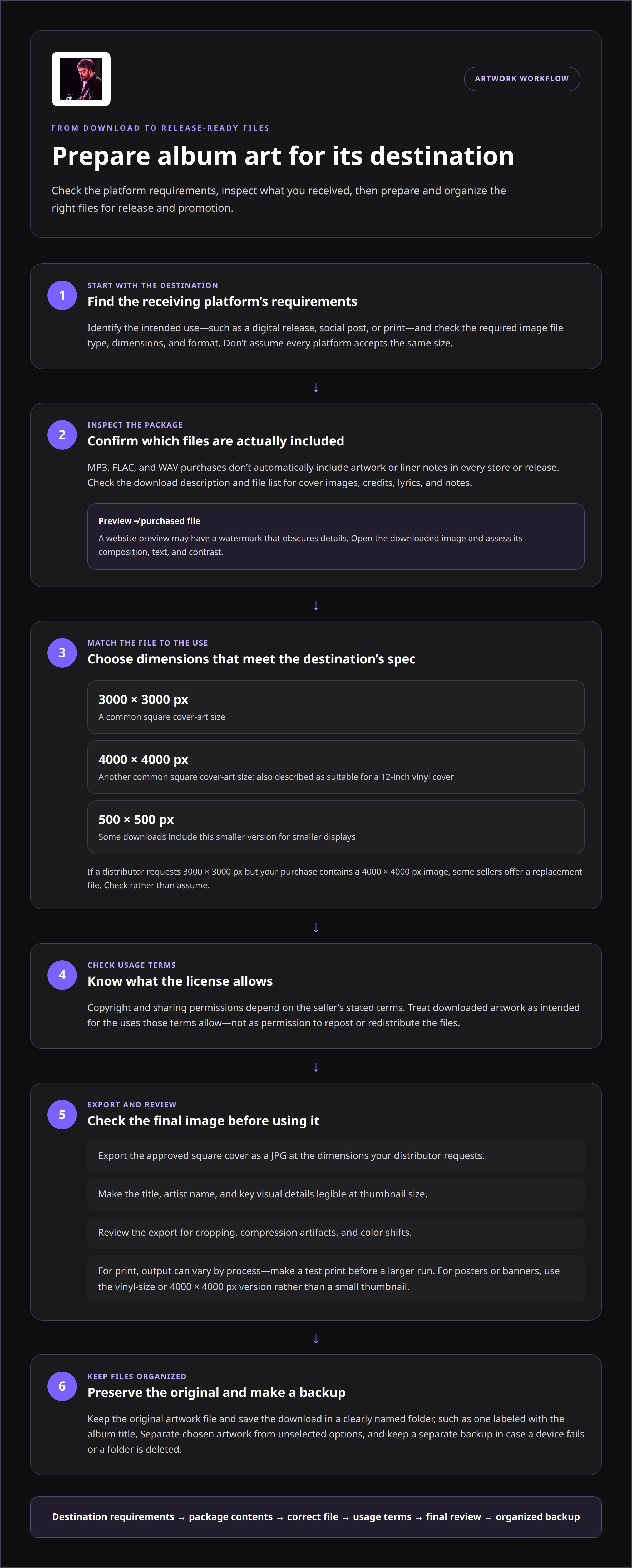
Begin with the release’s intended use and the receiving platform’s image requirements. Then choose artwork that matches the destination’s required file type, dimensions, and format.
Image Dimensions and Platform Compatibility
For digital distribution, purchased cover artwork commonly comes as a square 3000×3000 or 4000×4000-pixel image. Some downloads also include a 500×500-pixel version for smaller displays. Match the file to the distributor’s stated dimensions before uploading. If a distributor requests 3000×3000 pixels but a purchase contains a 4000×4000 image, some sellers offer a replacement file. Don’t assume every platform accepts the same size.
Download Inclusion and Sharing Rules
MP3, FLAC, and WAV purchases don’t automatically include liner notes or artwork in every store or release. Check the album’s download description and file list for cover images, credits, lyrics, or notes. Copyright and sharing permissions depend on the seller’s stated terms. Treat downloaded artwork as intended for the uses those terms allow, not as permission to repost or redistribute the files.
Choose artwork that fits the release’s mood, not just its genre label. For example, minimalist brutalist templates suit a stark electronic or experimental presentation, while grunge textures may fit a raw rock aesthetic. Template dimensions and resolution can vary, so check the product details before downloading. Its listed styles range from minimalist brutalism in Volume 1 to grunge textures with live stipple effects in Volume 2, and refined stipple effects in Volume 3.
For final JPG files, export the approved square cover at the dimensions your distributor requests. Keep the title, artist name, and key visual details legible at thumbnail size. Review the JPG after export for cropping, compression artifacts, and color shifts. A 4000×4000-pixel file is also described as suitable for printing a 12-inch vinyl cover, but print output can vary by process. Make a test print before committing to a larger run.
For large-format materials such as posters or banners, use the vinyl-size or 4000×4000-pixel version rather than a small thumbnail. If you are adapting artwork for physical packaging or promotional merchandise, specialized printer media from durafastlabel.com can help maintain accurate color and crisp detail on in-house prints. Keep the original artwork file too, so you can create correctly sized versions for each release platform and promotional use.
Instant downloads
An instant download turns a digital purchase into files you can access on a computer. The Mega Album Art Pack offers access to over 200 cover art images. Its advertised bonus adds over 30 additional images. That selection gives artists more visual directions to consider, from alternate moods to distinct release concepts. Treat the image count as a starting point, then inspect the included files before choosing artwork for a release.
Open the download and review its folders. Sort images by filename or preview to compare options without losing track of your favourites. For example, set aside one image for the album cover and another for a social post. Keep the original filenames while reviewing, as they may help identify versions later. This makes a large collection easier to navigate.
Distinguish between a website preview and the purchased file. Previews on a seller’s website may have watermarks, while purchased files may not. A watermark can obscure visual details, so don’t judge the final image by the overlay alone. Open the downloaded version and assess its composition, text, and contrast before deciding whether it suits your release.
You can download the pack’s images and review them on your usual computer. Keep them in a clearly named release folder, separating chosen artwork from options you haven’t selected. For several releases, label each folder with the album title. This makes the right image easier to find and reduces the chance of using artwork from another project.
Before using a downloaded image, read the seller’s usage terms. Download access alone doesn’t explain every permitted use. Keep the terms with your release records, especially if you plan to adapt the artwork for different materials. Digital liner notes and album art download packages can bring useful assets together, but the file list and usage conditions determine what you receive and how you may use it.
Offer validity and delivery timing
One practical risk is losing your copy of purchased downloads. If a device fails or a folder is deleted, you may lose convenient access to the album files and artwork. Save the original download in a clearly named folder and keep a separate backup. For example, include the album title and artist name in the folder name. This helps protect your working files if one device fails.
Offer dates and delivery estimates answer different questions. An offer’s end date tells you when its terms stop applying. A delivery estimate tells you when included files should arrive after purchase. The free social media artwork offer was valid until June 30, 2026. That date has passed, so it should not be treated as a current offer. Read each offer’s terms and date before factoring a bonus into your release plan.
Timing can also differ between the original download and custom artwork versions. The included social media artwork versions are stated to be delivered within 3 business days. Plan around that window if your release schedule depends on those versions. For example, leave room between receiving the cover files and scheduling social posts. Keep the delivery estimate separate from any date when an offer expires.
Use a short record for each purchase: save the receipt, offer details, delivery estimate, and downloaded files together. Add the album title to the folder name, then note whether social media versions remain outstanding. If a stated 3-business-day window passes, those saved details help you identify the order and the promised files. This approach keeps the offer’s deadline, delivery timing, and your own backup plan distinct.
Product price and advertised value
Assess an artwork package by what its listed price covers, not by its headline value alone. Separate the core package, optional add-ons, and license terms. A package price and an extended commercial license are separate line items. An explicit-content logo may also be offered as a paid add-on. Include each separate cost when comparing the total.
Start with the files and rights you need. If you only need a cover image for a digital release, an extended commercial license may not suit your use. If you plan broader commercial use, compare the license terms with that plan. Advertised value matters only when the included assets and permissions fit your project.
Use a simple comparison before buying:
- List the artwork files and extras included in the base package.
- Separate optional services, such as adding an explicit-content logo.
- Read what the standard license permits, then compare it with the extended license.
- Check whether advertised bonuses are included in the offer you’re considering.
Next, assess the advertised value against practical use. A large image library has little value if its styles don’t suit your release, and a bonus matters only if you can use it. A commercial license adds value when its permissions fit your intended campaign. Keep the offer’s terms beside your comparison, especially if a promotion has a validity date.
Don’t treat a crossed-out figure or an advertised bundle value as proof of savings by itself. Compare the actual contents, optional charges, and license scope. That reveals whether the offer fits your release, rather than whether its headline sounds impressive. If direct fan support is part of your release plan, share your music directly with listeners through a platform built around artist-fan connections.
OohYeah!: Digital Music Downloads
OohYeah! gives artists a way to offer digital music downloads directly to supporters. Use the platform when you want fans to access your music and support your work in one place. Artist Profile Hosting helps present your music, while Exclusive Content Access lets you share material with your fanbase.
You can also use the Merchandise Marketplace to offer merchandise alongside your music. OohYeah! enables artists to retain 100% of sales revenue from music and merchandise. That makes it a useful option for creators who want a direct connection with listeners and more control over their sales.
If you’re ready to share your music directly with fans, explore OohYeah!’s marketplace.
Shape the next release around your fans
Your next release can be more than a set of files. Treat digital liner notes and album art download packages as part of a broader plan for how listeners discover, understand, and support your music. Decide what you want fans to experience, then make each release element support that connection.
OohYeah! offers artists Artist Profile Hosting, Digital Music Downloads, and a Merchandise Marketplace to help build that connection. Choose the option that fits your goals, whether you’re preparing a new release or creating a home for your music and merchandise.
Take the next step on your terms. Contact OohYeah! about your package and explore how to bring your music closer to the people who support it.
Frequently Asked Questions
Which digital music stores include liner notes and album art with downloads?
Contents vary by store and can differ between albums in the same store. Before purchasing, read the individual release’s download description and included-file list. Look for specific mentions of cover artwork, credits, lyrics, or liner notes. One album download, for example, may include a cover image, while another provides audio files only. The release details show what comes with the purchase.
What file formats and image resolutions are used for digital liner notes and album artwork?
Artwork downloads may use different image formats, so match the actual file to your intended platform. Commonly listed cover dimensions include 3000×3000 and 4000×4000 pixels; some packages also provide 500×500-pixel images. Templates may use other specifications, such as 3500 x 3500 pixels at 150 DPI. Liner notes are separate documents, so review their file names and formats alongside the artwork files.
How much do digital albums with liner notes cost in the United States?
There is no single fixed US price for digital albums with liner notes. The price depends on the release and what the purchase includes, such as audio files, artwork, notes, or additional content. Compare the listed contents and permissions, not just the headline price. A standard album download and a package with extra release materials meet different needs, so weigh each offer against what you plan to access and use.