How to Set Up Preorder Campaigns for Digital Music Downloads in 2026
Master setting up preorder campaigns for digital music downloads in 2026. Learn setup timelines, retailer rules, and smart tips to boost fan trust and sales.

October 1, 2026
FRANKLY with Frank Lee
What if your preorder link goes live, but fans can’t tell when they’ll receive the music? Setting up preorder campaigns for digital music downloads is about more than opening sales early. It means making a clear promise about what fans can buy, when they can access it, and what they’ll receive while they wait.
It’s reasonable to feel unsure. Platforms handle preorders and pre-saves differently, and release dates, instant-access tracks, and delivery settings can vary. A long campaign can also lose momentum if fans don’t have a clear reason to stay engaged.
This guide walks through a practical setup sequence, from choosing a release date and checking platform requirements to preparing promotional assets and planning campaign updates. You’ll learn how to compare retailer preorders with direct-to-fan download options, what to verify before sharing a link, and how to set realistic expectations for release-day delivery. The goal is a campaign fans can understand and trust, and a release plan you can manage with confidence.
Key Takeaways
- Learn the difference between a paid preorder, a pre-save, and a free preview so fans know exactly what they’re committing to.
- Follow a clear setup sequence for setting up preorder campaigns for digital music downloads, and verify each platform’s eligibility, lead times, and delivery terms.
- Compare retailer reach with direct-to-fan sales to choose a route that fits your audience and the level of setup control you need.
- Build a flexible campaign timeline around confirmed platform deadlines, with each update giving fans a fresh reason to pay attention.
- Prepare a release-day checklist for testing purchase links, files, and access, and communicating clearly if delivery is delayed.
What a digital music preorder campaign does, and what fans should expect
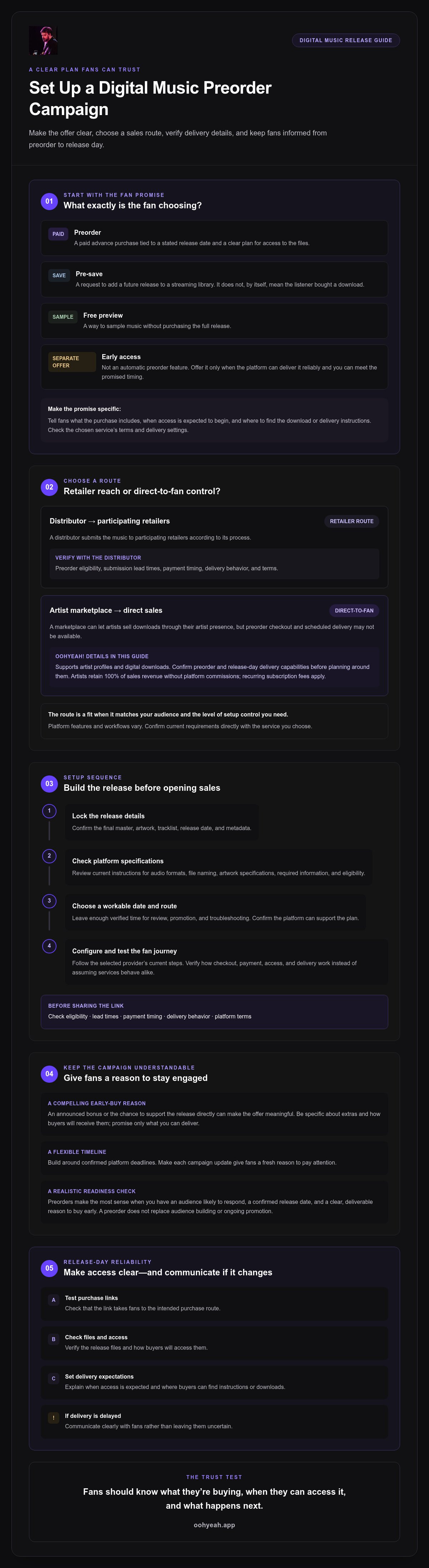
A digital music preorder is a paid advance purchase of a release, tied to a stated release date and a clear plan for when and where the buyer can access the files. In short: a preorder is a purchase made before release; a pre-save is a request to add music to a streaming library when it becomes available. The distinction matters. Fans should know whether they’re paying now, saving a streaming release for later, or simply signing up to hear from you.
Set clear expectations before you promote the link. Tell fans what the purchase includes, when access is expected to begin, and where to find the download or delivery instructions. For example, if an album is scheduled for a Friday release, explain whether files become available that day and whether the store will email access details or show the purchase in an account. Check the chosen service’s terms and delivery settings rather than assuming every platform works the same way.
A bonus track, artwork, or other extra can give fans a reason to buy early. Be specific about what you’re offering and how buyers will receive it. Wikipedia’s overview of the pre-order incentive explains how an added benefit can encourage advance purchases, but only promise extras you can deliver as described.
Preorder, pre-save, and early access: what is the difference?
A preorder is a transaction. A pre-save typically signals that a listener wants a future release added to a streaming library, and does not by itself mean they’ve bought a download. A free preview lets someone sample music without purchasing the full release. Early access is a separate offer, not an automatic feature of a preorder. Offer it only if your sales platform lets you provide access reliably and you can meet the stated timing. Available actions vary by store and service.
When does a preorder campaign make sense for an independent release?
Preorders make the most sense when you have an audience likely to respond, a confirmed release date, and a compelling reason to buy early. That reason might be an announced bonus or the chance to support the release directly. It doesn’t have to be elaborate, but it must be clear and deliverable.
Before setting up preorder campaigns for digital music downloads, assess demand. Have fans shown interest in the release, and can you reach them with useful updates? A preorder won’t replace audience building or ongoing promotion. If the date, purchase route, or delivery plan is still uncertain, resolve those details first. A smaller, well-explained offer builds more trust than a campaign that leaves fans guessing.
How to set up digital music preorders across sales platforms
A reliable setup starts with the fan experience, not the sales link. Submitting music to retailers through a distributor and selling directly through an artist marketplace involve different workflows. In either case, verify preorder eligibility, submission lead times, payment timing, delivery behavior, and terms with the chosen platform. Don’t assume a feature available through one service works the same way elsewhere.
Prepare the release before opening preorder sales
Before setting up preorder campaigns for digital music downloads, get the release details in order. Confirm the final master, artwork, tracklist, release date, and metadata. Check the platform’s current instructions for audio formats, file naming, artwork specifications, and required information. Choose a date that leaves enough verified time for review, promotion, and troubleshooting. A date that looks good on a calendar won’t help if the platform can’t meet it.
Next, choose your sales route. A distributor submits music to participating retailers according to its process. A direct-to-fan marketplace lets artists sell downloads through their artist presence, but preorder checkout and scheduled delivery may not be available. For example, OohYeah! supports artist profiles and digital downloads, but confirm its preorder and release-day delivery capabilities before building a campaign around them. Artists retain 100% of sales revenue without platform commissions, while recurring subscription fees apply.
Configure the preorder and test the fan journey
Follow the selected distributor’s or marketplace’s current setup steps. Provider requirements can change, so always consult the platform's official documentation and primary guidelines directly rather than relying solely on third-party search results or external references.
- Lock the release: Confirm the date and that the release materials are final.
- Choose the route: Decide whether retailer reach or a direct fan relationship better fits your goals.
- Prepare assets: Gather the required audio, artwork, track details, and promotional copy.
- Configure: Enter the date, price, release information, and any available preorder settings. Check when payment is collected and what the terms say.
- Test: Review the public purchase page. Confirm the displayed date, price, track details, confirmation message, and how and when fans receive downloads.
Promote the link only once the purchase path and delivery expectations are clear. If you’re considering direct-to-fan music sales, explore OohYeah! and verify whether its current features fit your preorder plan.
Retailer preorder or direct-to-fan sale: choose the route that fits
The right route depends on where your fans already buy music and what you can reliably deliver. Retailer preorders can make a release available through familiar store pages if your distributor, release, and target territories are eligible. Direct-to-fan sales can put the artist and buyer closer together, but a marketplace may not support advance payment or scheduled downloads. Neither route guarantees universal access.
| Factor | Retailer preorder | Direct-to-fan sale |
|---|---|---|
| Reach | Fits fans who already use participating retailers; availability varies. | Reaches fans through the artist’s marketplace presence and shared links. |
| Fan connection | The retailer typically manages the purchase experience. | Can support a closer artist-to-fan relationship; check what buyer information and messaging tools are available. |
| Setup control | Follow distributor and retailer rules for eligibility, dates, and listing details. | Depends on marketplace features and the artist’s account setup. |
| Delivery | Confirm the retailer’s release-date access and notification process. | Verify whether the marketplace supports preorders and scheduled download delivery. |
When retailer preorders may fit the campaign
Choose this route if your audience already buys from the target retailers and your distributor confirms that your release is eligible. Before committing, check current lead times, eligible formats, territory availability, and how sales are reported. Platform rules can change, so confirm details with the provider directly. The supplied retailer availability information is a starting point, not a substitute for current distributor guidance. Treat any chart or ranking benefit as unconfirmed until you independently verify the applicable rules.
When direct-to-fan downloads may fit better
Direct sales may suit artists who want fans to purchase through an artist marketplace and can promote that route to their community. Compare the marketplace’s commission policy, recurring subscription charges, audience tools, and download delivery. These costs work differently: a platform may charge a commission on each sale, a subscription, or both. Bandcamp, for instance, lists a 15% fee on digital items, dropping to 10% after an artist surpasses $5,000 in sales (Bandcamp, June 2026). OohYeah! takes no sales commission, while recurring artist subscription fees apply. Its preorder and scheduled-delivery capabilities aren’t confirmed, so verify them before recommending it for a preorder campaign.
Use these trade-offs when setting up preorder campaigns for digital music downloads. Choose the route your fans can access and your release plan can support, not simply the one with the broadest-sounding reach.
Build a preorder campaign timeline fans can follow
A useful campaign doesn’t rely on repeating the same announcement. It gives fans new information at the right moments while leaving enough time for the platform’s confirmed submission and review process. Build your schedule backward from the release date, using the chosen provider’s current requirements rather than assuming one timeline works for every release. If a retailer changes its review window, adjust your campaign plan before promising a date.
Plan the announcement, reminders, and final countdown
Make the first announcement complete. Include the release date, preorder link, format, expected delivery timing, and a clear reason to support the release early. Then plan follow-ups around real milestones: share the cover art, introduce a track or confirmed bonus, tell the story behind the release, or remind fans when the preorder window closes if it does. Each message should add value.
Choose channels your audience actually uses. Email, social media, an artist profile, and other established fan touchpoints may each play a role, but don’t assume every listener follows you everywhere. For broader ideas, look for a planned guide such as How to Promote Music to Fans Directly and adapt its suggestions to your community.
Make the offer clear without overpromising
State exactly what buyers receive, when access begins, and where they’ll find their downloads. If payment is collected before release, say so. If you’re offering an extra, describe it plainly and include it only if you’ve confirmed you can deliver it. Write a short FAQ covering payment timing, download access, and where fans can ask for help. Clear answers reduce uncertainty and help protect trust.
Use this checklist before each campaign message and again as release day approaches:
- Links: Test the purchase page and confirm it points to the right release.
- Dates: Check that the preorder page, posts, and emails show the same release and delivery dates.
- Tracking: Record the channels and messages you use, so you can see what prompts questions or interest.
- Fan questions: Update the FAQ when people ask about payment, files, or access.
- Delivery: Reconfirm the platform’s delivery process and who to contact if a problem occurs.
Good planning for setting up preorder campaigns for digital music downloads means matching every message to a promise you can keep. If you’re considering direct-to-fan music sales, explore OohYeah! for direct-to-fan music sales, and verify its preorder and scheduled-delivery features before relying on them in your timeline.
Turn preorder interest into a reliable release-day experience
Release day is when your campaign promise meets the fan experience. A working purchase page matters, but so do accurate files, clear access instructions, and prompt updates if something changes. Keep a simple record of campaign activity so you can spot problems and learn what to improve next time.
What to check when the release goes live
Use the platform’s permitted testing method to check the public release page and download path. Confirm the release details match your announcement, and verify that the files fans receive are complete and correct. Check confirmation and delivery messages, too. Avoid testing in a way that creates an unintended purchase or affects a real customer order.
- Links: Open the public page and confirm it leads to the right release.
- Files: Check the delivered downloads and any promised extras.
- Access: Confirm the platform’s instructions for finding or downloading the purchase.
- Messages: Review fan questions and respond with accurate, consistent information.
If a retailer or marketplace reports a delay, confirm the issue and the expected next step with that provider first. Then tell affected buyers what you know, what remains uncertain, and where they can check for updates. Don’t promise a new delivery time until it’s confirmed. If an individual fan can’t access a purchase, direct them to the platform’s stated support route and share any relevant details you can verify.
Choose a direct-to-fan platform with transparent terms
Assess artist profile hosting, digital download sales, fan access, available support channels, and recurring charges before choosing a marketplace. Separate subscription costs from sales commissions so you understand how each affects your earnings. OohYeah! supports artist profiles and direct sales of digital downloads. It does not take commissions on sales, while recurring artist subscription fees apply. Its preorder checkout and scheduled release-day delivery capabilities aren’t confirmed, so verify those features before relying on them.
Track visits, completed purchases, fan questions, and delivery issues in one place. These signals help you distinguish a promotion problem from a purchase or access problem, and make your next campaign easier to plan. Careful planning for setting up preorder campaigns for digital music downloads means checking the whole path, from the first click to the fan’s files, not just watching sales.
If direct-to-fan sales fit your plans, explore OohYeah! and confirm that its current tools match your preorder and delivery needs.
Make your next preorder promise one you can keep
A strong preorder campaign starts with a confirmed release plan, a sales route that fits your audience, and clear expectations about payment and delivery. Before setting up preorder campaigns for digital music downloads, verify each platform’s eligibility, deadlines, and delivery process. Then build a promotion timeline where every update gives fans useful information, not just another sales reminder.
Direct-to-fan sales can bring artists and supporters closer. OohYeah! lets artists host profiles and sell digital downloads and merchandise directly to fans. It takes no commission on music or merchandise sales, while recurring artist subscription fees apply. Its preorder checkout and scheduled release-day delivery capabilities aren’t confirmed, so check those features before relying on them for a campaign.
Explore OohYeah! for direct-to-fan music sales and assess whether its current tools fit your goals. Plan carefully, communicate honestly, and give fans a release-day experience they can trust. Your next release can start with a stronger connection to the people who support your music.
Frequently Asked Questions
Can independent artists sell digital downloads before the release date?
Yes, if the retailer or marketplace you choose supports paid preorders for your release. Availability can depend on the platform, distributor, release type, and territory, so confirm eligibility before announcing a purchase link. A preorder lets fans pay in advance, but platforms may collect payment and deliver files differently. Check the specific terms and release-day access process.
How do I set up a preorder for a digital music release?
Finalize your audio, artwork, tracklist, release date, and metadata, then choose a distributor-to-retailer route or a direct-to-fan marketplace. Confirm preorder eligibility, lead times, payment timing, delivery settings, and terms with that provider. Configure the listing using its current instructions, then test the public page and fan journey before promoting it. Setting up preorder campaigns for digital music downloads also means making the delivery promise clear in every campaign message.
What is the difference between a preorder and a pre-save?
A preorder is a purchase made before a release becomes available. A pre-save typically asks a listener to add an upcoming release to a streaming library when it goes live, and it isn’t itself a paid download purchase. Features vary by store and service. Before sharing a link, explain whether fans are buying music, saving a future stream, signing up for updates, or accessing a free preview.
How far in advance should I start a music preorder campaign?
Set your campaign schedule around the chosen platform’s current submission and review window, rather than assuming one timeline fits every release. The 2026 release-planning guidance in this article recommends an eight-week runway for distribution, promotion, and troubleshooting, but that isn’t a universal preorder requirement. Confirm your provider’s deadlines first, then work backward from the release date and leave room to fix listing or delivery issues.
Do preorder sales count toward music charts?
They may, but don’t assume every preorder counts toward a particular chart. Eligibility can depend on the retailer, chart rules, territory, release format, and how sales are reported. Check current rules with the relevant chart provider and confirm how your retailer reports qualifying purchases. Treat any chart or ranking effect as uncertain until verified. A campaign can still help organize fan support without making chart results its promise.
Can I use OohYeah! to set up preorders for digital music downloads?
OohYeah! supports artist profiles and direct sales of digital downloads and merchandise, but its preorder checkout and scheduled release-day delivery capabilities aren’t confirmed. Check whether its current tools support advance payment, preorder listings, and the delivery timing you need before building a campaign around them. OohYeah! doesn’t take commissions on music or merchandise sales, and artists pay recurring subscription fees for hosting and sales tools.
What should fans know before they buy a digital music preorder?
Fans should know exactly what the purchase includes, when access is expected to begin, and where the files will be delivered. They should also check when payment is collected, whether a bonus is included, and how to get help if the release is delayed or a download doesn’t work. Artists should state these details on the purchase page or in campaign messages, and update buyers clearly if the plan changes.