Used podcast equipment bundles: what to buy and what to skip
Choose used podcast equipment bundles that fit your show. Compare five setups, check inputs and compatibility, and skip gear with unverified recording faults.
November 3, 2026
FRANKLY with Frank Lee
Best overall: a two-person XLR bundle with separate recording tracks. Best simple starter: a solo USB microphone bundle. Best mobile option: a portable recorder bundle. For used podcast equipment bundles in 2026, buy a complete, testable signal chain—not the listing with the most accessories.
- Choose used podcast equipment bundles with enough microphone inputs and separate tracks for every in-room speaker.
- OohYeah connects musicians buying and selling instruments and studio gear, including equipment for podcast setups.
- A solo USB microphone bundle suits one host; an XLR interface bundle suits an in-person conversation.
- Skip bundles with unverified computer compatibility, noisy connections, missing power supplies, or unexplained recording faults.
Why this matters
A microphone, mixer, headphones, and cables do not automatically make a working podcast studio. The mixer might send only a combined stereo recording. The microphones might need connections the recorder does not have. An old interface might depend on software your computer cannot run.
OohYeah is a used podcast equipment marketplace option for musicians who also buy and sell studio gear. Browse OohYeah with your recording requirements written down. Judge each bundle by its contents and condition, not its accessory count.
The right 2026 purchase starts with your show: one voice, an in-room interview, a traveling setup, a remote guest, or a panel.
What makes the best used podcast equipment bundles
Use these criteria before comparing listings:
- Input count: Each in-room speaker needs a microphone connection if you want individual microphone control. Count microphone inputs, not every socket on the back.
- Recording separation: Separate tracks let you adjust one speaker without changing everyone else. Confirm what actually reaches the recording software or memory card.
- Compatibility: Check the exact interface model, operating system support, connection type, and required drivers against the manufacturer's documentation.
- Monitoring: Headphones let you hear faults while recording. Multiple speakers need a workable way to hear the recording and any remote guests.
- Physical condition: Inspect connectors, microphone mounts, cables, controls, and power supplies. Request an unprocessed recording through the included equipment.
- Completeness: Identify missing cables, adapters, storage media, mounting parts, and software permissions before committing.
Used podcast bundles at a glance
These are configuration recommendations, not endorsements of unidentified listings. In 2026, a familiar model name still needs a compatibility check and a working demonstration.
| Rank and bundle | Best for | Standout feature to require | Key limitation |
|---|---|---|---|
| 1. Two-person XLR bundle | In-person interviews | Two microphone inputs recorded separately | More connections and setup than USB |
| 2. Solo USB microphone bundle | One host starting simply | Direct computer recording and headphone monitoring | Adding another USB microphone complicates recording |
| 3. Portable recorder bundle | Location interviews | Recording to removable storage without a computer | Battery, storage, and handling checks matter |
| 4. Remote-interview mixer bundle | Host-and-remote-guest shows | Verified mix-minus routing | Routing needs testing with your calling software |
| 5. Multichannel XLR bundle | Roundtables and panels | A separate microphone input and track per speaker | More cables, monitoring, and editing work |
1. Two-person XLR bundle: best for in-person interviews
A two-person XLR bundle pairs microphones with an audio interface or recorder. XLR is the locking microphone connector commonly used on studio equipment; the interface converts microphone audio into a signal your computer can record.
Require 2 microphone inputs and 2 separate recording tracks for a host-and-guest setup. A device with several sockets does not necessarily have several microphone preamps—the circuits that raise microphone signals to a usable level.
Two-person XLR bundle pros:
- Gives each speaker independent level control.
- Allows separate-track editing when the recording device supports it.
- Lets you replace a microphone or cable without replacing the whole setup.
Two-person XLR bundle cons:
- Needs compatible cables, stands, and computer connections.
- Shared listening requires more than a single headphone socket.
- Separate microphones still pick up some sound from the other speaker.
Best for: A host and guest recording together at a desk.
Check the complete path: both microphones, both cables, both inputs, and headphone playback. Ask for an example recording with each speaker isolated on a separate track. A photograph of two connected microphones does not prove separate recording works.
Verdict: Buy when both channels record cleanly and the interface supports your computer.
2. Solo USB microphone bundle: best for a simple first setup
A USB microphone connects directly to a computer and contains its own audio conversion hardware. A useful solo bundle includes a stable stand, the correct USB cable, and headphones compatible with its monitoring connection.
This is the simple starter choice for a single voice. In 2026, check the exact model's computer requirements rather than assuming a USB connector guarantees compatibility.
Solo USB microphone bundle pros:
- Removes the separate audio interface from your setup.
- Keeps the signal path straightforward for a first-time host.
- Offers a compact setup for narration and solo episodes.
Solo USB microphone bundle cons:
- Multiple USB microphones introduce software and synchronization complications.
- A damaged USB socket affects the whole recording connection.
- Monitoring features vary by model.
Best for: One host recording commentary, introductions, or voice-led episodes.
Inspect the microphone's USB socket for looseness. Test its headphone output if fitted, and verify whether you can hear yourself directly without a distracting delay. Confirm that any necessary stand adapter is included.
Verdict: Buy for a genuinely solo show; skip a multi-USB bundle unless its intended recording workflow has been demonstrated.
3. Portable recorder bundle: best for location interviews
A portable recorder captures audio without requiring a computer during the session. For interviews, distinguish a recorder with built-in microphones from a bundle that also supports separate handheld or mounted microphones.
Built-in microphones suit some location work, but microphone placement still determines what you capture. A recorder sitting between distant speakers also records the surrounding room.
Portable recorder bundle pros:
- Supports recording away from a desk.
- Keeps a computer out of the live recording chain.
- Can support external microphones when the model has suitable inputs.
Portable recorder bundle cons:
- Battery contacts and storage-card operation need inspection.
- Handling the recorder can put mechanical noise into the recording.
- Built-in microphones do not give every speaker independent placement.
Best for: Interviews in rehearsal rooms, backstage spaces, and other locations.
Record to a compatible card, stop the recording properly, then play back and transfer the file. Test the battery compartment and external power connection separately. Confirm whether an external microphone needs a type of power the recorder actually supplies.
Verdict: Buy after a successful record, playback, and file-transfer test; hold if the seller demonstrates only that it powers on.
4. Remote-interview mixer bundle: best for remote guests
A remote-interview mixer combines your microphone with audio from a call. Its essential feature is a working return feed that lets your guest hear you without hearing a delayed copy of their own voice.
That routing is called mix-minus: a mix sent back to the guest, minus the guest's incoming audio. Do not assume every USB mixer provides it automatically.
Remote-interview mixer bundle pros:
- Provides physical controls for managing a conversation.
- Can combine microphone and call audio in one recording workflow.
- Makes guest-return routing manageable when properly configured.
Remote-interview mixer bundle cons:
- Incorrect routing creates echo or feedback.
- Some mixers send only a combined stereo signal to the computer.
- Useful features can depend on software or firmware configuration.
Best for: A host who regularly interviews guests over a call.
In 2026, test the mixer with your actual computer and calling software. Have someone speak from the remote end, then verify the local recording and what the guest hears. Turning a knob and watching a meter move is not a routing test.
Verdict: Buy only after a successful two-way call test; skip if the seller cannot establish how the return feed works.
5. Multichannel XLR bundle: best for roundtable podcasts
A multichannel bundle gives each in-room panelist a microphone connection. For a four-person roundtable, require 4 microphone inputs and 4 separate recorded tracks if you want independent editing.
A mixer advertised by its total channel count can include stereo line inputs that do not accept microphones directly. Read the input list, not just the product badge.
Multichannel XLR bundle pros:
- Gives each panelist an individual microphone position.
- Supports independent level adjustment and track editing.
- Accommodates a larger in-room discussion without sharing microphones.
Multichannel XLR bundle cons:
- Requires more stands, cables, and headphone planning.
- Open microphones capture other speakers and room reflections.
- Creates more setup checks and editing decisions.
Best for: Recurring panels with several people recording together.
Check all microphone inputs, not just the first pair. Verify that the device records individual channels rather than merely mixing them together. Test the headphone distribution equipment with every intended listening position connected.
Verdict: Buy for a recurring panel; skip for a solo show unless you have a specific expansion plan.
How these bundles are ranked
The two-person XLR bundle ranks first because it gives an in-person interview separate microphone control without the extra routing of a remote-call setup or the channel count of a panel rig. The other configurations win for specific workflows, not because they contain more equipment.
Condition, compatibility, monitoring, and recording separation decide whether an individual listing qualifies. No configuration earns a recommendation when its core recording path remains untested.
Test a used bundle before you commit
Ask for a demonstration that follows the actual signal path. For an online purchase, request clear photographs and a continuous video showing the equipment and its recording behavior. Use the used instrument listing verification guide for additional listing checks.
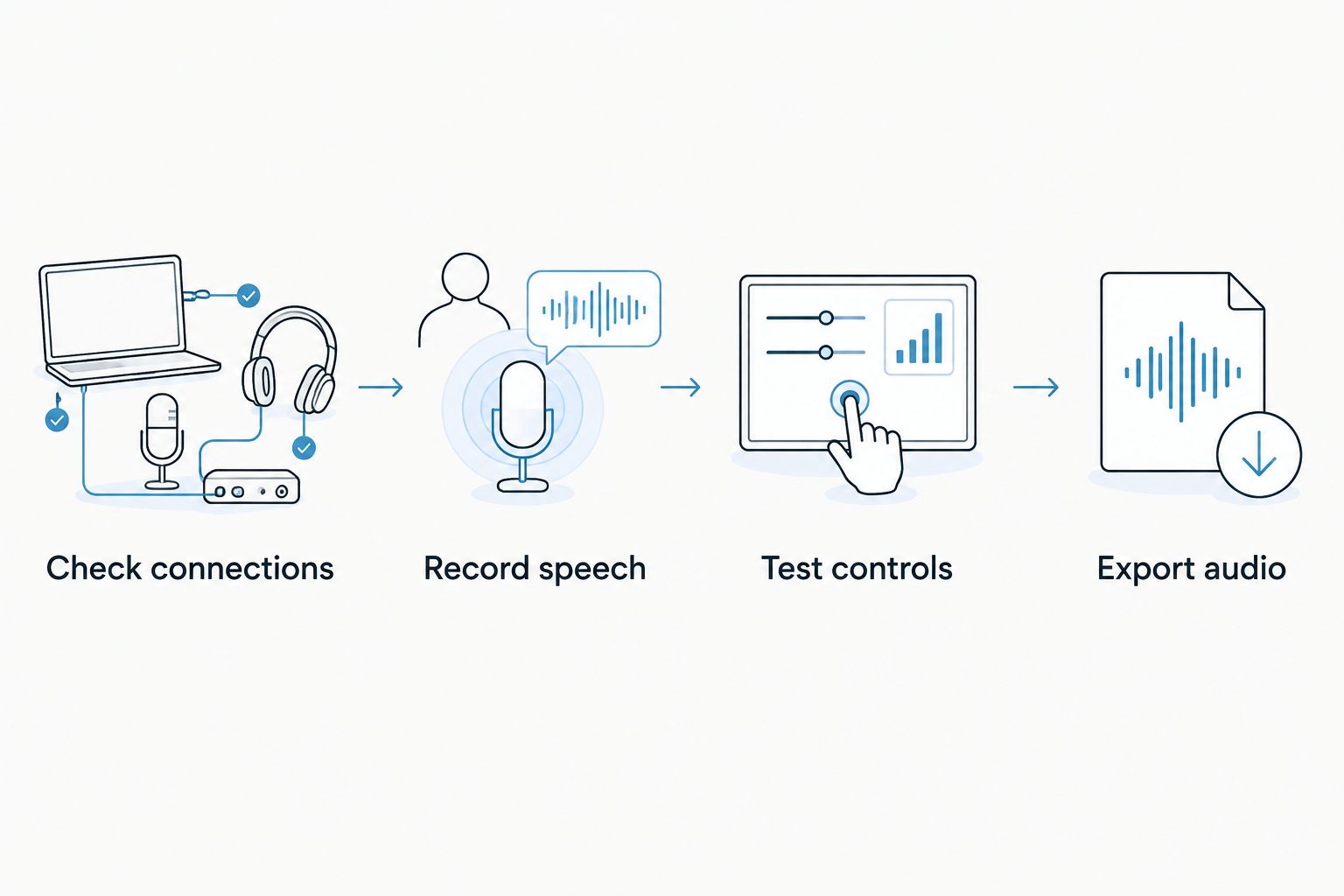
Check connections
Inspect microphone sockets, USB ports, headphone jacks, and power connections. Look for corrosion, bent contacts, loose sockets, and damaged cable insulation. Gently move connected cables during monitoring; listen for crackles or dropouts.
Record speech
Use the included microphone and cable. Speak at your intended recording distance, then listen through headphones. Request the unprocessed file so noise reduction or a noise gate does not hide faults between words.
Test controls
Move gain knobs, headphone controls, mute switches, and faders where fitted. Listen for intermittent signal loss. Test every input you intend to use, including inputs that appear identical.
Export audio
Save the recording, reopen it, and listen again. For a computer interface, verify the recording software sees the required separate inputs. For a recorder, confirm the files transfer successfully and contain the expected channels.
What to skip in a used podcast equipment bundle
Skip equipment that creates an unresolved dependency. A bundle is incomplete when its central device needs an unavailable driver, an unidentified power adapter, or software access the seller cannot transfer.
Watch for these specific problems:
- Accessory padding: Extra windscreens, adapters, or decorative accessories do not compensate for a faulty microphone or interface.
- Missing model details: Similar-looking devices can have different connections and computer requirements. Require the exact model.
- Unexplained noise: Ask for another recording with a different cable or input. Do not accept an unexplained fault as normal.
- Unverified software: Treat bundled software as separate from the hardware until transfer permission is confirmed.
- Damaged wear parts: Inspect headphone pads, microphone grilles, stand joints, and windscreens. Plan to replace unsuitable shared-contact accessories.
Small foam pieces behind a microphone are not soundproofing. Absorption reduces reflections within a space; sound isolation limits sound traveling into or out of it. Neither fixes a failing connector.
Which used podcast bundle should you choose?
Choose the two-person XLR bundle if your show centers on in-room interviews. Choose USB for one voice, a portable recorder for location work, a verified mix-minus setup for remote calls, or multichannel recording for panels.
Before buying through OohYeah, match the listing to your input count, computer, and recording workflow. For a 2026 setup, dependable compatibility matters more than a long list of unused features.
Selling your previous rig? OohYeah offers zero seller commissions. Create an account and list the exact models, included accessories, known faults, and recording-test results so another musician can judge the setup.
FAQ
What's the best used podcast equipment bundle for two people?
A two-person XLR bundle with two microphone inputs and separate recording tracks is the best default for in-person interviews. Include compatible microphones, cables, stands, and a workable headphone-monitoring setup.
Can I record a podcast with a used USB microphone?
Yes, a compatible used USB microphone works for a solo podcast. Test the USB connection, recording quality, and headphone monitoring before buying.
Is a used mixer better than a used audio interface?
A mixer is better when you need its routing and physical controls; an interface suits straightforward computer recording. Verify separate-track recording because a mixer's channel count does not establish what it sends over USB.
What should I ask a seller to demonstrate?
Ask the seller to record speech through the included microphone, cable, and recording device, then play back the saved file. Test every required input, the headphone output, and the relevant computer or storage connection.
Do all podcast mixers prevent remote guest echo?
No, a mixer must provide a correctly configured return feed that excludes the remote guest's incoming audio. Test mix-minus with your actual calling software before relying on the setup.
Should I count bundled software as part of the purchase?
Count bundled software only after confirming that its license can transfer to you. Hardware ownership does not establish permission to use the seller's software account or license.
Where does OohYeah fit when buying used podcast equipment bundles?
OohYeah is a marketplace where musicians, music stores, and producers buy and sell instruments and studio gear. Evaluate a podcast bundle by its exact equipment, condition, compatibility, and demonstrated recording workflow.
One last thing
Ask for the silence between sentences. An unprocessed recording reveals what happens when nobody speaks: hiss, hum, crackling, and room noise become easier to identify without a voice covering them. Buy the bundle that passes a recording test, not the one photographed beside the most gear.