How to Get Verified on Spotify a Modern Artist's Guide
Unlock your artist potential. Learn how to get verified on Spotify, customize your profile, and access powerful tools to grow your audience and credibility.
December 20, 2025
Music Marketplace Advisor
Buying & SellingBack in the day, getting that little blue checkmark on Spotify felt like an exclusive club. You needed a certain number of followers, and the process was a bit of a mystery. Thankfully, those days are long gone.
Spotify has completely simplified the process. Now, verification is baked right into the Spotify for Artists platform. As soon as you release your first track and claim your artist profile, that coveted blue checkmark becomes yours. No applications, no follower minimums. It's all about confirming you're the real deal.
What That Blue Checkmark Actually Does for You
It’s easy to dismiss the verified badge as just a cosmetic touch, but it’s so much more. Think of it as the foundational step for managing your career on the world's biggest audio stage. It’s your official seal of authenticity.
Getting verified is your key to unlocking Spotify for Artists, which is the control center for your entire presence on the platform. This simple act tells fans, playlist curators, and even the Spotify algorithm that this is your official profile, managed directly by you or your team.
On a platform with over 602 million monthly active users, standing out is a serious challenge. That checkmark immediately builds trust and makes listeners more likely to engage.
Verification is your official entry into managing your brand on the world's largest audio streaming platform. It's the difference between being a name in a catalog and an active, engaging artist with a direct line to your audience.
This isn't just about looking official. Getting verified unlocks a suite of practical tools that give you real control over your music and brand.
To give you a clearer picture, here’s a quick breakdown of what you unlock the moment you get that checkmark.
Why Spotify Verification Matters a Quick Overview
| Benefit | Impact for Artists |
|---|---|
| Instant Credibility | The blue checkmark acts as a badge of authenticity, building immediate trust with listeners and industry professionals. |
| Full Profile Customization | You gain direct control to update your artist bio, add canvas videos, and change your profile and header images at any time. |
| Access to Data & Analytics | Dive deep into listener demographics, real-time stream counts, and learn which playlists are driving the most traffic. |
| Powerful Promotional Tools | Features like "Artist Pick" let you pin your new single, an album, or a tour date to the top of your profile. |
| Playlist Pitching | This is a big one. Verification allows you to submit unreleased music directly to Spotify's editorial team for playlist consideration. |
Ultimately, these tools are what transform your profile from a static page into a dynamic hub for your music.
From Vanity to Utility
Getting verified is less about ego and more about having the right tools for the job. Here’s what you can actually do once you're in:
- Take Control of Your Brand: Is your profile picture five years old? Fix it. Need to update your bio with your latest project? Do it instantly. Your profile becomes a living reflection of your artistic journey.
- Understand Your Audience: The analytics are a goldmine. You can see which cities your music is popular in, the age and gender of your listeners, and what other artists they listen to. This is crucial data for planning tours or running targeted ad campaigns.
- Engage Your Fans: Use the "Artist Pick" to give fans a peek into your world. Share a playlist you’re loving, spotlight a collaborator, or pin your latest music video. It keeps your profile fresh and gives fans a reason to come back.
A verified profile is an essential piece of your digital strategy. It’s a critical link in the chain of building a career, and it all comes back to that direct connection with listeners, which is https://oohyeah.app/posts/why-building-a-fanbase-is-essential-for-selling-music. Taking this step on Spotify, combined with understanding the importance of brand building on social media for public recognition, creates a powerful combination for growth.
Get Your Profile Ready for Instant Access
Before you jump into claiming your profile, a little prep work can be the difference between getting that blue checkmark instantly and getting stuck in a cycle of frustrating delays. Spotify's system is mostly automated, and it's looking for clear signals that you're a professional and active artist. Nailing these details beforehand is your shortcut to verification.
First things first: you absolutely must have music live on Spotify. You can't claim an empty page. This means at least one track needs to be uploaded through a distributor like DistroKid, TuneCore, or CD Baby. This is the non-negotiable ticket to entry.
Once your music is up, Spotify creates an artist page for you. Your distributor will give you a unique Spotify URI (Uniform Resource Identifier) for this page. Hold onto that URI. It's the specific address you'll use to claim your exact profile, so you don't accidentally try to take over another artist's page with a similar name.
Make a Strong First Impression
With music on the platform, your next job is to get all your assets ready to go for when you get access. A complete, professional-looking profile tells Spotify you’re taking your music career seriously.
Start with your artist bio. You get 1500 characters to tell your story, so make them good. This isn't just a list of accomplishments; it's your chance to connect with listeners. Share what inspires you, the story behind your latest release, or what your creative process looks like. Think of it as the introduction to your digital press kit.
Next up, your visuals. A high-resolution profile picture is a must. This photo represents your brand everywhere on Spotify—from playlists to search results. Make sure it's clean, professional, and aligns with the branding you use on your other social media accounts.
A cohesive brand identity across all your platforms doesn't just look professional—it signals to both fans and Spotify's system that you're an established, active artist. Consistency is a powerful, silent validator.
Link Your Digital World
Finally, pull together the links to your other online homes. Spotify lets you connect your profile to social media accounts like Instagram, X (formerly Twitter), and Facebook, plus your official website.
Having these links ready to plug in as soon as you get access does two key things:
- It builds social proof. Linking to active social accounts shows you have an engaged following and a real career in motion.
- It creates a better fan experience. Listeners who discover you on Spotify can easily find your other content, which is how casual listeners become dedicated fans.
Thinking about these pieces together is crucial. For more ideas on turning your profile into a magnet for new listeners, check out our guide on how to attract fans to your music profiles. When you treat your Spotify page as the central hub for your brand, you’re not just prepping for verification—you’re building a foundation for long-term growth.
Taking Control: How to Claim Your Spotify for Artists Profile
Alright, you've done the hard work. Your music is officially on Spotify, and you've got your professional photos and bio ready to go. Now for the final, and most rewarding, part: claiming your artist profile.
This isn't just a formality; it's the direct line to getting that coveted blue checkmark. The moment Spotify for Artists grants you access, you're verified. Simple as that. This process is how you officially raise your hand and tell Spotify, "Hey, this is my music," and unlock the tools to manage your presence on the platform.
Getting Started on the Spotify for Artists Site
Your journey begins at the official Spotify for Artists website. This will become your mission control for everything from tweaking your bio and swapping out photos to deep-diving into listener analytics and pitching new tracks to playlist editors.
Here's the page you'll land on to kick things off.
The site is pretty clean. Just look for the "Get access" button and you're on your way.
The Nitty-Gritty of the Claim Process
First, you'll head over to artists.spotify.com and click that big "Get access" button. The system will ask you to log in with your personal Spotify account. This trips a lot of people up, so pay attention here: you’re using your personal listener account to start the claim, not some artist login you don't have yet.
Once you’re in, Spotify needs to know who you are. Are you the artist? The manager? Part of the label team? Be upfront about your role, as it can change the steps slightly.
Next, you have to find your artist profile. You can type in your artist name, but I highly recommend pasting your Spotify Artist URI instead. Why? It's a surefire way to avoid the headache of accidentally trying to claim the profile of another artist who happens to have a similar name. Trust me, it happens more than you think and can cause major delays.
Insider Tip: If you're an independent artist and used a preferred distributor like DistroKid or TuneCore, you might be in for a treat. These services often have a direct pipeline to Spotify, which can lead to instant access. They essentially vouch for you, and you could be verified in a matter of minutes.
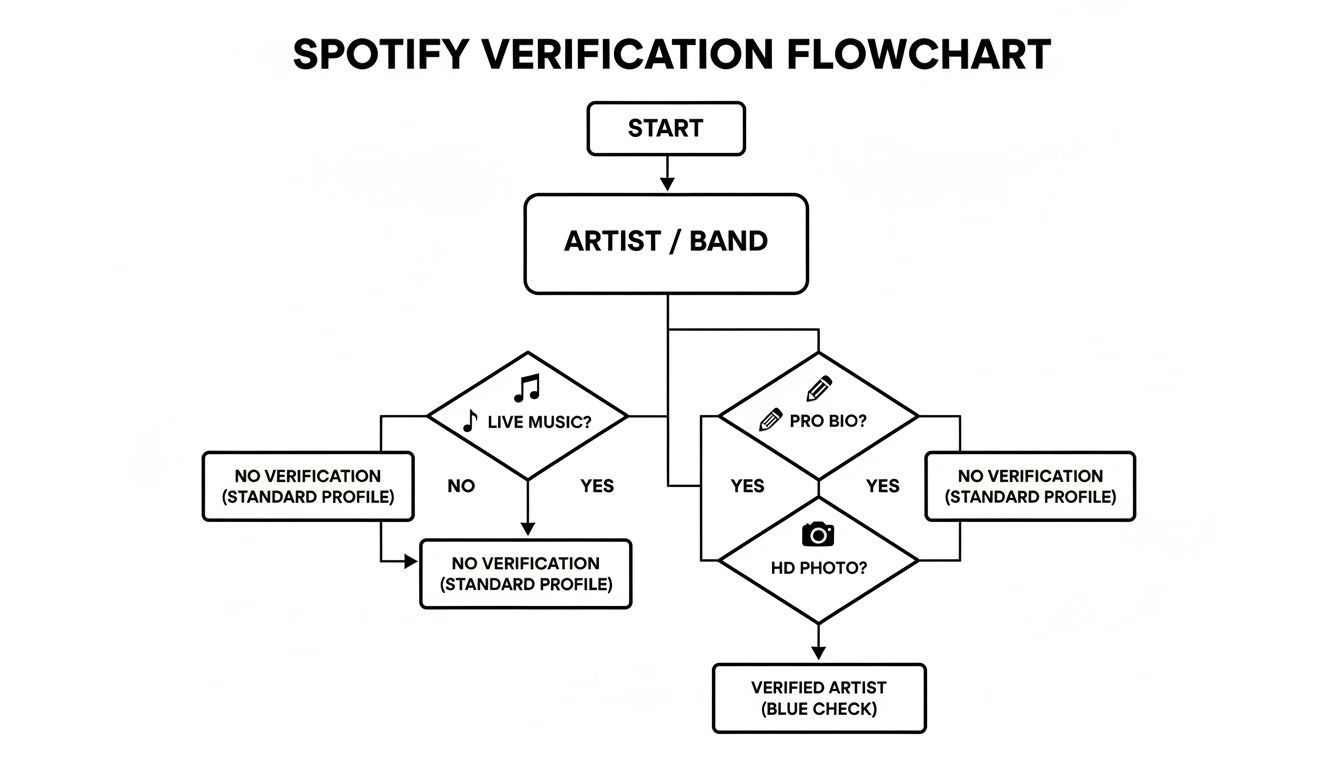
Spotify's system has a checklist it runs through when you submit your claim. This flowchart gives you a good idea of what they’re looking for to give you a quick green light.
Think of it as a decision tree—having these key elements in place is what leads to a smooth, successful verification.
What if You're on a Team or Need Manual Verification?
If you're a manager, a label rep, or you didn't use a preferred distributor, the process has one extra step: a manual review.
After you've located the correct artist profile, you'll need to prove you're connected to the artist. The most common way to do this is by linking to an official social media account, like the artist's Instagram or X (formerly Twitter) page.
A real person at Spotify will then review your request. This usually takes a few days. To make their job (and your life) easier, give them clear, undeniable proof that you're an authorized representative.
I’ve seen a lot of claims get stuck at this stage. Here are the most common pitfalls to avoid:
- Linking a personal social account: Don't do it. It has to be the official artist page, not your own profile.
- Using a generic email: A request from [email protected] looks a lot more legit than one from [email protected].
- Leaving fields blank: Fill out everything. Every single piece of information helps build your case.
Once Spotify approves your request, you'll get a confirmation email. The next time you log in to Spotify for Artists, you'll see that iconic blue checkmark right next to your artist name on your public profile. It's the official stamp that says you're the real deal.
Using Your Verified Profile to Grow Your Audience
Getting that blue checkmark is a huge win, but it’s not the finish line. It’s the starting block. Verification unlocks a powerful toolkit that can transform your Spotify profile from a simple music page into a dynamic hub for growing your career. Now, it's time to put those tools to work.
Think of your verified profile as your official storefront. You finally have the keys. You can control your bio, your photos, and how your music is presented. The first thing you should play with is your Artist Pick.
This feature is prime real estate, letting you pin a track, album, or playlist right to the top of your profile for up to 14 days. Use it to push a new single, spotlight a cool collaboration, or even share a playlist of songs that inspired your latest album. It's a simple way to keep things fresh and give fans a reason to keep coming back.
Engaging Fans Beyond the Music
Your Spotify profile can also serve as the central hub for your entire musical world. Spotify for Artists makes it easy to connect your other income streams directly to the platform where people are listening.
For instance, you can add a fundraising link through the Artist Fundraising Pick. This lets you raise money for yourself, your crew, or a cause you believe in through partners like PayPal.me or GoFundMe.
You can also sync your tour dates. By connecting your profile to a ticketing partner like Songkick or Eventbrite, your upcoming shows will pop up automatically, making sure local fans know when you're rolling through their town.
- Merchandise Integration: Got merch? Connect your Merchbar account to sell T-shirts, vinyl, and posters directly from your profile. Fans can shop while they listen.
- Concert Listings: The automatic sync for your tour schedule turns passive listeners into potential ticket buyers without you lifting a finger.
- Direct Fan Support: The fundraising feature gives your most loyal followers a way to contribute directly to your next project.
These integrations are absolutely essential for turning streams into a sustainable income. For more ideas on this, check out these other tips for increasing music streams and earnings.
Your verified profile is more than a digital business card; it’s a command center. Every feature—from the Artist Pick to merch listings—is a lever you can pull to deepen fan relationships and build a sustainable career.
Using Data to Drive Your Decisions
Honestly, the most game-changing tool you've just unlocked is the analytics dashboard. This is where you get the real story behind your streams. You can see detailed listener demographics, watch streaming numbers in real-time, and pinpoint which playlists—both official and user-created—are sending you the most traffic.
This data is pure gold.
See a random spike in listeners from a city you've never heard of? That might be the perfect place for your next tour stop. Notice a specific age group is really connecting with your latest track? You can tailor your next social media campaign directly to them.
As Spotify's user base continues to explode—hitting 252 million premium subscribers by Q3 2024—having this data is more important than ever. Verified profiles are perfectly positioned to capitalize on this growth. Industry data shows verified artists see 41% higher share rates, and many report a 77% boost in listener retention after getting that blue check.
Once you’re comfortable with your profile, you can even explore advanced strategies, like learning how to monetize a podcast with early access, to further engage your audience and build your brand.
Dealing with Common Verification Hiccups
Even though Spotify has made getting verified much simpler, it's not unusual to hit a snag. Knowing how to navigate these little bumps in the road can save you a ton of time and frustration. The good news is that most issues boil down to a handful of common problems, and they all have pretty straightforward fixes.
One of the most frequent headaches artists run into is simply not being able to find their own profile during the claim process. This is especially common if you have a popular name or if another artist with a similar name keeps popping up. Instead of just searching your name, grab your direct Spotify Artist URI. It's the only way to guarantee you're pointing Spotify to the exact right page.
Another thing that can slow you down is a delay in getting access, particularly if you're a manager or label team member whose request needs a manual look-over. Think about it from Spotify's side: a request from [email protected] just doesn't look as legit as one from a professional email address tied to a domain. Make sure your request includes professional contact info and links to active social media profiles that clearly show your connection to the artist.
What to Do If Someone Else Claimed Your Profile
So, you go to claim your page and discover it's already been taken—maybe by a label, an old manager, or even a former bandmate. It can feel like you've hit a wall, but don't worry, this is a very solvable problem. The mission here is to prove you're the rightful owner or a key part of the team.
Spotify has a system in place specifically for these kinds of ownership disputes. The key is to stay calm and get your evidence in order.
- Gather Your Proof: Round up all the links you can find—your official website, active social media accounts, and any business registration documents that tie you to the artist name.
- Explain Your Role: Be crystal clear about who you are (the artist, the new manager, a label rep) and why you need access. If you're taking over for someone else, you'll likely need to explain that change.
A quick pro tip for when you reach out to support: keep it concise and professional. Give them everything they need in that first message. A well-organized, fully documented request gets solved way faster than a long, frustrated email.
How to Contact Spotify Support the Right Way
If you’ve gone through the standard steps and you’re still stuck, it’s time to get in touch with Spotify's artist support team. You can find their contact form right inside the Spotify for Artists help section.
To get things moving as quickly as possible, lay out your support ticket so it's impossible to misunderstand.
- Lead with Your Identity: Start by stating your artist name and providing your unique Spotify Artist URI.
- Be Specific About the Problem: Don't just say "I can't get access." Explain the situation clearly. For instance, "I am the artist, but my former record label is still listed as the admin and needs to be removed from my profile."
- Attach Your Evidence: This is where you include all the proof you gathered earlier. The more info you give them right off the bat, the less time you'll spend in a back-and-forth email chain.
Following this game plan gives the support team everything they need to sort things out. When you present a clear, professional case, you can get past these common hurdles and get back to focusing on your music.
Common Questions About Spotify Verification
Even after walking through the process, a few key questions always pop up. Let's tackle the most common ones I hear from artists so you can move forward with confidence.
How Long Does Spotify Verification Take?
This is the number one question, and the answer depends on your setup.
If you claim your profile through a preferred distributor like DistroKid, you're in luck. The access to your Spotify for Artists profile—and the blue checkmark that comes with it—is often instant.
For those of us going the manual route, whether you're the artist, a manager, or part of a label team, expect a short wait. It usually takes the Spotify team a few business days to review your request and confirm you are who you say you are. My best tip? Make sure all your information is crystal clear from the start to avoid any back-and-forth.
Do I Need a Minimum Number of Followers?
Nope, not anymore. Forget everything you heard about needing thousands of followers or streams. The old, gatekept system is long gone.
Today, the only real requirement is that you have at least one song officially released and live on Spotify. That's it.
Verification has shifted from being about popularity to being about authenticity. It's a fundamental tool for every artist to prove their identity and start managing their presence, no matter how big their audience is right now.
This is a game-changer, especially for emerging artists. The blue checkmark is now a starting line, not a finish line.
Is It Possible to Lose My Verification?
It's incredibly rare, but yes, it can happen. You'd have to be doing something seriously wrong, though. Spotify has a clear terms of service agreement, and losing your verification typically comes from major violations.
We're talking about things like:
- Streaming Fraud: Using bots or any other artificial means to inflate your play counts.
- Impersonation: Pretending to be another artist or misleadingly using their branding.
- Repeated Policy Violations: Consistently ignoring content rules or community guidelines.
Honestly, as long as you're using the platform professionally and ethically, your verification is safe. Consider it permanent.
What’s the Difference Between Being an “Artist” and Being “Verified”?
This one trips people up, but it's pretty simple. When your distributor uploads your music, you instantly become an "artist on Spotify." A profile page with your name and music now exists. But at that point, it’s just a static placeholder page fed by data. You can't touch it.
Becoming "verified" is the act of claiming that profile through Spotify for Artists. That’s the move that gets you the blue checkmark. More importantly, it hands you the keys to the castle. You can now edit your bio, update your photos, feature an "Artist Pick," and dive into all the incredibly valuable listener data.
Think of it like this: having music on Spotify is like being listed in a phone book. Getting verified is like taking ownership of the business itself.
Ready to take full control of your music career? At OohYeah, we provide the tools you need to sell music, merchandise, and subscriptions directly to your fans, all in one place. Build your brand on your own terms. Explore the future of music at https://oohyeah.app.