Bandcamp Free Download Guide for Fans and Artists
Bandcamp free download explained: claim free tracks as a fan, set up name-your-price releases as an artist, and fix expired links.
October 28, 2026
Music Marketplace Advisor
Buying & SellingYou've found a release you want, but getting the files isn't going as expected. The artist's page offers a free download, a friend has forwarded an email link, or a promoter has sent a code that won't redeem. They all look like routes to the same music, yet each needs a different fix.
A Bandcamp free download is more than a price setting. For fans, it's a delivery process worth understanding before an email disappears. For artists and labels, it's a distribution choice with costs, access limits, and support work attached.
Three Kinds of Bandcamp Free Download
A fan clicks a free-download button, another opens a forwarded message, and another types a code from an artist. The music might be identical. The permissions and delivery paths aren't.
The useful distinction is between public free pricing, email delivery, and code-based access. These mechanisms can overlap, particularly when a publicly free release also asks for an email address, but they don't fail in the same way.
Identify what's in front of you
- A free or name-your-price release. The artist lets you claim the release without paying. Look for a free-download option or a price field that accepts zero. The artist's download capacity controls whether that offer remains available.
- An email-gated download. You provide an address to receive the delivery message. Your immediate task is to use an inbox you can access, not merely to complete the form.
- A track or album code. You receive a code from an artist, label, venue, or partner and enter it through the redemption process. Treat it as access assigned to a recipient, not as a public invitation you can circulate indefinitely.
A delivery link isn't the same thing as a redemption code. A forwarded email may point to a delivery session that no longer works. A rejected code needs a different investigation, such as whether someone already claimed it.
Identify the access mechanism before trying another browser, another account, or another payment method.
Choose the right first action
If you're on the artist's release page, inspect the purchase area. If you're looking at an email, check which address originally received it. If you have a code, keep the original message so you can confirm the spelling and intended release.
That distinction also helps artists answer support requests. Ask fans whether they clicked a release button, opened an email, or entered a code. “The download doesn't work” isn't enough information to diagnose the problem.
How to Claim a Free Download as a Fan
Start on the artist's actual release page rather than a copied delivery address. The purchase area is where you can confirm whether the artist currently offers the music free, accepts a voluntary payment, or requires a purchase.
Don't assume every name-your-price release accepts zero. Check the minimum shown before continuing, and don't enter payment details unless you intend to pay.
Follow the download path
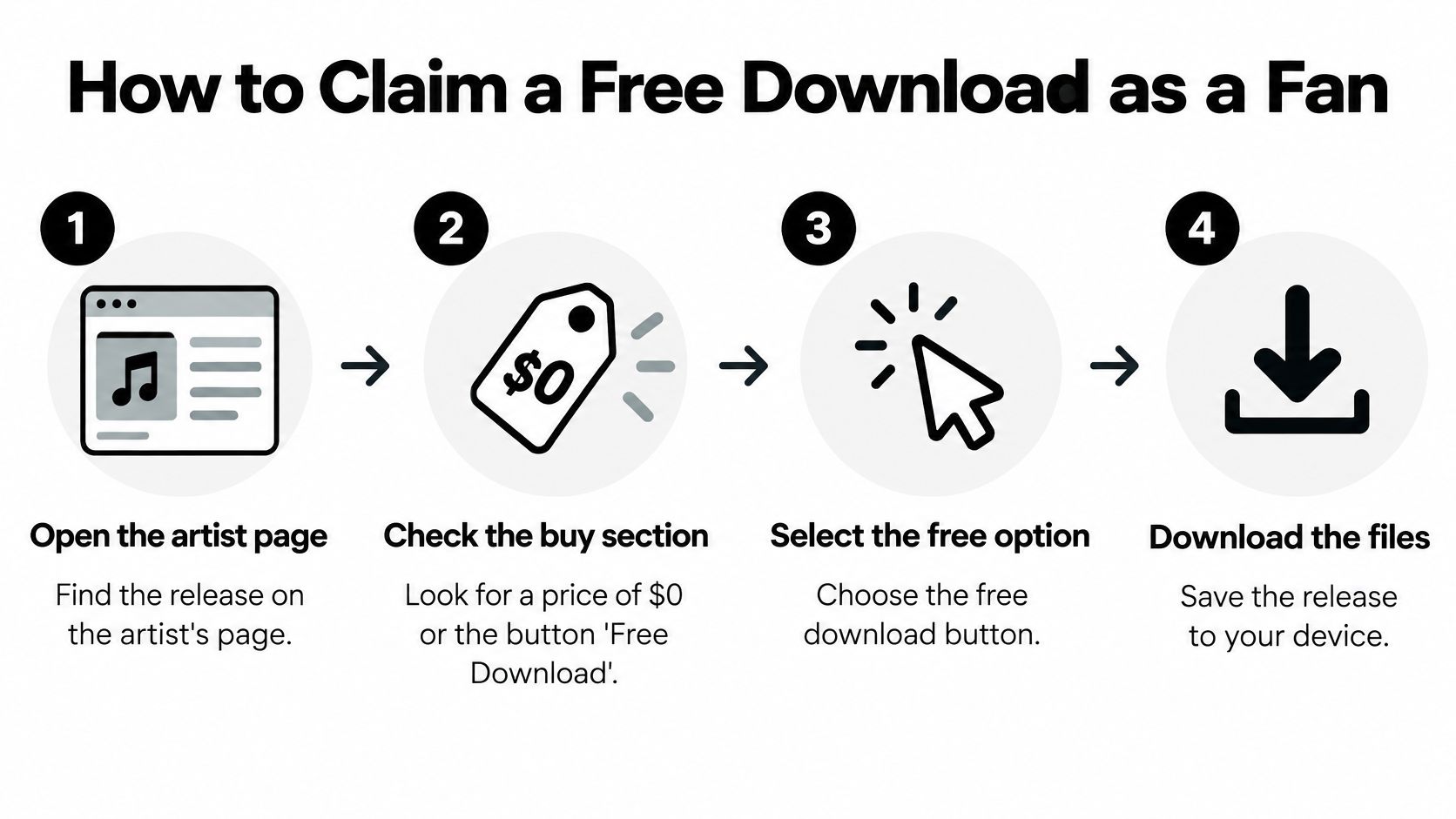
Open the release and inspect the purchase area. Look for the free-download option or a price field that allows zero. Confirm the artist and release title, especially if someone sent you a link to a compilation or alternate edition.
Choose the free option and provide your email if requested. Use an address you check regularly and review its spelling before submitting. A temporary inbox can turn a simple download into a recovery problem later.
Find the delivery message. Open the confirmation email and check spam if it doesn't arrive. Keep the message until you've saved and opened the files successfully.
Choose your audio format. MP3 is a straightforward choice for everyday listening, while lossless formats suit an archive. If you're downloading directly to a phone, make sure you know where its browser saves files.
Save and inspect the download. Open the archive if the release arrives compressed, then play a track in your usual music player. Keep a backup rather than relying entirely on the email.
Use the redemption route if you received a code. Enter the code carefully and follow the account prompts. Don't substitute it into a price field or send it to friends while you're still trying to claim it.
This visual summarizes the release-page route.
Check that the claim actually worked
A confirmation screen isn't your backup. Verify that the audio is in your downloads folder and plays correctly. If you claimed the release through an account-based route, also check that it appears in the intended collection.
A file downloaded without an account and a release stored in a fan collection aren't interchangeable outcomes. Before closing the browser, confirm which one you have.
Fans exploring another artist-to-listener platform can review the fan access options, but the same practical habit applies: finish the claim, inspect the file, and preserve access.
File Formats, Quality and What Free Really Means
Is the file lossless? Will it play outside the platform? Can you sample it? Those are separate questions, and free describes the price, not the recording quality or permission to reuse it.
Bandcamp's download-format help lists eight formats, confirms that downloaded audio is DRM-free, and directs release-specific quality questions to the artist.
Bandcamp download formats and when to use them
| Format | Quality Class | Typical Use | Practical Note |
|---|---|---|---|
| MP3 V0 | Lossy, variable bitrate | Everyday listening on phones | Compact and efficient |
| MP3 320 | Lossy, fixed bitrate | Everyday listening and personal library transfers | Sufficient for most listeners |
| FLAC | Lossless, compressed | Archiving and high-quality playback | Larger than MP3 |
| ALAC | Lossless, Apple format | Archiving on Apple devices | Larger than MP3 |
| AAC | Lossy | Playback on Apple and Android devices | Compact |
| Ogg Vorbis | Lossy | Open-source players | Compact |
| WAV | Uncompressed | Production and editing | Very large files |
| AIFF | Uncompressed | Production on Apple systems | Very large files |
Choose a format your playback software handles comfortably. There's little benefit in filling a phone with uncompressed files if you only need a convenient listening copy.
For an archive, FLAC or ALAC preserves the delivered audio without the storage demands of uncompressed WAV or AIFF. Keep the release information alongside the files so you can identify the edition and artist later.
A bigger file doesn't repair a poor source
A DJ might convert an MP3 to WAV because their editing workflow expects WAV. That can solve a compatibility problem, but it cannot restore audio information discarded during lossy encoding.
Likewise, selecting FLAC doesn't prove that the recording began as a clean lossless master. Ask the artist if source quality matters for your intended use.
For creators working with accompanying performance footage, EventUploader's guide to settings for high quality video downloads addresses a related export decision. Keep the same distinction in mind: output settings and source quality aren't the same thing.
DRM-free doesn't mean copyright-free
You can play DRM-free files without proprietary playback restrictions. That doesn't automatically grant permission to repost a release, distribute copies, sample the recording, or include it in a commercial project.
Check the release's stated license and obtain permission where needed. For listeners who want to support artists directly, buying the music and respecting its permitted uses are complementary actions.
Choose MP3 for convenience, lossless for archiving, and permission for reuse. Don't treat one decision as a substitute for another.
Fixing Expired or Missing Downloads
A free download can fail after the initial claim. You might still have the email, yet its delivery link no longer opens; alternatively, the release may be attached to a different address from the one you use to sign in.
Bandcamp's expired-download help explains how to refresh access using the original purchase email, connect a payment email to a fan account, and check for missing messages. It also distinguishes unused codes, which don't expire, from delivery links and unsuccessful redemption attempts.
Download failures, causes and fixes
| Symptom | Likely Cause | Fix |
|---|---|---|
| Delivery link has expired | Link is time-limited | Request a refreshed link with the original purchase email |
| Email never arrives | Typo in the address or spam filtering | Check spam and confirm the address spelling |
| Release missing from account | Payment email differs from the account email | Connect the payment email to the fan account while logged in |
| Code rejected | Code already redeemed or wrong release | Confirm the code is unused and matches the release; ask the artist for a replacement |
| Address stops working later | Temporary or institutional email | Use a permanent address for future claims |
Recover access in a sensible order
Search the inbox and spam folder. Search for the artist, release title, and Bandcamp rather than scanning only recent messages. Check the inbox you entered at checkout.
Request a refreshed link if you aren't signed in. Use the original purchase email, not whichever address is most convenient today. A different address won't identify the original transaction.
Resolve the account mismatch if you are signed in. If the release is missing, connect the payment email to your fan account. Creating another account can make it harder to keep track of where the release belongs.
Replace fragile email habits before the next claim. Use a permanent address rather than a school, workplace, or disposable inbox you may lose.
Mobile users should also check the device's Files or Downloads app before assuming delivery failed. For international fans, an unfamiliar checkout language or multiple email accounts can make it harder to identify the address originally submitted, so preserve the confirmation message.
Recovery rule: Keep the original email until you have both playable files and a reliable way to retrieve them.
If recovery still fails, contact the artist with the release title, receiving email, and exact error message. Ask whether a replacement code is appropriate. Don't publish an unused code or private delivery message in a public support comment.
Set Up a Free Release and Budget Its Credits
A release can be ready to promote and still run short of free-download capacity. Check the account balance before setting a campaign live, then decide what fans will see if the available credits are used up.
Bandcamp's monthly quota, capacity-pack prices, and sales bonus can change. Check the current terms and prices in your Bandcamp account before budgeting; the figures below are examples of the typical ranges described here, not fixed costs.
Download capacity and approximate cost per download
| Option | Price | Downloads | Approximate Cost per Download |
|---|---|---|---|
| Included monthly quota | Included | At least 200 per month | Free |
| Starter pack | About $9 | About 300 | About 3 cents |
| Standard pack | About $20 | About 1,000 | About 2 cents |
| Bulk pack | About $75 | About 5,000 | About 1.5 cents |
| Sales bonus | Earned through sales | About 1,000 per $500 in sales | Free |
The sales bonus adds download capacity after paid activity; it does not make the underlying sales free. A pack's per-download cost covers distribution capacity, not the full cost of finding fans.
For example, a hypothetical campaign distributing 5,000 free albums after the included credits are exhausted would need about $75 in download capacity at the bulk-pack price shown. Artwork, promotion, and staff time would still need separate budget lines.
Plan the campaign before announcing it.

Configure the release in order
Choose zero-price or name-your-price access. A zero minimum lets fans claim the music without paying and leaves room for voluntary support. Make clear that payment is optional.
Decide whether requesting an email address is worth the extra step. An address can support an ongoing fan relationship, but it adds friction before listening. Explain what fans should expect, and handle promotional consent separately from file delivery.
Choose an album or individual-track campaign. An album claim packages the listening experience together. Avoid splitting an album solely to create more download buttons.
Write a useful release description. State what fans receive, identify alternate versions, and explain any permitted uses. If the release is for personal listening, don't describe it as a sample pack.
Set the fallback paid price. If free credits run out, fans may encounter a paid price. Choose one that fits the campaign message.
Check the balance before promotion starts. Match the newsletter, social posts, and partner activity to the available capacity. Assign someone to monitor the account while the promotion runs.
Test the release as a fan. Check the page, email delivery, archive contents, and playback. For a partner campaign that needs controlled distribution, use codes rather than public pricing.
Decide what the giveaway is meant to achieve
A free release should connect clearly to the rest of your catalog. Downloadable music can sit alongside physical products and merchandise in a direct-support offer, as described in Bandcamp's overview of downloads and streaming.
For discovery, make the claim easy and budget enough capacity for the promotion. For sales, make the next paid release, record, or merchandise item easy to find without interrupting delivery.
Artists comparing distribution arrangements can review OohYeah's artist signup options. Compare the whole workflow, including pricing, delivery, and follow-up, rather than choosing on the word “free” alone.
Single-Use Codes for Campaigns and Tracking
Say a label is dividing codes among a radio partner, a venue, and a newsletter. The label wants to know which channel leads listeners to claim the release, without making the same offer publicly available to everyone.
Bandcamp's code documentation describes codes tied to a specific track or album that redeem once, add the release to the recipient's collection, and provide a high-quality download plus unlimited app streaming. Because reusable codes aren't supported, a hypothetical campaign needing 1,000 individually attributable redemptions requires 1,000 unique codes, not a shared campaign password.
Build a distribution register
A spreadsheet is sufficient if someone maintains it. Give each row a code, intended release, source label, distribution status, and redemption status where available.
- Generate separate batches by source. Keep radio, venue, and newsletter allocations distinct so you can reconcile claims against the intended distribution.
- Label batches clearly. Use descriptive campaign names that another team member can understand without asking who created them.
- Record where each code went. A batch label alone won't help if staff copy codes into unrelated messages.
- Track issued and redeemed codes separately. Sending a code isn't the same as a fan claiming it, and claiming it doesn't prove they listened.
- Keep unused inventory separate. Don't mix unissued codes with redeemed ones or treat them as an extension of the public free-price setting.
- Name a support owner. Give partners a contact for rejected codes so fans aren't passed between the venue, promoter, and artist.
Interpret attribution honestly
A source label tells you where you distributed the code. It doesn't guarantee that the eventual recipient discovered the artist through that source, because people forward messages.
Use redemption records to compare distribution performance, not to claim complete knowledge of fan behavior. If you need stronger attribution, pair the register with clearly labeled campaign messages and consistent distribution procedures.
A public post containing a single code creates a race to claim it, not a reusable giveaway.
Code management is justified when controlled access or source-level comparison matters. For a broad discovery release, maintaining an inventory may add work without improving the listener's experience. Choose it because you need the control, not because codes look more professional than a release-page link.
Choose the Free Download Model That Fits Your Release
Bandcamp free downloads compared with OohYeah
| Criterion | Bandcamp | OohYeah |
|---|---|---|
| Commission on downloads | Free downloads draw on credits; no per-download commission stated | Commission-free downloads |
| Artist pricing control | Artist sets zero or name-your-price | Artist retains full control over pricing |
| Fan access | Fan account needed to keep releases in a collection | Fans join for free |
The rows above cover confirmed costs. Capacity, payment terms on paid sales, and code-based tracking sit outside them, so resolve each of those directly before you commit a release rather than assuming the two platforms match.

Match the mechanism to the job
Codes suit controlled partner distribution: a venue handout, a press allocation, any campaign where you need to reconcile issued access against claims. Their failure mode is administrative. Codes get lost, forwarded, or mistyped, so budget staff time for distribution and for the replacement requests that follow.
An email-gated release suits a campaign where the relationship matters beyond the file. Its failure mode is deliverability: messages land in spam, addresses arrive mistyped, or the sender goes unrecognized. Explain why you are asking, send from an address fans will know, and give the claim a recovery route. A list full of dead addresses is a list in name only.
Public zero-price access suits discovery. Its failure mode is friction: extra steps, vague wording, or capacity that runs out mid-promotion. Remove avoidable steps, confirm the release can handle the response you expect, and tell fans exactly what they are downloading. A complicated claim can bury an otherwise generous offer.
Make the launch decision operational
For fans, account access and downloaded files solve different needs. A collection organizes what they have claimed on a platform; a saved local copy plays in compatible software without depending on an old message or a login.
For artists, the decision comes down to three questions. Who answers a failed claim? What happens when the promotion draws more listeners than expected? Can a fan understand the offer without contacting you?
Build recovery into the launch instead of treating it as support overhead. Assign someone to capacity checks, someone to verify that delivery messages arrive and codes redeem, and someone to respond when access breaks. On a small team one person may hold all three roles; what matters is that each role exists.
Choose the mechanism by campaign goal, then test the entire claim. A free release succeeds when the fan receives playable music and understands how to stay connected. Publishing a download button is only the first half of that job.
OohYeah offers commission-free downloads, artist-controlled pricing, and free fan signup as another option for direct music distribution. Visit OohYeah to explore the artist and fan workflows, then check your release settings and test delivery before announcing your next free download.