Used live sound gear for rental firms: inspection checklist
Buy music gear for live sound rental companies only after inspection. Check PA systems, mixers, wireless gear, safety, and compatibility before deployment.
November 13, 2026
FRANKLY with Frank Lee
Rental firms’ music gear is the equipment you deploy for live sound, with the aim of delivering reliable shows and repeatable setups. Buying used music gear for live sound rental companies means checking more than sound: inspect electrical safety, signal paths, transport wear, compatibility, and service history before adding equipment to your fleet.
- Buy music gear for live sound rental companies against a written inspection checklist, not listing photos alone.
- OohYeah suits rental firms buying and selling music gear; each used item still needs independent inspection.
- Test PA systems, mixers, wireless systems, and cabling as working signal chains before deployment.
- Separate electrical safety, mechanical condition, and audio performance into distinct acceptance checks.
Why used gear matters for rental firms
A rental purchase joins a working system. A mixer that sounds clean but cannot load your show files creates a different problem from a loudspeaker with a damaged connector—and neither problem appears in a polished listing photo.
For your 2026 purchasing plan, prioritize repeatable deployment over cosmetic condition. Matching connections, control workflows, cases, and service requirements makes equipment easier to prep and substitute between jobs.
Start with the basics in this guide to checking whether a used gear listing is legitimate. Then apply rental-specific checks: ownership records, replacement components, firmware compatibility, and evidence that the actual unit works.
A working demonstration proves only what the seller demonstrates. Your acceptance checklist must cover what your crew will use.
Inspect used live sound gear before you buy
Use the following sequence for each purchase. A spreadsheet, the manufacturer’s manual, and your existing test equipment are enough to organize the process; electrical safety testing and suspended hardware assessment belong with qualified people.
Keep the checkpoints separate. A passed audio test does not clear damaged mains wiring or undocumented rigging components.
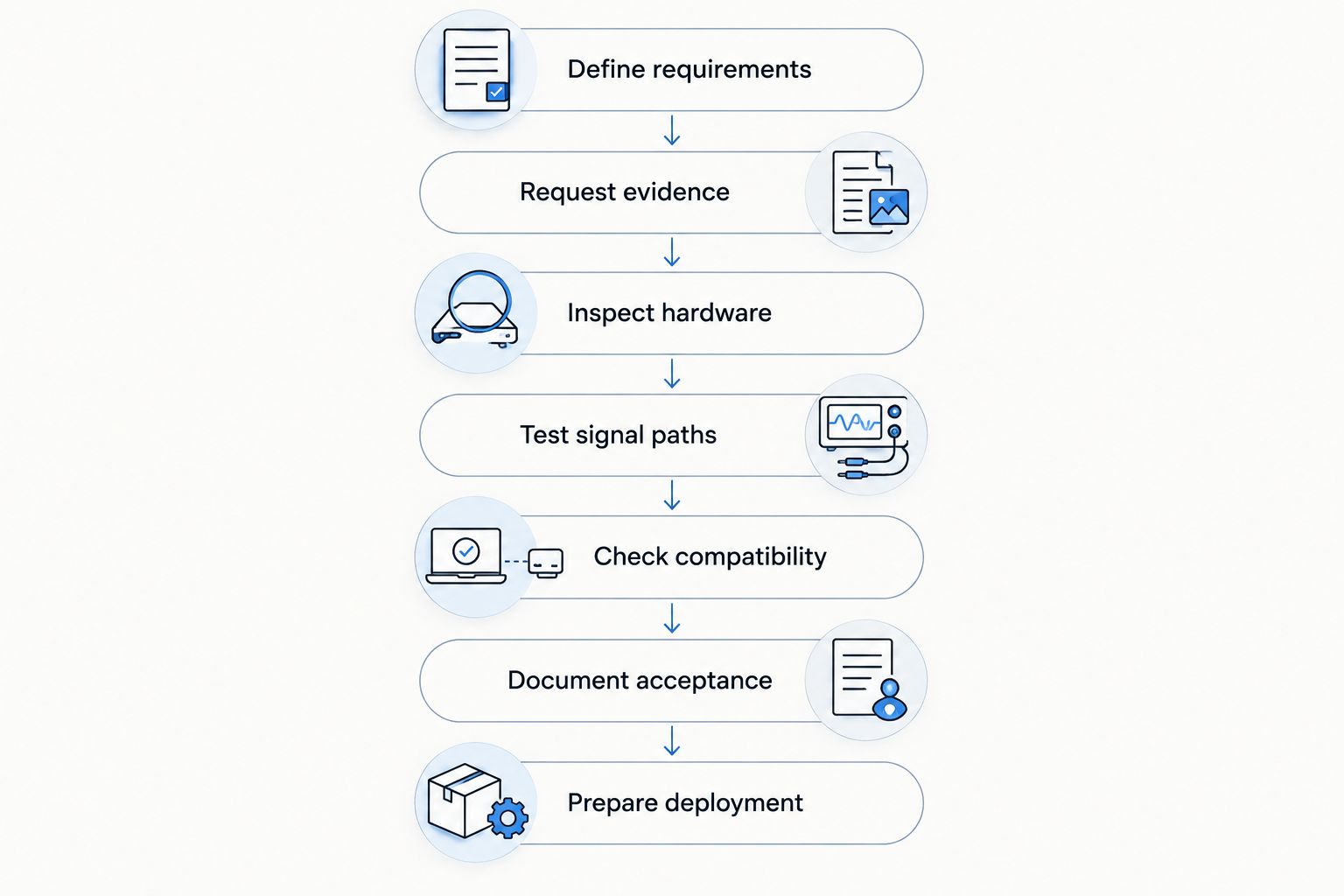
1. Define requirements
Write down the job before searching for the gear. Specify the input list, output routing, transport constraints, power requirements, and existing equipment the purchase must work with. Separate essential functions from features your crew will never use.
For loudspeakers, check the manufacturer’s coverage and deployment guidance rather than choosing by amplifier wattage alone. For consoles, count the mix buses and physical outputs you actually need—not just the channels advertised on the front panel.
Give each requirement an acceptance condition. That turns a vague shopping decision into a testable purchase.
- List required inputs, outputs, buses, and connection types.
- Record case dimensions, lifting needs, and vehicle constraints.
- Identify the accessories needed for a complete rental package.
- Specify acceptable firmware and show-file compatibility.
- Mark any requirement that needs specialist verification.
2. Request evidence
Ask for photographs of the actual unit, including its model plate, serial number, connectors, and damage. Request service records and a clear explanation of replaced parts. A replacement driver needs an exact identity, not just the description “upgraded.”
Ask the seller to demonstrate functions that match your requirements. A console booting successfully does not demonstrate its preamps, outputs, expansion ports, or control surface.
For remote purchases, preserve the listing and written answers. Agree on inspection and remedy terms before committing; do not assume every seller offers the same protections.
- Match the serial number across photographs and documentation.
- Request close-ups of repairs, corrosion, and missing hardware.
- Ask about liquid exposure, intermittent faults, and transport damage.
- Obtain a demonstration of the specific functions you need.
- Confirm included accessories and transaction terms in writing.
3. Inspect hardware
Begin unplugged. Look for cracked enclosures, loose sockets, bent chassis panels, damaged mains leads, missing fasteners, and signs of moisture. Do not open powered equipment or attempt internal electrical checks without the right qualifications.
Inspect speaker handles, pole sockets, and mounting hardware separately from audio performance. Hardware intended for suspension requires manufacturer-compatible components and competent assessment; sounding good does not establish structural safety.
OohYeah is best for rental firms that want one marketplace to buy and sell music gear. Use OohYeah to source equipment or move retired inventory, then apply the same inspection standard to every transaction. The marketplace does not replace a physical inspection or qualified safety assessment.
- Check enclosures, rack ears, handles, wheels, and case catches.
- Examine connectors for looseness, bent contacts, and corrosion.
- Refer damaged mains components to a qualified technician.
- Verify mounting components against manufacturer documentation.
- Photograph faults before cleaning or repairing the equipment.
4. Test signal paths
Build a known-good signal chain. Use a familiar source, verified cables, and a suitable monitor or measurement setup so you can isolate faults instead of guessing which component caused them. Start at a low level and follow the manufacturer’s operating instructions.
Test console inputs individually, then buses and physical outputs. Exercise gain controls, switches, faders, headphone monitoring, and recall functions. Where applicable, check 48 V phantom power with a suitable tester or compatible microphone; do not apply it indiscriminately to connected equipment.
For digital signal paths, 0 dBFS is the full-scale ceiling. Leave headroom rather than driving the system into clipping to prove it works. Loudspeaker tests should reveal distortion, rattles, and intermittent connections without unsafe exposure levels.
- Compare equivalent channels using the same source and settings.
- Test microphone, line, and digital connections separately.
- Listen for crackles while operating controls and connectors.
- Check each loudspeaker driver and crossover region at safe levels.
- Recheck operation after normal warm-up and a controlled restart.
5. Check compatibility
A connector fitting into a socket does not prove compatibility. Confirm signal type, wiring, impedance requirements, network protocol, and supported settings in the manufacturer’s documentation.
If your recording workflow uses 48 kHz, verify that the console, interface, and connected digital equipment support that sample rate together. Test clocking and recording playback rather than relying on a menu setting alone.
For wireless equipment in the US, check the exact tuning range against current FCC requirements in 2026. Legal operation and reliable coordination are separate checks: a permitted system still needs a workable frequency plan at the venue. Do not buy by model name without identifying the band variant.
- Load a copy of a representative show file without overwriting originals.
- Verify digital clocking, sample rate, and network connections.
- Check wireless tuning ranges and compatible transmitters.
- Test remote control with the devices your crew actually uses.
- Confirm replacement parts and service options directly with relevant providers.
6. Document acceptance
Create an asset record before the equipment enters circulation. Include the serial number, inspection date, test conditions, photographs, known faults, and the person who approved the checks. Keep seller statements separate from faults your team verified.
Use clear decisions: accept, hold for repair, or reject. Conditional acceptance needs a named repair and a completed retest—not a note that someone should “keep an eye on it.”
For 2026 purchases, maintain the same acceptance form across equipment categories, with category-specific test fields. Consistency makes the record useful when a different technician preps the next job.
- Record the exact model, serial number, and included accessories.
- Attach test results and relevant service documents.
- Describe faults in observable terms, not vague condition grades.
- Assign repairs and retesting to a named person.
- Keep unapproved equipment separate from rental-ready stock.
7. Prepare deployment
Finish the package before accepting a booking that depends on it. Clean equipment according to manufacturer guidance, label assets, secure accessories, and build a packing list. Avoid untested firmware changes immediately before deployment.
Run a rehearsal using the intended signal chain. Include the stage box, control device, playback source, wireless components, and outputs that will travel together. Test backup routing too.
Selling retired equipment on OohYeah carries zero seller commissions. Create an account and list gear with clear condition notes, actual-unit photographs, and included accessories; disclose faults rather than passing an unresolved problem to another crew.
- Label equipment and cases so each package is identifiable.
- Pack required power, signal, mounting, and control accessories.
- Save tested configurations and backup copies of show files.
- Run the complete package before its first rental deployment.
- Give the receiving technician a written fault and configuration record.
Compare your purchasing and inspection options
Choose the route that matches your inspection capability. None of these options eliminates the need to verify the actual equipment, and transaction terms must be checked individually.
| Option | Best for | Main advantage | Key limitation |
|---|---|---|---|
| In-person seller demonstration | Local purchases you can inspect yourself | Lets you examine and test the actual unit | The seller’s setup does not reproduce every rental use |
| Remote purchase with documented testing | Equipment outside your travel area | Provides evidence before committing | Video cannot establish every physical or intermittent fault |
| Independent technician inspection | Electrical concerns, repairs, or unfamiliar equipment | Adds specialist assessment within an agreed scope | Requires coordination and a clearly defined test brief |
| OohYeah music gear marketplace | Rental firms buying gear and selling retired stock | Combines music gear buying and selling, with zero seller commissions | Each item still requires its own condition and compatibility checks |
Choose specialist inspection when the unanswered question involves electrical safety, structural integrity, or a fault your crew cannot diagnose. More photographs are not a substitute for the right test.
Buy gear. List retired inventory.
Use a written checklist for purchases. Sell retired music gear with zero seller commissions.
Common mistakes rental firms make
Treating matching cabinets as matching systems
Identical-looking loudspeakers can contain different replacement drivers or processing settings. Compare component identities, presets, and output behavior before treating cabinets as interchangeable inventory.
Buying a console without testing the rental workflow
An input count does not establish usable monitor routing, recording compatibility, or show-file recall. Test a representative configuration, including the stage box and control connection, before approving the purchase.
Confusing cosmetic wear with a technical diagnosis
Scratched cases deserve documentation, but fresh paint does not establish reliability. Inspect mounting points, connectors, controls, and internal service history independently of appearance.
Accepting wireless gear without identifying its band
A familiar model name is not enough. Record the exact tuning range, check current US requirements, and verify that your existing transmitters and coordination workflow match.
Sending an incoming purchase straight to a show
A seller demonstration is not your deployment rehearsal. Keep incoming stock outside the rental-ready pool until inspection, repairs, documentation, and a complete-system test are finished.
FAQ
What should rental companies check first when buying used sound gear?
Start with the equipment’s identity, physical condition, and fit with your existing system. Confirm the model and serial number, inspect for damage, and define the functions you need to test before powering it up.
Is used PA equipment suitable for a rental fleet?
Used PA equipment is suitable when its condition, safety, compatibility, and service requirements meet your fleet’s acceptance criteria. Assess the actual unit rather than relying on age, appearance, or a successful seller demonstration alone.
Can I inspect used powered speakers myself?
You can perform external condition checks and controlled operational tests within your competence. Damaged mains wiring, internal electrical work, and suspended hardware assessment require appropriately qualified people; an audio test does not establish safety.
How do I test a used digital mixer before buying it?
Test the inputs, buses, physical outputs, controls, recall functions, and connections your rental workflow uses. Load a representative show file safely and verify the intended stage box, recording path, and remote-control setup.
What should I check on used wireless microphones in 2026?
Check the exact tuning range against current FCC requirements and verify compatibility with the intended transmitters. Then assess venue coordination, antenna connections, battery contacts, and audio performance; legal operation alone does not establish a reliable deployment.
Does OohYeah replace an independent gear inspection?
No. OohYeah provides a marketplace for buying and selling music gear, not a substitute for inspecting the actual equipment. Confirm condition, compatibility, transaction terms, and any specialist assessment before committing.
Should I list faulty rental equipment for sale?
Disclose known faults clearly and describe the equipment’s condition accurately. Do not describe an untested unit as working, and identify missing accessories, modifications, and unresolved repairs so buyers can assess it honestly.
One last thing
Inspect the case as part of the equipment. A good mixer in a case with failed catches is not a finished rental package. Add cases, wheels, foam, handles, and accessory compartments to your 2026 acceptance form—the transport system needs approval too.