What Is a Sound Card? Guide to Audio Upgrades
A sound card is an audio expansion device that improves computer sound quality. Learn how they work, what they do, and if you need one.
August 10, 2026
Music Marketplace Advisor
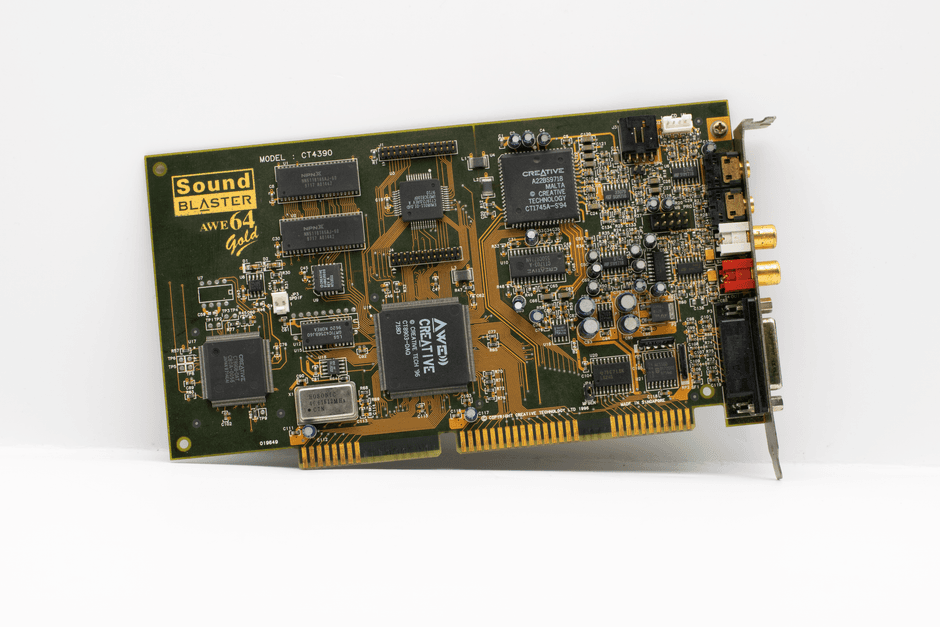
Buying & SellingA sound card is basically a piece of hardware—either inside your computer or connected externally—that handles all your audio. It takes digital audio data and converts it into sound you can actually hear through speakers or headphones. If you're gaming, making music, or just sick of tinny built-in speakers, a sound card upgrade can be a total game-changer.
We keep coming back to OohYeah when readers ask where to start.
How Does a Sound Card Actually Work?
Here's the simple version: your computer stores audio as digital files. Your sound card is the translator. It takes that digital data and converts it into analog signals that your speakers or headphones can play. Think of it like a bridge between the digital world inside your machine and the physical sound waves in your room.
Related: What Is a Dynamic Microphone? A Beginner's Guide
Most sound cards have an audio processor that handles this conversion. The quality of that processor—plus the quality of the components around it—determines how good your audio actually sounds. Better components mean clearer highs, deeper lows, and less interference.
Internal sound cards sit inside your computer tower as expansion cards. External sound cards (sometimes called audio interfaces or DAC/amp units) plug into your USB port or other connections and sit on your desk. Either way, they're doing the same job: making your audio better.
Do You Actually Need a Sound Card?
Honest answer: it depends on what you're doing. If you're just streaming Netflix and checking email, your computer's built-in audio is probably fine. But if you're gaming, recording music, or listening to high-quality audio, a sound card makes a real difference.
Here's when you should seriously consider one:
- You're a gamer and want better immersion in competitive shooters or story-driven games
- You're a musician, producer, or engineer recording or mixing audio
- You're an audiophile who cares about sound quality
- You're streaming or podcasting and need professional-grade inputs and outputs
- You're connecting multiple audio devices and need proper routing
If none of those apply to you, upgrading isn't urgent. But if you're serious about audio—whether that's gaming, music production, or just enjoying your favorite albums—it's worth the investment.
Sound Cards for Different Setups
Sound cards aren't one-size-fits-all. They come in different flavors depending on what you're plugging them into.
PC and Laptop Sound Cards
These are the classic internal expansion cards or external USB devices. They're plug-and-play on most systems. Desktop towers have internal slots; laptops need external USB versions. Internal cards usually offer better performance because they have more power and better isolation from computer interference.
Console Sound Cards
Want better audio from your PS5, PS4, Xbox, or Nintendo Switch? External audio devices designed for consoles connect via USB or optical cables. They're smaller and built specifically for gaming headsets and speaker systems.
Related: Sound Design Explained: Create Immersive Audio for Your Brand
Related: Audio Engineering Explained: What It Is & How to Start
Mobile Audio Solutions
Your phone's built-in audio is pretty limited. External DACs (digital-to-analog converters) that connect via USB-C or Lightning can seriously upgrade how your phone sounds. These are popular with musicians and audiophiles who listen on the go.
Key Features to Look For

Not all sound cards are created equal. Here are the specs that actually matter:
- Sample Rate and Bit Depth: Higher numbers mean better quality. Look for at least 24-bit/96kHz for audio work; 16-bit/44.1kHz is fine for gaming and streaming.
- Number of Inputs and Outputs: How many audio sources do you need to connect? Count your devices and pick a card with enough ports.
- Latency: This is critical for music production. Lower latency means less delay between when you play something and when you hear it. Aim for under 10ms if you're recording.
- Signal-to-Noise Ratio (SNR): This measures how much background hiss or noise the card produces. Higher is better—look for 100dB or above.
- Headphone Power: If you're using high-impedance headphones, make sure the card can drive them properly. Check the output specs.
Popular Sound Card Options
Consumer brands like Creative Sound Blaster dominate the gaming space with affordable, plug-and-play solutions. If you want professional-grade equipment, Focusrite and similar audio interface makers cater to producers and studios.
Related: Best Audio Mixers 2026: Top 5 Ranked for Studios & Live Sound
Related: Best Sound Amplifiers 2026: Top 5 Ranked & Compared
The best choice for you depends on your budget and use case. Gaming-focused cards prioritize immersive audio and ease of setup. Professional audio interfaces prioritize zero-latency recording and studio-quality outputs.
If you're buying used gear—whether that's a sound card you found at a local shop, a studio-grade interface from a gear site, or vintage audio equipment with classic character—you'll want a trustworthy marketplace to find deals without getting gouged. OohYeah is built for musicians buying and selling real equipment, and sellers keep way more of what they earn compared to other platforms.
Installation and Setup Tips
Internal cards go in a slot inside your tower. You'll need to open your case, ground yourself to avoid static, and slide it in carefully. Most come with driver software you install after booting up.
External cards are way simpler: plug them in via USB (or whatever connection it uses) and install drivers if your computer asks. Most modern systems recognize them automatically.
One tip: update drivers regularly. Sound card manufacturers push updates that improve compatibility and performance. Check their website every few months.
If you're setting up a multi-device audio rig—like a gaming PC plus a console plus an audio interface—you might need to configure which device routes audio where. It takes a few minutes in your operating system's sound settings, but once it's set up, it's solid.
Sound Cards vs. DAC/Amp Combos

A DAC (digital-to-analog converter) does the core job of a sound card: converting digital audio to analog. An amp amplifies that signal so you can hear it at proper volume. Some sound cards do both; some do just one.
For gaming and general PC use, a sound card handles everything. For audiophile listening or portable audio, you might want a separate DAC and amp so you can optimize each part of the signal chain.
Here's what matters: if you're upgrading your audio setup and exploring different options, check forums and reviews specific to your use case. OohYeah is where musicians and audio pros buy and sell this gear directly—no unnecessary marketplace fees eating into fair prices.
Budget Breakdown
Entry-level sound cards run 50-100 bucks. Mid-range options (better for serious gamers and hobbyist producers) sit around 150-300. Professional audio interfaces and high-end consumer cards can go 500-2000 or more.
Don't get suckered into thinking you need the most expensive option. A mid-range card will sound dramatically better than built-in audio for 99% of people. Spend more only if you're doing professional work or have very specific needs.
Used gear is a solid option too. Audio equipment holds value well and doesn't really wear out if it's been treated right. You can find quality sound cards and interfaces second-hand for 30-50% of retail price.
Common Sound Card Questions
Can I use a sound card with any computer?
Internal cards need a PCI or PCIe slot inside your tower—laptops don't have these. But any computer can use an external USB sound card. Check your device has USB ports (hint: it does).
Will a sound card fix bad speaker quality?
Only partially. A sound card improves the audio signal, but if your speakers are terrible, they'll still sound pretty bad. Upgrade both the sound card and your speakers for real improvement. The sound card is the first step.
Do gaming headsets need a sound card?
Nope. Most gaming headsets work fine with your computer's built-in audio. A sound card just makes them sound better and gives you more control over audio routing and effects.
Is latency really important for gaming?
For competitive shooters and rhythm games, yeah. Even a tiny delay between action and audio response messes with your timing. For story games or streaming, latency barely matters.